

We will learn here how to bind controls with data without a database.
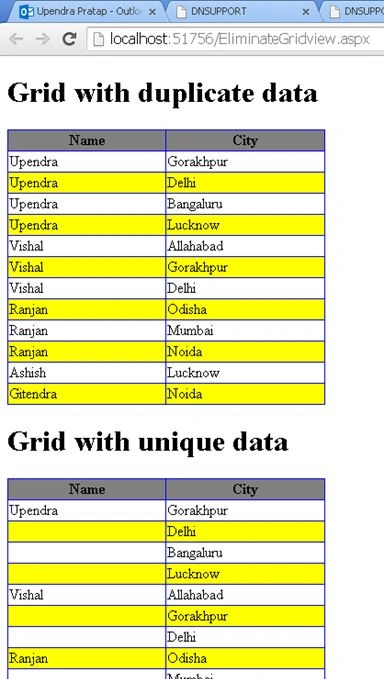
This code is useful to avoid data delicacy in a GridView.
Also read:
- Binding Data Using ListView and GridView in ASP.NET without Database
- Binding GridView Usin List in ASP.NET
Initial chamber
Step 1
Open your Visual Studio and create an empty website then provide a suitable name such as EliminateGridview.
Step 2
In Solution Explorer you will get your empty website, then add some web forms.
EliminateGridview. (your empty website). Right-click and select Add New Item Web Form. Name it EliminateGridview.aspx.
Design chamber
Step 3
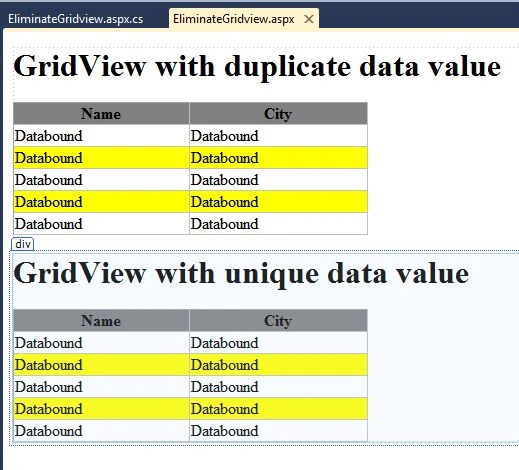
Open the EliminateGridview.aspx file and write some code for the design of the application.
Choose the control from the toolbox and put it on your design page as in the following.
For duplicate data:
- <div>
- <h1>
- GridView with duplicate data value
- </h1>
- <asp:GridView ID="gvDuplicateData" runat="server" HeaderStyle-BackColor="gray"
- AutoGenerateColumns="False" AlternatingRowStyle-BackColor="Yellow " BackColor="white"
- BorderColor="blue" BorderStyle="None">
- <Columns>
- <asp:BoundField DataField="Name" HeaderText="Name">
- <ItemStyle HorizontalAlign="Left" Width="20%" />
- </asp:BoundField>
- <asp:BoundField DataField="City" HeaderText="City">
- <HeaderStyle Wrap="true"></HeaderStyle>
- <ItemStyle HorizontalAlign="Left" Width="20%" Wrap="true" />
- </asp:BoundField>
- </Columns>
- </asp:GridView>
- </div>
- <div>
- <h1>
- GridView with unique data value
- </h1>
- <asp:GridView ID="gvUniqueData" runat="server" HeaderStyle-BackColor="gray" AutoGenerateColumns="False"
- AlternatingRowStyle-BackColor="Yellow " BackColor="white" BorderColor="blue"
- BorderStyle="None">
- <Columns>
- <asp:BoundField DataField="Name" HeaderText="Name">
- <ItemStyle HorizontalAlign="Left" Width="20%" />
- </asp:BoundField>
- <asp:BoundField DataField="City" HeaderText="City">
- <HeaderStyle Wrap="true"></HeaderStyle>
- <ItemStyle HorizontalAlign="Left" Width="20%" Wrap="true" />
- </asp:BoundField>
- </Columns>
- </asp:GridView>
- </div>
HTML of page: EliminateGridview.aspx
- <%@ Page Language="C#" AutoEventWireup="true" CodeFile="EliminateGridview.aspx.cs" Inherits="EliminateGridview" %>
- <!DOCTYPE html>
- <html xmlns="http://www.w3.org/1999/xhtml">
- <head runat="server">
- <title>C-sharp corner article by Upendra Pratap Shahi</title>
- </head>
- <body>
- <form id="form1" runat="server">
- <div>
- <h1>
- GridView with duplicate data value
- </h1>
- <asp:GridView ID="gvDuplicateData" runat="server" HeaderStyle-BackColor="gray"
- AutoGenerateColumns="False" AlternatingRowStyle-BackColor="Yellow " BackColor="white"
- BorderColor="blue" BorderStyle="None">
- <Columns>
- <asp:BoundField DataField="Name" HeaderText="Name">
- <ItemStyle HorizontalAlign="Left" Width="20%" />
- </asp:BoundField>
- <asp:BoundField DataField="City" HeaderText="City">
- <HeaderStyle Wrap="true"></HeaderStyle>
- <ItemStyle HorizontalAlign="Left" Width="20%" Wrap="true" />
- </asp:BoundField>
- </Columns>
- </asp:GridView>
- </div>
- <div>
- <h1>
- GridView with unique data value
- </h1>
- <asp:GridView ID="gvUniqueData" runat="server" HeaderStyle-BackColor="gray" AutoGenerateColumns="False"
- AlternatingRowStyle-BackColor="Yellow " BackColor="white" BorderColor="blue"
- BorderStyle="None">
- <Columns>
- <asp:BoundField DataField="Name" HeaderText="Name">
- <ItemStyle HorizontalAlign="Left" Width="20%" />
- </asp:BoundField>
- <asp:BoundField DataField="City" HeaderText="City">
- <HeaderStyle Wrap="true"></HeaderStyle>
- <ItemStyle HorizontalAlign="Left" Width="20%" Wrap="true" />
- </asp:BoundField>
- </Columns>
- </asp:GridView>
- </div>
- </form>
- </body>
- </html>
Code chamber
Step 4
In the code chamber we will write some code so that our application works.
Add the following namespaces in the namespace section of your code behind page as in the following:
- using System;
- using System.Collections.Generic;
- using System.Linq;
- using System.Web;
- using System.Web.UI;
- using System.Web.UI.WebControls;
- using System.Data;
- using System.Configuration;
Code behind Page
EliminateGridview.aspx.cs
- using System;
- using System.Collections.Generic;
- using System.Linq;
- using System.Web;
- using System.Web.UI;
- using System.Web.UI.WebControls;
- using System.Data;
- using System.Configuration;
- public partial class EliminateGridview : System.Web.UI.Page
- {
- protected void Page_Load(object sender, EventArgs e)
- {
- if (!IsPostBack)
- {
- gvDuplicateData.DataSource = gvUniqueData.DataSource = testData();
- gvDuplicateData.DataBind();
- gvUniqueData.DataBind();
- RemoveDuplicateData(0);
- }
- }
- public DataTable testData() {
- DataTable dt = new DataTable();
- //Adding columns to datatable
- dt.Columns.Add("Name");
- dt.Columns.Add("City");
- //Adding records to the datatable
- dt.Rows.Add("Upendra", "Gorakhpur");
- dt.Rows.Add("Upendra", "Delhi");
- dt.Rows.Add("Upendra", "Bangaluru");
- dt.Rows.Add("Upendra", "Lucknow");
- dt.Rows.Add("Vishal", "Allahabad");
- dt.Rows.Add("Vishal", "Gorakhpur");
- dt.Rows.Add("Vishal", "Delhi");
- dt.Rows.Add("Ranjan", "Odisha");
- dt.Rows.Add("Ranjan", "Mumbai");
- dt.Rows.Add("Ranjan", "Noida");
- dt.Rows.Add("Ashish", "Lucknow");
- dt.Rows.Add("Gitendra", "Noida");
- return dt;
- }
- private void RemoveDuplicateData(int cellno)
- {
- string initialnamevalue = gvUniqueData.Rows[0].Cells[cellno].Text;
- for (int i = 1; i < gvUniqueData.Rows.Count; i++)
- {
- if (gvUniqueData.Rows[i].Cells[cellno].Text == initialnamevalue)
- {
- gvUniqueData.Rows[i].Cells[cellno].Text = string.Empty;
- }
- else
- {
- initialnamevalue = gvUniqueData.Rows[i].Cells[cellno].Text;
- }
- }
- }
- }
I hope you liked this. Have a good day. Thank you for reading.
Santhakumar MunuswamyPosted Aug 12, 2015, 3:02 PM
Good Article. Thanks for sharing
Sibeesh VenuPosted Aug 11, 2015, 2:21 AM
Nice Share
Rajeesh MenothPosted Aug 11, 2015, 12:55 AM
Good One Upendra Pratap Shahi..
Ankit BansalPosted Aug 11, 2015, 12:34 AM
nice explanation...
Narasimha Reddy ChennupalliPosted Aug 10, 2015, 10:04 PM
Good one...
Pankaj Kumar ChoudharyPosted Aug 10, 2015, 9:49 PM
Nice Share Sir...........