

Introduction
This article describes an approach to embedding and displaying PDF documents in a web page through the use of a simple ASP.NET 2.0 custom server control. The approach indicated herein allows the developer the opportunity to control the web page content surrounding the embedded PDF; this is in contrast to linking directly to a PDF which uses the entire web page to display PDF but does not otherwise permit the developer to control the appearance of the page.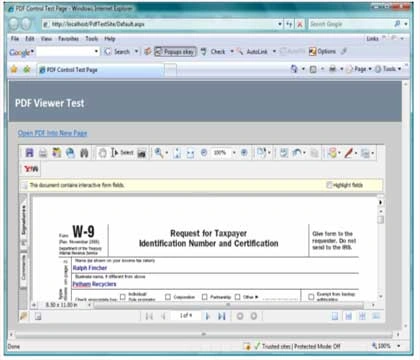
Figure 1. Embedding and Displaying PDFs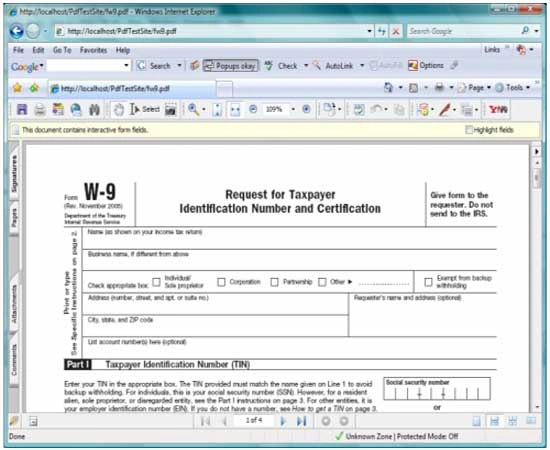
Figure 2. Linking Directly to a PDF
Getting Started.
There are two solutions included with this download, one is web custom control library containing a single custom control used to render out the PDF, the other is a test web site used to display a PDF through the use of the control.
Figure 3 (below) shows the solution explorer for the project. The project appearing at the top of the solution is the test web site, it contains only a single web page (default) and it includes a PDF file included for testing purposes. The bottom project is the web custom control library with the single control included ("ShowPdf"). The references in the test web site are per the default configuration; the custom control library references include the default references but also include System.Design.
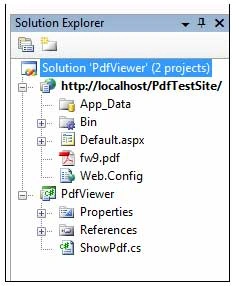
Figure 3. Solution Explorer with Both Projects Visible
The Web Custom Control Project
Code: ShowPdf.cs
Within the web custom control project, there is a single custom control provided in this example. The example is entitled, "ShowPdf.cs". The code for the project is very simple and should take very little time to implement. The control code starts out with the default imports:
using System;
using System.Collections.Generic;
using System.ComponentModel;
using System.Text;
using System.Web;
using System.Web.UI;
using System.Web.UI.WebControls;
namespace PdfViewer
{
[DefaultProperty("FilePath")]
[ToolboxData("<{0}:ShowPdf runat=server></{0}:ShowPdf>")]
public class ShowPdf : WebControl
{
Following the imports is the namespace and class declaration. The class contains a single property called FilePath, and the attributes for the class assign the default property attribute to point to the single added property. What this accomplishes is simple, when the control is dropped into a web page or selected by the developer at design time, the property editor will default to select this property. The toolbox data attribute is setup for a custom server control (runat=server).
After the class declaration, a declarations region was added and a single local member variable was defined and included within that region. The local member variable is used to retain the path to the PDF document loaded into the control.
#region "Declarations"
private string mFilePath;
#endregion
The next bit of code in the class is contained in a new region called "Properties". Within this region is a single property entitled, "FilePath". The property is used to provide public member access to the file path member variable. The attributes associated with this property indicate that the property is visible (Browsable) in the property editor, defines the property editor category under which to show the property in the editor, and provides the text used to describe the property which viewed in the property editor (Description). The editor defined specifies an association between this property and the URL Editor; when the developer using the control edits the property at design time, the URL editor will be displayed to allow the developer to navigate to and select a target file based using this editor. The System.Design reference is needed to support this portion of the design.
#region "Properties"
[Category("Source File")]
[Browsable(true)]
[Description("Set path to source file.")]
[Editor(typeof(System.Web.UI.Design.UrlEditor),
typeof(System.Drawing.Design.UITypeEditor))]
public string FilePath
{
get
{
return mFilePath;
}
set
{
if (value == string.Empty)
{
mFilePath = string.Empty;
}
else
{
int tilde = -1;
tilde = value.IndexOf('~');
if (tilde != -1)
{
mFilePath = value.Substring((tilde + 2)).Trim();
}
else
{
mFilePath = value;
}
}
}
} // end FilePath property
#endregion
Notice that in the set side of the property, the code is written to remove the tilde from in front of the file path if the tilde is present. If the tilde is left intact after setting the property to point to a file using the URL Editor, the tilde would otherwise be included in the HTML rendered to the page and the file would not found. It is necessary to strip this character from the file path in order to use the URL Editor to set this property at design time.
The last bit of code needed to finish the control is contained in a region called "Rendering". This region contains a single method used to override the RenderContents method. Within RenderContents, a string builder is created and then populated with the HTML needed to render the control on a page. In this instance, the simplest way to display the PDF is through the use of an IFrame. Looking at the string builder, note that the IFrame contains the source property which points to the file path property added earlier in this project. Further, the width and height of the IFrame is set to equal the height and width of the control itself. After the string builder is populated, the content is dumped into a div. The entire control is constructed within a try catch block, if the try fails, the catch block will render out "Display PDF Control" into a box on the page in lieu of showing the control. When the control is first added to the page, it does not point to a file and so the try will fail, this prevents an error from occurring during that initial placement of the control.
#region "Rendering"
protected override void RenderContents(HtmlTextWriter writer)
{
try
{
StringBuilder sb = new StringBuilder();
sb.Append("<iframe src=" + FilePath.ToString() + " ");
sb.Append("width=" + Width.ToString() + " height=" +
Height.ToString() + " ");
sb.Append("<View PDF: <a href=" + FilePath.ToString() + "</a></p> ");
sb.Append("</iframe>");
writer.RenderBeginTag(HtmlTextWriterTag.Div);
writer.Write(sb.ToString());
writer.RenderEndTag();
}
catch
{
// with no properties set, this will render "Display PDF Control" in
// a box on the page
writer.RenderBeginTag(HtmlTextWriterTag.Div);
writer.Write("Display PDF Control");
writer.RenderEndTag();
} // end try-catch
} // end RenderContents
#endregion
The Test Web Project
Code: Default Page
The default page included in the web project is provided to serve as a test bed for the control. The page contains only a panel used as a banner, a hyperlink pointing directly to a PDF file, and the custom control with its file path property also pointing to the PDF. The PDF added to the web site content is also included in the web project. When this site is viewed, the control will display the PDF document in the defined area, selection of the hyperlink will open the same PDF into a separate window; I just included the hyperlink for comparison purposes.
Summary.
This article demonstrates an approach that may be used to develop a custom control through which PDFs may be embedded into a web page. The purpose of the control is to allow the PDF to be included within a web page as opposed to the alternative of opening the PDF into a separate page where the PDF consumes the entire available display area and where the user cannot control the appearance of that page. Naturally, the code included in the custom control could be added directly into any page and the same effect could be achieved, however, by adding the code once into a custom control, the developer need only drop the control into the form and set the file path and dimensions to display PDFs without repeating the manual addition of the code each time it is needed.
Christian CamposPosted Sep 15, 2013, 12:26 AM
Hi, this control all it does is insert an iframe with the PDF, if I have not installed Acrobat plugin I can't see it, and is possible to download the PDF file.
srinivas sriniPosted Jun 7, 2012, 6:19 AM
This is opening even with pdf version 9.0 but it is not consistant. First time I hit, It opens a popup ( acrobat reader heading with question mark(?) symbol), again I hit twice or thrice it opens.., I am not sure, this issue is with the version 9.0 install or any settings. Please advice. Thanks, Srinivas [email protected]
srinivas sriniPosted Jun 7, 2012, 5:06 AM
Hi, This works really good with version 10.0.., I have one issue, where I am not able to open PDF file with Acrobat Reader version 9.0.., Do you have any suggestions? Please advice Thanks, Srinivas
satheyaraaj P TPosted Dec 20, 2010, 12:46 AM
how to disable save and print option for this pdf viewer. please any one help me.. mailId : [email protected]
satheyaraaj P TPosted Dec 20, 2010, 12:46 AM
how to disable save and print option for this pdf viewer. please any one help me.. mailId : [email protected]
RON SUKASEMPosted Jan 21, 2010, 6:20 PM
The control work great! But I have a project that need to save .pdf file AFTER the user fill in the field(s) on the .pdf form on the server... HELP?
guri baniPosted May 5, 2009, 10:32 AM
hey scott.. here u have shown that we can display a selected pdf by giving its path..but i am making a project in i allow my users to upload their own pdf documents and i have to dispay them in the editor.how can i do that.....if i have 5 pdfs...and i ahve selected 3 pdf to be displayed ...what additional code do i need for that.....i cant do that directly from the filepath...i need to pick id of that pdf document from databse n pick that pdf and display it......pls do help..... i am a beginner and its a very important project for me... thanks in advance
balaji kumarPosted Mar 30, 2009, 8:54 AM
i am facing the Problem While Loading a Pdf File From Local disk For Example i am loading a file from "E:\test\test.pdf" the viewer does not display the Pdf
Damon FlournoyPosted Nov 3, 2008, 1:47 PM
Where (direct link to info if you have that) can I find the documentation or programmers notes on programming with pdfviewer.dll.
phoenie tamPosted Aug 14, 2008, 5:18 AM
I've facing problem when loading the project... I guess the problem is because in the PdfViewer.dll, it refers the ShowPDF.cs from C:\Scott\authoring\code\PdfViewer\PdfViewe\ShowPDF.cs
phoenie tamPosted Aug 14, 2008, 5:12 AM
I've facing problem when loading the project... I guess the problem is because in the PdfViewer.dll, it refers the ShowPDF.cs from C:\Scott\authoring\code\PdfViewer\PdfViewe\ShowPDF.cs
phoenie tamPosted Aug 14, 2008, 5:12 AM
I've facing problem when loading the project... I guess the problem is because in the PdfViewer.dll, it refers the ShowPDF.cs from C:\Scott\authoring\code\PdfViewer\PdfViewe\ShowPDF.cs Or i am mistaken?
phoenie tamPosted Aug 14, 2008, 5:12 AM
I've facing problem when loading the project... I guess the problem is because in the PdfViewer.dll, it refers the ShowPDF.cs from C:\Scott\authoring\code\PdfViewer\PdfViewe\ShowPDF.cs Or i am mistaken?
phoenie tamPosted Aug 14, 2008, 5:11 AM
I've facing problem when loading the project... I guess the problem is because in the PdfViewer.dll, it refers the ShowPDF.cs from C:\Scott\authoring\code\PdfViewer\PdfViewe\ShowPDF.cs
phoenie tamPosted Aug 14, 2008, 5:10 AM
I've facing problem when loading the project... I guess the problem is because in the PdfViewer.dll, it refers the ShowPDF.cs from C:\Scott\authoring\code\PdfViewer\PdfViewe\ShowPDF.cs
KurtPosted Jan 26, 2008, 5:15 PM
Scott I really like your control and having the ability to control the surrounding page. I am trying to implement your control with a little bit of a twist. I want to have a text box on the page and have the user enter a unique form number to search for. Once the number is entered and a submit button is click I want the PDF to be displayed from a folder serving as the PDF library. I am writing in C# can you help me tweak this a little for this purpose? Sorry you did a great job documenting this custom control I am just a newbie developer working on my first project. Thanks in advance for any help you can provide. Kurt