

This is a series of articles to discuss CORS (Cross Origin Resource Sharing) issue for both setup and consumption.
This article will demonstrate how to enable CORS in .NET Core Web API for different situations.
Introduction
For this CORS article series, in Part I, we have made a separated Web API server and made an ASP.NET MVC Client to consume the Web API Server. In Part II, we made another Web API consumer, an Angular client, and show the effect of the CORS issue. In this article, we will demonstrate how to enable CORS in .NET Core Web API for different situations.
Requirements for Enabling CORS
To enable CORS in ASP.Net Core Web API, these are the steps we need to follow,
- Install the CORS middleware.
- Register CORS middleware to the pipeline in the ConfigureServices method of Startup.cs.
- Enable CORS in the Configure method of Startup.cs.
- Enable/Disable CORS in the controllers, the action methods, or globally.
Step 1 - Install the CORS middleware.
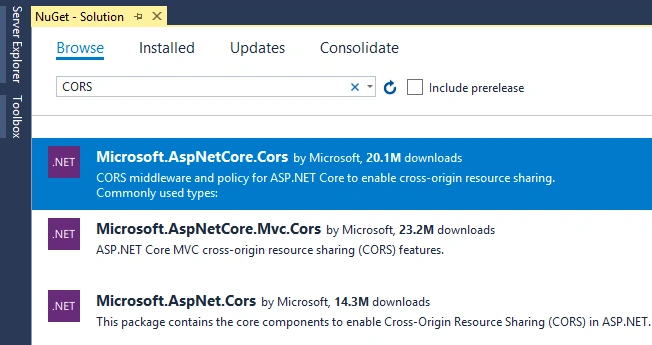
For .NET Core before v5.0, we need to install the Microsoft.AspNetCore.Cors Nuget package fromProject > Tools > NuGet Package Manager > Manage NuGet Packages for Solution.
However, for .NET Core 5.0, you do not need to do so, and if you skip this step, and everything will be OK for config CORS.
Step 2 - Register CORS middleware to the pipeline in the ConfigureServices method of Startup.cs.
You could register CORS in SonfigureService method of Startup.cs as,
// In general
services.AddCors();
with a Default policy,
// Default Policy
services.AddCors(options =>
{
    options.AddDefaultPolicy(
        builder =>
        {
            builder.WithOrigins("https://localhost:44351", "http://localhost:4200")
                                .AllowAnyHeader()
                                .AllowAnyMethod();
        });
});
or with a named policy,
// Named Policy
services.AddCors(options =>
{
    options.AddPolicy(name: "AllowOrigin",
        builder =>
        {
            builder.WithOrigins("https://localhost:44351", "http://localhost:4200")
                                .AllowAnyHeader()
                                .AllowAnyMethod();
        });
});
Step 3 - Enable CORS in the Configure method of Startup.cs
You could enable CORS in Sonfigure method of Startup.cs as,
// in general
app.UseCors();
Define a policy,
// Shows UseCors with CorsPolicyBuilder.
app.UseCors(builder =>
{
    builder
    .AllowAnyOrigin()
    .AllowAnyMethod()
    .AllowAnyHeader();
});
or with a named policy,
// with a named pocili
app.UseCors("AllowOrigin");
Note
- You have to register the CORS in ConfigureService method, and enable CORS in Configure Method, and you could define the policy in both places. However:
- You have to define the policy in at least one place;
- The call to
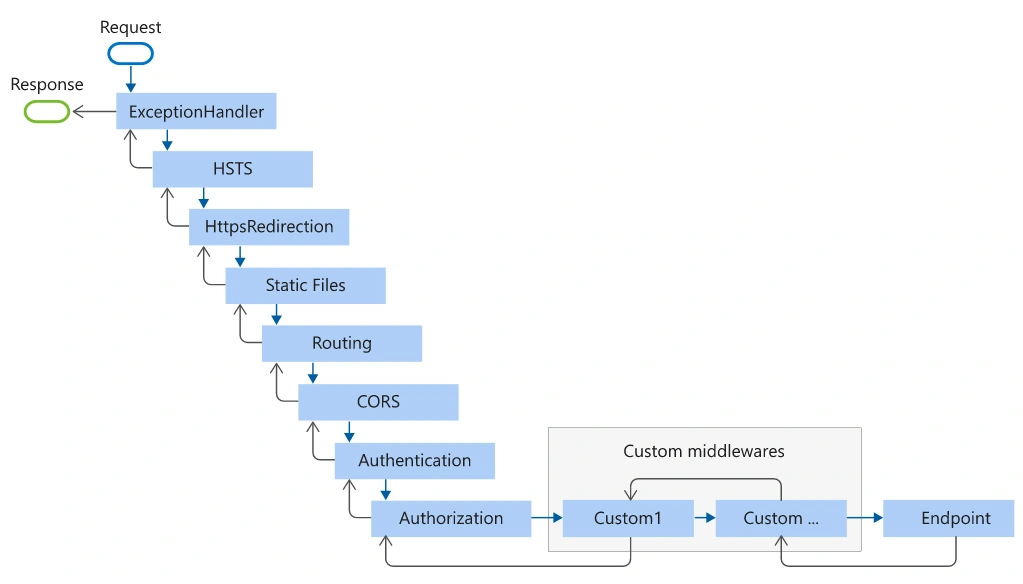
UseCorsmust be placed afterUseRouting, but beforeUseAuthorization. For more information, see Middleware order, or the graph below here:
Step 4 - Enable/Disable CORS in the controllers, the action methods, or globally.
[EnableCors]or[DisableCors]specifies the default policy.[EnableCors("{Policy String}")]specifies a named policy.[EnableCors("AllowOrigin")] // GET: api/StoresWebAPI [HttpGet] public async Task<ActionResult<IEnumerable<Store>>> GetStores() { return await _context.Stores.ToListAsync(); }
Dinand HartPosted Dec 28, 2022, 7:12 PM
For .net 7 Blazor server users: No need to install the nuget package, just add step 3 (no named policy is needed, but adviced), and it will work.