

Encapsulation refers to the concept of combining data (variables) and the methods (functions) that manipulate this data into a unified entity or class. This principle also involves limiting access to certain elements by designating them as private or protected. By concealing the internal workings, encapsulation ensures that only essential information is made available, thereby enhancing the management of data access and modification.
Example
using System;

namespace EncapsulationExample
{
    public class UserBankAccountDetails
    {
        // Encapsulated private fields
        private string accountNumber;
        private decimal initialBalance;

        // Constructor to initialize account details
        public UserBankAccountDetails(string accountNumber, decimal initialBalance)
        {
            this.accountNumber = accountNumber;
            this.initialBalance = initialBalance;
        }

        // Public method to get the account balance
        public decimal GetUserBalance()
        {
            return initialBalance;
        }

        // Public method to deposit money
        public void AmountDepositedByUser(decimal amount)
        {
            if (amount > 0)
                initialBalance += amount;
            else
                throw new ArgumentException("Deposit amount must be positive.");
        }

        // Public method to withdraw money
        public void GetAmountWithdrawnByUser(decimal amount)
        {
            if (amount > 0 && amount <= initialBalance)
                initialBalance -= amount;
            else
                throw new ArgumentException("Invalid withdraw amount.");
        }
    }

    class Program
    {
        static void Main()
        {
            UserBankAccountDetails useraccount = new UserBankAccountDetails("01245431", 2000);

            // Accessing the balance via controlled methods (Encapsulation)
            useraccount.AmountDepositedByUser(500);   // Deposit $500
            useraccount.GetAmountWithdrawnByUser(200); // Withdraw $200

            // Attempt to withdraw more than balance (Controlled validation)
            // useraccount.GetAmountWithdrawnByUser(400); // Invalid withdrawal

            // Checking balance using a controlled method
            Console.WriteLine($"Final Balance: {useraccount.GetUserBalance():C}");
        }
    }
}
Explanation of the above-encapsulated class
- Private Field: The balance field is private, meaning it cannot be accessed directly from outside the UserBankAccountDetails.cs class. This hides the internal state from the outside world.
- Public Methods: AmountDepositedByUser, GetAmountWithdrawnByUser, and GetUserBalance methods provide controlled access to the private initialBalance field. They ensure that the balance is only modified in a valid way.
- The AmountDepositedByUser method checks that the deposit amount is positive.
- The GetAmountWithdrawnByUser method ensures that withdrawals are valid (not greater than the current balance).
- These methods ensure that the balance can only be changed through safe and meaningful operations, preventing invalid operations from being performed.
- Data Integrity: The logic inside Deposit and GetAmountWithdrawnByUser maintains data integrity by preventing invalid data (e.g., negative deposits or withdrawals exceeding the balance).
Advantages of Encapsulation
- Enhanced Security: Sensitive information can be concealed from external access, allowing it to be revealed only in a regulated manner. This prevents unauthorized code from altering the internal state.
- Easier Maintenance: Modifications to the internal workings of a class (such as how the balance is calculated or stored) can be executed without impacting external code. Provided that the interface (public methods) remains unchanged, other components of the application will not require adjustments.
- Regulated Data Modification: By managing how data is accessed and altered, it is possible to impose rules (for instance, disallowing invalid values) and guarantee that the object consistently maintains a valid state.
- Adaptability and Extensibility: Encapsulation enables changes to internal implementations or logic without necessitating alterations to the external contract. This characteristic enhances the flexibility of the code and facilitates easier future extensions.
Encapsulation focuses on safeguarding the internal state of an object by concealing its data and offering a regulated method for accessing and altering that data. This approach guarantees that the object retains a valid state, facilitates maintenance, enhances security, and contributes to a more resilient and manageable system.
Abstraction emphasizes concealing the implementation specifics of a system while presenting only the essential functionalities. In C#, abstraction is realized through the use of abstract classes or interfaces, allowing the user to be aware of the methods or properties without being exposed to the underlying code that facilitates their operation.
Example of Abstraction in C# using Interface
using System;
using System.Collections.Generic;
using System.Linq;
using System.Text;
using System.Threading.Tasks;

namespace AbstractionExample
{
    public interface IVehicleDetails
    {
        void StartVehicle();
        void StopVehicle();
        void DriveVehicle();
    }

    public class CarMechanism : IVehicleDetails
    {
        public void StartVehicle()
        {
            Console.WriteLine("Car engine started.");
        }

        public void StopVehicle()
        {
            Console.WriteLine("Car has stopped.");
        }

        public void DriveVehicle()
        {
            Console.WriteLine("Car is driving.");
        }
    }

    public class BikeMechanism : IVehicleDetails
    {
        public void StartVehicle()
        {
            Console.WriteLine("Bike engine started.");
        }

        public void StopVehicle()
        {
            Console.WriteLine("Bike has stopped.");
        }

        public void DriveVehicle()
        {
            Console.WriteLine("Bike is driving.");
        }
    }
}

public class Program
{
    static void Main(string[] args)
    {
        IVehicleDetails myVehicle = new CarMechanism();
        myVehicle.StartVehicle();   // Outputs: Car engine started.
        myVehicle.DriveVehicle();   // Outputs: Car is driving.
        myVehicle.StopVehicle();    // Outputs: Car has stopped.

        myVehicle = new BikeMechanism();
        myVehicle.StartVehicle();   // Outputs: Bike engine started.
        myVehicle.DriveVehicle();   // Outputs: Bike is driving.
        myVehicle.StopVehicle();    // Outputs: Bike has stopped.
    }
}
Example of Abstraction in C# using Abstract class
An abstract class in C# is a type of class that cannot be instantiated independently and is intended for inheritance by other classes. It may include both abstract methods, which must be implemented by subclasses, and non-abstract methods, which already have an implementation.
Key Features
- Non-instantiable: Direct creation of an object from an abstract class is not permitted.
- Abstract Methods: This class can define abstract methods, which are method signatures lacking implementation. Subclasses are required to implement these methods.
- Non-Abstract Methods: It may also include fully implemented methods that subclasses can utilize or override.
- Constructors: Abstract classes can possess constructors, but these are invoked when subclasses are instantiated.
- Fields and Properties: It can define fields, properties, and events that are accessible to subclasses.
- Inheritance: Abstract classes serve as foundational classes, establishing a contract for subclasses.
public abstract class VehicleDetails
{
    public string Name { get; set; }
    public int MaxSpeed { get; set; }

    // Abstract method - must be implemented by derived classes
    public abstract void StartVehicle();

    // Abstract method - must be implemented by derived classes
    public abstract void StopVehicle();

    // Abstract method - must be implemented by derived classes
    public abstract void DriveVehicle();

    // Non-abstract method - shared by all vehicles
    public void DisplayInfo()
    {
        Console.WriteLine($"Vehicle: {Name}, Max Speed: {MaxSpeed} km/h");
    }
}

public class CarMechanism : VehicleDetails
{
    // Implementing the abstract method
    public override void StartVehicle()
    {
        Console.WriteLine("Car engine started.");
    }

    // Implementing the abstract method
    public override void StopVehicle()
    {
        Console.WriteLine("Car has stopped.");
    }

    // Implementing the abstract method
    public override void DriveVehicle()
    {
        Console.WriteLine("Car is driving.");
    }
}

public class BikeMechanism : VehicleDetails
{
    // Implementing the abstract method
    public override void StartVehicle()
    {
        Console.WriteLine("Bike engine started.");
    }

    // Implementing the abstract method
    public override void StopVehicle()
    {
        Console.WriteLine("Bike has stopped.");
    }

    // Implementing the abstract method
    public override void DriveVehicle()
    {
        Console.WriteLine("Bike is driving.");
    }
}

public class Program
{
    static void Main(string[] args)
    {
        // Creating instances of derived classes
        VehicleDetails myCar = new CarMechanism { Name = "Sedan", MaxSpeed = 180 };
        VehicleDetails myBike = new BikeMechanism { Name = "Mountain Bike", MaxSpeed = 25 };

        // Using the abstraction to start, stop, and display info
        myCar.DisplayInfo();    // Vehicle: Sedan, Max Speed: 180 km/h
        myCar.StartVehicle();    // Outputs: Car engine started.
        myCar.StopVehicle();     // Outputs: Car has stopped.
        myCar.DriveVehicle();    // Outputs: Car is driving.

        myBike.DisplayInfo();    // Vehicle: Mountain Bike, Max Speed: 25 km/h
        myBike.StartVehicle();    // Outputs: Bike engine started.
        myBike.StopVehicle();     // Outputs: Bike has stopped.
        myBike.DriveVehicle();    // Outputs: Bike is driving.
    }
}
This illustration exemplifies abstraction by distinguishing the required actions (StartVehicle, StopVehicle, DriveVehicle) from their implementation across various vehicles. The user of the Vehicle class is not required to understand the internal mechanisms of a Car or a Bike; they only need to be aware that these vehicles can be started, stopped, DriveVehicle, and provide essential information.
In C#, a concrete class is defined as a class that fully implements all of its methods and is capable of being instantiated, in contrast to abstract classes or interfaces, which are not complete and cannot be instantiated directly. A concrete class has the ability to inherit from abstract classes or implement interfaces; however, it is required to provide implementations for all inherited abstract methods or members of the interface.
In the above examples, concrete classes are “BikeMechanism.cs” and “CarMechanism.cs”.
Key Components of Abstraction
- Abstract Classes: These classes cannot be instantiated directly and typically include abstract methods, which lack a body and must be implemented by derived subclasses.
- Interfaces: These serve as agreements that outline the methods or properties a class is required to implement without specifying the manner of their implementation.
Benefits of Abstraction
- Code Reusability: Abstract classes and interfaces facilitate the reuse of code, allowing various derived classes to utilize the same abstract methods or adhere to the same interfaces.
- Modular Design: Abstraction aids in establishing a modular design by decoupling the interface from its implementation, ensuring that modifications in the implementation do not impact other components of the program.
- Simplified Maintenance: With internal details concealed, alterations to the underlying implementation do not influence the client code, thereby enhancing the maintainability of the codebase.
Abstraction plays a vital role in the development of clean, maintainable, and scalable object-oriented applications in C#.
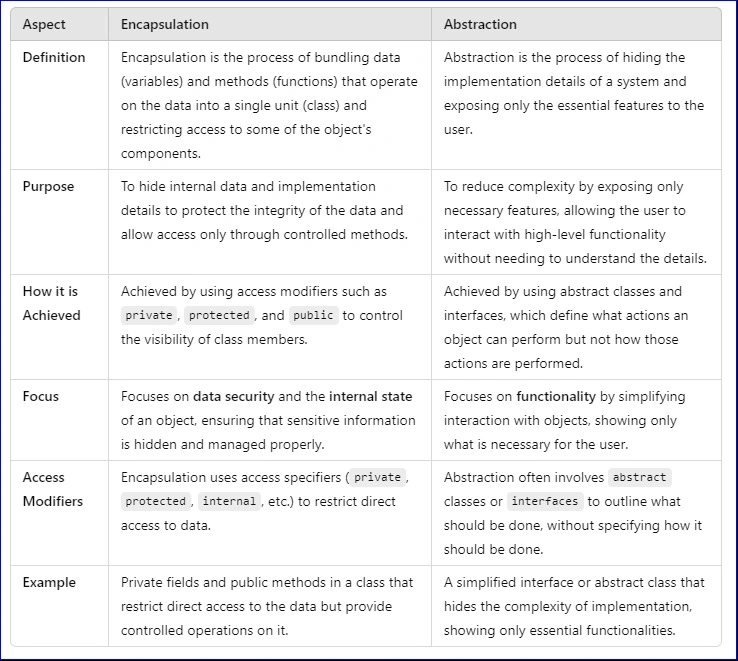
Comparison results summary
- Encapsulation tackles design-related challenges by concealing the internal workings of an object and revealing only the essential components. It establishes clear boundaries and regulates access to an object's data, thereby enhancing the modularity, maintainability, and security of the design. Encapsulation pertains to the organization and concealment of the internal structure.
- Abstraction addresses issues at the implementation level by emphasizing the capabilities of an object rather than the mechanisms behind those capabilities. It offers a streamlined interface to intricate underlying code, enabling modifications to implementation details without disrupting the overall system. Abstraction focuses on simplifying interactions by obscuring complexity.
Join the conversation! Your thoughts help the community grow.