

Introduction
This article will discuss Service Master Key, backup, restore and alter Service Master Key in SQL Server.
Service Master Key
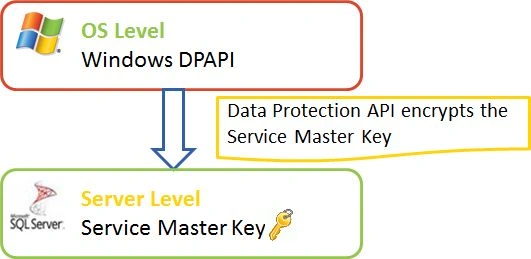
The Service Master Key is created at the time of installation of the SQL Server. There is only one Service Master Key per SQL instance. The Windows data protection API uses the SQL Server service account credentials to encrypt the Service Master Key. And the Service Master Key secures all other keys on the server.
Backup Service Master Key
Since there can be only one Service Master Key per instance, it is advisable to take a backup of this key.
BACKUP SERVICE MASTER KEY TO FILE = 'D:\SQLServer2008R2.SMK' ENCRYPTION BY PASSWORD = '@k$h@yPatel' GO
If you execute the SQL statement above, the following error might be thrown:
Cannot write into file "D:\SQLServer2008R2.SMK". Verify that you have to write permissions, that the file path is valid, and that the file does not already exist.
It is a SQL Server service account permission issue. Rather than granting permission to the account, we can take a backup from the default path. So remove the full path and pass in the file name.
BACKUP SERVICE MASTER KEY TO FILE= 'SQLServer2008R2.SMK'
ENCRYPTION BY PASSWORD = '@k$h@yPatel'
GO
Now you can find the "SQLServer2008R2.SMK" file on the following path.
C:\Program Files\Microsoft SQL Server\MSSQL10_50.SQLXPR2008\MSSQL\DATA
Note Take a backup of the Service Master Key and store it in a secure location immediately after installing SQL Server.
Restore Service Master Key
We can restore this file whenever it is required. The syntax is as follows:
RESTORE SERVICE MASTER KEY FROM FILE= 'SQLServer2008R2.SMK'
DECRYPTION BY PASSWORD = '@k$h@yPatel'
GO
Note The password should be the password previously used to encrypt the backup.
Alter Service Master Key
ALTER SERVICE MASTER KEY REGENERATE;
GO
Note It is advisable to regenerate the SMK whenever we make changes to the service account.
Conclusion
In this article, we have discussed Service Master Key. The following article will discuss Database Master Key in SQL Server.
mark dineshPosted May 21, 2013, 5:27 PM
Hi, Iam really new to SQL Server Data encryption. Can someone tell the best appropriate solution for sensitive data encryption. Likewise how the above solution explained by Akshay is different from TDE. What are the pro's and cons of both. I have requirement to encrypt data. Searching for apt solution.
Kamal RawatPosted May 12, 2013, 3:48 PM
It would be great if you can cover TDE (Transparent Data Encryptiuon).. which performs real-time I/O encryption and decryption of the data and log files.
Mahesh ChandPosted May 6, 2013, 12:19 PM
Thanks AP. How about data encryption? I think SQL Server 2012 has this feature where the entire data stored in the database can be encrypted. I think this is a great feature just in case somebody hacks into your database. Any article on this topic would be great.
jignesh solankiPosted May 6, 2013, 5:16 AM
Good one