

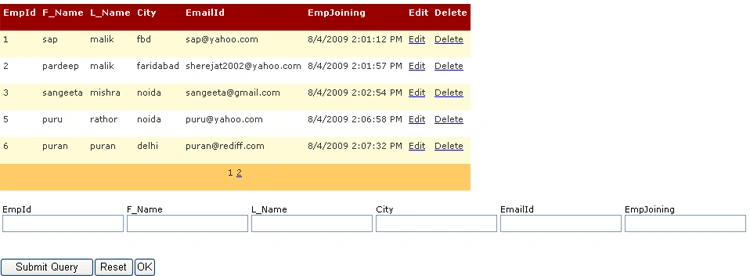
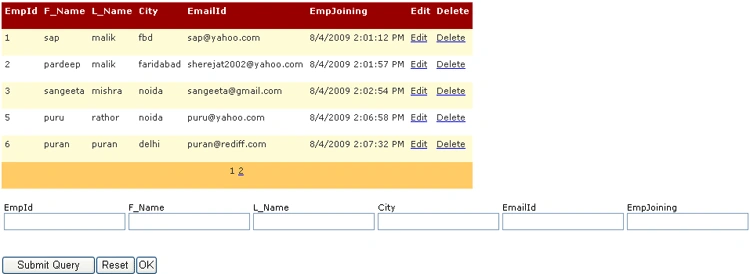
This is the aspx code in DataGrid
From Here we can design our web form. We use a DataGrid on webForm. Here we set all the property as we have to perform the operation with in DataGrid.
- <%@ Page Language="C#" AutoEventWireup="true" CodeFile="DataGrid.aspx.cs" Inherits="sapnamalik_DataGrid" %>
- <!DOCTYPE html PUBLIC "-//W3C//DTD XHTML 1.0 Transitional//EN" "http://www.w3.org/TR/xhtml1/DTD/xhtml1-transitional.dtd">
- <html xmlns="http://www.w3.org/1999/xhtml">
- <head runat="server">
- <title>Untitled Page</title>
- </head>
- <body>
- <form id="form1" runat="server">
- <div>
- <asp:DataGrid ID="Grid" runat="server" PageSize="5" AllowPaging="True" DataKeyField="EmpId" AutoGenerateColumns="False" CellPadding="4" ForeColor="#333333" GridLines="None" OnPageIndexChanged="Grid_PageIndexChanged" OnCancelCommand="Grid_CancelCommand" OnDeleteCommand="Grid_DeleteCommand" OnEditCommand="Grid_EditCommand" OnUpdateCommand="Grid_UpdateCommand">
- <Columns>
- <asp:BoundColumn HeaderText="EmpId" DataField="EmpId"> </asp:BoundColumn>
- <asp:BoundColumn HeaderText="F_Name" DataField="F_Name"> </asp:BoundColumn>
- <asp:BoundColumn HeaderText="L_Name" DataField="L_Name"> </asp:BoundColumn>
- <asp:BoundColumn DataField="City" HeaderText="City"> </asp:BoundColumn>
- <asp:BoundColumn DataField="EmailId" HeaderText="EmailId"> </asp:BoundColumn>
- <asp:BoundColumn DataField="EmpJoining" HeaderText="EmpJoining"> </asp:BoundColumn>
- <asp:EditCommandColumn EditText="Edit" CancelText="Cancel" UpdateText="Update" HeaderText="Edit"> </asp:EditCommandColumn>
- <asp:ButtonColumn CommandName="Delete" HeaderText="Delete" Text="Delete"> </asp:ButtonColumn>
- </Columns>
- <FooterStyle BackColor="#990000" Font-Bold="True" ForeColor="White" />
- <SelectedItemStyle BackColor="#FFCC66" Font-Bold="True" ForeColor="Navy" />
- <PagerStyle BackColor="#FFCC66" ForeColor="#333333" HorizontalAlign="Center" Mode="NumericPages" />
- <AlternatingItemStyle BackColor="White" />
- <ItemStyle BackColor="#FFFBD6" ForeColor="#333333" />
- <HeaderStyle BackColor="#990000" Font-Bold="True" ForeColor="White" /> </asp:DataGrid> <br /> <br />
- <table>
- <tr>
- <td>
- <asp:Label ID="lblEmpId" runat="server" Text="EmpId"></asp:Label>
- <asp:TextBox ID="TextBox1" runat="server"></asp:TextBox>
- </td>
- <td>
- <asp:Label ID="lblfname" runat="server" Text="F_Name"></asp:Label>
- <asp:TextBox ID="TextBox2" runat="server"></asp:TextBox>
- </td>
- <td>
- <asp:Label ID="lblLname" runat="server" Text="L_Name"></asp:Label>
- <asp:TextBox ID="TextBox3" runat="server"></asp:TextBox>
- </td>
- <td>
- <asp:Label ID="lblCity" runat="server" Text="City"></asp:Label>
- <asp:TextBox ID="TextBox4" runat="server"></asp:TextBox>
- </td>
- <td>
- <asp:Label ID="lblEmailId" runat="server" Text="EmailId"></asp:Label>
- <asp:TextBox ID="TextBox5" runat="server"></asp:TextBox> Q </td>
- <td>
- <asp:Label ID="lblEmpJoining" runat="server" Text="EmpJoining"></asp:Label>
- <asp:TextBox ID="TextBox6" runat="server"></asp:TextBox>
- </td>
- </tr>
- </table>
- <asp:Button ID="btnsubmit" runat="server" Text="Submit" OnClick="btnsubmit_Click" />
- <asp:Button ID="btnReset" runat="server" Text="Reset" OnClick="btnReset_Click" />
- <asp:Button ID="btnOk" runat="server" Text="OK" OnClick="btnOk_Click" /> </div>
- <div>
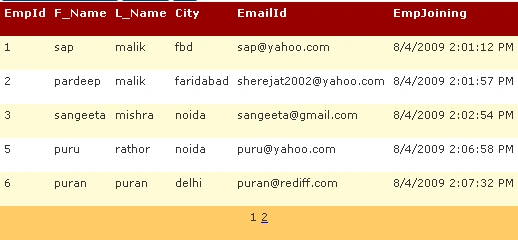
- <asp:DataGrid ID="Grid1" runat="server" PageSize="5" AllowPaging="True" AutoGenerateColumns="False" CellPadding="4" ForeColor="#333333" GridLines="None">
- <Columns>
- <asp:BoundColumn HeaderText="EmpId" DataField="EmpId"></asp:BoundColumn>
- <asp:BoundColumn HeaderText="F_Name" DataField="F_Name"></asp:BoundColumn>
- <asp:BoundColumn HeaderText="L_Name" DataField="L_Name"></asp:BoundColumn>
- <asp:BoundColumn DataField="City" HeaderText="City"></asp:BoundColumn>
- <asp:BoundColumn DataField="EmailId" HeaderText="EmailId"></asp:BoundColumn>
- <asp:BoundColumn DataField="EmpJoining" HeaderText="EmpJoining"> </asp:BoundColumn>
- </Columns>
- <FooterStyle BackColor="#990000" Font-Bold="True" ForeColor="White" />
- <SelectedItemStyle BackColor="#FFCC66" Font-Bold="True" ForeColor="Navy" />
- <PagerStyle BackColor="#FFCC66" ForeColor="#333333" HorizontalAlign="Center" Mode="NumericPages" />
- <AlternatingItemStyle BackColor="White" />
- <ItemStyle BackColor="#FFFBD6" ForeColor="#333333" />
- <HeaderStyle BackColor="#990000" Font-Bold="True" ForeColor="White" /> </asp:DataGrid>
- </div>
- </form>
- </body>
- </html>
Ermias JerimePosted Apr 18, 2019, 2:19 AM
Every Time when client enters data, he or she have to input EmpJoining do you think it's fair
Ramesh PalaniappanPosted Aug 29, 2016, 2:35 AM
Nice
kalu singh raoPosted Jul 9, 2016, 12:18 PM
Nice...
Rubal BansalPosted Apr 26, 2015, 7:33 AM
(y) perfect...
wael adelPosted Feb 27, 2015, 9:46 AM
Thank you . ???? ??
Pooja PPosted Feb 21, 2013, 7:04 AM
thank you
bala chandarPosted Jan 28, 2013, 4:36 AM
i am having some questions with questionid,question and type in database.that questions should load in a grid and in that same grid a column should added dynamically with textbox or radiobutton using the question type .
aruna dapatlaPosted Feb 10, 2012, 5:01 AM
thank u this code very useful to me
Nagaraju BollineniPosted Oct 10, 2011, 9:01 AM
Not using the cmd.ExecuteNonQuery(); in Bindata methods , in the same way we are using the dataset object no need to use open the connection because it is the disconnected architecture.
rino rajueditedPosted Jul 16, 2011, 7:22 PMEdited Jul 16, 2011, 7:25 PM
nothing geting saved to data base
Ulysses CastilloPosted May 4, 2011, 8:08 PM
Thank you, Sapna. This is exactly what I was looking for. Ulysses
jalpa brahmbhattPosted May 2, 2011, 10:12 PM
Hi i want to srot my grid by column header is that possible in your code please reply me soon
gjaya kanthanPosted Apr 18, 2011, 1:30 AM
Nice Article
Haytham HamdonPosted Apr 9, 2011, 3:21 AM
Please Upload The Source code Thnks for effort
SairamPosted Aug 30, 2010, 1:19 AM
in this datagrid example i don't get the page number in grid1 control..how to enable " page 2 link in that:"? kindly help me .....i need as soon as possible
Lennie KuahPosted Jul 26, 2010, 3:48 AM
Hi Sapna Malik, Regarding the DataGrid Article you posted here, can you please let me know what version of ASPNET are you using. I am looking for help of using ASPNET2008. Thank you
Abhijeet PatilPosted Jun 18, 2010, 1:40 AM
Hi Sapna, Thanks for sharing the code for datagrid. I am facing an error message for "cmd.CommandText = "Select * from Employee";" Where are we specifing the connection string? On which database this command text will execute? Please help.
Jeff VojtkoPosted Jun 11, 2010, 10:13 AM
Is there some way that you can have only one search box and designate to which column in the datagrid the search filter applies? I would like to use something like this on my Red Lobster Recipes website.
Muhammad UmairPosted Dec 22, 2009, 5:05 PM
Great work friend
Former memberPosted Aug 11, 2009, 12:37 PM
Hi, I have read your previous articles so I would like to give a constructive feedback that ur this article is not up to the par with standrd which u created in ur previous articles. This is rather a code snippet that article. There is no explanation.. But i hope ..u would come much better in further articles .. Keep it Up :)