

Exception handling is crucial since the robustness of software depends on how effectively a program deals with exceptions. Basically exceptions are a run time error.
Exception Handling in VB.Net:
Exception handling in VB.Net provides uniform, structured and type-safe handling errors.
-
The System.Exception is the super class of exceptions.
-
Well-Defined exception classes exist for system-level errors, such as overflow, divide-by-zero, and null references, that are treated on par with application-level errors.
-
VB.net contains inner exceptions. When a new exception is thrown from an existing exception, the new exception's inner exception can carry the existing exception.
-
Checked and unchecked statements are used to control overflow checking.
-
An exception raised in VB.NET but handled in a C# program is handled in the same way as one raised in C# but handled in VB.NET. There is a uniform way of handling errors.
VB provides a structured way of handling errors: the block of code where the errors are accepted is guarded by try-catch blocks where exceptions are handled.
System.Exception Overview:
System.Exception represents errors that occur during application execution. This is the base class for all exceptions in VB.net, so any other type of exception must be derived from it.
The Exception class is present in the System namespace and in the assembly mscorlib.dll.
Some Important Properties of the Exception class:
-
StackTrace: This StackTrace property can be used to determine where the error occurred.
-
Message: The Message property returns a description to the error's cause.
-
InnerException: The InnerException property can be used to create and preserve a series of exceptions during exception handling.
-
HelpLink: The HelpLink property can hold a URL to a help file that provides extensive information about the cause of the exception.
Exception Statements in VB.Net:
VB.Net supports structured exception handling. In structured exception handing, we write code surrounded by blocks. If an exception occurs, the block throws the execution control to a predefined handled code, the try, catch, finally statements define these blocks. In other words, if an application handles exceptions that occur during the execution of a block of application code, the code must be placed within a try statement.
Application code within a try statement is a try block. Application code that handles exceptions thrown by a try block is placed within the catch statement and is called a catch block.
In a try block, we define the code we want to execute and protect from any possible errors. The catch block defines the handlers for the exception. The finally block can free resources allocated in the try block.
The try statement provides a mechanism to capture exceptions in a block of code and a mechanism to execute blocks of code both under normal circumstances and when an exception occurs.
We can define a try statement in a few different forms:
-
try-catch
-
try-finally
-
try-catch-finally
If there is no exception then the catch block will not execute but the finally block will surely execute, whether there is an exception or not in the try block.
Let see the exception handling with this program.
Here in this program, I am accepting two numbers from the user and I am dividing the first number from the second number, here if the second number is zero then it will throw a DivideByZeroException.
The form 1 designed is:
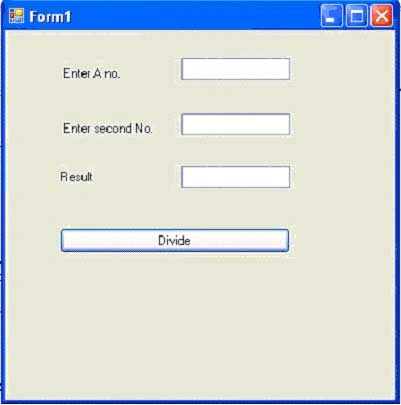
Figure 1:
The form.vb code is:
Imports System
Imports System.Collections.Generic
Imports System.ComponentModel
Imports System.Data
Imports System.Drawing
Imports System.Text
Imports System.Windows.Forms
Namespace AnExceptionHandlingExamle
Public Partial Class Form1 Inherits Form
Public Sub New()
InitializeComponent()
End Sub
Private Sub button1_Click(ByVal sender As Object, ByVal e As EventArgs)
MyException(Int32.Parse(textBox1.Text), Int32.Parse(textBox2.Text))
End Sub
Public Sub MyException(ByVal a As Int32, ByVal b As Int32)
Dim Result As Int32
Try
'The try block from where an exception will thrown
Result = a / b
textBox3.Text = Result.ToString()
Catch e As System.DivideByZeroException
'The catch block where Exception will be handle
'Here I am using e.Message
MessageBox.Show(e.Message)
End Try
End Sub
End Class
End Namespace
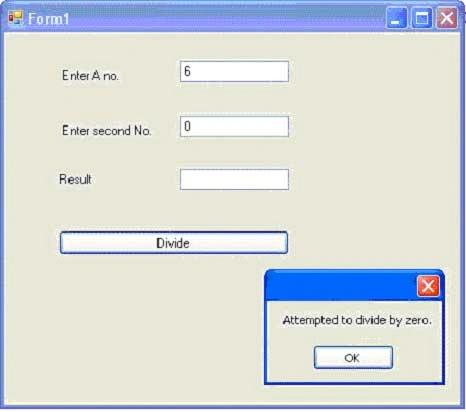
Figure 2: If I use e.Message.
If I write a catch block like this:
Catch e As System.DivideByZeroException
'The catch block where Exception will be handle
'Here I am using e.StackTrace
MessageBox.Show(e.StackTrace)
End Try
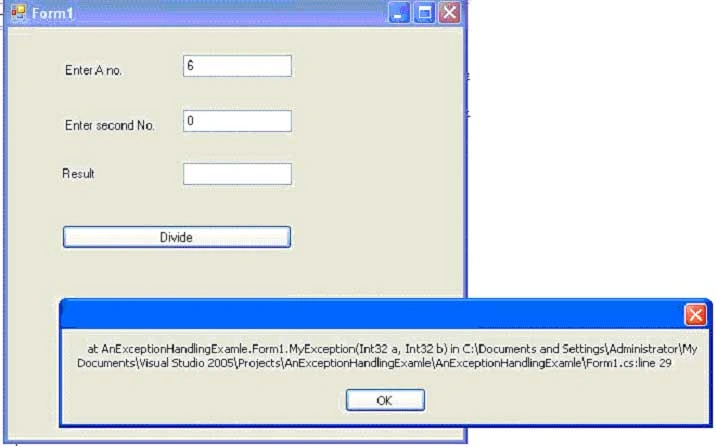
Figure 3: If I use e.StackTrace.
If I write a catch block like this:
Catch e As System.DivideByZeroException
'The catch block where Exception will be handle
'Here I am using e.Source
MessageBox.Show(e.Source)
End Try
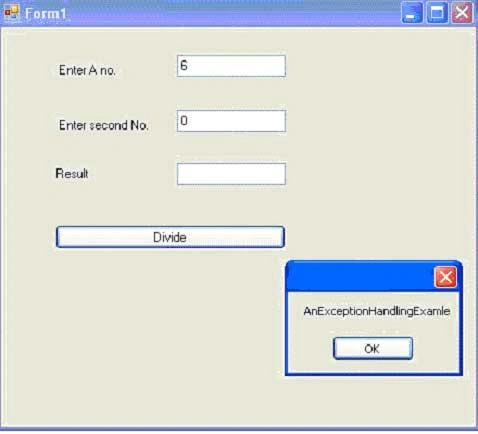
Figure 4: If I use e.Source.
If I use finally in the .vb code like this:
Try
'The try block from where an exception will thrown
Result = a / b
textBox3.Text = Result.ToString()
Catch e As System.DivideByZeroException
'The catch block where Exception will be handle
'Here I am using e.Source
MessageBox.Show(e.Source)
Finally
MessageBox.Show("Hi In Finally block")
End Try
Here either there is an exception in the try block or not but the finally block definitely will be executed.
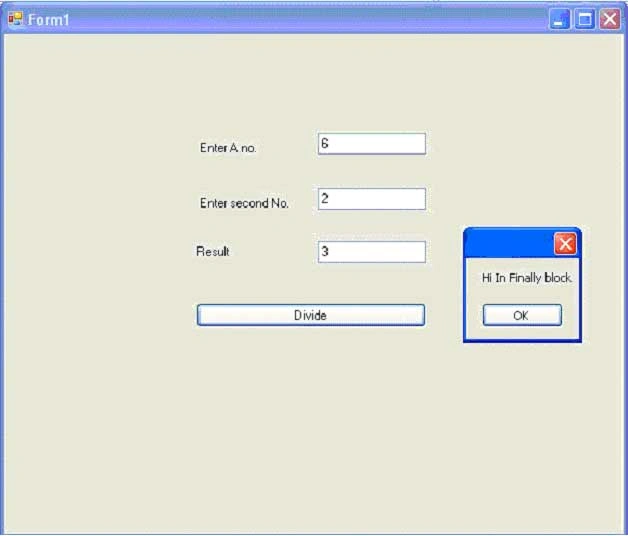
Figure 5:
Throw Statement
By using throw we can throw an exception from anywhere in a program.
Try
'The try block from where an exception will thrown
If a < 10 Then
' Form here an exception will be thrown If user enter number less then 10
Throw New ArgumentOutOfRangeException(" First Number can't be less then 10")
End If
Result = a / b
textBox3.Text = Result.ToString()
Catch e As Exception
'The catch block where Exception will be handle
'Here I am using e.Message
MessageBox.Show(e.Message)
End Try
If the user enters the first number that is less then 10 then an exception is thrown.
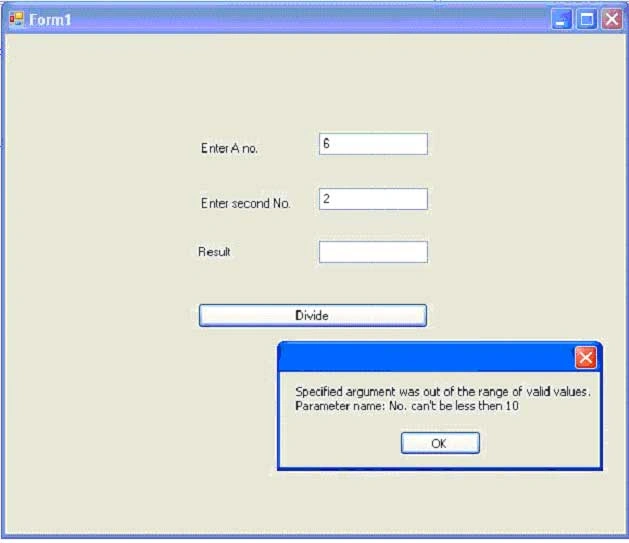
Figure 6:
Creating Our Own Exception Classes
To create our own exception class, the .NET framework requires us to drive our class from the System.Exception class and recommends that we implement all the constructors that are implemented by the base class. Here are some important recommendations:
-
Give a meaningful name to your Exception class and end it with Exception.
-
Do not develop a new Exception class unless there is a scenario for developers needing the class.
-
Throw the most specific exception possible.
-
Give a meaningful message.
-
Do use InnerExceptions.
-
When the wrong arguments are passed, throw an Argument Exception or a subclass of it, if necessary.
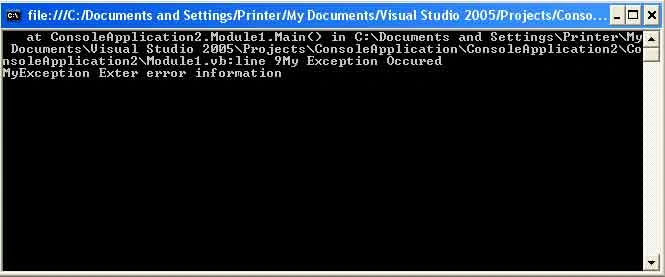
Let's see this in a console based application.
Module Module1
Sub
Try
Dim m As MyException
m = New MyException("My Exception Occured")
m.ExtarcterrorInfo = "MyException Exter error information"
Throw m
Catch e As MyException
Console.WriteLine(String.Concat(e.StackTrace, e.Message))
Console.WriteLine(e.ExtarcterrorInfo)
Console.Read()
End Try
End Sub
Public Class MyException
Inherits Exception
Public Sub New()
MyBase.New()
End Sub
Public Sub New(ByVal message As String)
MyBase.New(message)
End Sub
MyBase.New(message, e)
Dim strExtracrInfo As String
Public Property ExtarcterrorInfo() As String
Get
Return strExtracrInfo
End Get
Set(ByVal value As String)
strExtracrInfo = value
End Set
End Property
End Class
End Module
When the user runs the application:
Join the conversation! Your thoughts help the community grow.