Introduction
Application Insights is an extensible Application Performance Management (APM) service for web developers on multiple platforms. This is used to monitor the performance of your live web applications. It includes powerful analytics tools to help you diagnose issues and to understand what users do with your app.
You can check this
URL to get more details about Application Insights.
Prerequisites for Adding Application Insights
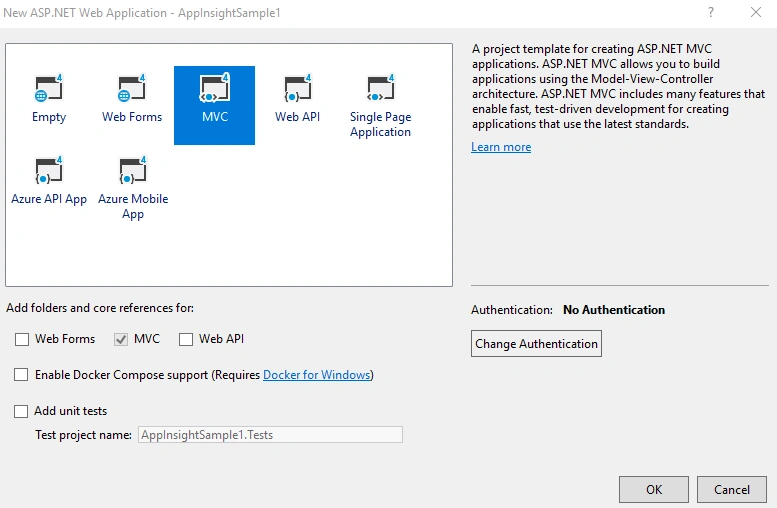
We can create an MVC application. I am using Visual Studio 2017 for creating the application.
Choose ASP.NET Web application template and select MVC option to create an application.
We can create an “Employees” table in SQL server using below script.
CREATE_EMPLOYEE_TABLE.sql
- USE [SarathlalDB]
- GO
-
- CREATE TABLE [dbo].[Employees](
- [Id] [nvarchar](50) NOT NULL,
- [Name] [nvarchar](50) NULL,
- [Gender] [nvarchar](10) NULL,
- [Company] [nvarchar](50) NULL,
- [Designation] [nvarchar](50) NULL,
- [City] [nvarchar](50) NULL,
- CONSTRAINT [PK_Employees] PRIMARY KEY CLUSTERED
- (
- [Id] ASC
- )
- )
- GO
Now we can add an Employee class inside “Models” folder.
Employees.cs
- namespace AppInsightSample1.Models
- {
- public class Employee
- {
- public string Id { get; set; }
- public string Name { get; set; }
- public string Gender { get; set; }
- public string Company { get; set; }
- public string Designation { get; set; }
- public string City { get; set; }
- }
- }
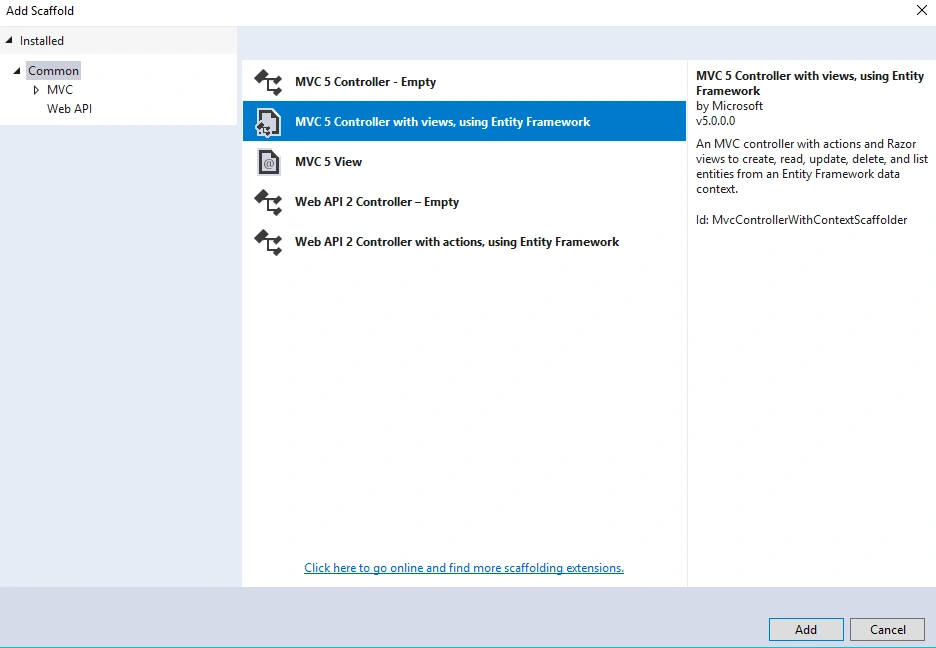
Create an Employees Controller with views for CRUD operations using scaffolding template.
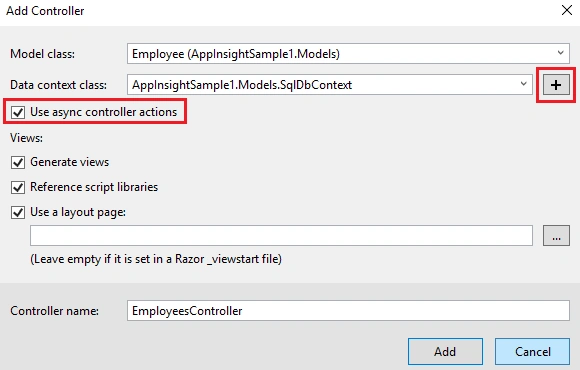
Choose the existing “Employee” class as a model class and click the “+” button to create a new data context class. This class will be used by entity framework for ORM (Object Relational Mapping) purposes.
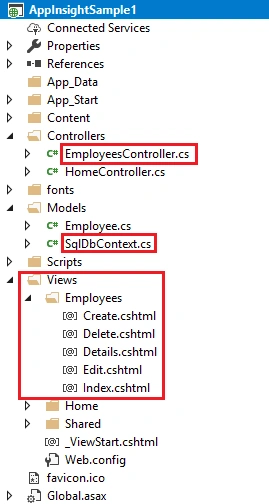
This scaffolding process will create an EmployeesController class along with 5 views under Employees folder inside Views folder.
You can see that a new connection string is created in Web.Config file as well. This connection will be used in entity framework for database connectivity. We can change the connection string according to our SQL server and database details.
We need a small change in _Layout.cshtml partial view to add Employees controller and Index action inside it.
- <!DOCTYPE html>
- <html>
- <head>
- <meta charset="utf-8" />
- <meta name="viewport" content="width=device-width, initial-scale=1.0">
- <title>@ViewBag.Title - Application Insights Sample</title>
- @Styles.Render("~/Content/css")
- @Scripts.Render("~/bundles/modernizr")
- <script type = 'text/javascript' >
- var appInsights=window.appInsights||function(config)
- {
- function r(config){ t[config] = function(){ var i = arguments; t.queue.push(function(){ t[config].apply(t, i)})} }
- var t = { config:config},u=document,e=window,o='script',s=u.createElement(o),i,f;for(s.src=config.url||'//az416426.vo.msecnd.net/scripts/a/ai.0.js',u.getElementsByTagName(o)[0].parentNode.appendChild(s),t.cookie=u.cookie,t.queue=[],i=['Event','Exception','Metric','PageView','Trace','Ajax'];i.length;)r('track'+i.pop());return r('setAuthenticatedUserContext'),r('clearAuthenticatedUserContext'),config.disableExceptionTracking||(i='onerror',r('_'+i),f=e[i],e[i]=function(config, r, u, e, o) { var s = f && f(config, r, u, e, o); return s !== !0 && t['_' + i](config, r, u, e, o),s}),t
- }({
- instrumentationKey:'ac363ab6-204d-4a79-9821-e49ada70b232'
- });
-
- window.appInsights=appInsights;
- appInsights.trackPageView();
- </script>
- </head>
- <body>
- <div class="navbar navbar-inverse navbar-fixed-top">
- <div class="container">
- <div class="navbar-header">
- <button type="button" class="navbar-toggle" data-toggle="collapse" data-target=".navbar-collapse">
- <span class="icon-bar"></span>
- <span class="icon-bar"></span>
- <span class="icon-bar"></span>
- </button>
- @Html.ActionLink("Application Insights", "Index", "Home", new { area = "" }, new { @class = "navbar-brand" })
- </div>
- <div class="navbar-collapse collapse">
- <ul class="nav navbar-nav">
- <li>@Html.ActionLink("Home", "Index", "Home")</li>
- <li>@Html.ActionLink("Employees", "Index", "Employees")</li>
- <li>@Html.ActionLink("Contact", "Contact", "Home")</li>
- </ul>
- </div>
- </div>
- </div>
- <div class="container body-content">
- @RenderBody()
- <hr />
- <footer>
- <p>© @DateTime.Now.Year - By Sarath Lal</p>
- </footer>
- </div>
-
- @Scripts.Render("~/bundles/jquery")
- @Scripts.Render("~/bundles/bootstrap")
- @RenderSection("scripts", required: false)
- </body>
- </html>
We have completed all the coding part for creating simple CRUD actions for Employee details.
We can add Application Insights to this project easily.
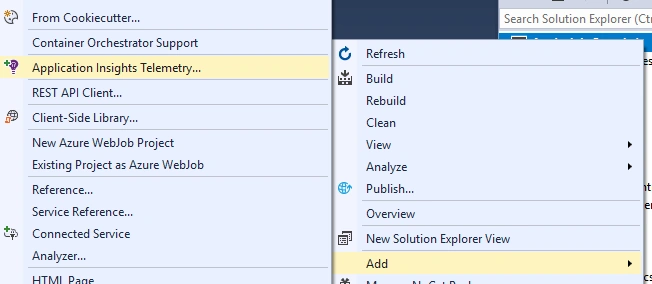
Right click the solution and click “Add” and choose “Application Insight Telemetry”
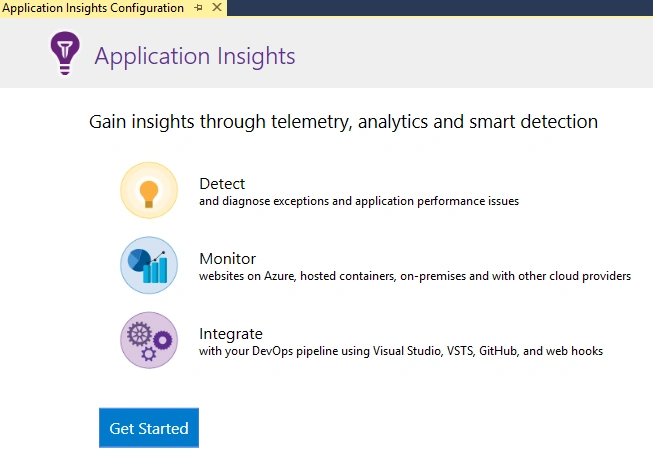
Click “Get Started” button to proceed.
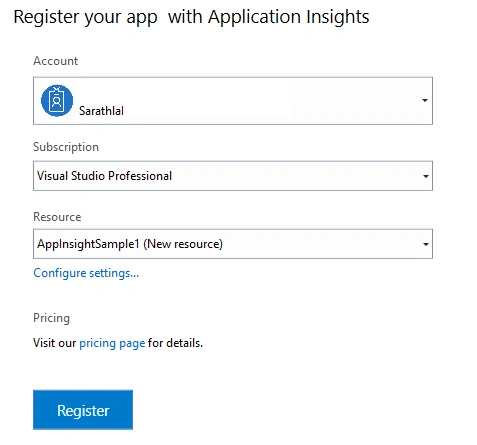
You can create the Application Insights and register the application now. You must have an active Azure account for that.
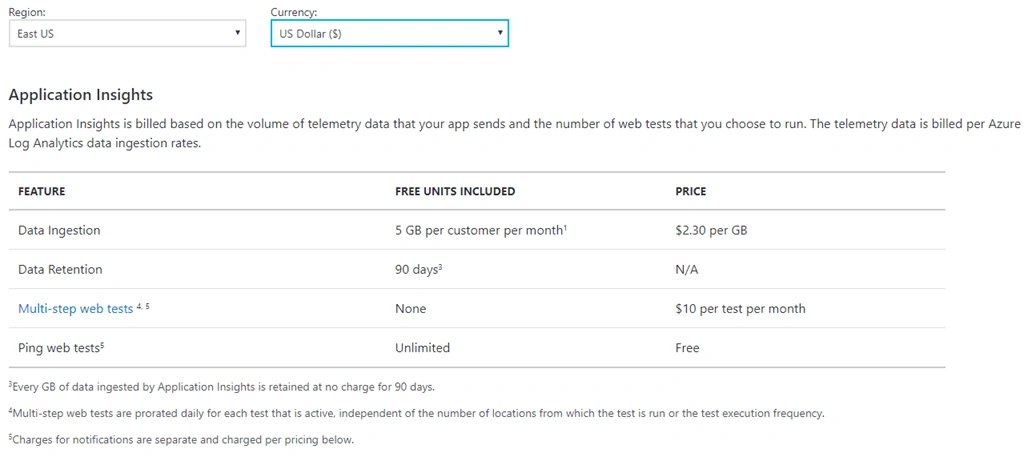
I am giving you the current pricing details for Application Insights. It will be varying from time to time.
Please check this URL to get the latest pricing details of Application Insights.
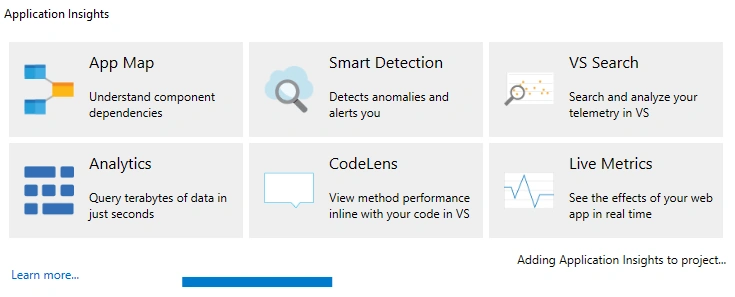
It will take some time to add Application Insights to our project.
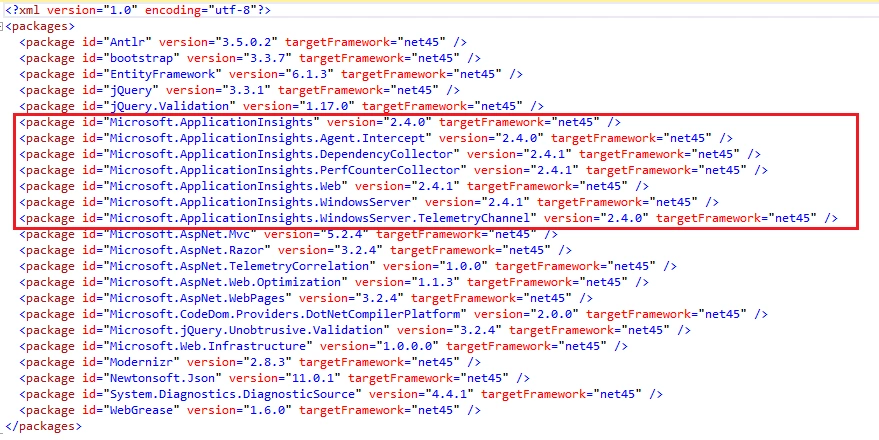
If you look at the packages.config file, you can notice that the below new packages are added to our project now.
packages.config
- <?xml version="1.0" encoding="utf-8"?>
- <packages>
- <package id="Antlr" version="3.5.0.2" targetFramework="net45" />
- <package id="bootstrap" version="3.3.7" targetFramework="net45" />
- <package id="EntityFramework" version="6.1.3" targetFramework="net45" />
- <package id="jQuery" version="3.3.1" targetFramework="net45" />
- <package id="jQuery.Validation" version="1.17.0" targetFramework="net45" />
- <package id="Microsoft.ApplicationInsights" version="2.4.0" targetFramework="net45" />
- <package id="Microsoft.ApplicationInsights.Agent.Intercept" version="2.4.0" targetFramework="net45" />
- <package id="Microsoft.ApplicationInsights.DependencyCollector" version="2.4.1" targetFramework="net45" />
- <package id="Microsoft.ApplicationInsights.PerfCounterCollector" version="2.4.1" targetFramework="net45" />
- <package id="Microsoft.ApplicationInsights.Web" version="2.4.1" targetFramework="net45" />
- <package id="Microsoft.ApplicationInsights.WindowsServer" version="2.4.1" targetFramework="net45" />
- <package id="Microsoft.ApplicationInsights.WindowsServer.TelemetryChannel" version="2.4.0" targetFramework="net45" />
- <package id="Microsoft.AspNet.Mvc" version="5.2.4" targetFramework="net45" />
- <package id="Microsoft.AspNet.Razor" version="3.2.4" targetFramework="net45" />
- <package id="Microsoft.AspNet.TelemetryCorrelation" version="1.0.0" targetFramework="net45" />
- <package id="Microsoft.AspNet.Web.Optimization" version="1.1.3" targetFramework="net45" />
- <package id="Microsoft.AspNet.WebPages" version="3.2.4" targetFramework="net45" />
- <package id="Microsoft.CodeDom.Providers.DotNetCompilerPlatform" version="2.0.0" targetFramework="net45" />
- <package id="Microsoft.jQuery.Unobtrusive.Validation" version="3.2.4" targetFramework="net45" />
- <package id="Microsoft.Web.Infrastructure" version="1.0.0.0" targetFramework="net45" />
- <package id="Modernizr" version="2.8.3" targetFramework="net45" />
- <package id="Newtonsoft.Json" version="11.0.1" targetFramework="net45" />
- <package id="System.Diagnostics.DiagnosticSource" version="4.4.1" targetFramework="net45" />
- <package id="WebGrease" version="1.6.0" targetFramework="net45" />
- </packages>
There are 7 new packages related to Application Insights added to project.
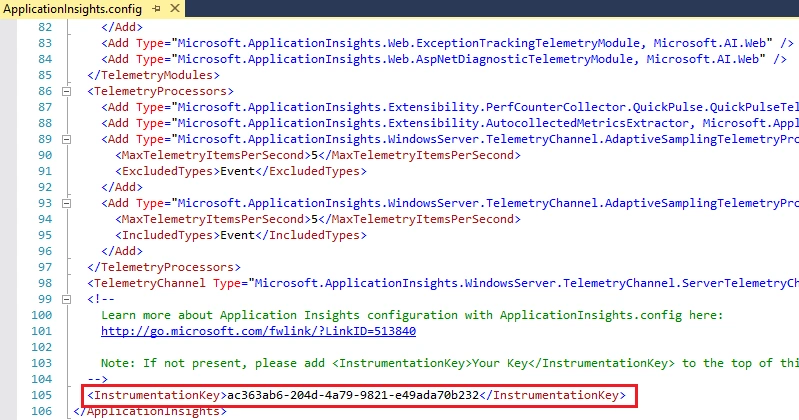
You can also see a “ApplicationInsights.config” file in the root folder. This file contains many configuration details along with the instrumentation key of Application Insights.
You can also see a “AiHandleErrorAttribute.cs” filter class (which is added to project automatically with Application Insights) to track the exceptions in the project level.
AiHandleErrorAttribute.cs
- using System;
- using System.Web.Mvc;
- using Microsoft.ApplicationInsights;
-
- namespace AppInsightSample1.ErrorHandler
- {
- [AttributeUsage(AttributeTargets.Class | AttributeTargets.Method, Inherited = true, AllowMultiple = true)]
- public class AiHandleErrorAttribute : HandleErrorAttribute
- {
- public override void OnException(ExceptionContext filterContext)
- {
- if (filterContext != null && filterContext.HttpContext != null && filterContext.Exception != null)
- {
-
- if (filterContext.HttpContext.IsCustomErrorEnabled)
- {
- var ai = new TelemetryClient();
- ai.TrackException(filterContext.Exception);
- }
- }
- base.OnException(filterContext);
- }
- }
- }
Whenever an error occurs in application, it will be caught in this attribute class and will be written to Application Insights immediately.
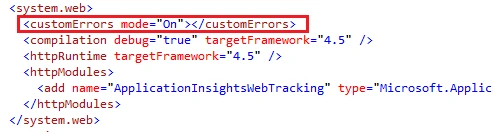
You must enable custom error mode in Web.Config to get the exception details in Application Insights.
Once we added all Application Insights related packages to the project, this will capture all the requests and page views along with exceptions too.
We can run the application to check the Application Insights logs.
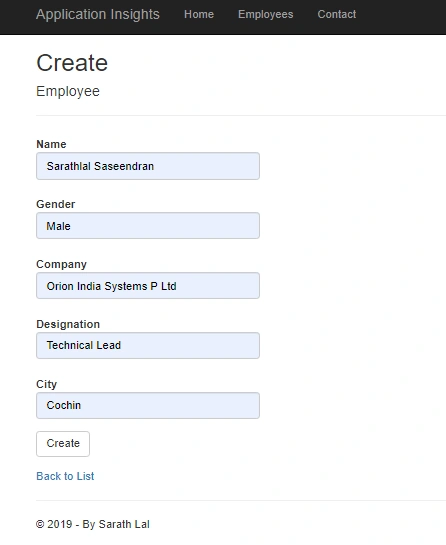
Select the Employees menu and create a new Employee record now.
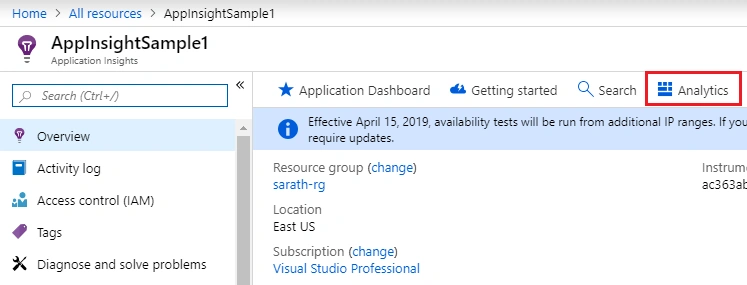
We can open the Azure Portal and open Application Insights resource. You can see an “Analytics” blade there. Please click that blade to open the Application Insights logs.
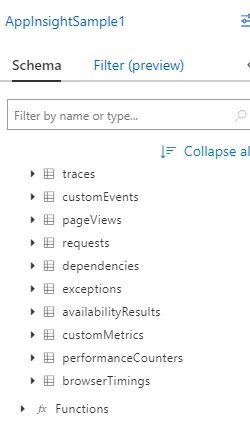
You can see various types of Application Insights schemas there.
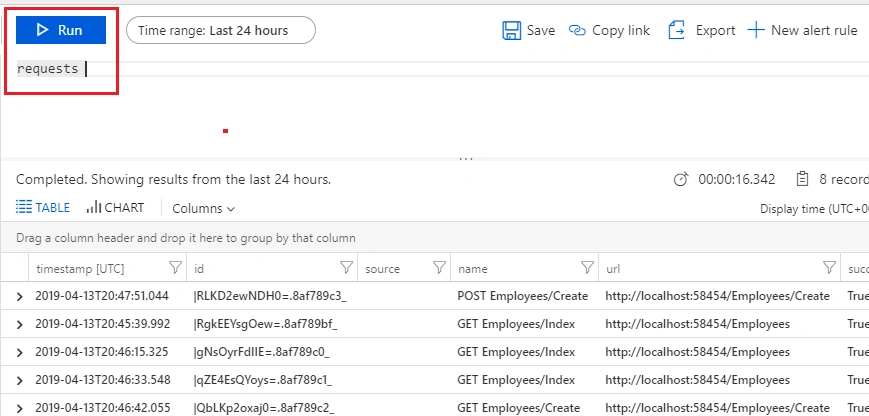
You can choose “requests” from the list and click the “Run” button. It will show the log details about all requests that happened from the application.
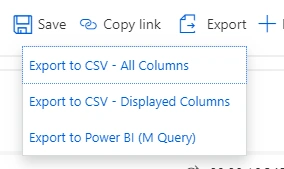
We can export these logs as CSV file very easily.
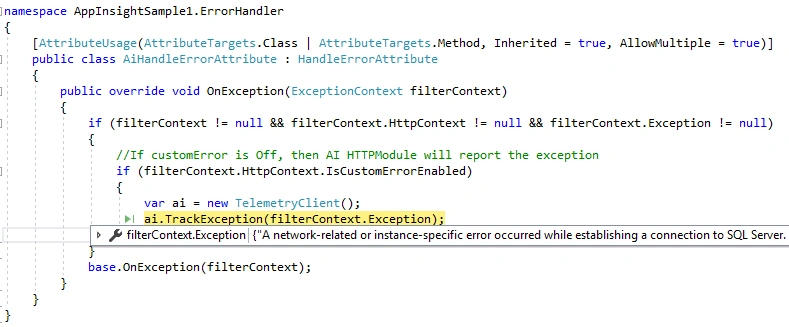
I am going to stop the SQL server service and create an exception in the application forcefully so that, we can check the exception logs in Application Insights.
I have already put a breakpoint in the exception filter. The current exception is caught there, and it will write the exception to Application Insights.
We can go to the Azure portal and open the Analytics blade.
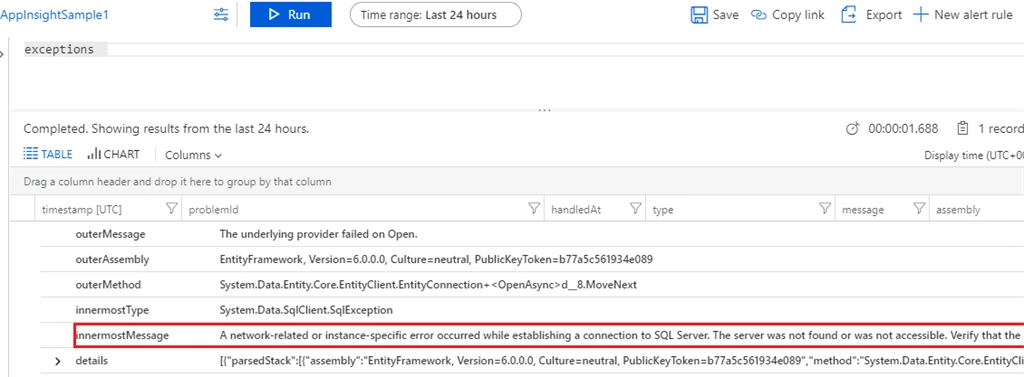
You can choose “exceptions” from the list and click the “Run” button to get the log details. You will get entire exception details in the log.
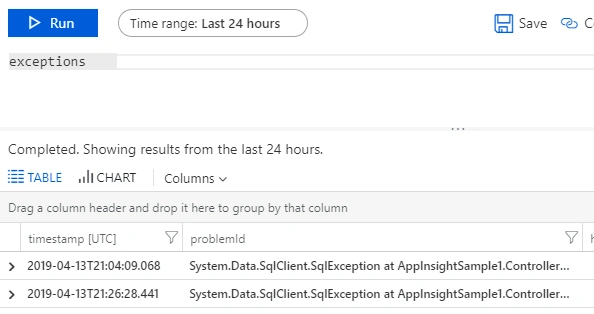
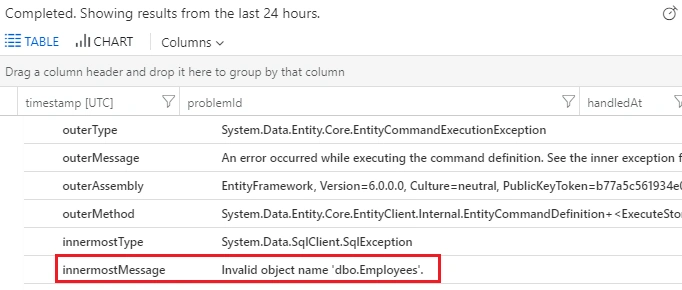
We can start the SQL server service again and rename the “Employees” table to “EmployeesChanged” in the database. Once again, click the Employees tab in the application. It will again create an exception and will write to Application Insights.
You can run the query again and get the second exception as well.
You will get the details about the exception by expanding the arrow key.
As expected, we have received the actual exception from log details.
Conclusion
We have created a simple MVC application in Visual Studio 2017 and we have added Application Insights SDK to this project. This SDK automatically added an exception filter to handle all the exceptions in the project level. We have seen all the requests came from application in Azure Portal using Application Insights. Later we have stopped the SQL server service and generated an exception in the application. We have seen this exception log in Application Insights as well.
In a nutshell, Application insights is the easy diagnostic tool to track the performance and exception details that occurred in any application (Azure Web Apps or on-premise Apps) anywhere from the Azure Portal. This will reduce the nightmare of any application developer to catch the exact root cause of exceptions that occurred in their application.



Join the conversation! Your thoughts help the community grow.