

What are AI Agents?
An AI agent is a software program that works without any human intervention to perform specific tasks based on certain inputs and uses AI to effectively to do so. AI agents use Artificial Intelligence (AI) techniques, such as machine learning, natural language processing, and decision-making algorithms, to carry out tasks efficiently.
Key Characteristics of AI Agents
- Autonomy: Operates independently without constant human intervention.
- Perception: Senses the environment through input data like sensors, APIs, and user inputs such as keyboard, voice, or other sources.
- Reasoning: Uses algorithms or learning models to make decisions based on the perceived data.
- Action: Performs tasks or operations to affect its environment or achieve goals.
- Adaptability: Learns and improves over time using techniques like reinforcement learning or supervised learning.

AI agents represent the building blocks of intelligent systems and are widely used in applications that require efficient, autonomous decision-making.
Applications of AI Agents
Some of the common examples of AI agents include the following.
- Customer Service: Chatbots and virtual assistants (e.g., Siri, Alexa).
- Chatbots: Online chatbots help a website visitor to answer questions.
- Healthcare: Personalized treatment plans and patient monitoring.
- Finance: Fraud detection and algorithmic trading.
- E-commerce: Product recommendations and dynamic pricing.
- Gaming: Non-player characters (NPCs) with adaptive behavior.
- Automation: Smart home systems and industrial robotics.
Types of AI Agents
We can divide AI agents into the following five categories.

- Simple Reflex Agents
- Model-Based Agents
- Goal-Based Agents
- Utility-Based Agents
- Learning Agents
1. Simple Reflex Agents
A Simple Reflex Agent is the most basic type of AI agent. It operates by observing the current state of the environment and reacting to it based on predefined rules or conditions. These agents do not have memory or learning capabilities and cannot adapt to changes or learn from past experiences.

Key Characteristics
- Stateless
- They only consider the current state of the environment and ignore the history of events.
- They lack any form of memory or internal representation of the environment.
- Rule-Based Behavior
- The agent follows a set of simple "if-then" rules (condition-action rules).
- For example: If condition A is true, perform action B.
- Reactive
- Their response is immediate and based solely on the current input.
- No reasoning or planning is involved.
- Efficient for Simple Tasks: Best suited for straightforward, predictable environments.
Limitations
- No Learning: Cannot adapt to new situations or learn from past outcomes.
- Limited Scope: Ineffective in dynamic, complex, or partially observable environments.
- Overwhelmed by Complexity: Requires an explicit rule for every possible situation.
Example: Thermostat
A thermostat is a classic example of a Simple Reflex Agent.
How Does It Work?
- Input (Perception): The thermostat senses the current room temperature.
- Condition-Action Rule
- If the temperature is below the set point, turn on the heater.
- If the temperature is above the set point, turn off the heater.
- Output (Action): The thermostat adjusts the heater accordingly.
Detailed Example: Vacuum Cleaner Agent
Scenario: A vacuum cleaner operates in a small, fully observable grid-like environment with two rooms (A and B). Each room can either be Dirty or Clean.
Agent Design
- Sensors: Detect the current room and whether it is dirty or clean.
- Actuators: Perform two possible actions.
- Clean: Remove dirt in the current room.
- Move: Go to the other room.
Condition-Action Rules
- If the current room is dirty, clean it.
- If the current room is clean, move to the other room.
Example Execution
- Initial State: Room A is dirty, and the agent starts in Room A.
- Step 1
- Perception: Room A is dirty.
- Action: Clean Room A.
- Step 2
- Perception: Room A is now clean.
- Action: Move to Room B.
- Step 3
- Perception: Room B is clean.
- Action: Move back to Room A.
Observations: The agent’s behavior is purely reactive, with no consideration of the previous state or any optimization.
Advantages
- Simplicity: Easy to design and implement.
- Fast Execution: Immediate responses based on current input.
- Low Resource Requirements: No need for memory or computationally intensive processes.
Disadvantages
- Inefficiency: May perform redundant actions (e.g., moving back and forth unnecessarily).
- Not Adaptive: Cannot handle unexpected changes in the environment.
- Lack of Awareness: Cannot optimize behavior over time.
When to Use Simple Reflex Agents?
- Environments that are static (do not change unpredictably).
- Tasks that are simple and repetitive.
- Scenarios where the cost of missteps is low.
Examples in Real Life
- Automatic doors open when someone approaches.
- Light sensors turn lights on or off based on brightness.
- Water sprinklers activate when soil moisture is low.
2. Model-Based Agents
A Model-Based Agent is a more advanced type of AI agent that uses an internal representation or "model" of the environment. This model helps the agent understand the relationship between its actions and the resulting changes in the environment. By maintaining an internal state, model-based agents can handle more complex and dynamic environments compared to simple reflex agents.

Key Characteristics
- Internal State
- The agent maintains an internal state that reflects the history of interactions with the environment.
- This state is updated based on observations and the effects of actions.
- Environment Model
- The agent uses a model to predict how the environment will respond to specific actions.
- The model is a set of rules or functions that describe the cause-and-effect relationships in the environment.
- Decision Making
- Combines the current perception, internal state, and environment model to choose the best action.
- Considers both the immediate and future consequences of actions.
- Adaptability
- Better suited for dynamic or partially observable environments.
- Can handle changes in the environment by updating its internal state.
Components of a Model-Based Agent
- Sensors: Gather information about the environment.
- Internal Model: Represents the environment's dynamics (e.g., what happens when an action is taken).
- State Updater: Updates the internal state using the current perception and the environment model.
- Decision Engine: Decide which action to take based on the internal state and model.
- Actuators: Execute the chosen action in the environment.
Advantages
- Handles Complexity: Can operate in dynamic and partially observable environments.
- More Informed Decisions: Uses historical data and predictions to make better choices.
- Adaptable: Updates its internal state as the environment changes.
Disadvantages
- Resource Intensive: Requires memory and computational resources to maintain and update the internal state.
- Complex Design: Designing an accurate environment model can be challenging.
- Not Fully Autonomous: May still rely on predefined models or rules.
Examples of Model-Based Agents
1. Navigation System
- How It Works:
- The GPS system uses an internal model of the map and traffic conditions.
- Updates the internal state (current location and route) based on user inputs and real-time traffic data.
- Suggests the best route considering the current and predicted traffic.
2. Self-Driving Cars
- How It Works:
- Maintain an internal model of the surrounding environment (e.g., road layout, nearby vehicles, and pedestrians).
- Predict the consequences of actions (e.g., braking or changing lanes).
- Make decisions to safely navigate through traffic.
3. Robot Vacuum Cleaner (Enhanced Version)
- How It Works:
- Maintains a map of the house as the internal state.
- Updates the map based on obstacles and room boundaries.
- Plans the most efficient path for cleaning based on its current location and the updated map.
Detailed Example: Mars Rover
Scenario
A Mars Rover explores a dynamic and partially observable environment on Mars.
Components
- Sensors: Cameras, temperature gauges, and soil analyzers gather data.
- Internal Model
- Includes a map of the terrain and scientific goals.
- Models the effects of actions like moving or drilling.
- State Updater
- Updates its position on the map.
- Records areas already explored and analyzed sample data.
- Decision Engine: Chooses actions like exploring new areas or analyzing samples based on mission objectives.
- Actuators: Wheels for movement, robotic arms for sample collection.
How It Operates?
- The rover uses sensors to observe its surroundings.
- Updates its internal model with terrain data and obstacles.
- Decide on the next best move to explore or collect data.
- Executes the move and repeats the process.
When to Use Model-Based Agents?
- When the environment is dynamic or partially observable.
- When decisions depend on both current conditions and historical data.
- In systems where actions have long-term consequences.
Real-Life Applications
- Autonomous drones navigating through changing weather conditions.
- Industrial robots optimizing workflows based on production data.
- AI systems in gaming create intelligent non-player characters (NPCs).
3. Goal-Based Agents
A Goal-Based Agent is an advanced AI agent that not only considers the current state of the environment but also takes into account specific goals it wants to achieve. This type of agent evaluates the desirability of various outcomes and selects actions that move it closer to its goals.

Key Characteristics
- Goal-Oriented
- The agent is driven by a specific goal or set of goals.
- Goals define what the agent aims to achieve, serving as the basis for its decision-making.
- Decision-Making
- The agent evaluates actions based on their potential to achieve the desired goal(s).
- Uses a search or planning mechanism to determine the best course of action.
- Evaluation of Future States: Considers not just the immediate effects of an action but also how it contributes to achieving long-term objectives.
- Adaptability: Can change its course of action dynamically based on progress or changes in the environment.
- Efficiency vs. Optimality: May balance between finding the optimal solution (best path to the goal) and efficiency (solving the problem quickly).
Components of a Goal-Based Agent
- Sensors: Gather information about the current state of the environment.
- State Representation: Maintains an internal model of the environment, often including past observations.
- Goal Representation: Specifies the target state(s) or conditions the agent aims to achieve.
- Search/Planning Mechanism: Evaluate possible sequences of actions to determine the best path toward the goal.
- Actuators: Executes the chosen actions to interact with the environment.
Examples of Goal-Based Agents
1. Autonomous Delivery Drone
- Goal: Deliver a package to a specified location.
- How It Works:
- The drone has a map and real-time GPS data.
- It plans the most efficient route considering obstacles, weather, and battery life.
- If the planned path is blocked (e.g., by a building or bad weather), it dynamically re-plans.
2. Chess-Playing AI
- Goal: Checkmate the opponent.
- How It Works
- Evaluates possible moves and their consequences.
- Plans a strategy to control the board and ultimately achieve checkmate.
- Adapts the plan based on the opponent's moves.
3. Personal Assistant AI
- Goal: Schedule meetings based on user preferences and availability.
- How It Works
- Collects calendar data and constraints from the user.
- Searches for available time slots that match all participants' schedules.
- Adapts to last-minute changes and reschedules if necessary.
Detailed Example: Maze-Solving Robot
Scenario: A robot navigates through a maze to reach an exit.
Agent Components
- Sensors: Detect walls, pathways, and their current position.
- Internal State: Maintains a map of the maze as it explores.
- Goal: Reach the exit of the maze.
- Planning: Uses algorithms like A* or breadth-first search to determine the optimal path.
- Actions: Moves forward, turns left/right, or backtracks.
How It Operates?
- Starts at the maze entrance and senses its surroundings.
- Plans a path to the exit using its goal representation and internal model.
- Executes actions step-by-step, updating its model as new pathways are discovered.
- Re-plans if it encounters unexpected obstacles.
When to Use Goal-Based Agents?
- When tasks involve multiple steps or require long-term planning.
- When the environment is dynamic or complex, short-term decision-making is insufficient.
- In scenarios where multiple paths can lead to the same goal.
Real-Life Applications
- Robotics: Pathfinding robots in warehouses or disaster zones.
- AI in Gaming: Non-player characters (NPCs) with objectives (e.g., quest completion).
- Autonomous Vehicles: Navigation systems planning safe and efficient routes.
- Healthcare AI: Diagnosis systems aiming to identify diseases based on symptoms and tests.
4. Utility-Based Agents
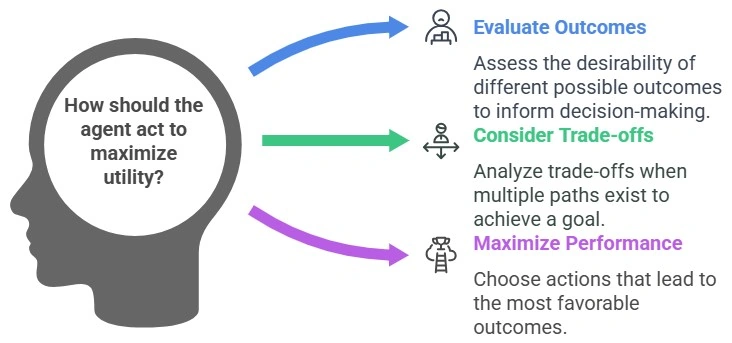
A Utility-Based Agent goes beyond simply achieving a goal—it evaluates the desirability or utility of different possible outcomes to make decisions. These agents aim to maximize their performance by choosing actions that lead to the most favorable outcomes, even when there are multiple ways to achieve a goal or when trade-offs are involved.
Key Characteristics
- Utility Measurement
- Uses a utility function to assign a numerical value to each possible outcome.
- Higher utility values represent more desirable outcomes.
- Trade-Off Handling
- Considers trade-offs between competing objectives.
- Chooses actions that provide the best balance between conflicting goals.
- Decision Making
- Evaluates the utility of future states resulting from different actions.
- Selects the action with the highest expected utility.
- Rational Behavior: Always seeks to optimize outcomes, not just achieve goals.
- Adaptability: Dynamically adjusts decisions as conditions change or new information becomes available.
Components of a Utility-Based Agent
- Sensors: Collect data about the environment.
- Internal State: Maintains a representation of the environment and its own current status.
- Utility Function: A mathematical model that calculates the desirability of possible outcomes.
- Action Evaluator: Compares different actions based on their expected utility.
- Actuators: Executes the chosen action to achieve the highest utility.
Advantages
- Optimal Decisions: Ensures actions are not only goal-driven but also maximize benefits.
- Handles Uncertainty: Can evaluate expected utility when outcomes are probabilistic.
- Flexible Goal Achievement: Allows for prioritization when multiple goals exist.
Disadvantages
- Complex Design: Defining an accurate and comprehensive utility function can be challenging.
- Resource Intensive: Requires significant computational power to evaluate all possible outcomes.
- Dependence on Accurate Models: Effectiveness is limited by the accuracy of the environment model and utility function.
Examples of Utility-Based Agents
1. Autonomous Vehicle
- Scenario: A self-driving car decides its route to a destination.
- How It Works
- Utility is defined by factors such as minimizing travel time, fuel consumption, and ensuring safety.
- Evaluates multiple routes based on real-time traffic, road conditions, and fuel efficiency.
- Selects the route with the highest utility, balancing time and safety.
2. Healthcare Diagnosis AI
- Scenario: An AI system prioritizing treatments for a patient.
- How It Works
- Utility is assigned to treatments based on success rates, side effects, and patient preferences.
- The AI evaluates all possible treatment options.
- Recommends the treatment plan with the highest utility for the patient’s well-being.
3. Personal Assistant AI
- Scenario: A virtual assistant scheduling tasks for a user.
- How It Works
- Assigns utility to tasks based on deadlines, importance, and user preferences.
- Creates a schedule that maximizes overall utility by balancing competing tasks.
- Adjusts dynamically if priorities change.
Detailed Example: Smart Home Thermostat
Scenario: A smart thermostat aims to maintain comfort while minimizing energy costs.
Agent Components
- Sensors: Detect room temperature, weather, and occupancy.
- Utility Function: Assigns high utility to maintain comfortable temperatures and low energy costs.
- Decision Engine: Evaluates trade-offs between heating/cooling and energy savings.
- Actuators: Adjust the heating or cooling system.
How It Operates?
- Measures the current temperature and checks if someone is home.
- Predicts the energy cost of raising or lowering the temperature.
- Selects the setting that maximizes utility, balancing comfort and cost.
- Updates decisions dynamically based on occupancy and weather changes.
When to Use Utility-Based Agents?
- When trade-offs are involved (e.g., cost vs. performance, safety vs. speed).
- In uncertain environments where probabilistic outcomes must be evaluated.
- When multiple goals exist and need to be prioritized based on their utility.
Utility Function Design
The utility function is the core of a utility-based agent and is typically designed to consider.
- Immediate Rewards: The benefits of a particular action.
- Future Rewards: The long-term impact of actions.
- Trade-offs: Balancing competing objectives.
- Probability of Success: Incorporating uncertainty into decision-making.
Real-Life Applications
- E-Commerce Recommendation Systems: Recommend products based on customer preferences, balancing relevance and profit margins.
- Energy Management Systems: Optimize energy usage in buildings or factories by considering cost, demand, and environmental impact.
- Robotics: Robots perform tasks in complex environments while balancing speed, efficiency, and safety.
Join the conversation! Your thoughts help the community grow.