

Before going through this article ensure that you have basic knowledge of MVC Architecture and ASP.NET Web API.
Open Visual Studio 2012 and create a new project as in the following:
Open Visual Studio 2012 and create a new project as in the following:
- Select "File" -> "New" -> "Project...".
- Select Web in the installed template, then select ASP.NET Web Application.
- Provide the name for the project and click OK as in Figures 1 and 2.

Figure 1

Figure 2
My database schema is as in Figure 3.
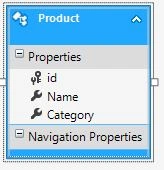
Figure 3
My Microsoft SQL table structure is as in Figure 4.
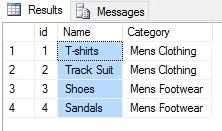
Figure 4
I am using Entity Framework with the Database First approach, so the Entity Framework builds the default model classes and context classes.
Now it’s time to create a Web API controller.
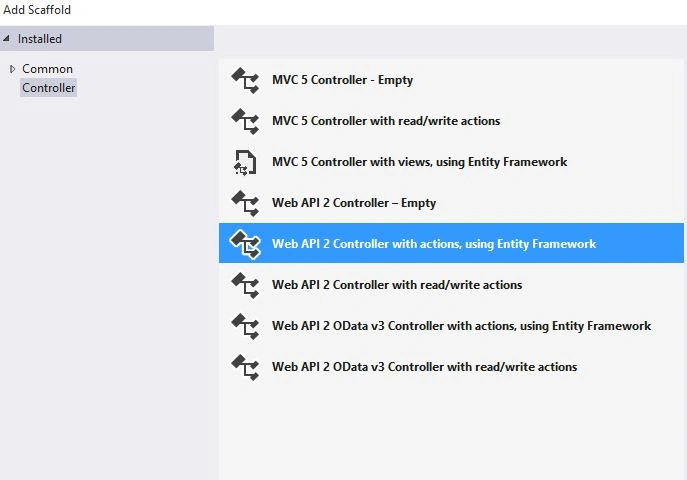
Right-click on the Controller folder then select Add, Controller and create a WEB API class as in Figure 5 and 6.
I am using Entity Framework with the Database First approach, so the Entity Framework builds the default model classes and context classes.
Now it’s time to create a Web API controller.
Right-click on the Controller folder then select Add, Controller and create a WEB API class as in Figure 5 and 6.
Figure 5
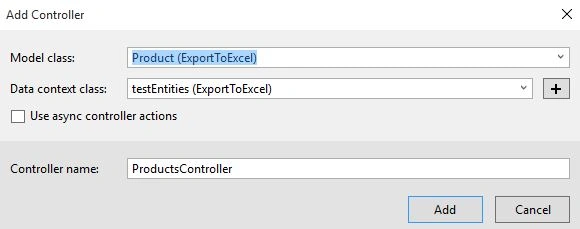
Figure 6
Check the API services using the POSTMAN/Fiddler as in Figure 7.

Figure 7
Check the API services using the POSTMAN/Fiddler as in Figure 7.
Figure 7
Exporting the Kendo Grid data to Excel
Now it's time for creating a design to consume the service.
Create an HTML page, here is the design:
- <!DOCTYPE html>
- <html xmlns="http://www.w3.org/1999/xhtml">
- <head>
- <title></title>
- <link rel="stylesheet" href="http://kendo.cdn.telerik.com/2015.2.805/styles/kendo.common.min.css">
- <link rel="stylesheet" href="http://kendo.cdn.telerik.com/2015.2.805/styles/kendo.rtl.min.css">
- <link rel="stylesheet" href="http://kendo.cdn.telerik.com/2015.2.805/styles/kendo.default.min.css">
- <link rel="stylesheet" href="http://kendo.cdn.telerik.com/2015.2.805/styles/kendo.mobile.all.min.css">
- <script src="http://code.jquery.com/jquery-1.9.1.min.js"></script>
- <script src="http://kendo.cdn.telerik.com/2015.2.805/js/angular.min.js"></script>
- <script src="http://kendo.cdn.telerik.com/2015.2.805/js/jszip.min.js"></script>
- <script src="http://kendo.cdn.telerik.com/2015.2.805/js/kendo.all.min.js"></script>
- </head>
- <body>
- <div id="example">
- <div class="demo-section k-header wide">
- <div>
- <h4>Export to Excel</h4>
- <div id="test-grid" data-role="grid"
- date-scrollable="true"
- data-editable="true"
- data-toolbar="['excel']"
- data-columns="[
- { 'field': 'Name', 'width': 270 },
- { 'field': 'Category' },
- ]"
- data-bind="source: products,
- visible: isVisible"
- style="height: 300px"></div>
- </div>
- </div>
- </div>
- </body>
- </html>
JavaScript in MVVM Model
- var viewModel = kendo.observable({
- isVisible: true,
- products: new kendo.data.DataSource({
- schema: {
- model: {
- id: "id",
- fields: {
- Name: { type: "string" },
- Category: { type: "string" }
- }
- }
- },
- batch: true,
- transport: {
- read: {
- url: "/api/Products",
- dataType: "json"
- },
- parameterMap: function(options, operation) {
- if (operation !== "read" && options.models) {
- return {models: kendo.stringify(options.models)};
- }
- }
- }
- }),
- });
- kendo.bind($("#example"), viewModel);

Figure 8
Click the Export to Excel button to export the Grid data to Microsoft Excel as in Figure 9.

Figure 9
The Grid data in the Excel sheet is as in Figure 10.

Figure 10
Exporting the Kendo Grid data to CSV
To Export a Grid data to the CSV format I will use blog.js and fileSave.js script libraries along with Kendo JavaScript libraries.
HTML Design
Exporting the Kendo Grid data to CSV
To Export a Grid data to the CSV format I will use blog.js and fileSave.js script libraries along with Kendo JavaScript libraries.
HTML Design


Arul RPosted Oct 28, 2015, 5:56 AM
Nice share!!!
Arul RPosted Oct 28, 2015, 5:56 AM
Nice share!!!
Van LaiPosted Aug 25, 2015, 11:46 PM
Nice one, thx for sharing.
Shridhar SharmaPosted Aug 25, 2015, 10:40 AM
good show.
Gopi ChandPosted Aug 25, 2015, 10:00 AM
Nice work
RakeshPosted Aug 25, 2015, 9:35 AM
Good one
Ankit BansalPosted Aug 25, 2015, 6:17 AM
good..
Mohammed IbrahimPosted Aug 25, 2015, 5:43 AM
nice
Karthikeyan KPosted Aug 25, 2015, 4:29 AM
Good one sir..Thanks for sharing
Vaikesh K PPosted Aug 25, 2015, 4:28 AM
Nice Share :)