ASP.NET 5
Firstly, we will understand what are the additional features provided in ASP.NET 5. The basic advantage is that ASP.NET 5 easily runs on Windows OS. The other difference is we can able to see that the concept of web Form is removed.
Step 1: Create new project in visual studio and select web Application.
Then you can able to see the following screen.
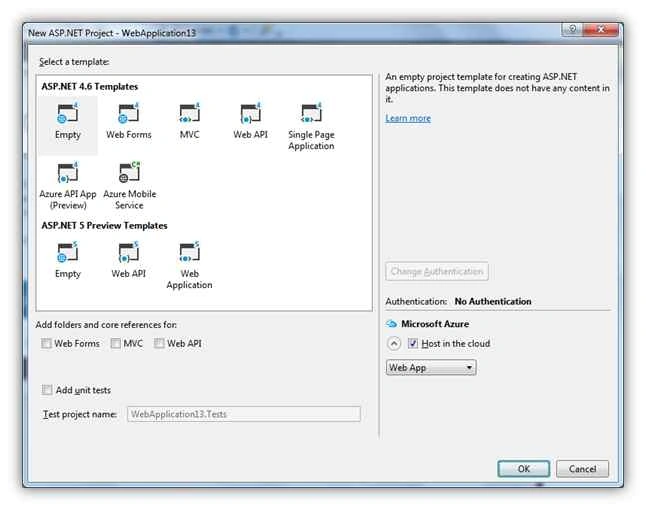
Now you can see ASP.NET 5 Templates.
Note: If you are unable to see the ASP.NET 5 Templates, then ASP.NET 5 is not installed on your machine.
Please go through URL.
There are 3 options available: empty, web API, and Web Application.
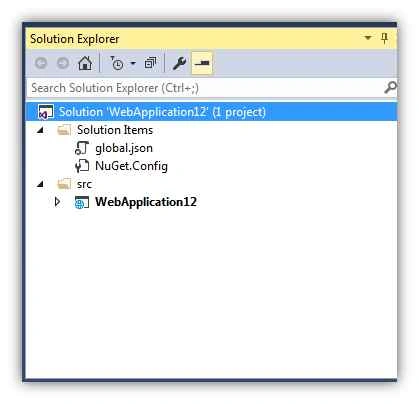
I am selecting empty option. Please find the following screenshot for solution explorer that is giving the clear picture of folder and file structure in ASP.NET 5 application.
There are two main parts present,
1. Solution Items
- global.json
- NuGet.Config
2. Src
- Application solution,
Now, we will go through more details about those files,
global.json
If you open this file then it contents,
- {
- "projects": [ "src", "test" ],
- "sdk": {
- "version": "1.0.0-beta7"
- }
- }
src means Application Solution and also include version of the application.
NuGet.Config
This is config file like web.config or App.config and maintains the neget packages data. As all of us know the nuget packages are the online dot net references that we can manage in our application using nuget.
- <?xml version="1.0" encoding="utf-8"?>
- <configuration>
- <packageSources>
- <!--To inherit the global NuGet package sources remove the <clear/> line below -->
- <clear />
- <add key="api.nuget.org" value="https://api.nuget.org/v3/index.json" />
- </packageSources>
- </configuration>
Now we can move towards application
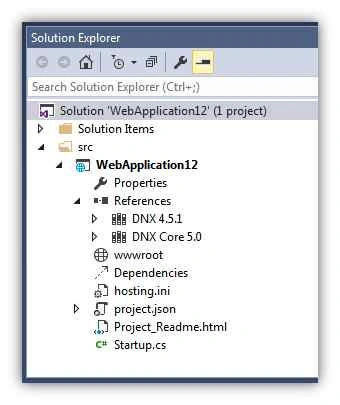 What is DNX?
Simple word DNX means .NET Execution Environment (DNX). This is useful for cross platform building the ASP.NET application.
Startup.cs
This is new file included in ASP.NET 5 and is the startup file of application.
- public class Startup
- {
- public void ConfigureServices(IServiceCollection services)
- {
- }
-
- public void Configure(IApplicationBuilder app)
- {
- app.Run(async (context) =>
- {
- await context.Response.WriteAsync("Hello World!");
- });
- }
- }
Configure function is the place where we can specify the default code that should get executed first. It is same like previously we are mentioning this part in global.asax file.
wwwroot
This folder contains all files like images, css, js.
Also we can add Bower, NPM in wwwroot
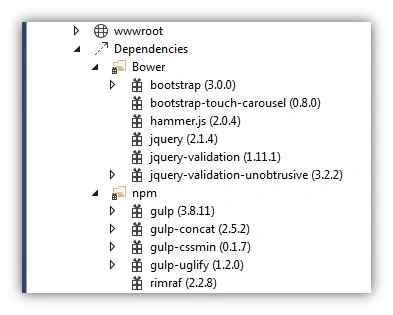
We can go one by one with this
Client-Side Development
Npm and bower both are used to add online JavaScript in our application. Just like nuget packages we are adding for downloading the .net references for our application.
What is Bower?
Right click on the web project's name in the src folder and choose
Add » New Item. 
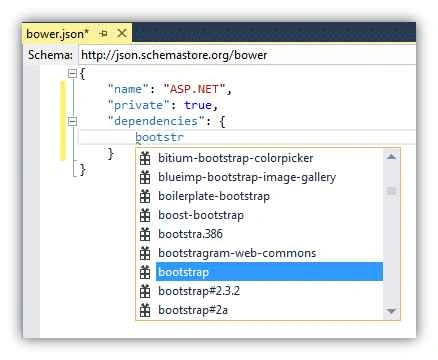
- {
- "name": "ASP.NET",
- "private": true,
- "dependencies": {
- "jquery": "2.1.4",
- }
- }

- {
- "version": "1.0.0",
- "name": "ASP.NET",
- "private": true,
- "devDependencies": {
- }
- }
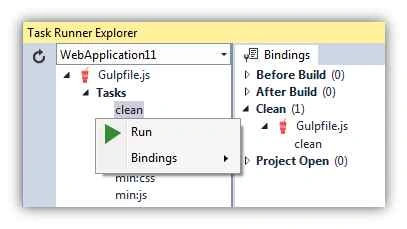
Gulp is javascript task runner.
The following are the tasks done by Gulp:
- Bundling and minifying libraries and style sheets.
- Refresh browser as save a file.
- Running unit tests.
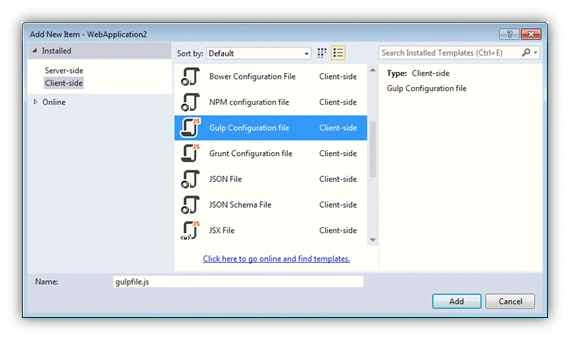
Please find the following gulp file for reference:
-
-
- var gulp = require("gulp"),
- rimraf = require("rimraf"),
- concat = require("gulp-concat"),
- cssmin = require("gulp-cssmin"),
- uglify = require("gulp-uglify"),
- project = require("./project.json");
-
- var paths = {
- webroot: "./" + project.webroot + "/"
- };
-
- paths.js = paths.webroot + "js/**/*.js";
- paths.minJs = paths.webroot + "js/**/*.min.js";
- paths.css = paths.webroot + "css/**/*.css";
- paths.minCss = paths.webroot + "css/**/*.min.css";
- paths.concatJsDest = paths.webroot + "js/site.min.js";
- paths.concatCssDest = paths.webroot + "css/site.min.css";
-
- gulp.task("clean:js", function (cb) {
- rimraf(paths.concatJsDest, cb);
- });
-
- gulp.task("clean:css", function (cb) {
- rimraf(paths.concatCssDest, cb);
- });
-
- gulp.task("clean", ["clean:js", "clean:css"]);
-
- gulp.task("min:js", function () {
- gulp.src([paths.js, "!" + paths.minJs], { base: "." })
- .pipe(concat(paths.concatJsDest))
- .pipe(uglify())
- .pipe(gulp.dest("."));
- });
-
- gulp.task("min:css", function () {
- gulp.src([paths.css, "!" + paths.minCss])
- .pipe(concat(paths.concatCssDest))
- .pipe(cssmin())
- .pipe(gulp.dest("."));
- });
-
- gulp.task("min", ["min:js", "min:css"]);
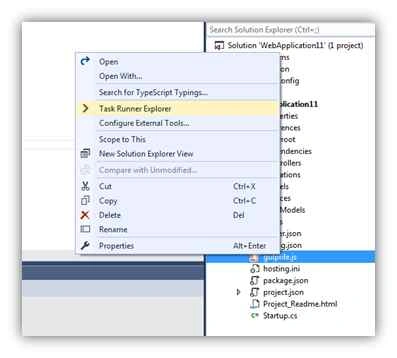
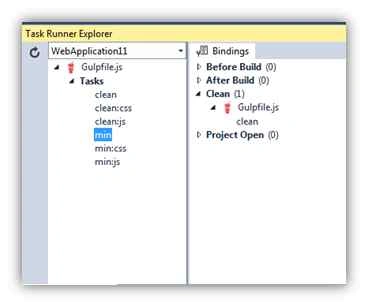
This document only gives you overall ASP.NET 5 understanding and the new features added.


Pankaj Kumar ChoudharyPosted Jan 14, 2016, 7:50 PM
Nice Explain Sir............
Ajay GandhiPosted Nov 17, 2015, 1:58 PM
Good
Sibeesh VenuPosted Nov 17, 2015, 3:57 AM
Nice Share
Manoj KulkarniPosted Nov 17, 2015, 3:37 AM
Nice article. Thank you for sharing
Harshad PansuriyaPosted Nov 17, 2015, 3:29 AM
Nice one
Atul RawatPosted Nov 17, 2015, 1:17 AM
nice article sir
Ankit BansalPosted Nov 17, 2015, 12:43 AM
nice one..
Rajeesh MenothPosted Nov 17, 2015, 12:18 AM
Good One
Humayun Kabir MamunPosted Nov 17, 2015, 12:09 AM
Nice...
Nitin PanditPosted Nov 16, 2015, 11:09 PM
nice article really :)
Raja TPosted Nov 16, 2015, 11:39 AM
Nice, Thanks for sharing