Introduction
This tutorial is intended to introduce you to the CodeIgniter framework and the basic principles of MVC architecture. It will show you how a basic CodeIgniter application is constructed and for starters, I will assume that you already have installed CodeIgniter and you have a MySQL database installed on your webserver.
In this article, I will show you how to fetch data from s database and show it in a view in a tabular format in Codeigniter.
See the following points.
- Create Table in MySQL database
My database name is "abc" and my table name is "country".
- CREATE TABLE country
- (
- Country_id int,
- country_name varchar(255)
- );
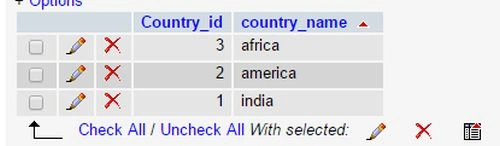
Here is my table structure;
- Database connectivity
You must first edit the file database.php that can be found in application/config/ folder. The important changes are these:
- $db['default']['hostname'] = 'localhost';
- $db['default']['username'] = 'root';
- $db['default']['password'] = '';
- $db['default']['database'] = 'abc';
- $db['default']['dbdriver'] = 'mysql';
- Autoload the database
If your application uses the database very much then you need to change the autoload.php that can also be found inside the application/config/ folder.
- $autoload['libraries'] = array('database');
- Config file
By default, CodeIgniter has one primary config file, located at application/config/config.php.
- $config['base_url'] = 'http://localhost/CI/';
CI is the folder where my application is present.
- The Model
In Models, we have CRUD operations. I will create a model named select.php.
- <?php
- class select extends CI_Model
- {
- function __construct()
- {
-
- parent::__construct();
- }
-
- public function select()
- {
-
- $query = $this->db->get('country');
- return $query;
- }
- }
- ?>
- The Controller
I will create a model named home.php.
- <?php
- class home extends CI_Controller
- {
- public function index()
- {
-
- $this->load->database();
-
- $this->load->model('select');
-
- $data['h']=$this->select->select();
-
- $this->load->view('select_view', $data);
- }
- }
- ?>
- The view
To display the output we need a view named "select_view". The code will go something like this:
- <html xmlns="http://www.w3.org/1999/xhtml">
- <head>
- <meta http-equiv="Content-Type" content="text/html; charset=utf-8" />
- <title>Untitled Document</title>
- </head>
- <table border="1">
- <tbody>
- <tr>
- <td>Country Id</td>
- <td>Country Name</td>
- </tr>
- <?php
- foreach ($h->result() as $row)
- {
- ?><tr>
- <td><?php echo $row->Country_id;?></td>
- <td><?php echo $row->country_name;?></td>
- </tr>
- <?php }
- ?>
- </tbody>
- </table>
- <body>
- </body>
- </html>
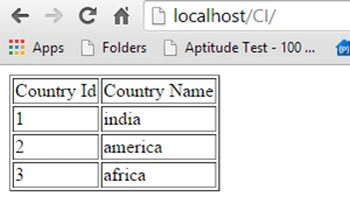
- Output


Eric StephenPosted Apr 11, 2021, 4:51 AM
Thank you. Good work.
PALASH KAYALPosted Dec 24, 2018, 1:04 PM
I try it but i get error "call to a member function result() on null"
ebenezerPosted Jul 30, 2018, 7:46 AM
Works fine.
lovely princePosted May 29, 2018, 12:22 AM
This code will work but u should know flow of mvc
Gopal agarwalPosted Jan 29, 2018, 5:55 AM
This code is inform variable undefind
Gopal agarwalPosted Jan 29, 2018, 5:54 AM
This is not correct working
Ninad NikamPosted Dec 13, 2017, 11:28 AM
This is not working
Ninad NikamPosted Dec 13, 2017, 11:28 AM
I want this whole code in mysqli formate
Ganesh ParatePosted Dec 8, 2017, 2:31 AM
Thanks, It's working for me :)
CHANDANI NILURPosted Feb 9, 2016, 12:40 AM
showing error
CHANDANI NILURPosted Feb 9, 2016, 12:39 AM
Notice: Undefined variable: h in C:\xampp\htdocs\chandani\mvc\CI\application\view\select_view.php on line 13 Fatal error: Call to a member function result() on a non-object in C:\xampp\htdocs\chandani\mvc\CI\application\view\select_view.php on line 13
CHANDANI NILURPosted Feb 9, 2016, 12:39 AM
I'll try but the answer give me ....
CHANDANI NILURPosted Feb 9, 2016, 12:38 AM
this code not work help
taekook dopePosted Oct 5, 2015, 10:56 PM
Been looking for this. Thank you so much!
vivek anandPosted Aug 1, 2015, 8:01 AM
Nice Example.. its help for me..