

In this article I will demonstrate how to build RSS Feed Reader using LINQ to XML.
Step 1
You need to grab the feed Link. In my case i will be using C# Corner Feed Link. The following image helps to find the desired link from C# Corner Main Page.

You can get Link from above yellow highlighted regions. I am pasting the links for reference.
Step 2
Now after opening Visual Studio you can creating a new website by going to File, New, then Website or by pressing Shift+Alt+N command in Visual Studio.
Now after opening Visual Studio you can creating a new website by going to File, New, then Website or by pressing Shift+Alt+N command in Visual Studio.

Step 3: Create ASP.NET Empty Web Site and then add new web form to the page.
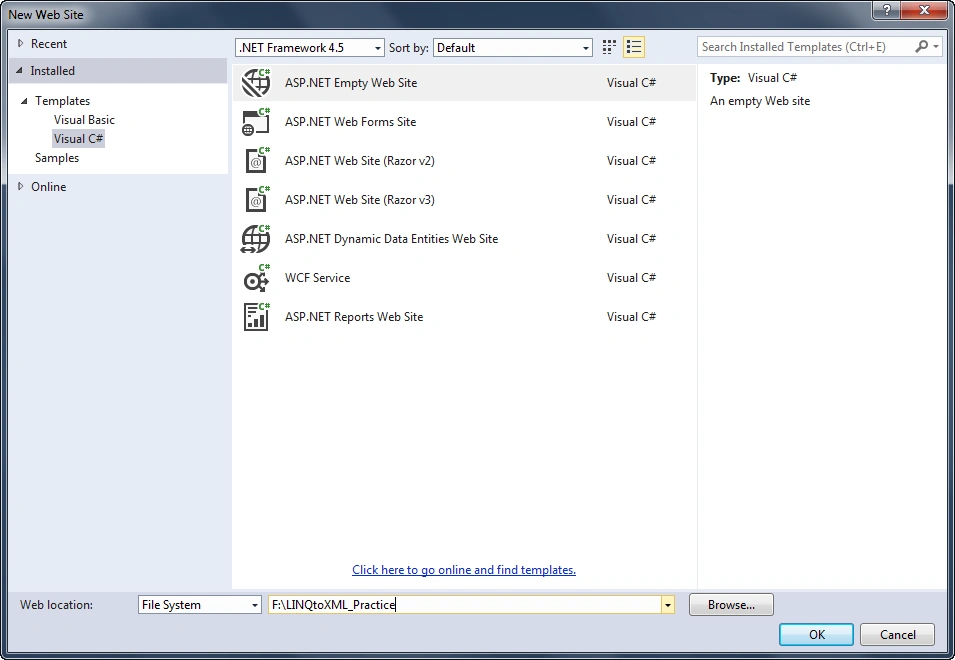

Step 4: Add Controls to the page. In our case we required a TextBox and Button.
Here is the code for building the Rss Reader.
Here is the code for building the Rss Reader.
- <!DOCTYPE html>
- <html xmlns="http://www.w3.org/1999/xhtml">
- <head runat="server">
- <title></title>
- </head>
- <body>
- <form id="form1" runat="server">
- <div>
- <strong>RSS Feed:</strong><br />
- <asp:TextBox ID="txtrss" runat="server" TextMode="Url" Width="500px" placeholder="Enter RSS URL"></asp:TextBox>
- <br />
- <br />
- <asp:Button ID="btngetrss" runat="server" Text="Get RSS Feed" OnClick="btngetrss_Click" />
- </div>
- </form>
- </body>
- </html>

Step 5: Add new class and public properties inside it.
- using System;
- using System.Collections.Generic;
- using System.Linq;
- using System.Text;
- public class RssNews
- {
- public string tit
- {
- get;
- set;
- }
- public string desc
- {
- get;
- set;
- }
- public string auth
- {
- get;
- set;
- }
- public string contentlink
- {
- get;
- set;
- }
- public string date
- {
- get;
- set;
- }
- }
Step 6: Add required Namespaces
- using System.Xml;
- using System.Xml.Linq;
Step 7: Now we can write code behind logic in button.
- protected void btngetrss_Click(object sender, EventArgs e)
- {
- var posts = GetFeeds(txtrss.Text);
- StringBuilder sb = new StringBuilder();
- sb.Append("<p style='font-weight:larger'><b>C# Corner Latest Content Fetch From RSS by Aqib Shehzad</b></p>");
- foreach (var item in posts)
- {
- sb.Append("<b>Title: </b>" + item.tit);
- sb.Append("<br />");
- sb.Append("<b>Description: </b>" + item.desc);
- sb.Append("<br />");
- sb.Append("<b>Article Link: </b><a target='_blank' href='" + item.contentlink + "'>" +item.contentlink+"</a>");
- sb.Append("<br />");
- sb.Append("<b>Published Date: </b>" + item.date);
- sb.Append("<br />");
- sb.Append("<b>Author: </b>" + item.auth);
- sb.Append("<br />");
- sb.Append("------------------------------------------------------------------------------------------------------------");
- sb.Append("<br />");
- }
- HttpContext.Current.Response.Write(sb);
- }
- public static IEnumerable<RssNews> GetFeeds(string url)
- {
- XDocument rssfeedxml;
- XNamespace namespaceName = "http://www.w3.org/2005/Atom";
- rssfeedxml = XDocument.Load(url);
- StringBuilder rssContent = new StringBuilder();
- var list = (from descendant in rssfeedxml.Descendants("item")
- //Response.Write(list);
- select new RssNews
- {
- tit = descendant.Element("title").Value,
- desc = descendant.Element("description").Value,
- contentlink = descendant.Element("link").Value,
- date = descendant.Element("pubDate").Value,
- auth = descendant.Element("author").Value
- });
- return list.ToList();
- }
- XNamespace namespaceName = "http://www.w3.org/2005/Atom";
- XDocument.Load(url);
- var list = (from descendant in rssfeedxml.Descendants("item")
and after manipulation we return the data as list and do processing per need.
Step 8:
Final Output

Hope you find this useful.
Bhuvanesh MohankumarPosted May 4, 2016, 2:41 PM
Good one...
Mohsin AzamPosted Feb 18, 2016, 9:11 AM
nice one
Santhakumar MunuswamyPosted Feb 1, 2016, 2:14 PM
Thanks for nice share
Sibeesh VenuPosted Feb 1, 2016, 1:12 AM
Nice Share
Ankit BansalPosted Feb 1, 2016, 12:39 AM
nice one..
Nanddeep NachanPosted Jan 31, 2016, 10:24 AM
Nice share
Jaco ZwartsPosted Jan 31, 2016, 6:36 AM
Nice thank you for sharing