

Introduction
This article explains how to get the records in one table from one or more other tables. First we have explained about Joins in SQL Server and how to access the values from other tables. In this article we have explained only Inner Join, Left Join and Outer Join. Using these kinds of Joins we can access the records in one table from other tables.
Joins
SQL Joins play a very vital role in databases. Using joins we can retrieve values from other tables in a database. Records are accessed based on a relationship among the column fields among the tables.
The following are the types of joins described here:
- Inner Join
- Left Join
- Right Join
Inner Join
Inner Join acts like an intersection between the tables; it displays the matching records in the tables. It displays all the rows from the first table and displays matched rows from the second tables.
Syntax:
Select columnlists
from table1 t1
inner join table2 t2
on t1.fieldname=t2.fieldname
Left Join
Left Join will return all records in the left table (table-1) regardless if any of those records have a match in the right table (table-2).
Syntax:
Select columnlists
from table1 t1
left join table2 t2
on t1.fieldname=t2.fieldname
Right Join
Right Join will return all the records in the right table (table-2) regardless if any of those records have a match in the left table (table-1).
Syntax:
Select columnlists
from table1 t1
right join table2 t2
on t1.fieldname=t2.fieldname
Create Database joining
use joining
Create Table-1
create table table1(
UserId int primary key,UserName nvarchar(max),FirstName varchar(max),LastName varchar(max))
insert into table1 values(101,'Pankey','Pankaj','Lohani')
insert into table1 values(102,'Paru','Pravesh','Khanduri')
insert into table1 values(103,'Nicks','Nimit','Joshi')
insert into table1 values(104,'Ammu','Amit','Senwal')
insert into table1 values(105,'Ravi','Ravi','Kumar')
Create Table-2
create table table2(
EmpId int primary key identity (101,1),Address nvarchar(max),City varchar(max),DepartmentNo int,Salary money)
insert into table2(Address,City,DepartmentNo,Salary) values('A-43 strno-6 delhi','Delhi',1,10000)
insert into table2(Address,City,DepartmentNo,Salary) values('B-44 pratap vihar noida','Gr.Noida',2,20000)
insert into table2(Address,City,DepartmentNo,Salary) values('C-45 vinod nagar new delhi','New Delhi',3,30000)
insert into table2(Address,City,DepartmentNo,Salary) values('d-47 laxminagagr delhi','Delhi',4,40000)
insert into table2(Address,City,DepartmentNo,Salary) values('RK puram','Delhi',5,50000)
insert into table2(Address,City,DepartmentNo,Salary) values('mohammod pur','GR.NOIDA',6,10000)
insert into table2(Address,City,DepartmentNo,Salary) values('DLF CITY','Gurgaon',7,20000)
insert into table2(Address,City,DepartmentNo,Salary) values('ASHOK NAGAR','Noida',3,30000)
insert into table2(Address,City,DepartmentNo,Salary) values('Indirapuram','Noida',10,88000)
insert into table2(Address,City,DepartmentNo,Salary) values('Nehru Place','Delhi',11,60000)
Create Procedure for Inner Join
Create proc GetInnerJoin
as
begin
select t1.UserId,t1.FirstName,t1.LastName,t2.Address,t2.salary
from table1 t1 inner join table2 t2
on
t1.UserId=t2.EmpId
end
Create Procedure for Right Join
Create proc GetRightOuterJoin
as
begin
select t1.UserId,t1.FirstName,t1.LastName,t2.Address,t2.salary
from table1 t1 right join table2 t2
on
t1.UserId=t2.EmpId
end
Create Procedure for Left Join
Create proc GetLeftOuterJoin
as
begin
select t1.FirstName,t1.LastName,t2.DepartmentNo,t2.salary
from table1 t1 Left join table2 t2
on
t1.UserId=t2.EmpId
end
Now I want to show the retrieved data in a Windows Forms application just use the following steps.
Step 1:
Open Visual Studio then select "Create New Project" --> "F# Console Application".

Step 2:
Now go the Solution Explorer on the right side of Visual Studio. Right-click on "References" and select "Add references".

Step 3:
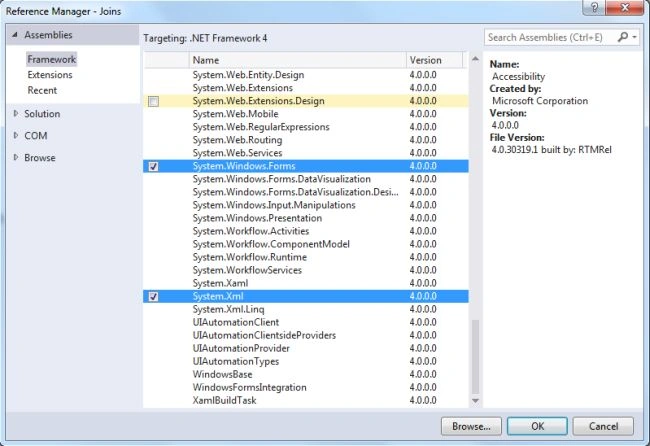
After selecting "Add References", in the Framwork template you need to select "System.Windows.Forms", "System.Drawing", "System.Xml" and "System.Data" while holding down the Ctrl key and click on "Ok."


Bob LoblawPosted Nov 22, 2020, 11:24 AM
So your solution is hard code three very specific and non-reusable procedures every time you want to do a simple select? Either write the query as command text, or at least do some sort of parameterizatiin of the procs to give them some semblance of reusability. This seems like its using the worst features of each layer to achieve the goals.