

This article explains the filtering of the collection in backbone.js. The goal here is to create a collection in which a filer function is provided for filtering the collection. The filter function is SetFilter(function() {}), it is set as the given function as the filter.
Use the following procedure to create the sample:
- Create a Web application:
- Start Visual Studio 2013.
- From the Start window select "New Project".
- Select "Installed" -> "Visual C#" -> "Visual Studio 2012"and select "Empty web application".
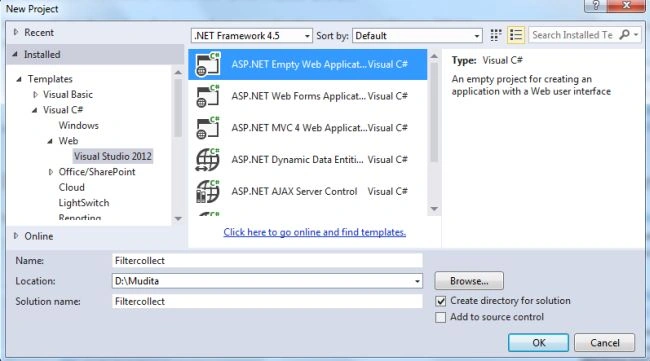
- Click the "OK" button.
- Now add an HTML page to the project.
- In the Solution Explorer.
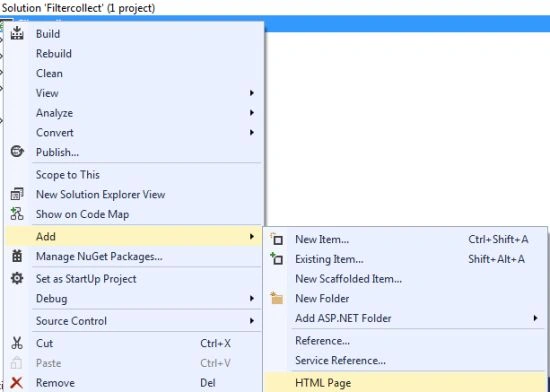
- Right-click on the project and select "Add" -> "HTML Page".
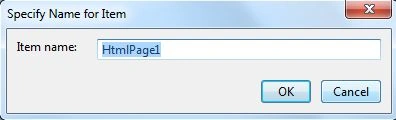
- Change the Name of the page.
- Now click on the "Add" button.
Add the following code:
<!DOCTYPE HTML PUBLIC "-//W3C//DTD HTML 4.01//EN"
"http://www.w3.org/TR/html4/strict.dtd">
<html lang="en">
<head>
<title>Backbone.js Filter List Example</title>
</head>
<body>
<div id="mainContainer">
<div id="contentContainer"></div>
</div>
<script>
var myapp = {
model: {},
view: {},
collection: {},
router: {}
}
</script>
<script id="list_container_tpl" type="text/template">
<div class="grid_5 listContainer">
<div class="box">
<h2 class="box_head grad_colour">Tasks List</h2>
<div class="sorting">
ShowList: <select id="taskSorting"><option value="0">Currently working on</option><option value="1">Completed Task</option></select>
<input class="search round_all" id="searchTask" type="text" value="">
</div>
<div class="block">
<ul id="taskList" class="list"></ul>
</div>
</div>
</div>
</script>
<script id="task_item_tpl" type="text/template">
<li class="task">
<h4 class="name searchItem"><%= name %></h4>
</li>
</script>
<script type="text/javascript" src="libs/jquery-1.6.2.min.js"></script>
<script type="text/javascript" src="libs/underscore-min.js"></script>
<script type="text/javascript" src="libs/backbone.js"></script>
<script type="text/javascript" src="js/model.js"></script>
<script type="text/javascript" src="js/collection.js"></script>
<script type="text/javascript" src="js/views/view.tasksContainer.js"></script>
<script type="text/javascript" src="js/views/view.tasksItem.js"></script>
<script type="text/javascript" src="js/router.js"></script>
<script>
Backbone.history.start();
</script>
</body>
</html>
- Now add a new folder in the project in which we add the JavaScript file:
- In the Solution Explorer.
- Right-click on the project and select "Add" -> "New Folder".
- Set the folder name as "js".
- Now add three Js files Model, router, collection.
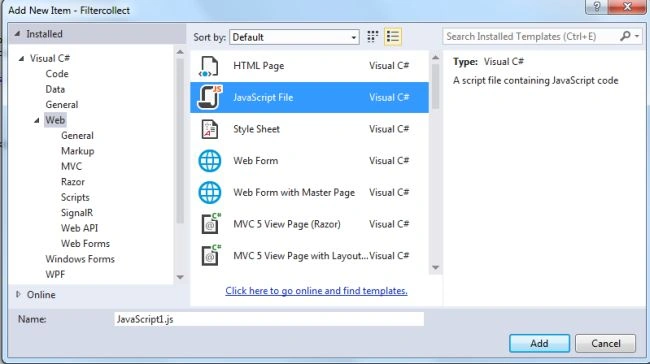
- Right-click on the folder and select "Add" -> "New Item" -> "JavaScript".
In the "Collection.js" script file add the following code:
myapp.collection.Tasks = Backbone.Collection.extend({
currentStatus: function (status) {
return _(this.filter(function (data) {
return data.get("completed") == status;
}));
},
search: function (letters) {
if (letters == "") return this;
var pattern = new RegExp(letters, "gi");
return _(this.filter(function (data) {
return pattern.test(data.get("name"));
}));
}
});
myapp.collection.tasks = new myapp.collection.Tasks([tasks1, tasks2, tasks3, tasks4]);
In the Model.js file Add the following Code:
myapp.model.Tasks = Backbone.Model.extend({
default: {
completed: 0,
name: ""
},
url: "/js/libs/fixtures/task.json"
});
var tasks1 = new myapp.model.Tasks({
completed: 0,
name: "Dishis Ready for serve"
}
);
var tasks2 = new myapp.model.Tasks({
completed: 1,
name: "Decoration have done"
}
);
var tasks3 = new myapp.model.Tasks({
completed: 0,
name: "Do the laundry"
}
);
var tasks4 = new myapp.model.Tasks({
completed: 1,
name: "Vacuuming the carpet"
}
);
In the "router.js" script file add the following code:
myapp.router.Tasks = Backbone.Router.extend({
routes: {
"": "list",
},
list: function () {
this.listContainerView = new myapp.view.TasksContainer({
collection: myapp.collection.tasks
});
$("#contentContainer").append(this.listContainerView.render().el);
this.listContainerView.sorts()
}
});
myapp.router.tasks = new myapp.router.Tasks;
- Now execute the application, it will look like this:

Select the Task type from the drop down list; it changes depending on the selection:


Join the conversation! Your thoughts help the community grow.