

Recently, I came across the situation where a child user control needed to fire an event on the parent control.
I resolved the problem using delegates. Let's see how the problem was resolved considering a small example.
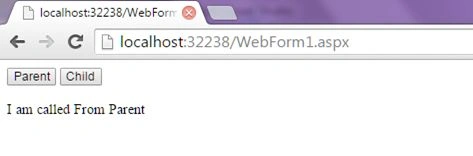
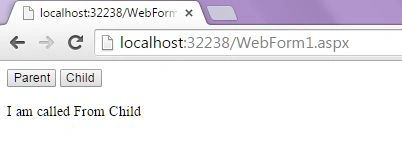
For simplicity I have designed a Webform containing a button, label and user control.
This user control contains the one button that fires an event on the parent control in which we set the text for the label containing the name of the button from which the event was fired.
Implementation
Step 1
Create an Empty Web Application and name it "LearningEvents".
Step 2
Add a User Control "WebUserControl1.ascx" and write the HTML and code as in the following.
HTML for "WebUserControl1.ascx"
- <%@ Control Language="C#" AutoEventWireup="true" CodeBehind="WebUserControl1.ascx.cs" Inherits="LearningEvents.WebUserControl1" %>
- <asp:Button ID="Button1" runat="server" Text="Child" onclick="Button1_Click" />
- using System;
- namespace LearningEvents
- {
- public partial class WebUserControl1 : System.Web.UI.UserControl
- {
- public delegate void ButtonClick(object sender, EventArgs e);
- public ButtonClick BtnDelegate{get;set;}
- protected void Page_Load(object sender, EventArgs e)
- {
- }
- protected void Button1_Click(object sender, EventArgs e)
- {
- BtnDelegate.Invoke(null, null);
- }
- }
- }
Please note that in the preceding code we have declared a public delegate "ButtonClick" and public property "BtnDelegate" of type ButtonClick.
To fire an event on the parent control we will invoke BtnDelegate.
Step 3
Add a User Control "WebForm1.aspx" and write the HTML and code as in the following code snippet.
HTML for "WebForm1.aspx"
Piyush DixitPosted Sep 12, 2015, 11:03 PM
nice articles
Akash MalhotraPosted Sep 2, 2015, 2:09 PM
Thanks everyone
Santhakumar MunuswamyPosted Aug 29, 2015, 4:42 AM
Nice article. Thanks for sharing
Shakti SaxenaPosted Aug 28, 2015, 2:11 AM
Nice share :)
Pankaj Kumar ChoudharyPosted Aug 27, 2015, 9:08 PM
Nice and informative article Sir.........
Vipul MalhotraPosted Aug 27, 2015, 1:32 PM
Nice article. Thanks for sharing
Rajeesh MenothPosted Aug 27, 2015, 1:30 PM
Nice One
Gowtham KPosted Aug 27, 2015, 10:02 AM
Good one
Gowtham RajamanickamPosted Aug 27, 2015, 9:44 AM
good
Mohammed IbrahimPosted Aug 27, 2015, 8:37 AM
nice
Yashwanth MuthineniPosted Aug 27, 2015, 3:22 AM
Nice Share..
Ankit BansalPosted Aug 27, 2015, 2:21 AM
Good one..Thanks for sharing..
Karthikeyan KPosted Aug 27, 2015, 2:03 AM
Good one sir...Thanks for share