

What is a form input?
Bootstrap provides several form control styles, layout options, and custom components for creating a wide variety of forms.
Form controls
It supports the following form controls,
- Input
- Textarea
- Checkbox
- Radio
- Select
Bootstrap Input
The bootstrap supports all html5 inputs types for example text,password,datetime,date,month,time,week,number,email,url,search and color
It is not fully styled if their type is not properly declared
Sample program for form input
- <!DOCTYPE html>
- <html>
- <head>
- <meta charset="utf-8">
- <meta name="viewport" content="width=device-width, initial scale=1">
- <link rel="stylesheet" type="text/css" href="css/bootstrap.min.css">
- </head>
- <body>
- <div class="container">
- <div class="row">
- <div class="form-group">
- <label for="usr">Name:</label>
- <input type="text" class="form-control" id="usr">
- </div>
- <div class="form-group">
- <label for="pwd">Password:</label>
- <input type="password" class="form-control" id="pwd">
- </div>
- </div>
- </div>
- <script type="text/javascript" src="js/bootstrap.min.js"></script>
- <script type="text/css" src="js/jquery"></script>
- </body>
- </html>
Output

It is the output for the bootstrap input
Textarea
In this text area basically used to the comment box, address box etc..
Sample program for textarea
- <!DOCTYPE html>
- <html>
- <head>
- <meta charset="utf-8">
- <meta name="viewport" content="width=device-width, initial scale=1">
- <link rel="stylesheet" type="text/css" href="css/bootstrap.min.css">
- </head>
- <body>
- <div class="container">
- <div class="row">
- <div class="form-group">
- <label for="comment">Comment:</label>
- <textarea class="form-control" rows="5" id="comment">
- <script type="text/javascript" src="js/bootstrap.min.js"></script>
- <script type="text/css" src="js/jquery"></script>
- </body>
- </html>
Output

This is the output for the textarea
Checkboxes
This checkbox is basically used to select the many number of options from a list of the preset options
There are many checkboxes we can use to access the single list
Sample program for checkbox
- <!DOCTYPE html>
- <html>
- <head>
- <meta charset="utf-8">
- <meta name="viewport" content="width=device-width, initial scale=1">
- <link rel="stylesheet" type="text/css" href="css/bootstrap.min.css">
- </head>
- <body>
- <div class="container">
- <div class="row">
- <div class="checkbox">
- <label><input type="checkbox" value="">Option 1</label>
- </div>
- <div class="checkbox">
- <label><input type="checkbox" value="">Option 2</label>
- </div>
- <div class="checkbox">
- <label><input type="checkbox" value="">Option 3</label>
- </div>
- </div>
- </div>
- <script type="text/javascript" src="js/bootstrap.min.js"></script>
- <script type="text/css" src="js/jquery"></script>
- </body>
- </html>
Output
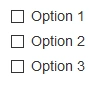
This the output for the bootstrap checkbox
Checkboxes are used in inline
In this inline class it is used so the checkboxes appear in a single line
.checkbox-inline class is used to set an inline checkbox
Sample program for inline checkboxes (example 1)
- <!DOCTYPE html>
- <html>
- <head>
- <meta charset="utf-8">
- <meta name="viewport" content="width=device-width, initial scale=1">
- <link rel="stylesheet" type="text/css" href="css/bootstrap.min.css">
- </head>
- <body>
- <div class="container">
- <div class="row">
- <div class="checkbox-inline">
- <label><input type="checkbox" value="">Option 1</label>
- </div>
- <div class="checkbox-inline">
- <label><input type="checkbox" value="">Option 2</label>
- </div>
- <div class="checkbox-inline">
- <label><input type="checkbox" value="">Option 3</label>
- </div>
- </div>
- </div>
- <script type="text/javascript" src="js/bootstrap.min.js"></script>
- <script type="text/css" src="js/jquery"></script>
- </body>
- </html>
Sample program for inline checkboxes (example 2)
- <!DOCTYPE html>
- <html>
- <head>
- <meta charset="utf-8">
- <meta name="viewport" content="width=device-width, initial scale=1">
- <link rel="stylesheet" type="text/css" href="css/bootstrap.min.css">
- </head>
- <body>
- <div class="container">
- <div class="row">
- <label class="checkbox-inline"><input type="checkbox" value="">Option 1</label>
- <label class="checkbox-inline"><input type="checkbox" value="">Option 2</label>
- <label class="checkbox-inline"><input type="checkbox" value="">Option 3</label>
- </div>
- </div>
- <script type="text/javascript" src="js/bootstrap.min.js"></script>
- <script type="text/css" src="js/jquery"></script>
- </body>
- </html>
Output

This the output for the bootstrap inline checkbox
Radio Buttons
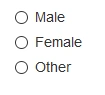
Radio buttons are used if you want to limit the user to just one selection from a list of preset options.
The radio button is basically used to chose the identification for humans (male or female)
Sample program for the radio button





Nandhini SPosted Jul 17, 2017, 6:52 AM
Good.. keep it up.....