

When we are defining Validations at the Model level first we need to import the name space,
using System.ComponentModel.DataAnnotations;
In this article we are going to discuss about some of the validation attributes.
- Required
- StringLength
- RegularExpression
- Range
We can also create our own custom validation attribute we will see in later article series.
Create an MVC Project,
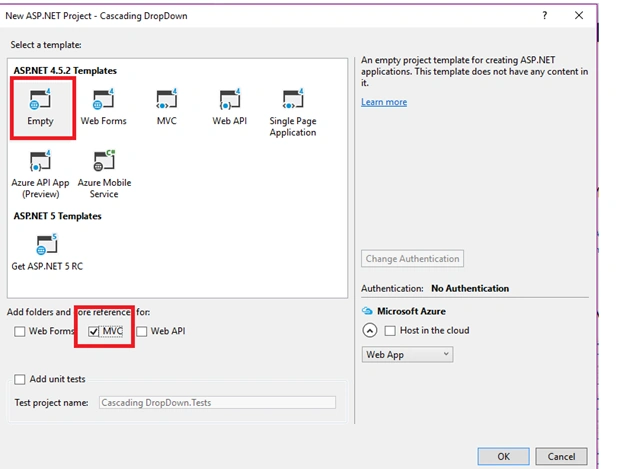
Select Empty Template and Add MVC Folder Reference,
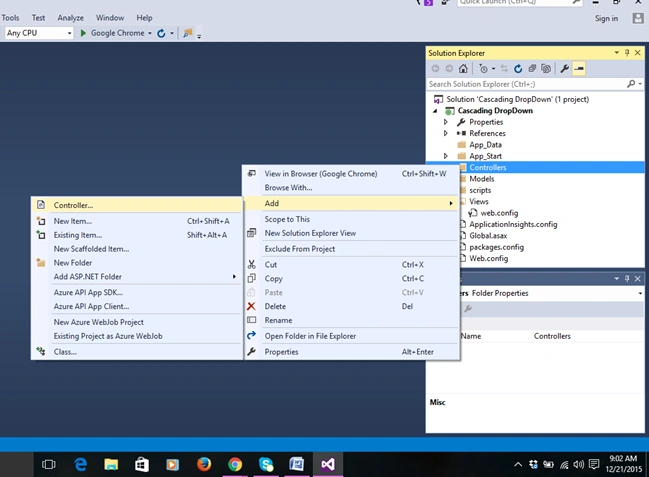
Add New Controller in Controllers folder,
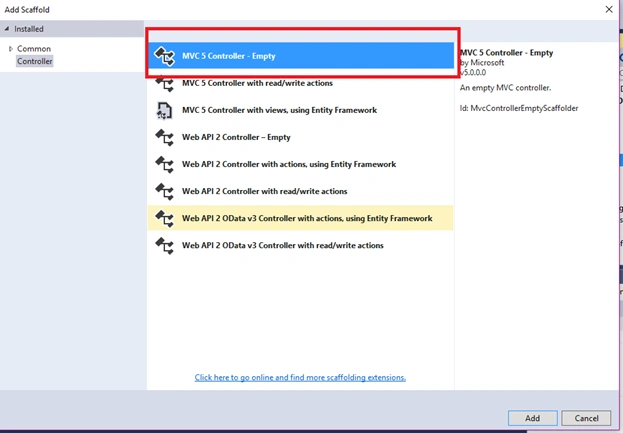
Select MVC 5 Controller - Empty,
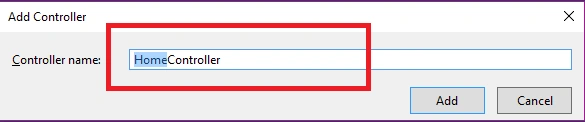
Give Controller Name as Home,
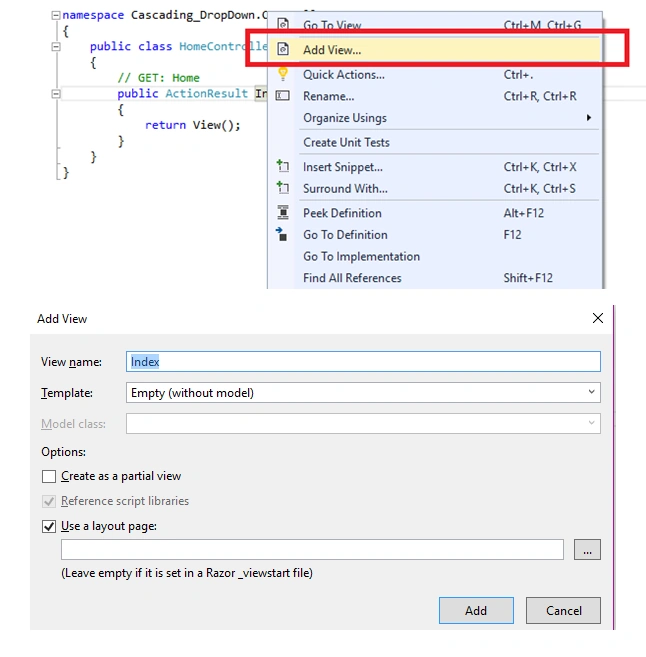
Add a View,
Right click on the Action Name and add view.
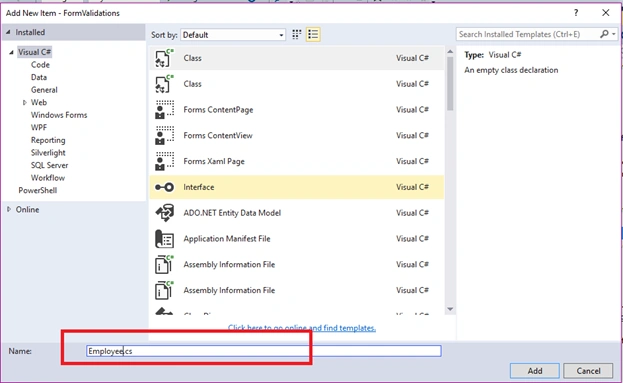
Add the Employee Class in Model folder,
Import the Namespace in Employee.cs
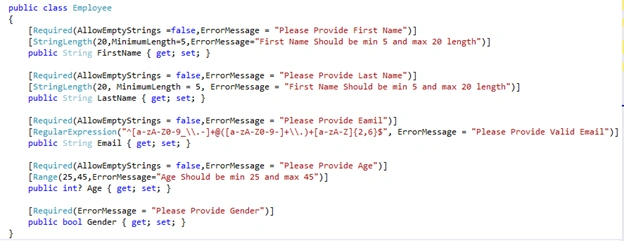
In the above Employee Class we have FirstName, Last Name, Email, Age, Gender properties defined.
Required
Gets or Sets value that indicates whether an empty string is allowed or not.

In the Required attribute we have different type of properties.
AllowEmptyStrings:
AllowEmptyStrings is a Boolean property and it accepts true or false, by default it is false.
ErrorMessage:
ErrorMessage accepts string when validation fails on properties and it shows the error message to end user.
StringLength:
Gets or Sets Maximum length or Minimum length of characters to be allowed.

maximumLength:
It allows integer value and sets the maximum length of characters to be allowed.
minimumLength:
It allows integer value and sets the minimum length of characters to be allowed.
ErrorMessage:
ErrorMessage accepts string when validation fails on property and it shows the error message to end user.
Range:
Set the minimum or maximum value allowed to data filed,

Minimum:
It allows double data type and specifies the Minimum value to be allowed.
Maximum:
It allows double data type and specifies the Maximum value to be allowed.
Add the Employee Class in Model folder,
Import the Namespace in Employee.cs
- using System.ComponentModel.DataAnnotations;
- Define the Properties with DataAnnations attributes.
- public class Employee
- {
- [Required(AllowEmptyStrings = false, ErrorMessage = "Please Provide First Name")]
- [StringLength(20, MinimumLength = 5, ErrorMessage = "First Name Should be min 5 and max 20 length")]
- public String FirstName
- {
- get;
- set;
- }
- [Required(AllowEmptyStrings = false, ErrorMessage = "Please Provide Last Name")]
- [StringLength(20, MinimumLength = 5, ErrorMessage = "First Name Should be min 5 and max 20 length")]
- public String LastName
- {
- get;
- set;
- }
- [Required(AllowEmptyStrings = false, ErrorMessage = "Please Provide Eamil")]
- [RegularExpression("^[a-zA-Z0-9_\\.-]+@([a-zA-Z0-9-]+\\.)+[a-zA-Z]{2,6}$", ErrorMessage = "Please Provide Valid Email")]
- public String Email
- {
- get;
- set;
- }
- [Required(AllowEmptyStrings = false, ErrorMessage = "Please Provide Age")]
- [Range(25, 45, ErrorMessage = "Age Should be min 25 and max 45")]
- public int ? Age
- {
- get;
- set;
- }
- [Required(ErrorMessage = "Please Provide Gender")]
- public bool Gender
- {
- get;
- set;
- }
- }
In the above Employee Class we have FirstName, Last Name, Email, Age, Gender properties defined.
Required
Gets or Sets value that indicates whether an empty string is allowed or not.
In the Required attribute we have different type of properties.
AllowEmptyStrings:
AllowEmptyStrings is a Boolean property and it accepts true or false, by default it is false.
ErrorMessage:
ErrorMessage accepts string when validation fails on properties and it shows the error message to end user.
StringLength:
Gets or Sets Maximum length or Minimum length of characters to be allowed.
maximumLength:
It allows integer value and sets the maximum length of characters to be allowed.
minimumLength:
It allows integer value and sets the minimum length of characters to be allowed.
ErrorMessage:
ErrorMessage accepts string when validation fails on property and it shows the error message to end user.
Range:
Set the minimum or maximum value allowed to data filed,
Minimum:
It allows double data type and specifies the Minimum value to be allowed.
Maximum:
It allows double data type and specifies the Maximum value to be allowed.
ErrorMessage:
ErrorMessage accepts string when validation fails on property and it shows the error message to end user.
RegularExpression:

Pattern:
It sets the regular expression for Email, Phone number, Card Numbers, etc...
ErrorMessage:
ErrorMessage accepts string when validation fails on property and shows the error message to end user.
Index.cshtml:
HomeController.cs
In the Index ActionMethod with HttpPost we are checking the ModelState.IsValid property.
If ModelState.IsValid is true the form is successfully submitted without any form validation errors, then returning Details view in Home Controller.
If ModelState.IsValid is false then the form is not successfully submitted with form validation error, then returning same view with employee object for repopulating the submitted values and error messages for model object.
Run the Project.
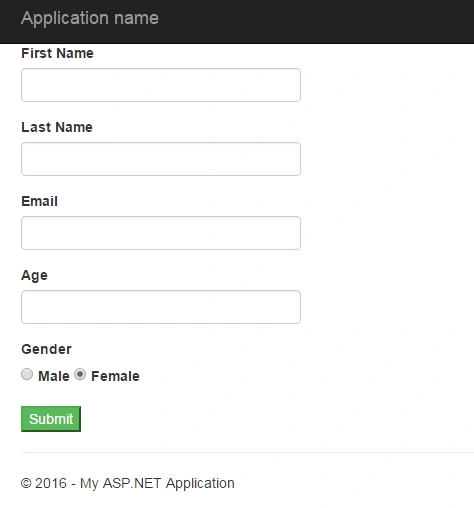
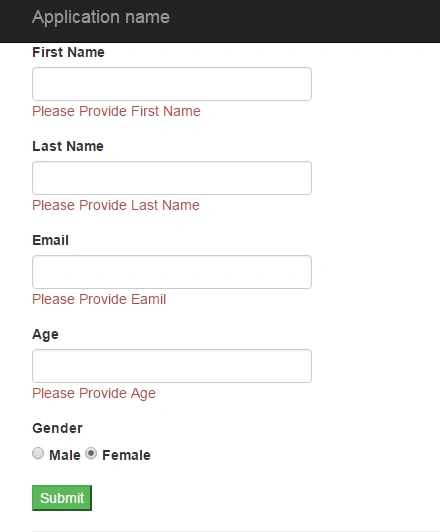
Submit the form without providing any values.
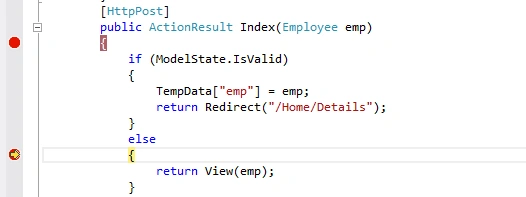
When form is submitted without any values in this case ModelState.IsValid is false, then returning employee object to index view.
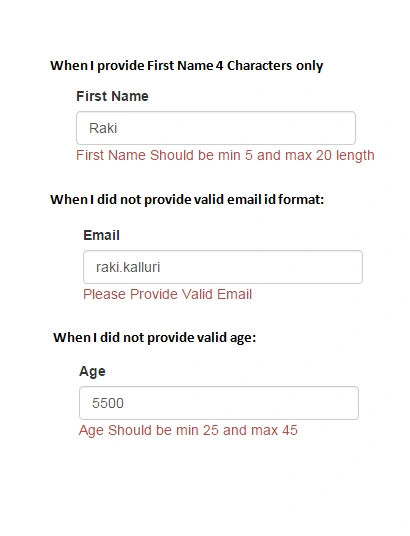
ErrorMessage accepts string when validation fails on property and it shows the error message to end user.
RegularExpression:
Pattern:
It sets the regular expression for Email, Phone number, Card Numbers, etc...
ErrorMessage:
ErrorMessage accepts string when validation fails on property and shows the error message to end user.
Index.cshtml:
- @model FormValidations.Models.Employee
- @
- {
- ViewBag.Title = "Index";
- }
- @using(Html.BeginForm("", "", FormMethod.Post, htmlAttributes: new
- {
- @class = "form"
- }))
- { < div class = "form-group" > < label > First Name < /label>
- @Html.TextBoxFor(m => m.FirstName, null, htmlAttributes: new
- {
- @class = "form-control"
- })
- @Html.ValidationMessageFor(m => m.FirstName, "", new
- {
- @class = "text-danger"
- }) < /div> < div class = "form-group" > < label > Last Name < /label>
- @Html.TextBoxFor(m => m.LastName, null, htmlAttributes: new
- {
- @class = "form-control"
- })
- @Html.ValidationMessageFor(m => m.LastName, "", new
- {
- @class = "text-danger"
- }) < /div> < div class = "form-group" > < label > Email < /label>
- @Html.TextBoxFor(m => m.Email, null, htmlAttributes: new
- {
- @class = "form-control"
- })
- @Html.ValidationMessageFor(m => m.Email, "", new
- {
- @class = "text-danger"
- }) < /div> < div class = "form-group" > < label > Age < /label>
- @Html.TextBoxFor(m => m.Age, null, htmlAttributes: new
- {
- @class = "form-control"
- })
- @Html.ValidationMessageFor(m => m.Age, "", new
- {
- @class = "text-danger"
- }) < /div> < div class = "form-group" > < label > Gender < /label> < div > @Html.RadioButtonFor(m => m.Gender, Model.Gender) < label > Male < /label>
- @Html.RadioButtonFor(m => m.Gender, Model.Gender) < label > Female < /label>
- @Html.ValidationMessageFor(m => m.Gender, "", new
- {
- @class = "text-danger"
- }) < /div> < /div> < div class = "form-group" > < input type = "submit"
- value = "Submit"
- class = "btn-success" / > < /div>
- }
- [HttpPost]
- public ActionResult Index(Employee emp)
- {
- if (ModelState.IsValid)
- {
- TempData["emp"] = emp;
- return Redirect("/Home/Details");
- }
- else
- {
- return View(emp);
- }
- }
- public ActionResult Details()
- {
- Employee emp = (Employee) TempData["emp"];
- return View(emp);
- }
If ModelState.IsValid is true the form is successfully submitted without any form validation errors, then returning Details view in Home Controller.
If ModelState.IsValid is false then the form is not successfully submitted with form validation error, then returning same view with employee object for repopulating the submitted values and error messages for model object.
Run the Project.
Submit the form without providing any values.
When form is submitted without any values in this case ModelState.IsValid is false, then returning employee object to index view.
Santhakumar MunuswamyPosted Jan 5, 2016, 11:26 PM
Thanks for nice article
Rakesh KalluriPosted Jan 5, 2016, 2:16 PM
Thnaks to all
Muhammad Aqib ShehzadPosted Jan 5, 2016, 7:42 AM
Nice one Dear
Gowtham RajamanickamPosted Jan 5, 2016, 7:26 AM
Good article
Arul RPosted Jan 4, 2016, 10:46 PM
Nice share
Kumaresh RajalingamPosted Jan 4, 2016, 9:10 PM
Good one for begineers
sreenivasa kPosted Jan 4, 2016, 8:08 PM
nice
Karthikeyan KPosted Jan 4, 2016, 1:24 PM
Good one...Thanks for sharing
Gowtham KPosted Jan 4, 2016, 12:01 PM
Good one, Thanks for sharing
Humayun Kabir MamunPosted Jan 4, 2016, 6:25 AM
Nice...
Ankit BansalPosted Jan 4, 2016, 6:20 AM
Nice one..
Raja TPosted Jan 4, 2016, 5:44 AM
Nice, Thanks for sharing