

In this article, we will learn how to create a Google Calendar Event from. NET. This is the fifth article in a series accessing Google API. NET. I have added links to other articles at the end of this blog.
Google configuration
We won't go into details of how to create a service account or grant a service access role as admin of Gsuite. Below are some reference links.
- Create a service account
- Enable Admin SDK
- Enable Client ID on service account - We should get a JSON file, and store it somewhere safe we would need it in our code.
- Enable domain-wide delegation
Please make sure you add scopes to ClientId as mentioned in the domain domain-wide delegation step. For this sample below scope would be required.
- https://www.googleapis.com/auth/calendar,
- https://www.googleapis.com/auth/calendar.events,
- https://www.googleapis.com/auth/calendar.events.readonly
.NET API
Get the Google Admin SDK Nuget package from Visual Studio.
Or you can directly download it from this link, Please check for the latest version from the above URL, you should get an option to Download the package on the right side. Add references to the below DLLs.
For our purpose, we will use the Nuget Package Manager of Visual Studio to download and reference required DLLs.
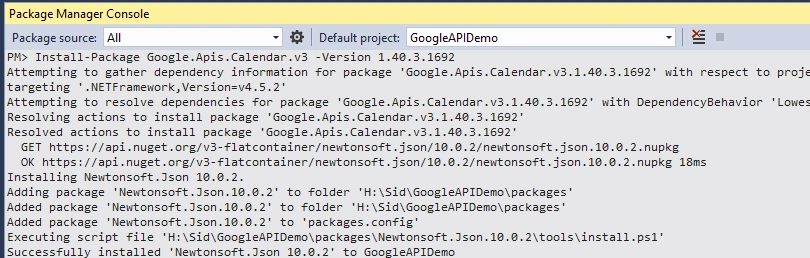
Go to Tools->NuGet Package Manager->Package Manager Console. Run the below command in the console.
Install-Package Google.Apis.Calendar.v3 -Version 1.40.3.1692
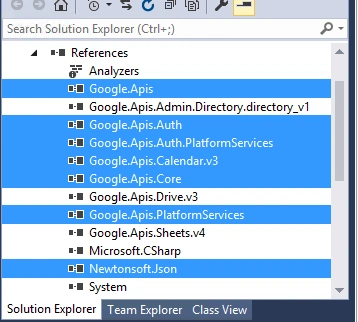
All below highlighted dll references will be added. Ignore other Google API dlls(Directory, Drive, and Sheets), this is required for other samples.
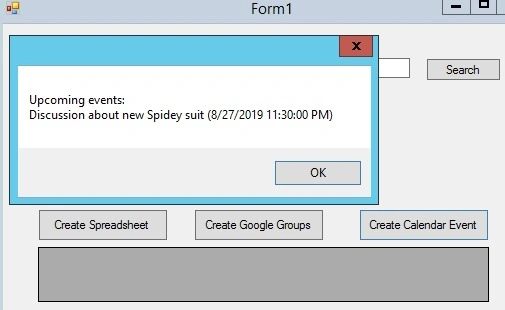
For this demo, I have created a Windows application and it will create a group and display a list of upcoming events in the message box.
private void button8_Click(object sender, EventArgs e)
{
    CalendarService _service = this.GetCalendarService("PATHTOJSONFILE\gsuite-migration-123456-a4556s8df.json");
    CreateEvent(_service);
    GetEvents(_service);
}
First method to get CalendarService object.
private CalendarService GetCalendarService(string keyfilepath)
{
    try
    {
        string[] Scopes = {
            CalendarService.Scope.Calendar,
            CalendarService.Scope.CalendarEvents,
            CalendarService.Scope.CalendarEventsReadonly
        };

        GoogleCredential credential;
        using (var stream = new FileStream(keyfilepath, FileMode.Open, FileAccess.Read))
        {
            // As we are using admin SDK, we need to still impersonate user who has admin access
            // https://developers.google.com/admin-sdk/directory/v1/guides/delegation
            credential = GoogleCredential.FromStream(stream)
                .CreateScoped(Scopes).CreateWithUser("[email protected]");
        }

        // Create Calendar API service.
        var service = new CalendarService(new BaseClientService.Initializer()
        {
            HttpClientInitializer = credential,
            ApplicationName = "Calendar Sample",
        });
        return service;
    }
    catch (Exception ex)
    {
        throw;
    }
}
Next let us write the method to Create an Event, if you notice below we are converting time to Asia/Calculate by adding +0530 as an offset. This will make sure the time is in IST.
private void CreateEvent(CalendarService _service)
{
    Event body = new Event();
    EventAttendee a = new EventAttendee();
    a.Email = "[email protected]";
    EventAttendee b = new EventAttendee();
    b.Email = "[email protected]";
    List<EventAttendee> attendees = new List<EventAttendee>();
    attendees.Add(a);
    attendees.Add(b);
    body.Attendees = attendees;
    EventDateTime start = new EventDateTime();
    start.DateTime = Convert.ToDateTime("2019-08-28T09:00:00+0530");
    EventDateTime end = new EventDateTime();
    end.DateTime = Convert.ToDateTime("2019-08-28T11:00:00+0530");
    body.Start = start;
    body.End = end;
    body.Location = "Avengers Mansion";
    body.Summary = "Discussion about new Spidey suit";
    EventsResource.InsertRequest request = new EventsResource.InsertRequest(_service, body, "[email protected]");
    Event response = request.Execute();
}
The below method is to get upcoming events(please note that it will only return events in the future as we have set the TimeMin parameter to Now.
private void GetEvents(CalendarService _service)
{
    // Define parameters of request.
    EventsResource.ListRequest request = _service.Events.List("primary");
    request.TimeMin = DateTime.Now;
    request.ShowDeleted = false;
    request.SingleEvents = true;
    request.MaxResults = 10;
    request.OrderBy = EventsResource.ListRequest.OrderByEnum.StartTime;

    string eventsValue = "";
    // List events.
    Events events = request.Execute();
    eventsValue = "Upcoming events:\n";
    if (events.Items != null && events.Items.Count > 0)
    {
        foreach (var eventItem in events.Items)
        {
            string when = eventItem.Start.DateTime.ToString();
            if (String.IsNullOrEmpty(when))
            {
                when = eventItem.Start.Date;
            }
            eventsValue += string.Format("{0} ({1})", eventItem.Summary, when) + "\n";
        }
        MessageBox.Show(eventsValue);
    }
    else
    {
        MessageBox.Show("No upcoming events found.");
    }
}
We have all other methods ready, let us now run the code and see the output. Below is a message box that will be displayed once we click on Create Calendar Event. If you notice here, the time returned is not IST and we will have to convert it explicitly to IST(not done in the above method).
Go to calendar.google.com or any of the users added as an attendee and we can see the below event added to the calendar. time here displayed is correct as we have set it in the create event method. It will be displayed as per the user's time zone.
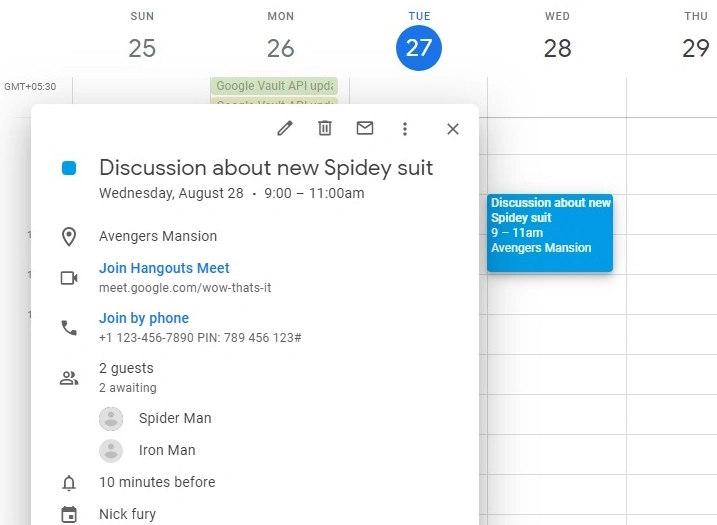
So here it is, a new meeting invite is sent to Spiderman and Iron Man to discuss about new Spiderman suit.
Conclusion
- We can use Google Calendar API to create events in the user's calendar(send meeting invite).
- We are using a service account to impersonate users, this can be done by normal users also.
- We can set different parameters like location, summary, date, etc while creating an event.
Hope you enjoyed reading!
Links to previous articles in this series.
- Create And Update Google Spreadsheet via Google API.NET Library
- How To Upload A File To Google Drive Using Google API From .NET
- How To Search Files On Google Drive Progamatically From .NET Using Drive API
- Create Google Group And Add User To Group Programmatically From .NET Using Google Directory API
Hemant MahajanPosted Feb 24, 2026, 8:33 PM
The service calendar has thrown an exception.HttpStatusCode is Forbidden. Google.Apis.Requests.RequestError Service accounts cannot invite attendees without Domain-Wide Delegation of Authority. [403] Errors [ Message[Service accounts cannot invite attendees without Domain-Wide Delegation of Authority.] Location[ - ] Reason[forbiddenForServiceAccounts] Domain[calendar] ] Google.GoogleApiException: The service calendar has thrown an exception. HttpStatusCode is Forbidden. Service accounts cannot invite attendees without Domain-Wide Delegation of Authority. at Google.Apis.Requests.ClientServiceRequest`1.ParseResponse(HttpResponseMessage response) at Google.Apis.Requests.ClientServiceRequest`1.ExecuteAsync(CancellationToken cancellationToken) at Google.Apis.Requests.ClientServiceRequest`1.ExecuteAsync() at DellPlannerDotnetApi.logic.GoogleCalendarService.CreateEventWithInvite(String ownerCalendarEmail, String deepakEmail, String summary, String description, DateTime startTime, DateTime endTime, String timeZone) at DellPlannerDotnetApi.Controllers.WeatherForecastController.CreateGoogleCalEvent() at Microsoft.AspNetCore.Mvc.Infrastructure.ActionMethodExecutor.TaskOfIActionResultExecutor.Execute(ActionContext actionContext, IActionResultTypeMapper mapper, ObjectMethodExecutor executor, Object controller, Object[] arguments) at Microsoft.AspNetCore.Mvc.Infrastructure.ControllerActionInvoker.<InvokeActionMethodAsync>g__Awaited|12_0(ControllerActionInvoker invoker, ValueTask`1 actionResultValueTask) at Microsoft.AspNetCore.Mvc.Infrastructure.ControllerActionInvoker.<InvokeNextActionFilterAsync>g__Awaited|10_0(ControllerActionInvoker invoker, Task lastTask, State next, Scope scope, Object state, Boolean isCompleted) at Microsoft.AspNetCore.Mvc.Infrastructure.ControllerActionInvoker.Rethrow(ActionExecutedContextSealed context) at Microsoft.AspNetCore.Mvc.Infrastructure.ControllerActionInvoker.Next(State& next, Scope& scope, Object& state, Boolean& isCompleted) at Microsoft.AspNetCore.Mvc.Infrastructure.ControllerActionInvoker.<InvokeInnerFilterAsync>g__Awaited|13_0(ControllerActionInvoker invoker, Task lastTask, State next, Scope scope, Object state, Boolean isCompleted) at Microsoft.AspNetCore.Mvc.Infrastructure.ResourceInvoker.<InvokeFilterPipelineAsync>g__Awaited|20_0(ResourceInvoker invoker, Task lastTask, State next, Scope scope, Object state, Boolean isCompleted) at Microsoft.AspNetCore.Mvc.Infrastructure.ResourceInvoker.<InvokeAsync>g__Awaited|17_0(ResourceInvoker invoker, Task task, IDisposable scope) at Microsoft.AspNetCore.Mvc.Infrastructure.ResourceInvoker.<InvokeAsync>g__Awaited|17_0(ResourceInvoker invoker, Task task, IDisposable scope) at Microsoft.AspNetCore.Authorization.AuthorizationMiddleware.Invoke(HttpContext context) at Swashbuckle.AspNetCore.SwaggerUI.SwaggerUIMiddleware.Invoke(HttpContext httpContext) at Swashbuckle.AspNetCore.Swagger.SwaggerMiddleware.Invoke(HttpContext httpContext, ISwaggerProvider swaggerProvider) at Microsoft.AspNetCore.Authentication.AuthenticationMiddleware.Invoke(HttpContext context) at Microsoft.AspNetCore.Diagnostics.DeveloperExceptionPageMiddlewareImpl.Invoke(HttpContext context) HEADERS ======= Accept: */* Connection: keep-alive Host: localhost:5162 User-Agent: Mozilla/5.0 (Windows NT 10.0; Win64; x64) AppleWebKit/537.36 (KHTML, like Gecko) Chrome/145.0.0.0 Safari/537.36 Accept-Encoding: gzip, deflate, br, zstd Accept-Language: en-US,en;q=0.9 Referer: http://localhost:5162/swagger/index.html sec-ch-ua-platform: "Windows" sec-ch-ua: "Not:A-Brand";v="99", "Google Chrome";v="145", "Chromium";v="145" sec-ch-ua-mobile: ?0 Sec-Fetch-Site: same-origin Sec-Fetch-Mode: cors Sec-Fetch-Dest: empty
krishna HotaPosted Mar 28, 2023, 5:18 AM
Can you please provide code for recurrence Appointment..
krishna HotaPosted Mar 23, 2023, 1:15 PM
What is the name space required for calendarservice and how to get the dll for it?
Ruwan RatnayakePosted Mar 2, 2023, 3:45 PM
Without Enable domain wide delegation cant we create a conferance
Stephan BussingPosted Nov 22, 2022, 7:43 AM
Where can I download the code to test is. The link at the top throws an execption
sunny sainiPosted Oct 18, 2022, 1:29 PM
Can any one help me ..where to get the json file..or souce code of the project thanks
Nil ParekhPosted Oct 28, 2021, 6:18 AM
It is working if i use my own account but it's not working I am trying to use different gmail account. Is there anyway to create this dynamic? Like whoever login with this app, can access google calendar with all functionality. When I logged in with different gmail account it says "Google.Apis.Requests.RequestErrorNot Found [404]".
pazil fernanPosted Jun 30, 2021, 5:14 PM
Useful article, I tried this example, But I got an error like this. "Error:"unauthorized_client", Description:"Client is unauthorized to retrieve access tokens using this method, or client not authorized for any of the scopes requested.", Uri:"""searched for root case, didn't find solution yet.Any idea?
Siddharth VaghasiaPosted Nov 30, 2019, 7:36 AM
Thanks everyone..!!!
Dipa MehtaPosted Nov 27, 2019, 9:33 AM
Interesting topic.
Mageshwaran RPosted Nov 27, 2019, 8:46 AM
Nice Article..
Sourav Kumar DasPosted Nov 27, 2019, 2:42 AM
Nice useful article sir.