

Introduction
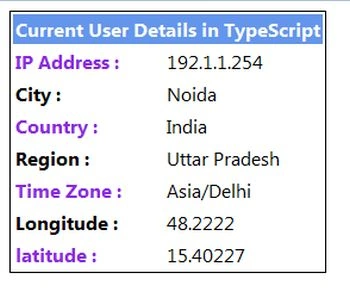
In this article, I will explain how to access the current user's details in TypeScript. We can get the IP, country, city, region, latitude, longitude and timezone of the user. The "smart-ip.net" JSON provides all the information about the user.
Use the following procedure.
Step 1
Give the name of your application as "Get_User_Detail" and then click "Ok."
Step 2
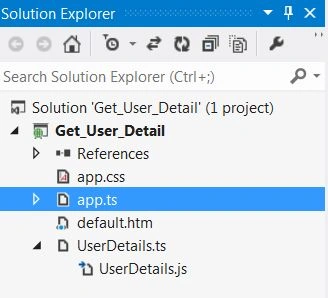
After this session, the project has been created. A new window is opened on the right side. This window is called the Solution Explorer. The Solution Explorer contains the ts file, js file and CSS files and the aspx page.
Program Coding
UserDetails.ts
- class User_Details {
- UserInfo(data) {
- var ip, country, city, region, latitude, longitude, timezone
- ip = data.host;
- country = data.countryName;
- city = data.city;
- region = data.region;
- latitude = data.latitude;
- longitude = data.longitude;
- timezone = data.timezone;
- document.getElementById('userip').innerHTML = ip;
- document.getElementById('city').innerHTML = city;
- document.getElementById('country').innerHTML = country;
- document.getElementById('region').innerHTML = region;
- document.getElementById('timezone').innerHTML = timezone;
- document.getElementById('longitude').innerHTML = longitude;
- document.getElementById('latitude').innerHTML = latitude;
- }
- }
- window.onload = () => {
- var obj = new User_Details();
- obj.UserInfo({
- "source": "smart-ip.net",
- "host": "192.1.1.254",
- "lang": "en",
- "countryName": "India",
- "countryCode": "IN",
- "city": "Noida",
- "region": "Uttar Pradesh",
- "latitude": "15.40227",
- "longitude": "48.2222",
- "timezone": "Asia\/Delhi"
- });
- };
default.htm
Sumit SharmaPosted Apr 5, 2018, 4:36 AM
You're just passing the information manually and displaying it on the screen.
Santhakumar MunuswamyPosted Jul 27, 2015, 2:57 PM
Thanks for nice article:)