

What is AlgoKit?
AlgoKit is a software development kit (SDK) that helps developers build decentralized applications (dApps) on the Algorand blockchain. It's an open-source platform that lets developers easily integrate blockchain technology into their apps.
- AlgoKit has many features that allow developers to create dApps that are fast, secure, and scalable. It comes with various software development tools such as command-line tools, libraries, and REST APIs, making it easy for developers to write code and build applications on the Algorand blockchain.
- The best thing about AlgoKit is its easy-to-use documentation. It has guides, tutorials, and reference materials that help developers get started with the platform. The documentation covers everything from setting up a development environment to creating and deploying smart contracts.
- AlgoKit provides developers with libraries that allow them to interact with the Algorand blockchain easily. For example, the AlgoSDK is a comprehensive library that gives developers all the tools they need to build dApps on the Algorand blockchain. The AlgoSigner library enables developers to create web-based applications that interact with the Algorand blockchain.
- AlgoKit also supports smart contracts written in the TEAL programming language, a stack-based language that's easy to learn and use. AlgoKit provides developers with tools to create, test, and deploy smart contracts on the Algorand blockchain.
- AlgoKit has security features such as multi-factor authentication, encryption, and access control. These features ensure that dApps built on the Algorand blockchain are secure and protected against unauthorized access.
In summary, AlgoKit is a powerful tool that gives developers everything they need to build dApps on the Algorand blockchain. It comes with tools, libraries, and APIs that make interacting with the blockchain easy and build secure, scalable applications. With its user-friendly documentation and support for smart contracts, AlgoKit is an excellent choice for developers who want to build blockchain-based applications.
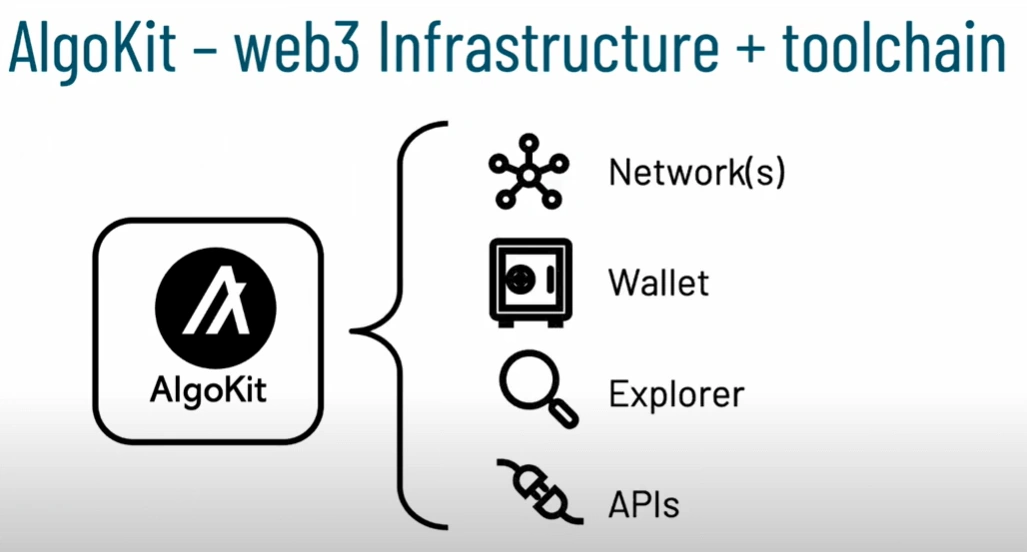
Source- Algorand Developers
So, Let's get started with the AlgoKit setup on Windows in a few steps.
Step 1. Window Prerequisites
Using this procedure requires the following components to be installed already
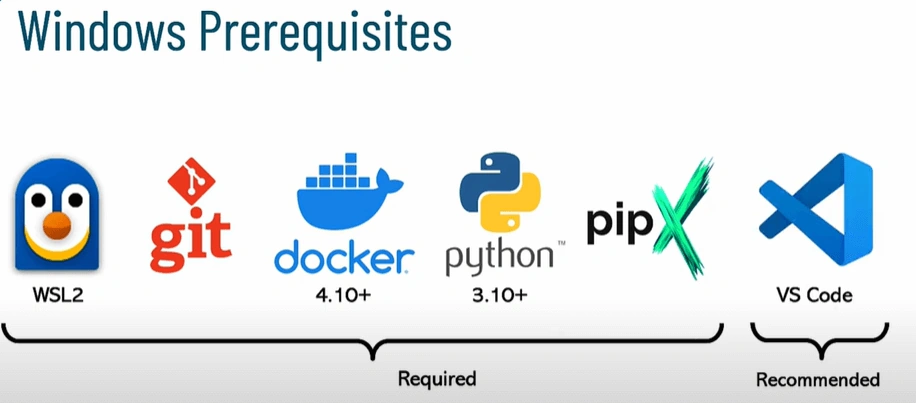
Source- Algorand Developer
Step 2. Check for Prerequisites are properly installed
| Name | Command | Version |
| WSL 2 | wsl -l -v | |
| Git | git --version | 2.40.0+ |
| Docker | docker version | 20.10.23+ |
| Python | python --version | 3.10 |
| PipX | pipx --version | 1.2.0 |
- Confirmation of successful installation and operation of WSL 2 can be determined by checking if the status of the WSL 2 command displays 'Running'.
- Git commands are compatible if the version is 2.35.1.windows.2 or higher.
- The ability to execute AlgoKit SDKs can be verified by ensuring that the Docker version is 20.10.23 or newer when executing Docker commands.
- Python commands are expected to be version 3.10 or higher.
- Installation and utilization of the AlgoKit tool are facilitated by PipX command version 1.2.0 or higher.
Step 3. Beaker Project using AlgoKit
The initial Command to initiate the AlgoKit is algokit init; the command will show you different types of templates like
-
The first template, beaker_starter, is a basic starting point for developing Beaker applications, providing examples of how to create and interact with the Beaker database and how to use smart contracts for data validation and processing.
-
The second template, beaker_production, is recommended for more advanced users who are ready to build production-ready Beaker applications. It includes additional features and best practices for building robust and scalable applications, including optimization for performance, security, and reliability.
-
The third template, playground, includes various small example applications and demos to help developers learn and experiment with different aspects of Algorand development, such as asset creation and management, smart contract interaction, and working with Algorand accounts and transactions. This template is ideal for developers who want to explore and better understand the capabilities of the Algorand blockchain through practical examples.
So, I selected beaker_starter.
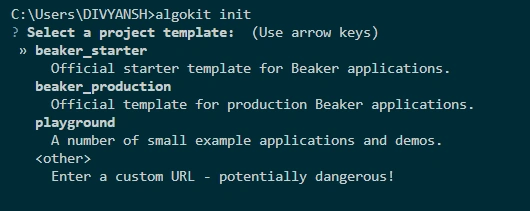
When using Algokit to create a new Algorand project, the first step is to select a template using the "algokit init" command.
- After that, you will need to specify the project's name or directory where the project files will be created on your local machine.
- You can choose any name you want for your project or directory, whether it's a new directory specifically created for the project or an existing one. Just make sure to enter a descriptive and meaningful name to help you easily identify and locate your project files during development.
- Algokit will create the project files and directory structure based on the name you provide and your chosen template. The exact structure and files created will depend on the template you select.
- Algokit will prompt you to provide the package author's name and email during the project creation process. These details will be associated with the metadata of your project and can help identify the author or maintainer of the project.
- The package author's name should be the name of the individual or organization responsible for creating and maintaining the project. You can enter your full name, a username, or the name of your organization, depending on your preference.
- The package author's email is the email address that can be used to contact the author or maintainer of the project. It can be an individual or organizational email address associated with the project. Providing accurate and up-to-date package author name and email information is important for maintaining transparency and accountability in open-source projects.
After that, they ask some more questions like :
- "Do you want to add VSCode configuration?"- This question asks if you want to include configuration files for Visual Studio Code (VSCode), a popular code editor, in your project. Including VSCode configuration can provide useful settings and optimizations for coding with Algorand using VSCode.
- "Do you want to use a Python linter?"- This question asks if you want to use a Python linter, which is a tool that helps identify and report coding issues, such as syntax errors or style violations, in your Python code. A linter can help ensure your code follows best practices and adheres to coding standards.
- "Do you want to use a Python format (via Black)?"- This question asks if you want to use a Python code formatter called Black, which automatically formats your code to adhere to a consistent style. Using a code formatter can help improve the readability and maintainability of your code.
- "Do you want to use a Python type checker (via mypy)?"- This question asks if you want to use mypy, a popular static type checker for Python, in your project. Using a type checker can help catch type-related errors and improve the reliability of your code.
- "Do you want to include unit tests (via pytest)?"- This question asks if you want to include unit tests in your project using the pytest testing framework. Unit tests are a common practice in software development for verifying the correctness of your code and ensuring that it functions as expected.
- "Do you want to include Python dependency vulnerability scanning (via pip-audit)?"- This question asks if you want to include vulnerability scanning for Python dependencies using pip-audit. This can help identify and fix potential security vulnerabilities in the third-party libraries used in your project.
- "Do you want to run algokit bootstrap for this new project? This will install and configure dependencies allowing it to be run immediately?"- This question asks if you want to automatically install and configure dependencies for your project using algokit bootstrap. This can help set up the project with the necessary dependencies to run immediately without manual installation and configuration steps.
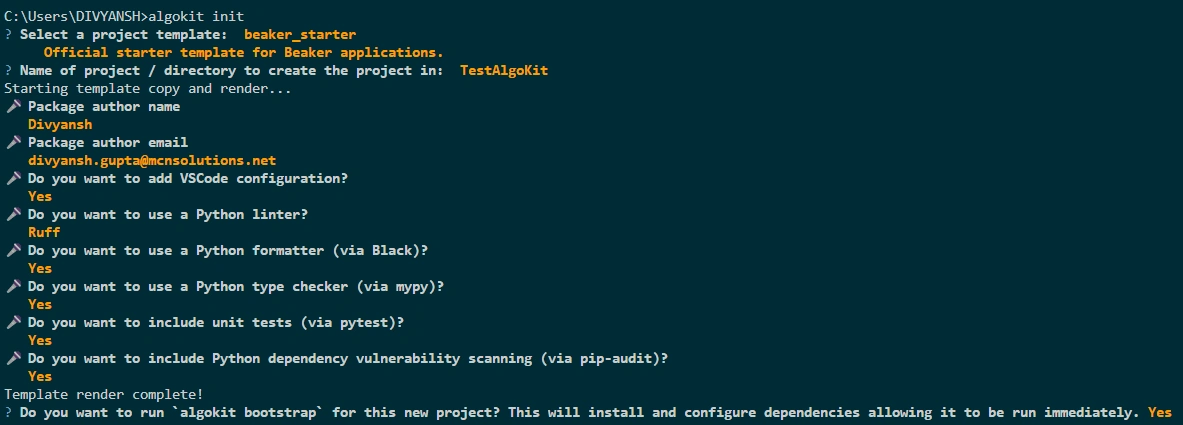
The development toolchain is installed and configured with a virtual environment, so your project code remains isolated from everything else on your workstation. You are prompted to change directly to your project folder. The project AlgoKit asks you to confirm the installation of the recommended extension. Now search for app.py and open that.
This code appears to be using the Python SDK for Algorand, specifically the "beaker" module, along with the "pyteal" module, which is a library for writing Algorand smart contracts using TEAL (Transaction Execution Approval Language).
Here's a breakdown of the code.
- Import Statements
from beaker import *
from pyteal import *
The code imports the necessary modules, "beaker" and "pyteal", for working with Algorand in Python.
- Application Definition
app = Application("HelloWorld")The code defines an Algorand application named "HelloWorld" using the Application class from the "beaker" module.
- External Function Definition
@app.external
def hello(name: abi.String, *, output: abi.String) -> Expr:
    return output.set(Concat(Bytes("Hello, "), name.get()))
The code defines an external function named "hello" using the @app.external decorator. This function takes two arguments, "name" and "output", which are of type "abi.String", and returns an expression (TEAL code) using the Expr> class from the "pyteal" module. The expression sets the value of "output" to the concatenation of the bytes "Hello, " and the value of "name".
- Delete Function Definition
@app.delete(bare=True, authorize=Authorize.only(Global.creator_address()))
def delete() -> Expr:
    return Approve()
The code defines a delete function using the @app.delete decorator. This function does not take any arguments and returns an expression that approves the deletion of the application.
- Main Block
if __name__ == "__main__":
    app.build().export("./artifacts")
The code checks if the current module is being executed as the main module (i.e., not imported as a module) and if so, it builds the "HelloWorld" application using the build() method from the "beaker" module and exports the compiled TEAL code and application state to the "./artifacts" directory.
Overall, this code defines an Algorand application named "HelloWorld" with an external function "hello" that returns a greeting message and a delete function that approves the deletion of the application. The TEAL code for the application is compiled and exported to the "./artifacts" directory when the module is executed as the main module.
#app.py

from beaker import *
from pyteal import *

app = Application("HelloWorld")

@app.external
def hello(name: abi.String, *, output: abi.String) -> Expr:
    return output.set(Concat(Bytes("Hello, "), name.get()))

@app.delete(bare=True, authorize=Authorize.only(Global.creator_address()))
def delete() -> Expr:
    return Approve()

if __name__ == "__main__":
    app.build().export("./artifacts")
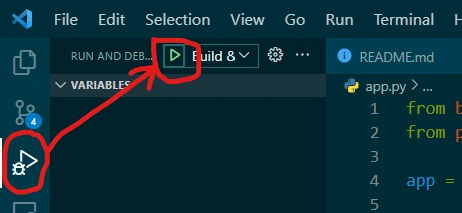
Now compile the code by clicking the run and debug icon in the left nav panel, then locate the Green arrow at the top and click to compile the Kit as shown below.
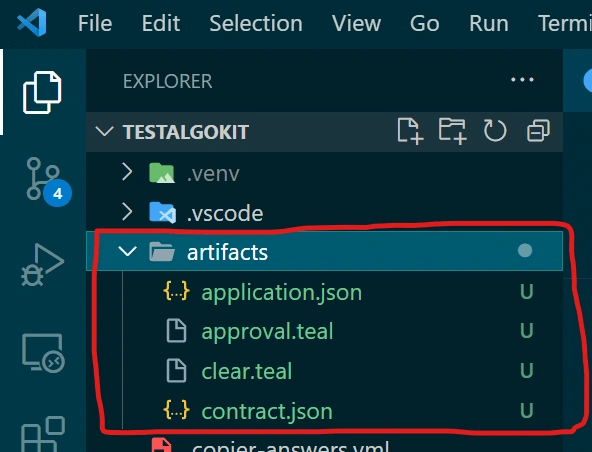
AlgoKit compiles this high-level language source code and outputs a low-level language program, two JSON objects, and two teal files.
- application.json- This file is automatically generated by the "beaker" module and contains the JSON representation of the Algorand application. It includes information such as the application ID, the TEAL approval and clear programs (compiled from the "approval.teal" and "clear.teal" files, respectively), global and local schemas (if defined), and any other configuration options set in the application.
- approval.teal- This file is the TEAL program for the approval logic of the Algorand application. It is generated based on the "hello" function defined in the code you provided. The "hello" function is an external function with the TEAL expression that sets the value of the "output" argument to the concatenation of the bytes "Hello, " and the value of the "name" argument. This TEAL logic is compiled into a binary format and stored in the "approval.teal" file.
- clear.teal- This file is the TEAL program for the clear logic of the Algorand application. It is generated based on the "delete" function defined in the code you provided. The "delete" function is a delete function with the TEAL expression that approves the deletion of the application. This TEAL logic is compiled into a binary format and stored in the "clear.teal" file.
- contract.json- This file is automatically generated by the "beaker" module and contains the JSON representation of the Algorand smart contract associated with the application. It includes information such as the application ID, TEAL approval and clear programs (referenced from the "application.json" file), and any other configuration options set in the contract.
These files are used to deploy and manage the Algorand application on the Algorand blockchain using the "beaker" module or other Algorand SDKs. They define the logic and configuration of the application that determines its behaviour when executed on the Algorand blockchain.
Step 4. Start Algorand Local Net
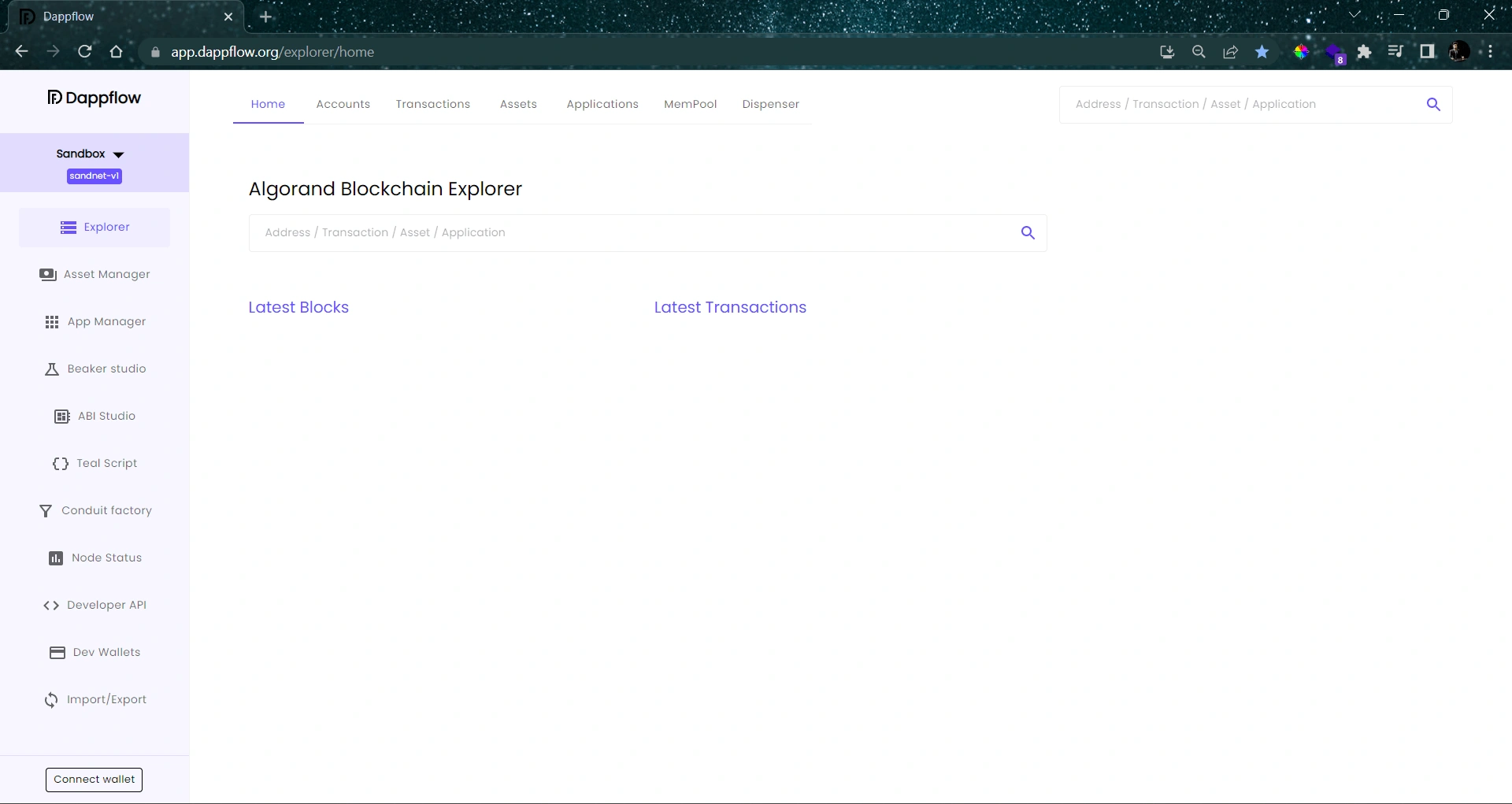
To start the Local Net, use the command algokit localnet start and execute it. This will start a local Algorand development blockchain where your dApp will reside. It usually takes less than one minute to start the local network. Now use the integrated block explorer to view more details about this network. After that, execute the algokit explorer command to start the explorer. After executing this, your web browser opens the explorer site automatically configured to the AlgoKit local net. Notice there are no blocks or transactions on this newly created network. Now you are ready to deploy your smart contract.
RECALL: The WEB3 user interface requires a wallet to interact with dApp.
Step 5. Connect your wallet with dApp
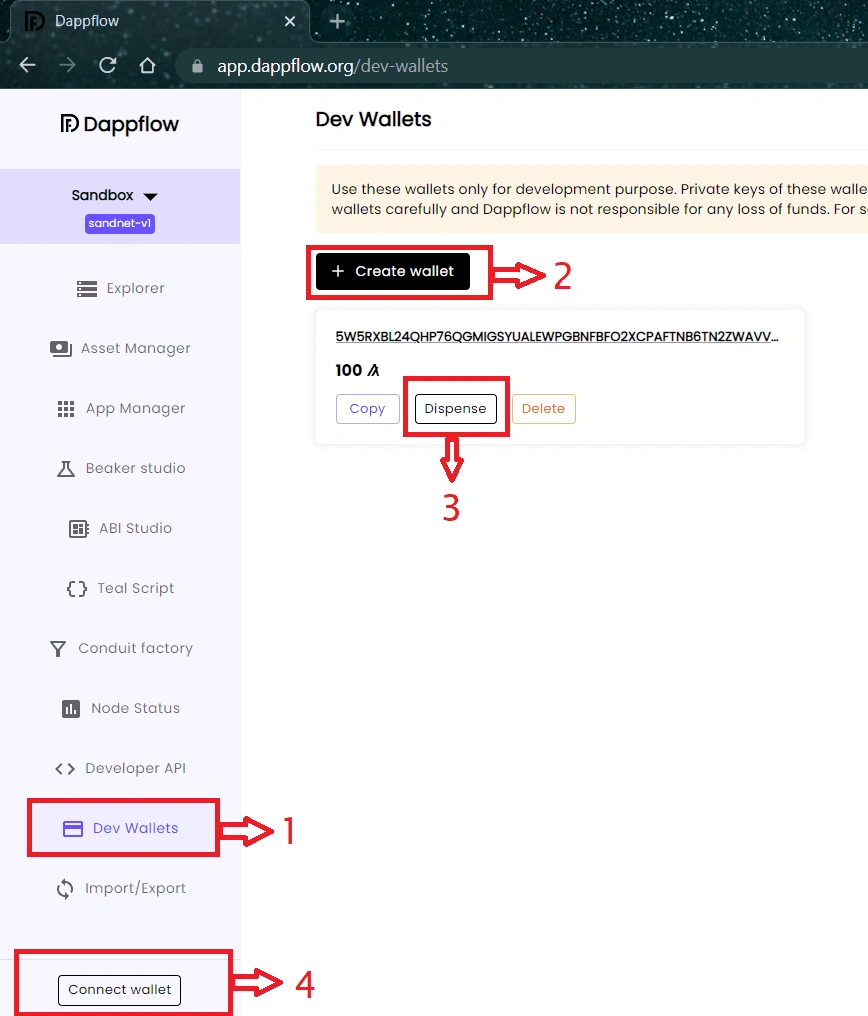
To connect your wallet, click on the Dev Wallet section in the left nav panel, then click the Create Wallet button to generate a new unfunded Algorand account. Next, use the to dispense button to add 100 test Algos to that account. Then click the connect wallet button in the lower left corner and select Dev Wallet from the list of providers. Notice the wallet icon displays the address of the account you dispense.
Step 6. Import ABI (Application Binary Interface)
Before importing an ABI file, you must know what ABI is.
ABI stands for Application Binary Interface. It is a standardized interface that defines how different parts of an Algorand application communicate. ABI defines the data types, function signatures, and encoding/decoding rules used to interact with an Algorand smart contract or application.
In the context of the Algorand blockchain, ABI is used to serialize and deserialize data passed between an application's on-chain and off-chain components. It allows developers to interact with the Algorand application using different programming languages and platforms.
ABI includes the following components
- Data types- ABI defines standard data types such as integers, bytes, addresses, and booleans that can be used in Algorand applications.
- Function signatures- ABI defines the signatures of the functions (methods) that can be called on the Algorand application. Function signatures include the name of the function, the input parameters (data types and names), and the return type (if any).
- Encoding/decoding rules- ABI specifies how the data should be encoded into binary format before being sent to the Algorand blockchain (serialization) and how the binary data received from the blockchain should be decoded into the corresponding data types (deserialization) in the off-chain application.
ABI is essential for enabling communication between the on-chain and off-chain components of an Algorand application. It allows developers to create front-end applications, APIs, or other off-chain components that can interact with the Algorand smart contract or application in a standardized way, regardless of the programming language or platform used.
After connecting with your wallet, click on the ABI Studio section. This tool consumes the artifacts created during the complied process earlier, now click on the import ABI button, switch to the File tab then click the upload file button. Next, navigate to your project folder and send through the Smart Contract folder into artifacts and locate the contract.json file. This file contains the method exposed by the Smart Contract and is rendered as a simple user interface for testing. Before you may interact with your method, you must install your Smart Contract program to the blockchain.

Now locate create app button. The make application modal requests the storage schema values, which will be set to zero, then upload both the approval program and the clear program from the artifacts folder of the project, scroll to the bottom, and click create.

The application is created successfully here. The app ID was assigned index two. Finally, click the execute button from the hello method. This method requires the user to provide a string value for the name field; then execute and observe the "hello, Divyansh" response, which means the contract was called successfully.

Finally, you executed your first Smart Contract on Algorand Blockchain.
Conclusion
This article taught you what AlgoKit is and how to deploy your first smart contract using AlgoKit and Beaker template.
FAQ
Q- What programming languages are supported by Algorand AlgoKit?
A- Algorand AlgoKit currently provides SDKs in multiple programming languages, including but not limited to JavaScript, Python, Go, Java, C#, and Rust. This makes it accessible to developers with different language preferences.
Q- What can I build with Algorand AlgoKit?
A- With Algorand AlgoKit, you can build a wide range of decentralized applications (dApps) on the Algorand blockchain. This includes but is not limited to creating and managing Algorand accounts, sending and receiving Algorand transactions, interacting with Algorand smart contracts, building custom Algorand tokens, and more.
Q- Is Algorand AlgoKit open source?
A- Yes, Algorand AlgoKit is an open-source project. The source code for AlgoKit libraries and SDKs can be found on GitHub (https://github.com/algorand), which allows developers to access, review, and contribute to the development of the tools.
Q- What are some common use cases for Algorand AlgoKit?
A- Some common use cases for Algorand AlgoKit include building decentralized finance (DeFi) applications, creating and managing custom tokens on the Algorand blockchain, implementing secure and transparent supply chain solutions, creating NFT (Non-Fungible Token) marketplaces, and building other blockchain-based applications that require secure, transparent, and decentralized transactions.
Q- Is there a community or support available for Algorand AlgoKit?
A- Yes, Algorand has an active developer community that provides support and resources for AlgoKit. You can join the Algorand community forums, chat rooms, and social media groups to connect with other developers, ask questions, and get help with your AlgoKit-related projects.
Q- Are there any fees associated with using Algorand AlgoKit?
A- Yes, similar to other blockchain platforms, Algorand has transaction fees associated with using the blockchain, such as transaction fees and smart contract fees. These fees are typically paid in ALGO, the native cryptocurrency of the Algorand blockchain. You can refer to the Algorand documentation for more information on the fee structure.
Q- Can I use Algorand AlgoKit for both testnet and mainnet development?
A- Yes, Algorand AlgoKit supports both the Algorand testnet and mainnet. You can use the tools for development and testing on the Algorand testnet and then deploy your applications on the Algorand mainnet for production use.
Join the conversation! Your thoughts help the community grow.