

Automapper is an object to the object mapper. By this, we can map properties of one object of one type, to the properties of another object. The automapper is widely used in the cases where DTO (Data transfer object) are used. By this, object properties can be assigned very easily from View object to DTO object and DTO object to Domain model.
What problem does the automapper solve?
In View, we have to show the personObject, while we get the PersonDTO object from the Middle layer.
- PersonDTO personDTO = GetPersonFromDB();
- PersonView personview = new PersonView()
- {
- FirstName = personDTO.FirstName,
- LastName = personDTO.LastName
- }
How it works
Automapper is an object to object mapper. Object-object mapping works by transforming an input object of one type into an output object of a different type.You can find more details of automapper here.

So, the automapper sits between the source and destination object.
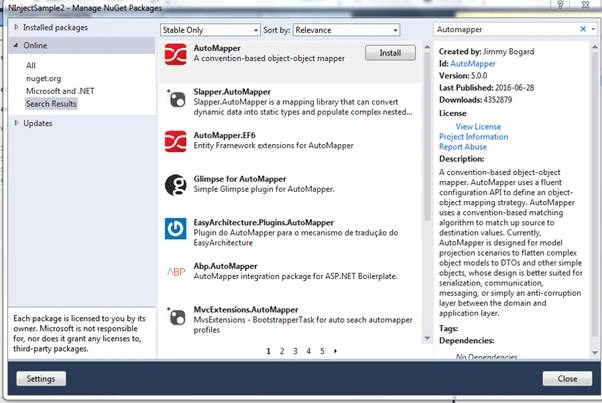
Now, in a console application add a nuget package automapper.
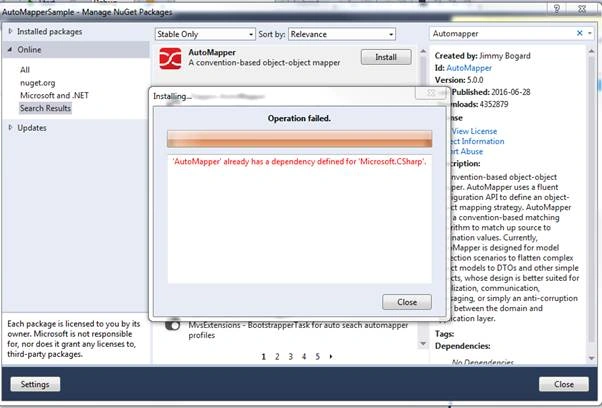
Sometime, you may face the following issue. This is basically because of the version incompatibility of nuget package manager and automapper version.
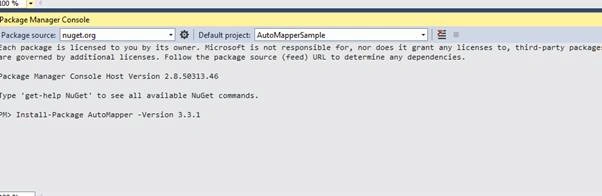
You can directly install the lower version of automapper (just for now) with package manager console, by Install-Package AutoMapper -Version 3.3.1.

Now, I have created two classes:
- public class Person {
- public string FirstName {
- get;
- set;
- }
- public string LastName {
- get;
- set;
- }
- public string UID {
- get;
- set;
- }
- public DateTime DateOfBirth {
- get;
- set;
- }
- }
- And
- public class PersonDTO {
- public string FirstName {
- get;
- set;
- }
- public string LastName {
- get;
- set;
- }
- public string UID {
- get;
- set;
- }
- public DateTime DateOfBirth {
- get;
- set;
- }
- }
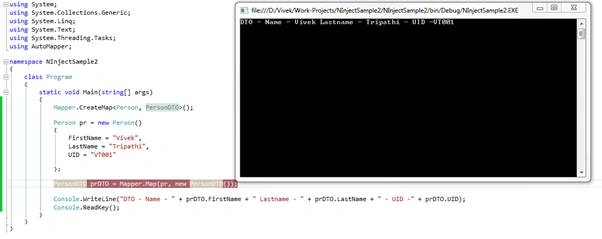
We can see that both the classes have the same properties. Through automapper, we can assign property values of one object to another object. As shown in program.cs, below:
- using System;
- using System.Collections.Generic;
- using System.Linq;
- using System.Text;
- using System.Threading.Tasks;
- using AutoMapper;
- namespace NInjectSample2 {
- class Program {
- static void Main(string[] args) {
- Mapper.CreateMap < Person, PersonDTO > ();
- Person pr = new Person() {
- FirstName = "Vivek",
- LastName = "Tripathi",
- UID = "VT001"
- };
- //PersonDTO prDTO = Mapper.Map(pr, new PersonDTO());
- PersonDTO prDTO = Mapper.Map < Person, PersonDTO > (pr);
- Console.WriteLine("DTO - Name - " + prDTO.FirstName + " Lastname - " + prDTO.LastName + " - UID -" + prDTO.UID);
- Console.ReadKey();
- }
- }
- }
Let's see here some more complex example. Suppose, we have DTO a FullName.Property that is a combination of customer's firstname and lastname.
public string FullName { get; set; }
Then we have to change something in the Createmap.
Mapper.CreateMap<Person, PersonDTO>().ForMember(s => s.FullName, d => d.MapFrom(v => v.FirstName + " " + v.LastName));

Here, we can see the changes.
Bohdan StupakPosted Feb 15, 2020, 11:35 AM
Great article. Still, I would love to see more advanced examples like ReverseMap, flattening, or custom expressions for some properties.
Vignesh ManiPosted Jul 11, 2016, 5:44 PM
Nice
Vidya Vrat AgarwalPosted Jul 11, 2016, 2:07 PM
Nice work Vivek Tripathi it's very well explained. Looking forward for more.
Hari ShankerPosted Jul 11, 2016, 12:55 AM
Thanx
Guest UserPosted Jul 9, 2016, 9:17 PM
It's good to use AutoMapper and conveinient. What if there are few distinctive properties available in each class, ex Person class has a property Address and DTO has a property Age. In that case what will be the behavior, please explain
Nikhil SanganiPosted Jul 9, 2016, 5:21 AM
Nice Sir.
Sandeep Singh ShekhawatPosted Jul 9, 2016, 3:36 AM
As Automapper uses reflection which causes performance barrier so is it good for small object? It reduces little development work while could decrease application performance.
kalu singh raoPosted Jul 9, 2016, 2:33 AM
Nice...