

In my previous article, I talked about new front-end frameworks. I forgot to mention one of the popular frameworks, Ember JS, that's why I decided to write an article on it. Well, here it is.
Importance of front-end framework
The end-users are seeking easy-to-use applications with robust, modern, intuitive features. Some of the characteristics of the web front-end framework are Drive Performance, Optimize Navigation, Visitor Retention, and Aligning Business Intent.
What is EmberJS?
Ember.js is an open-source JavaScript web framework, based on the Model–View–ViewModel pattern. It allows the developers to create scalable single-page web applications by incorporating common idioms and best practices into the framework.
Why do developers choose Ember.js?
Ember.js has powerful add-ons, convention over configuration, Ember CLI, Community, Ember Octane, etc. All the above reasons are just the tip of the iceberg and it helps to make a more powerful and approachable UI.
Configuration of .NET Core 3 and EmberJS
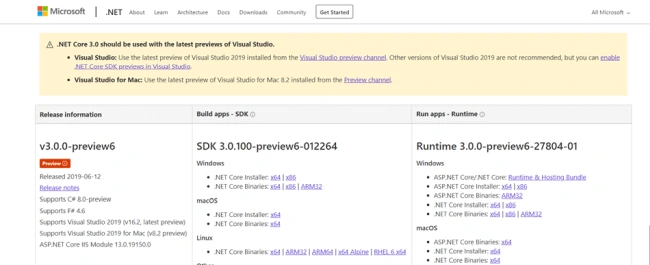
Download the latest version of this SDK and install it.
You can install Ember with a single command using npm.
- npm install -g ember-cli
Let's perform one practical task with Ember.js and .NET Core 3.
Create ASP.NET Core 3 web application project using API template. It takes a few minutes to create an API project.
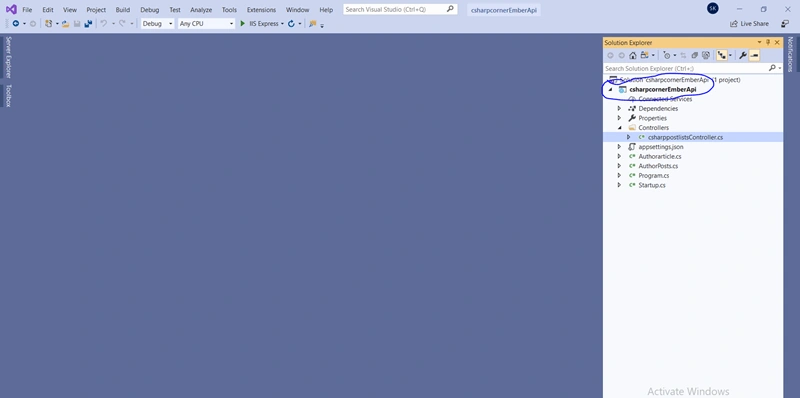
Create one controller called csharppostlistsController and add the following code as below. In this controller, I made one method which returns author posts.
- using System;
- using System.Collections.Generic;
- using System.Globalization;
- using System.Linq;
- using System.Xml.Linq;
- using Microsoft.AspNetCore.Mvc;
- using Newtonsoft.Json;
- namespace csharpcornerEmberApi.Controllers
- {
- [Route("api/[controller]")]
- [ApiController]
- public class csharppostlistsController : ControllerBase
- {
- public readonly CultureInfo culture = new CultureInfo("en-US");
- // GET api/values
- [HttpGet]
- public ActionResult<List<Feed>> Get()
- {
- try
- {
- XDocument doc = XDocument.Load("https://www.c-sharpcorner.com/rss/latestcontentall.aspx");
- var entries = (from item in doc.Root.Descendants().First(i => i.Name.LocalName == "channel").Elements().Where(i => i.Name.LocalName == "item")
- select new Feed
- {
- Content = item.Elements().First(i => i.Name.LocalName == "description").Value,
- PublishDate = Convert.ToDateTime(item.Elements().First(i => i.Name.LocalName == "pubDate").Value, culture).ToString("dd-MMM-yyyy"),
- Title = item.Elements().First(i => i.Name.LocalName == "title").Value,
- FeedType = (item.Elements().First(i => i.Name.LocalName == "link").Value).ToLowerInvariant().Contains("blog") ? "Blog" : (item.Elements().First(i => i.Name.LocalName == "link").Value).ToLowerInvariant().Contains("news") ? "News" : "Article",
- Author = item.Elements().First(i => i.Name.LocalName == "author").Value
- }).Where(a => a.FeedType == "Article").ToList();
- entries= entries.OrderBy(a=>a.PubDate).Take(5).ToList();
- AuthorArticlecs Authorpost = new AuthorArticlecs();
- int i = 1;
- foreach (var item in entries)
- {
- Datum data = new Datum
- {
- id = i.ToString(),
- type = "csharppostlist",
- attributes = PrepareAttribute(item)
- };
- Authorpost.data.Add(data);
- i++;
- }
- string json = JsonConvert.SerializeObject(Authorpost,Formatting.Indented);
- return Ok(json);
- }
- catch
- {
- List<Feed> feeds = new List<Feed>();
- Feed feed = new Feed();
- feeds.Add(feed);
- return Ok(feeds.Take(1).ToList());
- }
- }
- public Attributes PrepareAttribute(Feed item)
- {
- return new Attributes
- {
- author = item.Author,
- content = item.Content,
- pd = item.PublishDate,
- title = item.Title
- };
- }
- }
- }
- using System.Collections.Generic;
- namespace csharpcornerEmberApi
- {
- public class AuthorArticlecs
- {
- public AuthorArticlecs()
- {
- data = new List<Datum>();
- }
- public List<Datum> data { get; set; }
- }
- public class Datum
- {
- public Datum()
- {
- attributes = new Attributes();
- }
- public string type { get; set; }
- public string id { get; set; }
- public Attributes attributes { get; set; }
- }
- public class Attributes
- {
- public string title { get; set; }
- public string author { get; set; }
- public string content { get; set; }
- public string pd { get; set; }
- }
- }
- using System;
- using System.Collections.Generic;
- namespace csharpcornerEmberApi
- {
- public class Feed
- {
- public string Link { get; set; }
- public string Title { get; set; }
- public string FeedType { get; set; }
- public string Author { get; set; }
- public string Content { get; set; }
- public DateTime PubDate { get; set; }
- public string PublishDate { get; set; }
- public Feed()
- {
- Link = "";
- Title = "";
- FeedType = "";
- Author = "";
- Content = "";
- PubDate = DateTime.Today;
- PublishDate = DateTime.Today.ToString("dd-MMM-yyyy");
- }
- }
- }
- app.UseCors(builder =>
- {
- builder.WithOrigins("http://localhost:4200")
- .AllowAnyHeader()
- .AllowAnyMethod()
- .AllowCredentials();
- });
- ember new clientapp
- cd clientapp
- ember generate route csharppostlists
After this, you will see the left side folder like in the below picture.
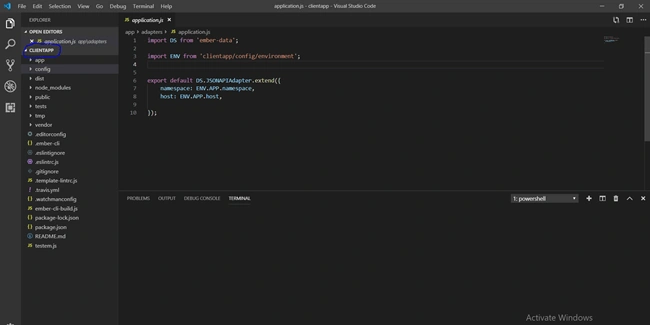
In this example, I used jsonapiadapter for handling the JSON data. Let's create one file called application.js under Adapter folder and put the following code.
- import DS from 'ember-data';
- import ENV from 'clientapp/config/environment';
- export default DS.JSONAPIAdapter.extend({
- namespace: ENV.APP.namespace,
- host: ENV.APP.host,
- });
- APP: {
- host:'https://localhost:44391',
- namespace: 'api'
- }
- import Route from '@ember/routing/route';
- export default Route.extend({
- model() {
- return this.store.findAll('csharppostlist')
- }
- });
- import DS from 'ember-data';
- export default DS.Model.extend({
- author: DS.attr(),
- content: DS.attr(),
- pd :DS.attr(),
- title: DS.attr()
- });

Now, it's almost done. We have to do some work with the UI and CSS part. Open csharppostlists.hbs file and application.hbs files and put the following codes.
- <table class="author">
- <tr>
- <th>No</th>
- <th>Author Name</th>
- <th>Title</th>
- <th>Content</th>
- <th>Publication Date</th>
- </tr>
- {{#each this.model as |Author|}}
- <tr>
- <td>{{Author.id}}</td>
- <td>{{Author.author}}</td>
- <td>{{Author.content}}</td>
- <td>{{Author.title}}</td>
- <td>{{Author.pd}}</td>
- </tr>
- {{/each}}
- </table>
- <img src="https://csharpcorner-mindcrackerinc.netdna-ssl.com/App_Themes/CSharp/Images/SiteLogo.png" class="cimage" alt="C# Corner">
- <h1 class="heading">Welcome to c-sharp corner letest 5 author post from feed</h1>
- {{outlet}}
Open the app.css file and put the below style in it.
- .author {
- font-family: "Trebuchet MS", Arial, Helvetica, sans-serif;
- border-collapse: collapse;
- width: 100%;
- }
- .author td, .author th {
- border: 1px solid #ddd;
- padding: 8px;
- }
- .author tr:nth-child(even){background-color: #f2f2f2;}
- .author tr:hover {background-color: #ddd;}
- .author th {
- padding-top: 12px;
- padding-bottom: 12px;
- text-align: left;
- background-color: #4CAF50;
- color: white;
- }
- .heading{
- text-align: center;
- margin-bottom: 30px;
- }
- .cimage{
- display: block;
- margin-left: auto;
- margin-right: auto;
- margin-top: 20px;
- text-align: center;
- height: 83px;
- }
- ember serve
Let's wrap up this article.
Hope you guys learned something new.
Here are the links to my previous articles.
mitul patelPosted Jul 9, 2019, 12:03 AM
Nice explanation with Example