

Introduction
First, you must install Xamarin for Android.
Let's Start
1. Go to File -> New -> Project.
2. Select Android Application -> Give it a Name.
 Before starting, have a look at Solution Explorer. An Android Application contains Properties, References, Assets and Resources and so on. Properties contain AssemblyInfo (the same as you saw in the C# project). The References folder contains Assembly Files (DLL files). The Mono.Android DLL assembly contains the C# binding to the Android API.
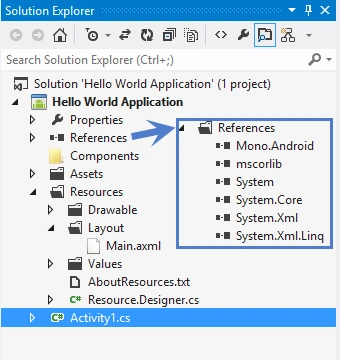 The resources folder contains a Drawable folder (that contains icons and images for the application), Layout (provides a designer surface for the application). Resource.Designer.cs contains auto-generated code. As we will start from the basics, delete the main.axml layout and the Activity1.cs file from the project.
3. Right-click on Layout then select Add -> New Item.
The resources folder contains a Drawable folder (that contains icons and images for the application), Layout (provides a designer surface for the application). Resource.Designer.cs contains auto-generated code. As we will start from the basics, delete the main.axml layout and the Activity1.cs file from the project.
3. Right-click on Layout then select Add -> New Item.
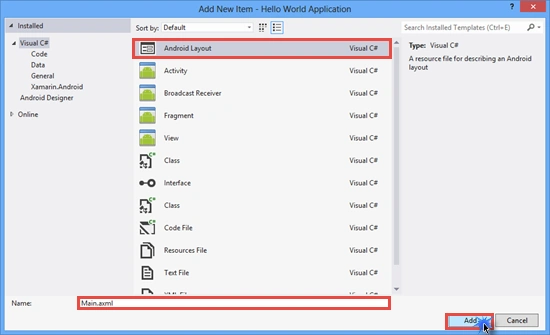
 4. Add an Android Layout (named Main.axml) then click on Add and select it.


Main.axml code:
- <?xml version="1.0" encoding="utf-8"?>
- <LinearLayout xmlns:android="http://schemas.android.com/apk/res/android"
- android:orientation="vertical"
- android:layout_width="fill_parent"
- android:layout_height="fill_parent"
- android:minWidth="25px"
- android:minHeight="25px">
- <Button
- android:text="Click Me!"
- android:layout_width="fill_parent"
- android:layout_height="wrap_content"
- android:id="@+id/btn_Hello" />
- </LinearLayout>

Activity1.cs Code:
- using System;
- using System.Collections.Generic;
- using System.Linq;
- using System.Text;
- using Android.App;
- using Android.Content;
- using Android.OS;
- using Android.Runtime;
- using Android.Views;
- using Android.Widget;
- namespace Hello_World_Application
- {
- //Set the Label = "Hello World Application" which is displayed on the Top of the Application(in Title)
- //Set MainLauncher = true makes this Activity as a Main Activity and Application starts from this Activity.
- //Set Icon using Icon = "@drawable/icon"
- [Activity(Label = "Hello World Application", MainLauncher = true, Icon = "@drawable/icon")]
- public class Activity1 : Activity
- {
- //Creating Instance of Button
- Button btn_Hello;
- protected override void OnCreate(Bundle bundle)
- {
- base.OnCreate(bundle);
- //SetContentView
- SetContentView(Resource.Layout.Main);
- //Get btn_Hello Button control from the Manin.axml Layout.
- btn_Hello = FindViewById<Button>(Resource.Id.btn_Hello);
- //Creating Click event of btn_Hello
- btn_Hello.Click += btn_Hello_Click;
- }
- //btn_Hello Click Event
- void btn_Hello_Click(object sender, EventArgs e)
- {
- //Display a Toast Message on Clicking the btn_Hello
- Toast.MakeText(this, "Hello World Application by Anoop", ToastLength.Short).Show();
- }
- }
- }


Asfend YarPosted Mar 9, 2016, 3:59 AM
what about xamarin forms ?? Share some post on xamarin forms ..
Guest UserPosted Dec 4, 2014, 5:12 AM
good one. you can also explore VS2013/2015 has this capability alongwith Xamarin to create Android/iOS apps
Suhit KalubarmePosted Dec 4, 2014, 2:28 AM
I like it.... No need to depends on JAVA :)
Sudheer KumarPosted Dec 4, 2014, 1:23 AM
Nice for beginners