
Previously in our discussion, we discussed the concept of Conditional breakpoints. This article explains Hitting Conditional breakpoints.
Consider a case where you have a for loop iterating through a thousands records. You know that your records at around the 500th location is corrupted and you need to debug that value. Will you sit and continue to press F5 until the record number 500 is reached ? This is where you can use a conditional breakpoint. This is done by setting the Hit Count condition on the breakpoint, in other words hit the breakpoint when has it iterated 499 times.
Let's create a sample application to understand this. Add a for loop with an iteration of 1000 records and add a condition to hit the breakpoint when the 500th record is being iterated.
To add the condition, right-click on the breakpoint and select the 'Hit Count' condition. This will open a window where we can define a condition to hit the breakpoint only when it meets the criteria set for its execution.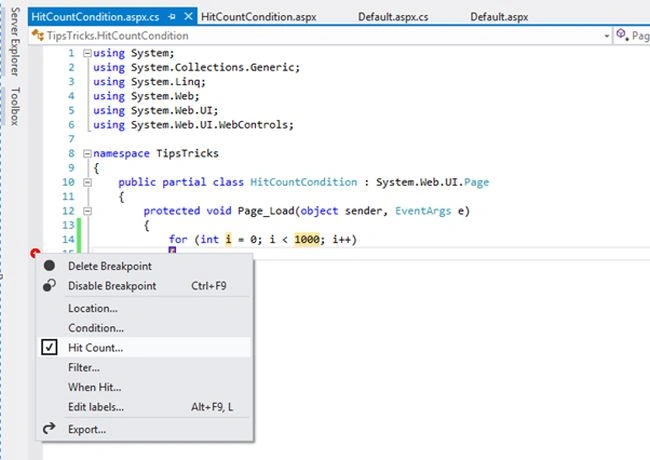
Here we have 4 conditions and they are self explanatory. So we select the condition "break when the hit count is equal to" and set its value to 500. 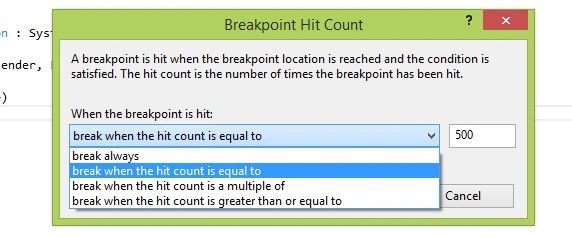
Hover to the breakpoint and see the details: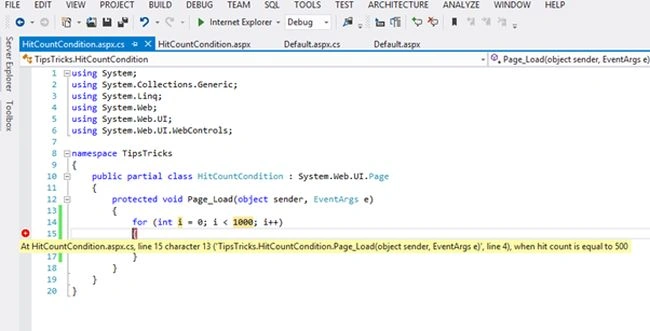
Run the application and see the value of variable 'i', when the breakpoint is hit.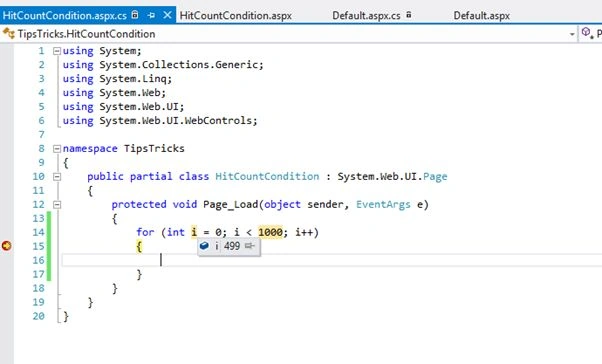
So here when the value of i becomes 499 (starting from 0), it is iterating the 500th record and the breakpoint is hit. Set the breakpoint and enjoy debugging!

Hit Conditional Breakpoints in C#
Join the conversation! Your thoughts help the community grow.
Sign in to leave a comment
It is the same account you read, post and publish with — and you will come straight back to this page.
Robert ButarbutarPosted Jun 28, 2017, 12:17 AM
Thanks, Great information
Sandeep SharmaPosted Aug 24, 2016, 12:24 AM
Good article.. You saved by time.. :) Thanks for sharing..
Hemendra JarmaPosted Jul 7, 2015, 8:00 AM
Good article.
Afzaal Ahmad ZeeshanPosted Jul 6, 2015, 6:32 PM
I like the new debugger tools that Visual Studio has provided us with. :) A great solution for developers.
Santhakumar MunuswamyPosted Jul 6, 2015, 3:46 PM
Good article. Thanks for sharing
Gopi ChandPosted Jul 6, 2015, 12:37 PM
Nice one
Nilesh JadavPosted Jul 6, 2015, 8:49 AM
Good information
Sibeesh VenuPosted Jul 6, 2015, 8:14 AM
Good One.Thanks for sharing :)