

Introduction
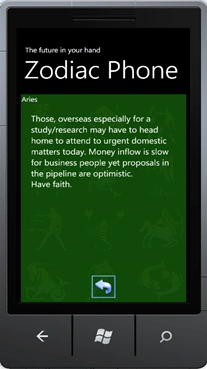
This article show how to create a Horoscope Application to Windows Phone 7. The tecnologies used are XAML, WCF, LINQ and C#.

Background
The scenario is based on Windows Phone to access a published WCF service with the chosen sign. This service will open a RSS, get the prevision, and return this prevision to Windows Phone.
Using the code
Start a Windows Phone Application project:

Create a Title Panel to show the title of the Application and a short explanation.
Insert the ContentPanel that has all the controls of this application (Sign Buttons and Prevision Panel).
Insert 12 images that represent the Zodiac Signs. Determine the position, image source and size of images to have good appearence. Mount the MouseLeftButtonDown as click event equals to all images and for each image determine a parameter Code and Name in property Tag.

Prevision Grid have controls to show the Sign name, Prevision text and the Back Button.

Here is the complete XAML:
<phone:PhoneApplicationPage
x:Class="ZodiacPhone.MainPage"
xmlns="http://schemas.microsoft.com/winfx/2006/xaml/presentation"
xmlns:x="http://schemas.microsoft.com/winfx/2006/xaml"
xmlns:phone="clr-namespace:Microsoft.Phone.Controls;assembly=Microsoft.Phone"
xmlns:shell="clr-namespace:Microsoft.Phone.Shell;assembly=Microsoft.Phone"
xmlns:d="http://schemas.microsoft.com/expression/blend/2008"
xmlns:mc="http://schemas.openxmlformats.org/markup-compatibility/2006"
mc:Ignorable="d" d:DesignWidth="480" d:DesignHeight="768"
FontFamily="{StaticResource PhoneFontFamilyNormal}"
FontSize="{StaticResource PhoneFontSizeNormal}"
Foreground="{StaticResource PhoneForegroundBrush}"
SupportedOrientations="Portrait" Orientation="Portrait"
shell:SystemTray.IsVisible="True">
<!--LayoutRoot is the root grid where all page content is placed-->
<Grid x:Name="LayoutRoot" Background="Transparent">
<Grid.RowDefinitions>
<RowDefinition Height="Auto"/>
<RowDefinition Height="*"/>
</Grid.RowDefinitions>
<!--TitlePanel contains the name of the application and page title-->
<StackPanel x:Name="TitlePanel" Grid.Row="0" Margin="12,17,0,28">
<TextBlock x:Name="ApplicationTitle" Text="The future in your hand" Style="{StaticResource PhoneTextNormalStyle}"/>
<TextBlock x:Name="PageTitle" Text="Zodiac Phone" Margin="9,-7,0,0" Style="{StaticResource PhoneTextTitle1Style}"/>
</StackPanel>
<!--ContentPanel - place additional content here-->
<Grid x:Name="ContentPanel" Grid.Row="1" Margin="12,0,12,0">
<Image Name="iAries" Cursor="Hand" Height="128" Width="128"
HorizontalAlignment="Left" Margin="10,24,0,0" Stretch="Fill" VerticalAlignment="Top"
HorizontalAlignment="Left" Margin="10,24,0,0" Stretch="Fill" VerticalAlignment="Top"
Source="/ZodiacPhone;component/img/aries.png" MouseLeftButtonDown="callPrevision_MouseLeftButtonDown" Tag="1|Aries" />
<Image Name="iTaurus" Cursor="Hand" Height="128" Width="128"
HorizontalAlignment="Left" Margin="165,24,0,0" Stretch="Fill" VerticalAlignment="Top"
Source="/ZodiacPhone;component/img/touro.png" MouseLeftButtonDown="callPrevision_MouseLeftButtonDown" Tag="2|Taurus"/>
HorizontalAlignment="Left" Margin="165,24,0,0" Stretch="Fill" VerticalAlignment="Top"
Source="/ZodiacPhone;component/img/touro.png" MouseLeftButtonDown="callPrevision_MouseLeftButtonDown" Tag="2|Taurus"/>
<Image Name="iGemini" Cursor="Hand" Height="128" Width="128"
HorizontalAlignment="Left" Margin="322,24,0,0" Stretch="Fill" VerticalAlignment="Top"
Source="/ZodiacPhone;component/img/gemeos.png" MouseLeftButtonDown="callPrevision_MouseLeftButtonDown" Tag="3|Gemini"/>
HorizontalAlignment="Left" Margin="322,24,0,0" Stretch="Fill" VerticalAlignment="Top"
Source="/ZodiacPhone;component/img/gemeos.png" MouseLeftButtonDown="callPrevision_MouseLeftButtonDown" Tag="3|Gemini"/>
<Image Name="iCancer" Cursor="Hand" Height="128" Width="128"
HorizontalAlignment="Left" Margin="10,172,0,0" Stretch="Fill" VerticalAlignment="Top"
Source="/ZodiacPhone;component/img/cancer.png" MouseLeftButtonDown="callPrevision_MouseLeftButtonDown" Tag="4|Cancer"/>
HorizontalAlignment="Left" Margin="10,172,0,0" Stretch="Fill" VerticalAlignment="Top"
Source="/ZodiacPhone;component/img/cancer.png" MouseLeftButtonDown="callPrevision_MouseLeftButtonDown" Tag="4|Cancer"/>
<Image Name="iLeo" Cursor="Hand" Height="128" Width="128"
HorizontalAlignment="Left" Margin="165,172,0,0" Stretch="Fill" VerticalAlignment="Top"
Source="/ZodiacPhone;component/img/leao.png" MouseLeftButtonDown="callPrevision_MouseLeftButtonDown" Tag="5|Leo"/>
HorizontalAlignment="Left" Margin="165,172,0,0" Stretch="Fill" VerticalAlignment="Top"
Source="/ZodiacPhone;component/img/leao.png" MouseLeftButtonDown="callPrevision_MouseLeftButtonDown" Tag="5|Leo"/>
<Image Name="iVirgo" Cursor="Hand" Height="128" Width="128"
HorizontalAlignment="Left" Margin="322,172,0,0" Stretch="Fill" VerticalAlignment="Top"
Source="/ZodiacPhone;component/img/virgem.png" MouseLeftButtonDown="callPrevision_MouseLeftButtonDown" Tag="6|Virgo"/>
HorizontalAlignment="Left" Margin="322,172,0,0" Stretch="Fill" VerticalAlignment="Top"
Source="/ZodiacPhone;component/img/virgem.png" MouseLeftButtonDown="callPrevision_MouseLeftButtonDown" Tag="6|Virgo"/>
<Image Name="iLibra" Cursor="Hand" Height="128" Width="128"
HorizontalAlignment="Left" Margin="10,330,0,0" Stretch="Fill" VerticalAlignment="Top"
Source="/ZodiacPhone;component/img/libra.png" MouseLeftButtonDown="callPrevision_MouseLeftButtonDown" Tag="7|Libra"/>
HorizontalAlignment="Left" Margin="10,330,0,0" Stretch="Fill" VerticalAlignment="Top"
Source="/ZodiacPhone;component/img/libra.png" MouseLeftButtonDown="callPrevision_MouseLeftButtonDown" Tag="7|Libra"/>
<Image Name="iScorpio" Cursor="Hand" Height="128" Width="128"
HorizontalAlignment="Left" Margin="165,330,0,0" Stretch="Fill" VerticalAlignment="Top"
Source="/ZodiacPhone;component/img/escorpiao.png" MouseLeftButtonDown="callPrevision_MouseLeftButtonDown" Tag="8|Scorpio"/>
HorizontalAlignment="Left" Margin="165,330,0,0" Stretch="Fill" VerticalAlignment="Top"
Source="/ZodiacPhone;component/img/escorpiao.png" MouseLeftButtonDown="callPrevision_MouseLeftButtonDown" Tag="8|Scorpio"/>
<Image Name="iSagitarius" Cursor="Hand" Height="128" Width="128"
HorizontalAlignment="Left" Margin="322,330,0,0" Stretch="Fill"VerticalAlignment="Top"
Source="/ZodiacPhone;component/img/sagitario.png" MouseLeftButtonDown="callPrevision_MouseLeftButtonDown"Tag="9|Sagittarius"/>
HorizontalAlignment="Left" Margin="322,330,0,0" Stretch="Fill"VerticalAlignment="Top"
Source="/ZodiacPhone;component/img/sagitario.png" MouseLeftButtonDown="callPrevision_MouseLeftButtonDown"Tag="9|Sagittarius"/>
<Image Name="iCapricorn" Cursor="Hand" Height="128" Width="128"
HorizontalAlignment="Left" Margin="10,481,0,0" Stretch="Fill"VerticalAlignment="Top"
Source="/ZodiacPhone;component/img/capricornio.png" MouseLeftButtonDown="callPrevision_MouseLeftButtonDown"Tag="10|Capricorn"/>
HorizontalAlignment="Left" Margin="10,481,0,0" Stretch="Fill"VerticalAlignment="Top"
Source="/ZodiacPhone;component/img/capricornio.png" MouseLeftButtonDown="callPrevision_MouseLeftButtonDown"Tag="10|Capricorn"/>
<Image Name="iAquarius" Cursor="Hand" Height="128" Width="128"
HorizontalAlignment="Left" Margin="165,481,0,0" Stretch="Fill"VerticalAlignment="Top"
Source="/ZodiacPhone;component/img/aquario.png" MouseLeftButtonDown="callPrevision_MouseLeftButtonDown"Tag="11|Aquarius"/>
HorizontalAlignment="Left" Margin="165,481,0,0" Stretch="Fill"VerticalAlignment="Top"
Source="/ZodiacPhone;component/img/aquario.png" MouseLeftButtonDown="callPrevision_MouseLeftButtonDown"Tag="11|Aquarius"/>
<Image Name="iPisces" Cursor="Hand" Height="128" Width="128"
HorizontalAlignment="Left" Margin="322,481,0,0" Stretch="Fill" VerticalAlignment="Top"
Source="/ZodiacPhone;component/img/peixes.png" MouseLeftButtonDown="callPrevision_MouseLeftButtonDown" Tag="12|Pisces"/>
HorizontalAlignment="Left" Margin="322,481,0,0" Stretch="Fill" VerticalAlignment="Top"
Source="/ZodiacPhone;component/img/peixes.png" MouseLeftButtonDown="callPrevision_MouseLeftButtonDown" Tag="12|Pisces"/>
<Grid x:Name="TextGrid" Visibility="Collapsed" Background="#FF144B0D" Opacity="0.97">
<TextBlock Name="txtPrevisionTitle" Width="452" FontSize="20" Opacity="1"></TextBlock>
<TextBlock Name="txtPrevision" Width="400" Height="500" TextWrapping="Wrap" FontSize="24" />
<Button Name="btnHome" VerticalAlignment="Bottom" Width="90" Height="90" Cursor="Hand" BorderBrush="#FF70A1E2" Click="btnHome_Click">
<Button.Background>
<ImageBrush ImageSource="/ZodiacPhone;component/img/back_button.png" Stretch="None" />
</Button.Background>
</Button>
</Grid>
</Grid>
</Grid>
<!--Sample code showing usage of ApplicationBar-->
<!--<phone:PhoneApplicationPage.ApplicationBar>
<shell:ApplicationBar IsVisible="True" IsMenuEnabled="True">
<shell:ApplicationBarIconButton IconUri="/Images/appbar_button1.png" Text="Button 1"/>
<shell:ApplicationBarIconButton IconUri="/Images/appbar_button2.png" Text="Button 2"/>
<shell:ApplicationBar.MenuItems>
<shell:ApplicationBarMenuItem Text="MenuItem 1"/>
<shell:ApplicationBarMenuItem Text="MenuItem 2"/>
</shell:ApplicationBar.MenuItems>
</shell:ApplicationBar>
</phone:PhoneApplicationPage.ApplicationBar>-->
</phone:PhoneApplicationPage>
</phone:PhoneApplicationPage>
Now create the WCF Project. I used separate projects because I use the Express Version. If the Visual Studio is not Express, you can use the same solution for the WCF project.
Choose WCF Service Application. Type a name like WcfService, choose location and click Ok.

Clear all example code that open with template. Rename the interface from IService1 to IZodiacPhone.
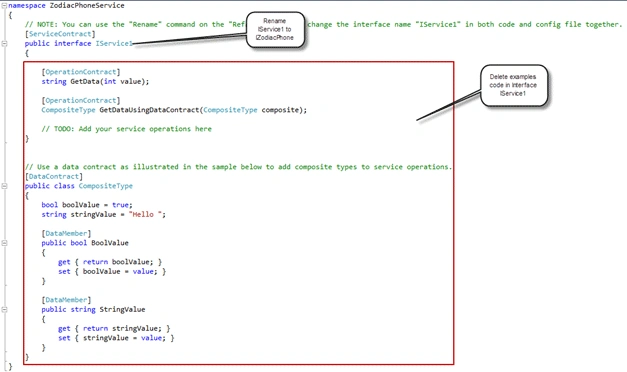
Create the interface method GetPrevision to be used by the main class.

Open the main class Service1. Rename the class to ZodiacPhone, change the interface to IZodiacPhone, and clear the examples code.

See the Interface code:


Manikavelu VelayuthamPosted Nov 16, 2010, 4:34 AM
Excellent Article with good explanation. Multiple Technologies involved in this single article is very much appreciated.
Suthish NairPosted Nov 5, 2010, 11:01 AM
if we have some kind of competition for best articles of the month... sure this will score.
Mahesh ChandPosted Nov 3, 2010, 7:48 AM
Great work Joao. Nice to see developers stepping up building games for Windows Phone. Keep it up!
Suthish NairPosted Nov 3, 2010, 1:57 AM
good work...