

Images are a crucial part of application navigation, usability, and branding. Xamarin.Forms applications need to be able to share images across all platforms, but also potentially display different images on each platform.
Before reading this article, please go through the following article.
Reading this article, you will learn how to add an image in Xamarin.Forms application for Android and Universal Windows Platform with XAML and Visual C# in cross platform application development.
The following important tools are required for developing UWP app.
- Windows 10 (Recommended)
- Visual Studio 2015 Community Edition (It is a free software available online).
- Using Visual Studio 2015 Installer, enable the Xamarin (cross-platform mobile development and C#/.NET) while installing/modifying Visual Studio 2015.
Now, we can discuss step by step app development.
Step 1

Step 2
Now, create project “XamFormImg_Droid”. Choose the target and minimum platform versions for your Universal Windows Project.


Step 5
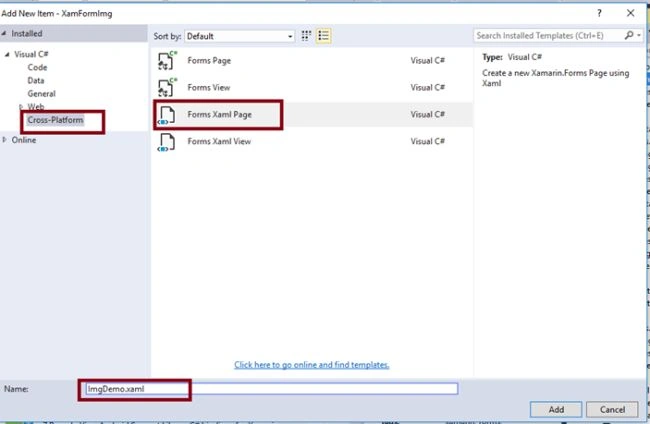
Step 6
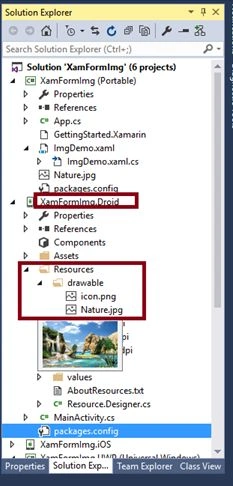
Select XamFormImg_Droid-> Resources-> Right click the drawable ->Add->Existing Item and add the image.

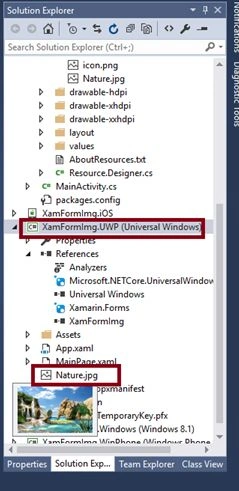
Select XamFormImg_UWP-> Right click, add the existing item, and add the image
- <StackLayout>
- <Label Text="Xamarin Forms Image Demo - UWP and Android" VerticalOptions="Center" HorizontalOptions="Center" />
- <Button x:Name="btnImg" Text=" Click the Button To display the Image." HorizontalOptions="Center"
- VerticalOptions="CenterAndExpand" Clicked="btnImgClicked" />
- <Image x:Name="imgDisp" ></Image>
- </StackLayout>

Step 8
- void btnImgClicked(object sender, EventArgs args)
- {
- imgDisp.Source = "Nature.jpg";
- }

Step 9

Step 10

Step 11
Uncheck all the Build and deploy options to the iOS, Windows, WinPhone. Check the Droid and UWP.

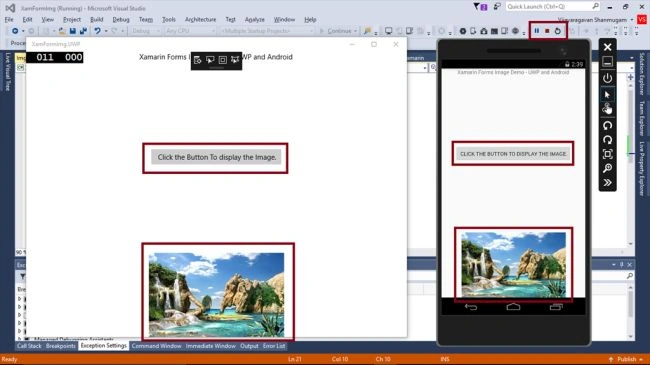
Summary
Now, you have successfully tested adding an Image in Xamarin Forms application, using Visual C# and Xamarin.
Anandu G NathPosted Jan 6, 2024, 9:41 AM
Good one ,well explained
Peter GriffinPosted Sep 12, 2018, 11:32 PM
Hi Vijayaragavan, could you please update for Visual Studio 2017? Thanks, Peter
Balakrishnan GPosted Jul 2, 2017, 2:37 AM
<ContentPage.Resources> <ResourceDictionary> <OnPlatform x:Key="CameraIcon" x:TypeArguments="ImageSource"> <OnPlatform.iOS>Assets/AppIcons/camera.png</OnPlatform.iOS> <OnPlatform.Android>camera.png</OnPlatform.Android> <OnPlatform.WinPhone>Assets/AppIcons/camera.png</OnPlatform.WinPhone> </OnPlatform> </ResourceDictionary> </ContentPage.Resources> <Button Grid.Column="1" x:Name="btnVideoCamera" VerticalOptions="CenterAndExpand" ContentLayout="Top,0" Image="{StaticResource CameraIcon}" HorizontalOptions="FillAndExpand" Text="Video" Margin="1"/>
Balakrishnan GPosted Jul 2, 2017, 2:35 AM
Bro i want to add image for button . In my button show text and Image both. My button show image and text in uWp app .but android not show.