Background
There are many ways to bind DropDownList in MVC. In this article we will learn how to bind simple dropdownlist using SelectListItem class. So let us learn in brief about SelectListItem class
What is SelectListItem Class
SelectListItem is a class which represents the selected item in an instance of the System.Web.Mvc.SelectList class.
It has the following properties.
- Text - It represent any text.
- Value - Its is the value against the particular text.
- Group - Group of items in single element .
- Disabled - Whether the selection item is disabled or not, default is false.
- Selected - Decides whether the item in list is by default selected or not, default is false.
Now let's implement the above description practically by creating the MVC application through the following steps:
Step 1 - Create an MVC application
- "Start", then "All Programs" and select "Microsoft Visual Studio 2015".
- "File", then "New" and click "Project" then select "ASP.NET Web Application Template", then provide the Project a name as you wish and click on OK.
- Choose MVC empty application option and click OK.
If you don't know how to create an MVC application, then please watch the following video.
Step 2 - Add controller class.
Right click on the Controller folder in the created MVC application and give the class name. I have given the class name Home and clicked OK.
HomeControlle.cs
- public class HomeController : Controller
- {
-
- public ActionResult Index()
- {
- List<SelectListItem> ObjItem = new List<SelectListItem>()
- {
- new SelectListItem {Text="Select",Value="0",Selected=true },
- new SelectListItem {Text="ASP.NET",Value="1" },
- new SelectListItem {Text="C#",Value="2"},
- new SelectListItem {Text="MVC",Value="3"},
- new SelectListItem {Text="SQL",Value="4" },
- };
- ViewBag.ListItem = ObjItem;
- return View();
- }
- }
In the above code I have added items in SelectedListItem class of MVC as a List and saved into the ViewBag. Now open the Index.cshtml view and write the following code.
Step 3 - Add View
Right click on the solution explorer of our created project and add the empty view. Now write the following code into the created view.
- @{
- ViewBag.Title = "Index";
- }
- <br /><br />
- <p>Dropdown Using viewbag with Html.DropDownList </p>
- <br />
- @Html.DropDownList("ListItem")
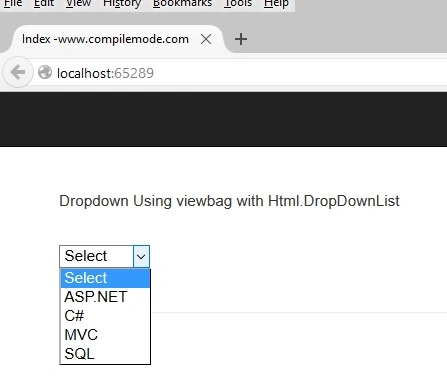
In the above code, we have passed the Viewbag name as string to the Html helper dropdownlist and now run the application the output will look like the following screenshot:
From all the above examples, we have learned how to bind the DropDownList in MVC.
Note
- Download the Zip file of the sample application for a better understanding.
- You can bind the list from the database, since this is an example so it did not used any database.
- Since this is a demo, it might not be using proper standards, so improve it depending on your skills.
- Handle the exception in the database or text file as per you convenience, since in this article I have not implemented it.
Summary
I hope this article is useful for all the readers. In my next article we will learn another technique to bind dropdownlist. If you have any suggestion please contact me.


sanjay pariyarPosted Apr 6, 2018, 2:57 AM
Please same dropdownvalues in database
Vithal WadjePosted Oct 24, 2015, 12:48 AM
Thanks
Ekrem TapanPosted Oct 23, 2015, 4:45 AM
thanks for tutorial
Vithal WadjePosted Oct 18, 2015, 5:26 AM
Thanks sir
Santhakumar MunuswamyPosted Oct 18, 2015, 2:45 AM
Good one
Vithal WadjePosted Oct 16, 2015, 2:17 AM
Thanks
Shridhar SharmaPosted Oct 15, 2015, 3:50 PM
nice share sir :)
Vithal WadjePosted Oct 15, 2015, 2:03 PM
thanks
Nithya MohanrajhPosted Oct 15, 2015, 7:31 AM
Neat and Simple.Thanks.
Vithal WadjePosted Oct 15, 2015, 7:31 AM
Thanks Atul Rawat sir
Rupali ShindePosted Oct 15, 2015, 7:09 AM
nice
Atul RawatPosted Oct 15, 2015, 6:44 AM
nice article sir
Vithal WadjePosted Oct 15, 2015, 5:27 AM
Thanks Sibeesh Venu sir
Vithal WadjePosted Oct 15, 2015, 5:27 AM
Thanks Rajeesh Menoth sir
Sibeesh VenuPosted Oct 15, 2015, 4:13 AM
Thanks for sharing
Rajeesh MenothPosted Oct 15, 2015, 3:28 AM
Good One..!!
Vithal WadjePosted Oct 15, 2015, 2:52 AM
Thanks Mukesh Kumar sir
Vithal WadjePosted Oct 15, 2015, 2:51 AM
Thanks Nilesh Jadav sir
Vithal WadjePosted Oct 15, 2015, 2:50 AM
Thanks Harshad Pansuriya sir
Mukesh KumarPosted Oct 15, 2015, 2:28 AM
Great JOB
Ankit BansalPosted Oct 15, 2015, 12:48 AM
nice..thanks for sharing
Nilesh JadavPosted Oct 15, 2015, 12:45 AM
GOod work sir !
Humayun Kabir MamunPosted Oct 15, 2015, 12:03 AM
Nice...
Harshad PansuriyaPosted Oct 15, 2015, 12:01 AM
nice one