

Introduction
Azure Functions is used for executing a small piece of code or “function” in a cloud and you pay only for the time your code executes. You can use a development language of your choice, such as C#, F#, PHP, Java etc. Some of the key features of Functions are - Choice of language, Pay-per-use pricing model, bring your own dependencies, integrated security, simplified integration, flexible development, and open-source. Please refer Azure Functions for more details. Refer to my previous articles below:
- How to create a simple Azure Function App using C#
- How to create Azure Function app to delete SharePoint Online list using CSOM
Azure Logic Apps is a fully managed integration Platform-as-a-Service which provides a way to automate the workflows and business process. You could easily integrate across different services in cloud and on-premise through connectors. Refer to my previous articles mentioned below:
- Create Blank Logic App
- Create Azure Logic App from template
- Add a condition to Azure Logic App.
- Add parameters to Azure Logic App
- How to send reminder emails for overdue tasks in SharePoint using Azure Logic App
In this article, you will see how to call Azure Functions in Logic Apps. I have created a custom list named “List Info” with “Title” field. Title field will contain the list name which will be deleted by the Azure Functions. I have already created an Azure function to delete SharePoint list. When a new item is created in List Info, Logic App will get triggered and execute the Azure function which will get the list name from the “List Info” list Title field and delete the respective list.
Azure Function Code
- #r "Microsoft.SharePoint.Client.dll"
- #r "Microsoft.SharePoint.Client.Runtime.dll"
- using System.Net;
- using Microsoft.SharePoint.Client;
- public static async Task<HttpResponseMessage> Run(HttpRequestMessage req, TraceWriter log)
- {
- string siteURL="https://c986.sharepoint.com/sites/Vijai/Subsite";
- string userName="[email protected]";
- string password="*********";
- // parse query parameter
- string name = req.GetQueryNameValuePairs()
- .FirstOrDefault(q => string.Compare(q.Key, "name", true) == 0)
- .Value;
- // Get request body
- dynamic data = await req.Content.ReadAsAsync<object>();
- // Set name to query string or body data
- name = name ?? data?.name;
- System.Security.SecureString secureString=new System.Security.SecureString();
- foreach(char ch in password)
- {
- secureString.AppendChar(ch);
- }
- SharePointOnlineCredentials creds=new SharePointOnlineCredentials(userName, secureString);
- using(var ctx=new ClientContext(siteURL))
- {
- ctx.Credentials=creds;
- List list=ctx.Web.Lists.GetByTitle(name);
- list.DeleteObject();
- ctx.ExecuteQuery();
- return list == null
- ? req.CreateResponse(HttpStatusCode.BadRequest, "Error retreiveing the list")
- : req.CreateResponse(HttpStatusCode.OK, "ListDeleted successfully " + name);
- }
- return null;
- }
Logic App design
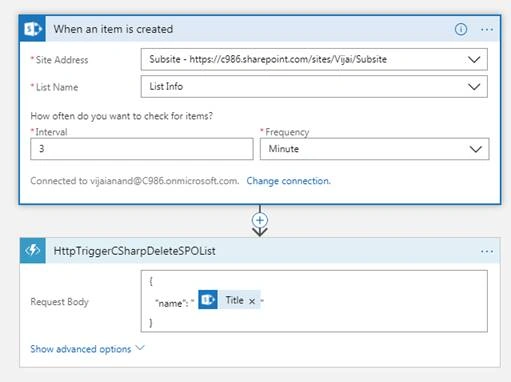
When an item is created
Used to trigger an event at regular time interval whenever a new item is created in the SharePoint Online list.
Add Azure Function
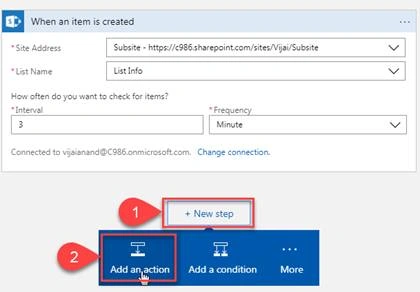
Once the above trigger is configured, click "Next Step" and then click "Add an action".
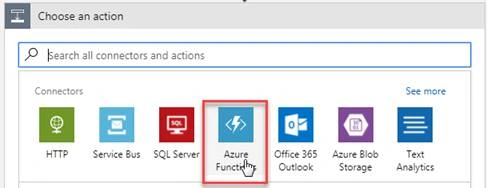
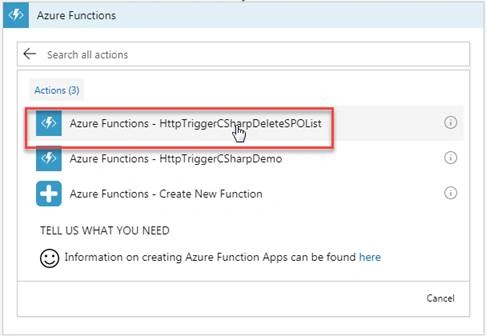
Click "Azure Functions".
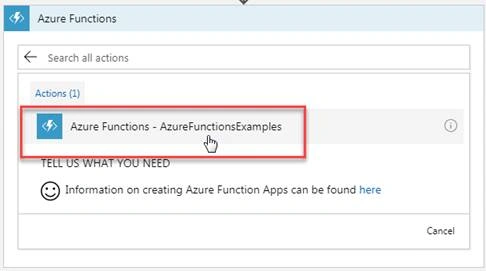
Select the Azure Functions which was created to delete the SharePoint Online List.
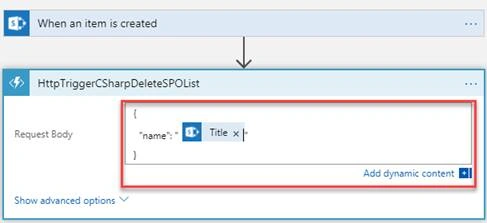
Enter the Request body as shown below.
Save and run the logic app to test it immediately.
The list names mentioned in the newly created items in “List info” will be deleted. Example: Documents, Configuration List & Test List A will be deleted from the site.
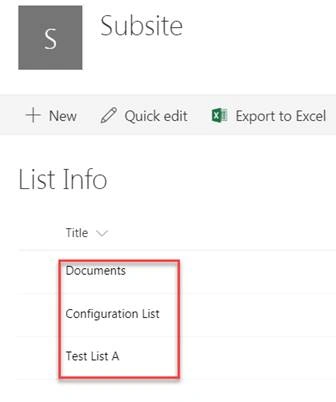
Result
In this article, you saw how to call Azure Functions in Logic Apps.
Ravi KhambhatiPosted Feb 19, 2020, 10:21 AM
Great article. In your example, you have hardcoded your user id and password in azure function. Could you please let me know the best practice for not added these details on function.