

Introduction
In this article, I describe how to create a Captcha in PHP. Such as when we submit a form a Captcha is often used. A Captcha is an image that is like a verification code. I am using a simple Captcha image without any other custom font to create an image or code. The Captcha code is stored in a session variable. We are using the session variable "cap_code" for the code the user entered and compare it to the session variable. A Captcha is a smartly blurred image and a Captcha code avoid spam and auto submissions. In this article, I am using "css" and "jquery" for additional functionality.
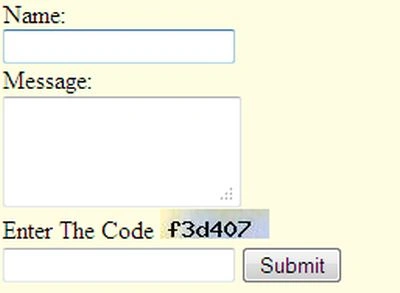
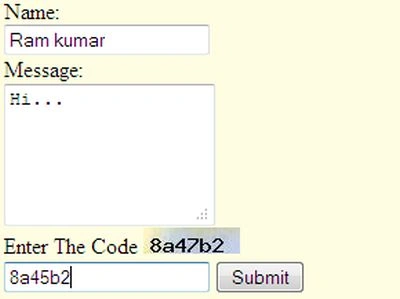
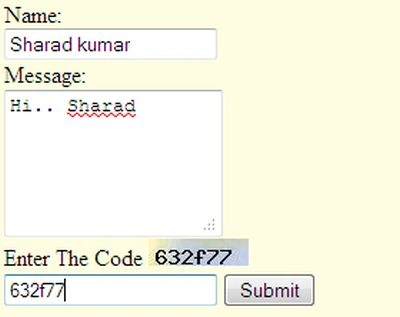
The $_SESSION[variable] creates the original Captcha code and $_POST['captcha'] - Captcha create a code and user enter the code in text box.
Example
This file is "captcha.php":
<?php
//session start
session start();
// calculates the MD5 hash of a string
$Str = md5(microtime());
//substr is a string function
$Str = substr($Str, 0, 6);
//cap_code is a session variable
$_SESSION['cap_code'] = $Str;
//cap_bg is image
$newImage = imagecreatefromjpeg("cap_bg.jpg");
$txtColor = imagecolorallocate($newImage, 0, 0, 0);
imagestring($newImage, 5, 5, 5, $Str, $txtColor);
header("Content-type: image/jpeg");
imagejpeg($newImage);
?>
Simply create a HTML form and include the jQuery code in the head section jQuery uses for validaion. I am using "CSS/JQuery"; I used that just for an extra enhancement.
<?php
//session start here
session_start();
$cap = 'notEq';//this variable use for message
if ($_SERVER['REQUEST_METHOD'] == 'POST')
{
if ($_POST['captcha'] == $_SESSION['cap_code'])
{
// Code is Correct. Do something here!
$cap = 'Eq';
}
else
{
// Code is wrong. Take other action
$cap = '';
}
}
?>
<html>
<head>
<script type="text/javascript" src="http://ajax.googleapis.com/ajax/libs/jquery/1.4.2/jquery.min.js"></script>
<script type="text/javascript">
$(document).ready(function () {
$('#submit').click(function () {
var name = $('#name').val();
var msg = $('#msg').val();
var captcha = $('#captcha').val();
if (name.length == 0) {
$('#name').addClass('error');
}
else {
$('#name').removeClass('error');
}
if (msg.length == 0) {
$('#msg').addClass('error');
}
else {


debasish mallickPosted Mar 12, 2015, 6:24 AM
Thank you Vinod. Your all topic very helpful and informative. Waiting for new topic.
Lekhu RaichandaniPosted Feb 9, 2013, 3:30 PM
thanx vinod it's very helpfull article.
Sharad GuptaPosted Feb 5, 2013, 5:03 AM
nice article