

Introduction
Xamarin.Forms is a cross platform UI toolkit, which allows the user to efficiently create native user interface layout. Code can be shared with all the devices (IOS, Android, Windows Phone and Win store app) .
System Requirements
- Mac / Windows 7++ Machine with 8 GB RAM.
- Xamarin Studio 5.0 or new version/ Visual Studio 2012 or new version.
Support Devices
Xamarin.Forms applications can be supported by the following operating systems devices,
- Android 4.0.3 (API 15) or higher.
- iOS 6.1 or higher.
- Windows Phone 8.1.
- Windows 8.1.
- Windows 10 Universal Apps.
- Windows Phone 8 Silverlight.

Step 1: Open Visual Studio ( Run - Devenv.exe),
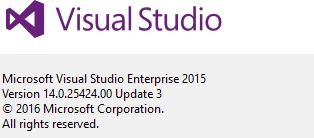
- My system has a following VS version with Xamarin.

Step 3: Open New Project template Cross Platform - Blank App(Xamarin .Forms .Portable),
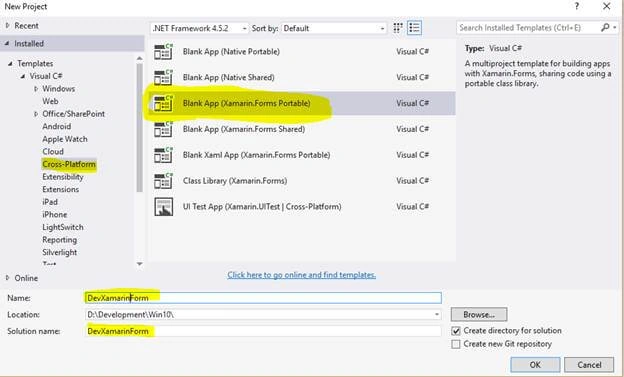
*** Solution and project name is DevXamarinForms
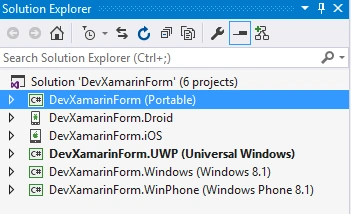
Visual Studio automatically creates following projects:
DevXamarinForms.Android, DevXamarinForms.iOS, DevXamarinForms.UWP, etc and a shared Portable Class Library (PCL) project named called DevXamarinForms (Refer below)
After creating a project, solution should be like, as shown below:
Step 4
Right click on Portable Project (DevXamarinForms) - Add - New Item -Cross-Platform - Forms Xaml Page and name it HomePage.CS.
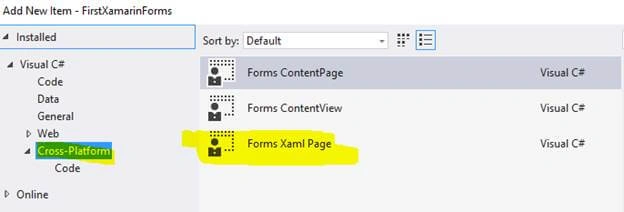
After the two new files are created under portable library HomePage.XAML and HomePage.XAML.cs, in HomePage.XAMl , the code, given below, will automatically be added into XAML page:
- <?xml version="1.0" encoding="utf-8" ?>
- <ContentPage xmlns="http://xamarin.com/schemas/2014/forms" xmlns:x="http://schemas.microsoft.com/winfx/2009/xaml" x:Class="DevXamarinForms.HomePage">
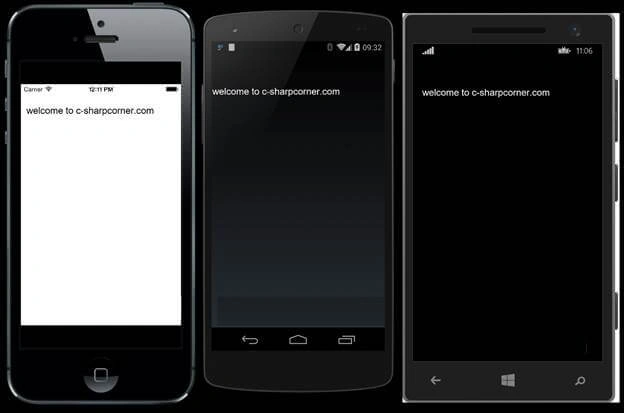
- <Entry x:Name="txtresult" Text="welcome to c-sharpcorner.com" />
- <!--Add this TextBox-->
- </ContentPage>
The HomePage.xaml.cs code at the backend file looks like, as shown below:
- using Xamarin.Forms;
- namespace DevXamarinForms
- {
- public partial class HomePage: ContentPage
- {
- public HomePage() {
- InitializeComponent();
- }
- }
- }
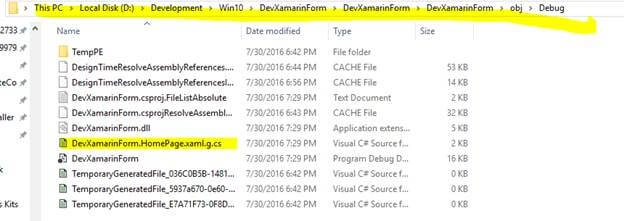
InitializeComponent() method will generate during build so build your portable library and the C# code file is generated from the XAML file. If you look in the \DevXamarinForms\DevXamarinForms\obj\Debug directory, you’ll find a file named DevXamarinForms.HomePage.xaml.g.cs. The ‘g’ stands for generated.
- namespace DevXamarinForm
- {
- using System;
- using Xamarin.Forms;
- using Xamarin.Forms.Xaml;
- public partial class HomePage: global::Xamarin.Forms.ContentPage
- {
- [System.CodeDom.Compiler.GeneratedCodeAttribute("Xamarin.Forms.Build.Tasks.XamlG", "0.0.0.0")]
- private global::Xamarin.Forms.Entry txtresult;
- [System.CodeDom.Compiler.GeneratedCodeAttribute("Xamarin.Forms.Build.Tasks.XamlG", "0.0.0.0")]
- private void InitializeComponent() {
- this.LoadFromXaml(typeof(HomePage));
- txtresult = this.FindByName < global::Xamarin.Forms.Entry > ("txtresult");
- }
- }
- }
- using System;
- using System.Collections.Generic;
- using System.Linq;
- using System.Text;
- using Xamarin.Forms;
- namespace DevXamarinForm
- {
- public class App: Application
- {
- public App() {
- // The root page of your application
- //MainPage = new ContentPage
- //{
- // Content = new StackLayout
- // {
- // VerticalOptions = LayoutOptions.Center,
- // Children = {
- // new Label {
- // HorizontalTextAlignment = TextAlignment.Center,
- // Text = "Welcome to Xamarin Forms!"
- // }
- // }
- // }
- //};
- MainPage = new HomePage(); // Add this code
- }
- }
- }
Ajay SinghPosted Dec 28, 2016, 11:29 PM
Very nice and useful article
Raja SekarPosted Sep 9, 2016, 8:55 AM
Very Useful..
SubashPosted Sep 8, 2016, 12:41 AM
Very nice sir
Kanimozhi MPosted Sep 1, 2016, 8:51 AM
Well
Thirumoorthy LakshmananPosted Aug 6, 2016, 9:54 PM
Fabulous article to know about Xamarin..!!
Munesh SharmaPosted Aug 2, 2016, 12:11 PM
Nice
Ashish KumarPosted Aug 2, 2016, 11:27 AM
Good Article with detailed explanations.
VenkatPosted Aug 2, 2016, 9:47 AM
Good article
divya viswanathPosted Aug 2, 2016, 8:14 AM
Good article. Very easy to understand the concept.
dinesh tirupatiPosted Aug 2, 2016, 7:33 AM
Clearly explained step by step to start with xamarin forms application
Ganesh GanbotePosted Aug 2, 2016, 7:23 AM
Good article to start with xamarin form.
Vignesh ManiPosted Aug 2, 2016, 5:41 AM
Nice one