
First open Visual Studio 2013. Create a new project and select WCF Service Application and give it the name WCFdemo.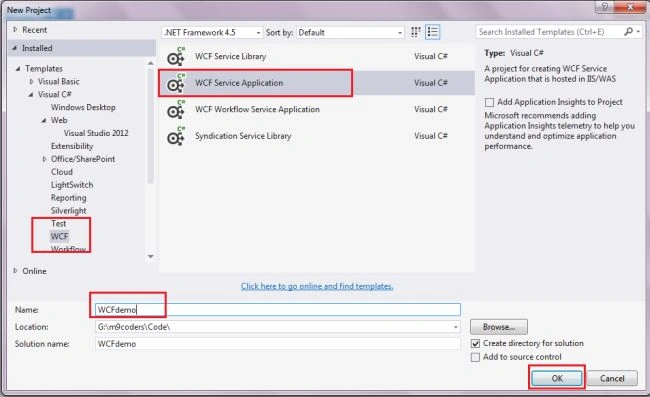
Then click OK. Now In Solution Explorer right-click on the WCFdemo project and seelct Add New Item and seelct ADO.Net Entity Data Model.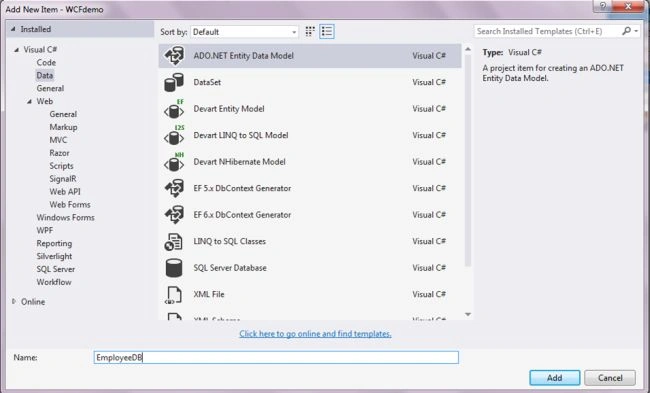
Add a database here and select Tables.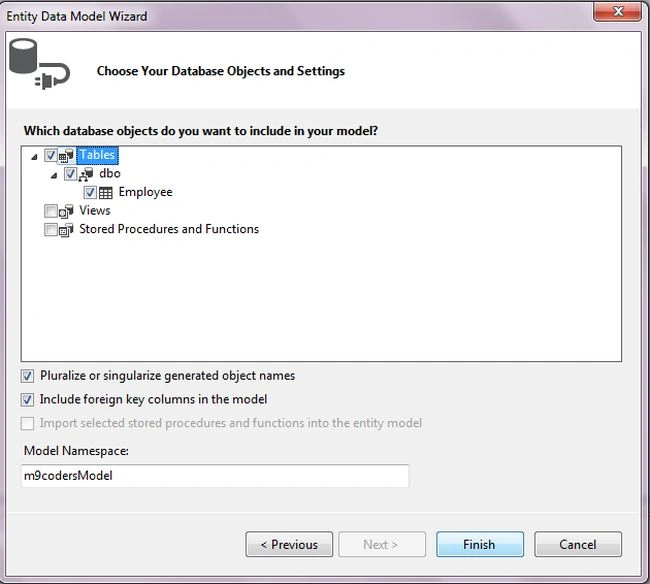
Now your Solution Explorer looks like this.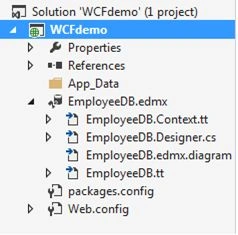
Now add a new item, WCF Service.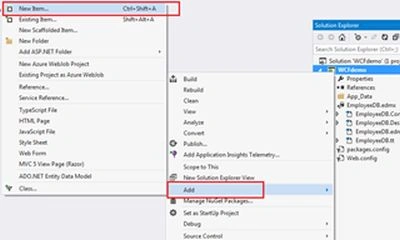
Select WCF Service and give it a name.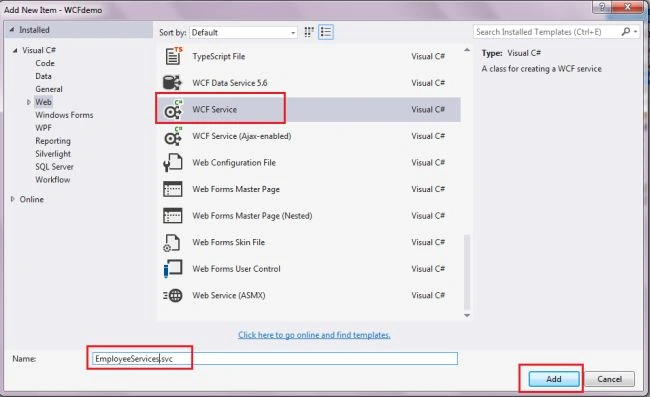
Now EmployeeServices.svc and IEmployeeServices.cs files have been added to Solution Explorer.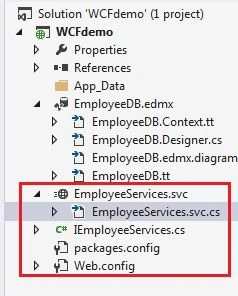
Now open the EmployeeServices.svc.cs file and write the following code.
Here Employee is my database table and m9codersEntities is the entity name.
Now open IEmployeeServices.cs and write the method name of the EmployeeServices.svc.cs file.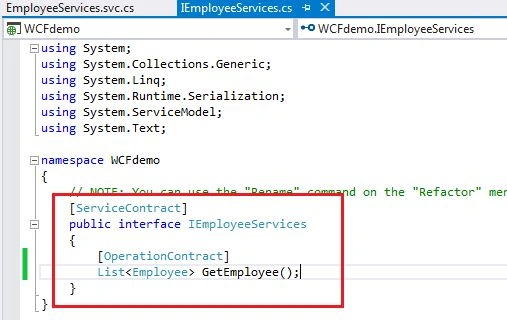
Now build the project. (Shortcut: F6).
Now run the EmployeeServices.svc file. (Ctrl+F5).
Then open the WCF Client popup window.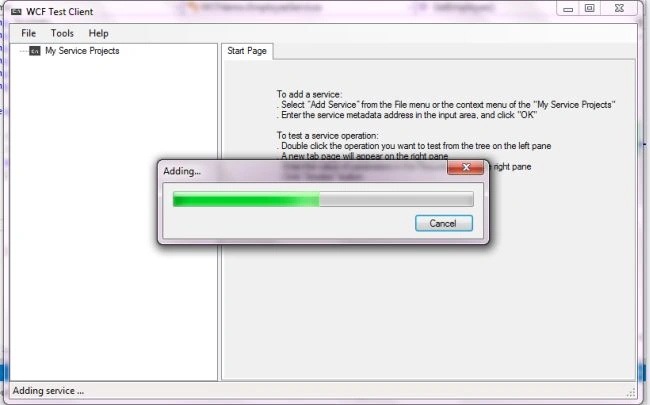
And your service will be added.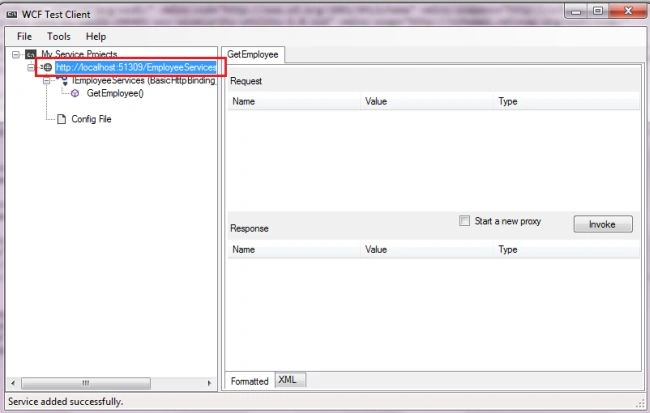
After the service has been added successfully copy the URL and paste it into your browser.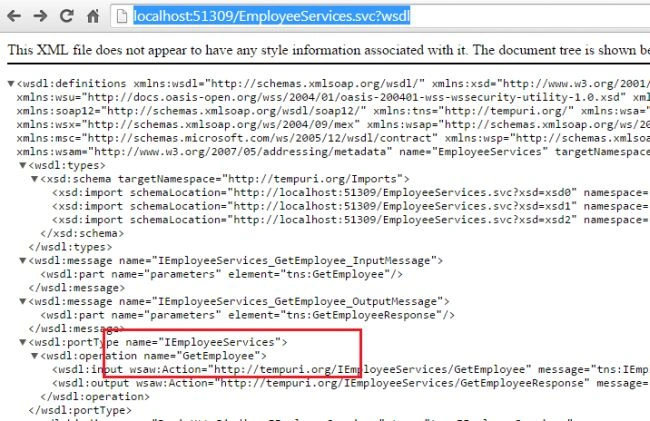
You can see all your methods here and now can be used in any project.
In the next article, I will explain how to use a WCF service in MVC.

How to Create WCF Service in Visual Studio 2013
Join the conversation! Your thoughts help the community grow.
Sign in to leave a comment
It is the same account you read, post and publish with — and you will come straight back to this page.
Dinesh GabhanePosted Nov 7, 2019, 8:36 AM
Very Nice Article
Christopher KuznickiPosted Dec 17, 2017, 5:36 AM
When it says add database here...how? I'm using VS 2015 and keep getting cannot login to local with your user name and password? Please help
Prasad pPosted Mar 5, 2017, 8:44 PM
How to publish this wcf service in IIS ? I WENT TO "PUBLISH" ON SOLN EXPLORER AND clicked on publish and selected the filesystem way . but when i browsed to this location , after mapping it to a new web site , it throws an error : endpoint not found.
Shubham KhandekarPosted Feb 21, 2017, 6:53 AM
Now what ?.............. :(
Shubham KhandekarPosted Feb 21, 2017, 6:52 AM
Error: Cannot obtain Metadata from http://localhost:61469/EmployeeServices.svc If this is a Windows (R) Communication Foundation service to which you have access, please check that you have enabled metadata publishing at the specified address. For help enabling metadata publishing, please refer to the MSDN documentation at http://go.microsoft.com/fwlink/?LinkId=65455.WS-Metadata Exchange Error URI: http://localhost:61469/EmployeeServices.svc Metadata contains a reference that cannot be resolved: 'http://localhost:61469/EmployeeServices.svc'. The requested service, 'http://localhost:61469/EmployeeServices.svc' could not be activated. See the server's diagnostic trace logs for more information.HTTP GET Error URI: http://localhost:61469/EmployeeServices.svc There was an error downloading 'http://localhost:61469/EmployeeServices.svc'. The request failed with the error message:-- Server Error in '/' Application. -------------------------------------------------------------------------------- The type 'Wcfdemo.EmployeeServices', provided as the Service attribute value in the ServiceHost directive, or provided in the configuration element system.serviceModel/serviceHostingEnvironment/serviceActivations could not be found. Description: An unhandled exception occurred during the execution of the current web request. Please review the stack trace for more information about the error and where it originated in the code. Exception Details: System.InvalidOperationException: The type 'Wcfdemo.EmployeeServices', provided as the Service attribute value in the ServiceHost directive, or provided in the configuration element system.serviceModel/serviceHostingEnvironment/serviceActivations could not be found. Source Error: An unhandled exception was generated during the execution of the current web request. Information regarding the origin and location of the exception can be identified using the exception stack trace below. Stack Trace: [InvalidOperationException: The type 'Wcfdemo.EmployeeServices', provided as the Service attribute value in the ServiceHost directive, or provided in the configuration element system.serviceModel/serviceHostingEnvironment/serviceActivations could not be found.] System.ServiceModel.Activation.ServiceHostFactory.CreateServiceHost(String constructorString, Uri[] baseAddresses) +60438 System.ServiceModel.HostingManager.CreateService(String normalizedVirtualPath, EventTraceActivity eventTraceActivity) +1420 System.ServiceModel.HostingManager.ActivateService(ServiceActivationInfo serviceActivationInfo, EventTraceActivity eventTraceActivity) +52 System.ServiceModel.HostingManager.EnsureServiceAvailable(String normalizedVirtualPath, EventTraceActivity eventTraceActivity) +641[ServiceActivationException: The service '/EmployeeServices.svc' cannot be activated due to an exception during compilation. The exception message is: The type 'Wcfdemo.EmployeeServices', provided as the Service attribute value in the ServiceHost directive, or provided in the configuration element system.serviceModel/serviceHostingEnvironment/serviceActivations could not be found..] System.Runtime.AsyncResult.End(IAsyncResult result) +488823 System.ServiceModel.Activation.HostedHttpRequestAsyncResult.End(IAsyncResult result) +174 System.ServiceModel.Activation.ServiceHttpHandler.EndProcessRequest(IAsyncResult result) +11 System.Web.CallHandlerExecutionStep.OnAsyncHandlerCompletion(IAsyncResult ar) +129 -------------------------------------------------------------------------------- Version Information:?Microsoft .NET Framework Version:4.0.30319; ASP.NET Version:4.6.1087.0 --.
Shubham KhandekarPosted Feb 21, 2017, 3:59 AM
Configuration ErrorDescription: An error occurred during the processing of a configuration file required to service this request. Please review the specific error details below and modify your configuration file appropriately. Parser Error Message: Sections must only appear once per config file. See the help topic <location> for exceptions. Source Error: Line 59: </service> Line 60: </services> Line 61: <behaviors> Line 62: <serviceBehaviors> Line 63: <behavior name="wcfconfig">
Shubham KhandekarPosted Feb 20, 2017, 7:07 AM
Public class EmployeeServices : IEmployeeServices { public List<Tbl_EmployeeDetails> GetTbl_EmployeeDetails() { EMPLOYEEDETAILSEntities db = new EMPLOYEEDETAILSEntities(); return db.Tbl_EmployeeDetails.*ToList();* } }
Richa SharmaPosted Jan 24, 2016, 11:06 PM
Hi Malvik, I need your help in linking a .msd file with wcf service and implementing it with jquery and html.
Christopher LiuPosted Dec 26, 2015, 11:04 PM
Hi Malvik, my test client application is in aother PC, so I have to use Ip address or server name instead of localhost. But I got error: Bad Request - Invalid Hostname HTTP Error 400. The request hostname is invalid. How to solve this issue? thanks.
Md. Raskinur RashidPosted Jan 8, 2015, 11:46 AM
Helpful for beginners. But need more explanation..