

In this article, I am going to explain various methods to delete duplicate rows from a table in SQL Server. This detailed article will cover the following topics as follows.
- Introduction
- Various methods to remove duplicate rows from a table in SQL Server
- Points to Remember
- Conclusion
First of all, we are going to create a new database using the SQL Server. You can still do this step if you already have an existing database.
Create a new Database
The following SQL query creates a new database and a table. Copy this query and execute it in Query Explorer or the command line.
-- Execute the following query to create the database...
IF (DB_ID('OnkarSharma_DeleteDuplicateRows') IS NOT NULL)
BEGIN
    USE master
    PRINT 'Database exists'
    DROP DATABASE OnkarSharma_DeleteDuplicateRows
    PRINT 'Database Dropped...'
END
GO
CREATE DATABASE OnkarSharma_DeleteDuplicateRows
PRINT 'New Database ''OnkarSharma_DeleteDuplicateRows'' Created'
GO
USE [OnkarSharma_DeleteDuplicateRows]
GO
-- Employee Table
CREATE TABLE [dbo].[Employee] (
    EmployeeID INT IDENTITY(31100, 1),
    EmployerID BIGINT NOT NULL DEFAULT 228866,
    FirstName VARCHAR(50) NOT NULL,
    LastName VARCHAR(50) NOT NULL,
    Email VARCHAR(255) NOT NULL,
    DepartmentID VARCHAR(100) NOT NULL,
    Age INT NOT NULL,
    GrossSalary BIGINT NOT NULL,
    PerformanceBonus BIGINT,
    ContactNo VARCHAR(25),
    PRIMARY KEY (EmployeeID)
);
Next, you can insert data to the tables using the SQL INSERT statement or by adding data directly to the tables in SSMS.
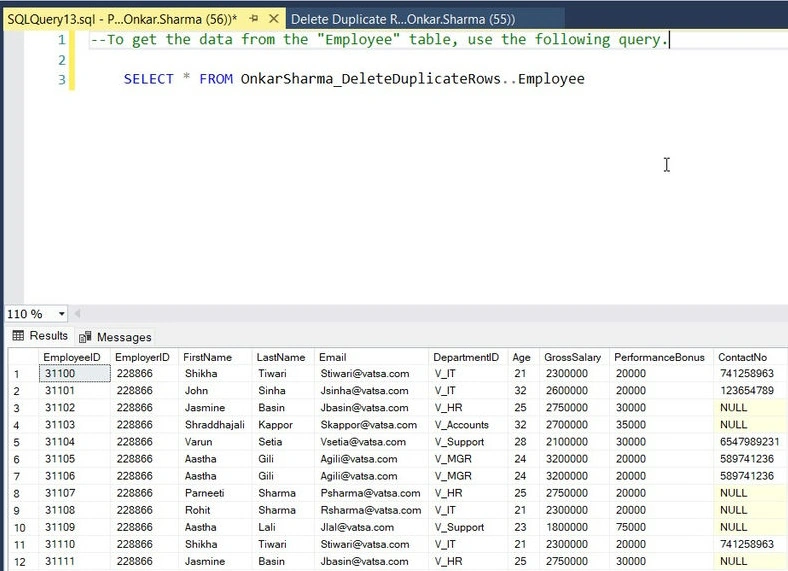
Let's check our table using the following query.
To get the data from the "Employee" table, use the following query.
SELECT * FROM OnkarSharma_DeleteDuplicateRows..Employee
3 Ways to Delete Duplicate Rows From A Table In SQL Server
Here are 3 common methods that you can use to delete duplicate records from a table In SQL Server.
Method 1. Using GROUP BY and Having Clause.
In this method, the SQL GROUP BY clause is used to identify and remove duplicate rows from a table.
Syntax
DELETE FROM <Table_Name>
WHERE ID NOT IN
(
    SELECT MAX(ID) AS MaxRecordID
    FROM <Table_Name>
    GROUP BY column1, columns2, ...
);
Example
DELETE FROM [Employee]
    WHERE EmployeeID NOT IN
    (
        SELECT MAX(EmployeeID) AS MaxRecordID
        FROM [Employee]
        GROUP BY [EmployerID], [FirstName], [LastName], [Email], [DepartmentID], [Age], [GrossSalary], [PerformanceBonus], [ContactNo]
    );
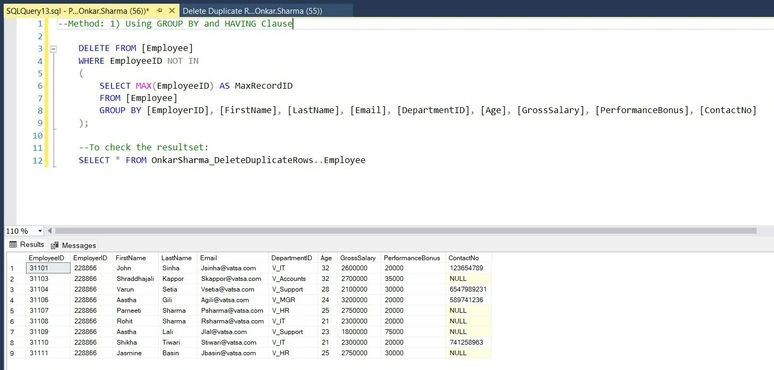
To verify the deletion, use the following query.
SELECT * FROM OnkarSharma_DeleteDuplicateRows..Employee
Method 2. Using CTE (Common Table Expression).
CTE (Common Table Expression) can also be used to remove duplicate rows from a table in SQL Server.
Syntax
WITH CTE AS (
    SELECT
        column1,
        column2,
        ...
        ROW_NUMBER() OVER (
            PARTITION BY column1, column2, ...
            ORDER BY column1, column2, ...
        ) AS RowNumber
    FROM
        <Table_Name>
)
DELETE FROM CTE
WHERE RowNumber > 1;
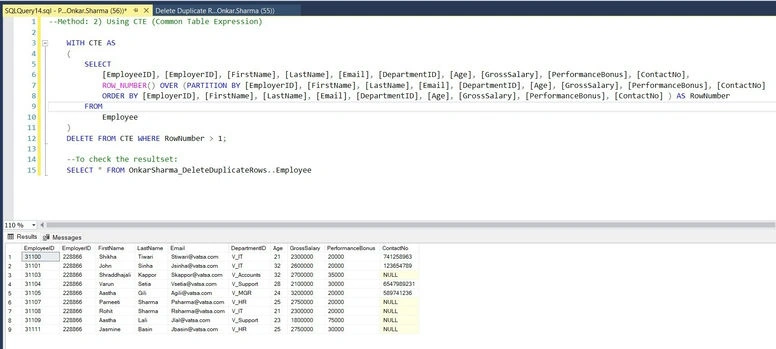
Example
Join the conversation! Your thoughts help the community grow.