

Platform Support
Here, we have used DependencyService to download any file from server path because we cannot download any file directly in Xamarin.Forms. We will see the DependencyService for Android and iOS Platforms. It is similar to UWP with slight changes.
DependencyService
Xamarin.Forms allows developers to define behavior in platform-specific projects. DependencyService then finds the right platform implementation, allowing shared code to access the native functionality. To know more about DependencyService Click Here.
Without much introduction, we will skip into the coding part of this article.
Steps
I have explained the method to create DependencyService with the steps as shown in the following.
- Step 1: Creating new Xamarin.Forms Projects.
- Step 2: Setting up AndroidManifest and info.plist
- Step 3: Creating a Dependency Service for Android and iOS Platforms.
- Step 4: Implementing the functionality to download the file in PCL.
Step 1 - Creating new Xamarin.Forms Projects
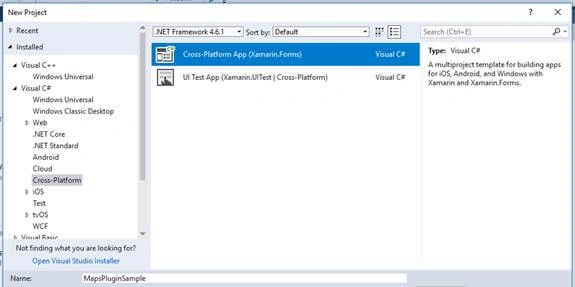
Create New Project by Selecting New - Project - Select Xamarin Cross-Platform App and click OK.
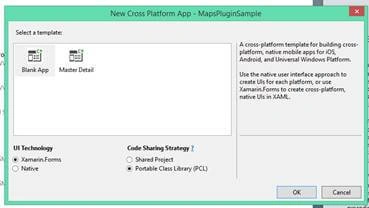
Then Select Android and iOS Platforms as shown below with Code Sharing Strategy as PCL or .NET Standard and click OK.
Step 2 - Setting up AndroidManifest and info.plist
Before starting, we need to make some setup respective to the Platforms.
For Android
- Expand your Android Project and open Properties.
- Then add or check the following permissions.
- INTERNET
- WRITE EXTERNAL STORAGE
- Then click Save.
For iOS
- Expand your iOS Project and Open your Info.plist file with XML Editor.
- Then add the following Permissions.
- <key>NSPhotoLibraryAddUsageDescription </key>
- <string>Need permission to save files.</string>
- It provides permission to save file.
- <key>NSPhotoLibraryUsageDescription </key>
- <string>Need permission to access files.</string>
- It provides permission to access files.
From iOS 11, Separate Permission Patterns are followed for saving and Accessing the Storage or Gallery.
Step 3 - Creating Dependency Service by Platform wise
In Xamarin.Forms, we need to go with dependency service to download files.
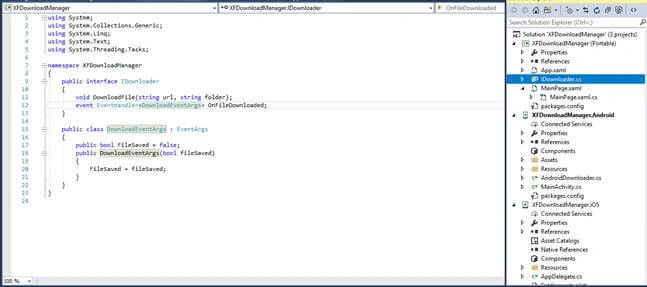
- First, we need to create an interface in your PCL or Shared Projects. In my case, I have created an Interface named “IDownloader.cs”.
- Then Paste the following code in that.
- public interface IDownloader
- {
- void DownloadFile(string url, string folder);
- event EventHandler<DownloadEventArgs> OnFileDownloaded;
- }
- Here, I have create a custom event handler to notify app users about file download. You have to create a class named “DownloadEventArgs” and paste the following code.
- public class DownloadEventArgs : EventArgs
- {
- public bool FileSaved = false;
- public DownloadEventArgs(bool fileSaved)
- {
- FileSaved = fileSaved;
- }
- }
For Android
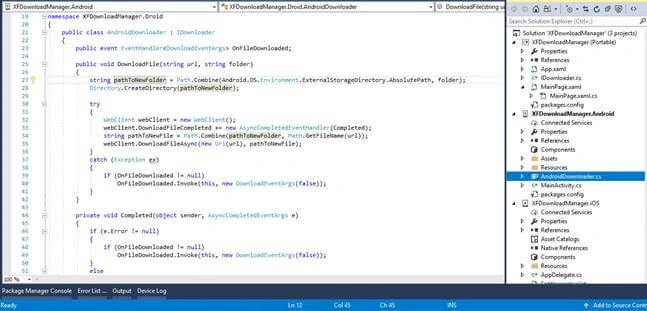
- Create a class named “AndroidDownloader.cs” in your Android Project and implement the class with “IDownloader” interface created in your Portable Library.
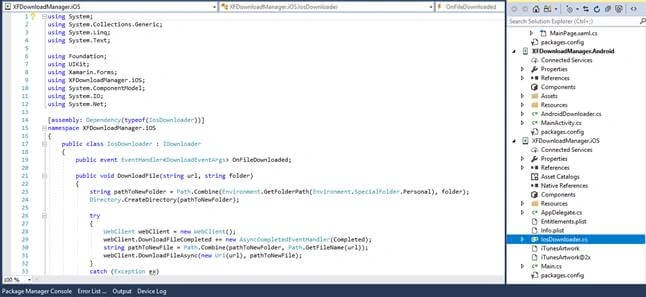
- We can use WebClient to download any file from the given URL. WebClient is used for both Android and iOS Platforms to download files.
- You can find the code used in Android Platform.
- public class AndroidDownloader : IDownloader
- {
- public event EventHandler<DownloadEventArgs> OnFileDownloaded;
- public void DownloadFile(string url, string folder)
- {
- string pathToNewFolder = Path.Combine(Android.OS.Environment.ExternalStorageDirectory.AbsolutePath, folder);
- Directory.CreateDirectory(pathToNewFolder);
- try
- {
- WebClient webClient = new WebClient();
- webClient.DownloadFileCompleted += new AsyncCompletedEventHandler(Completed);
- string pathToNewFile = Path.Combine(pathToNewFolder, Path.GetFileName(url));
- webClient.DownloadFileAsync(new Uri(url), pathToNewFile);
- }
- catch (Exception ex)
- {
- if (OnFileDownloaded != null)
- OnFileDownloaded.Invoke(this, new DownloadEventArgs(false));
- }
- }
- private void Completed(object sender, AsyncCompletedEventArgs e)
- {
- if (e.Error != null)
- {
- if (OnFileDownloaded != null)
- OnFileDownloaded.Invoke(this, new DownloadEventArgs(false));
- }
- else
- {
- if (OnFileDownloaded != null)
- OnFileDownloaded.Invoke(this, new DownloadEventArgs(true));
- }
- }
- }
Octavio ManzanoPosted Apr 21, 2022, 5:21 PM
Hi, Is there option to put a progressbar and show the percentage of downloading?
Mushtaq M APosted Jul 22, 2020, 11:59 PM
Check the downloader is bull or not
NATHANIAL COVELLPosted Jul 13, 2020, 6:54 PM
Hello, sorry, noob to phone apps. I get 'Object reference not set to an instance of an object.' when I hit this line: downloader.OnFileDownloaded += OnFileDownloaded;
qasim saleemPosted Jun 6, 2020, 6:18 PM
Okay it seems I have found the solution: Uninstall app from the device. Deploy & install app with Visual Studio. Goto Settings->Applications->Application Manager and find your app. Permissions will not be set. Set the permissions manually. Redeploying should now work fine without having to set permissions manually again. Good luck!
Rutuja shindePosted May 6, 2020, 4:47 AM
Hi, How to download the image in Base64 format??
Mashkur SaiyeedPosted Jan 13, 2020, 11:57 PM
Hi Mushtaq, First of all thanks for your article. I can download the file but the OnFileDownloaded event is not fired. I have added the event in the Page constructor. Am I missing anything?
leandro nunezPosted Sep 2, 2019, 4:55 PM
System.UnauthorizedAccessException Access to the path '/storage/emulated/0/myfolder' is denied. I get this exception, could you help me please? Also, let's say a have successfully downloaded the file in an older version of android emulator, how do i view/show the file in the app. Thanks mate, I would really appreciate your help because i'm desperate.
Pedro SoaresPosted Aug 1, 2019, 7:41 AM
Hello i followed your recommendations but I keep getting an error downloader.OnFileDownloaded += OnFileDownloaded; and downloader.DownloadFile("http://www.dada-data.net/uploads/image/hausmann_abcd.jpg", "XF_Downloads"); - object reference not set to an instance of an object and I don't know why.
Bhanu PrasadPosted May 22, 2019, 9:20 PM
How to download a file which is there in my PCL project not from url (http://www.dada-data.net/uploads/image/hausmann_abcd.jpg").
Hasan HIDIROGLUPosted Apr 30, 2019, 9:26 AM
Hi.. downloaded images bad or not downloaded ! any solution for download images correctly.
ayaz shaikhPosted Mar 15, 2019, 7:03 AM
Same issue Hi..I have implemented your solution.. but i am unable to find the downloaded file in ios. Can you please tell where the files are downloaded on ios and how to find that folder?
Arsh SinghPosted Feb 26, 2019, 12:24 AM
Hi..I have implemented your solution.. but i am unable to find the downloaded file in ios. Can you please tell where the files are downloaded on ios and how to find that folder?
Fadi RezqPosted Feb 19, 2019, 4:22 AM
Hi... why have you used a DependencyService instead of creating it directly in the Shared Project?
Vikram JadhavPosted Dec 6, 2018, 6:25 AM
How can I use this in MVVM?
Ram KumarPosted Oct 31, 2018, 12:35 PM
How to give download progress bar and download file notification in xamerian forms. Please guide and help me.
sujata bhaviPosted Oct 22, 2018, 8:30 AM
Hi Mushtaq, how to pass multiple urls to this instead of hard coded single url?? And in my case i get urls in loop after user selects multiple checkboxes for download all button. How to do this, can you help??
Ajay SainiPosted Sep 11, 2018, 2:32 PM
Hi Mushtaq, your article is very good but can you please clarify if this will download the files into External Storage only? I had implemented it and message shows file has been downloaded but nothing is in my phone. I have only Internal Memory.
amit kumarPosted Aug 29, 2018, 4:41 AM
How can I show progress bar on notification section while file downloading
Patrick JordanPosted Jul 12, 2018, 9:09 AM
Hi Mushtaq, what's the reason for using a DependencyService? Why can't you just download directly?
Alper TUNGIRPosted Jul 3, 2018, 2:23 AM
Thank you : )
Rajesh JhaPosted Jun 15, 2018, 1:15 PM
Keep sharing....Thanks Man.
rameshkumarp pPosted Jun 9, 2018, 5:07 AM
Hi Mushtaq. Your Pieces of information is helping much for Xamarin developers. Can you please let me know how to print a small POS receipt to receipt printer using Xamarin Android/UWP applications with visual studio.?. Suggest how can we achieve this local USB Printer from Mobile device?.
Munish APosted Jun 5, 2018, 9:36 PM
Nice article keep sharing......