

Introduction
Amazon S3 (Simple Storage Service) is a cloud storage service that allows you to store and manage files securely. To protect your data, you can use encryption. In this article, we’ll show you how to enable Server-Side Encryption (SSE) for an existing Amazon S3 bucket in your AWS account.
Step 1. Access Your S3 Bucket
- In the AWS Management Console, type S3 in the search bar and click on S3.
- You will see a list of your existing buckets. Click on the bucket where you want to enable encryption.
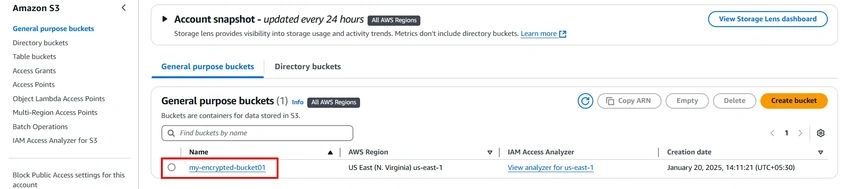
Step 2. Enable Server-Side Encryption (SSE).
To enable encryption on your existing S3 bucket, follow these steps.
- In your selected S3 bucket, click on the Properties tab.
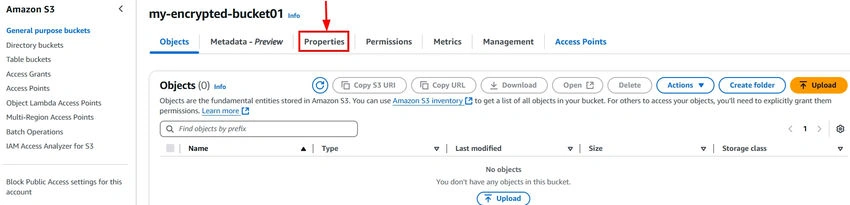
- Scroll down to the Default encryption section under Bucket settings.
- Click on Edit to modify the encryption settings.

- Select Enable under Default encryption.
- Choose the Amazon S3 key (SSE-S3) as the encryption option.
- Click Save Changes.
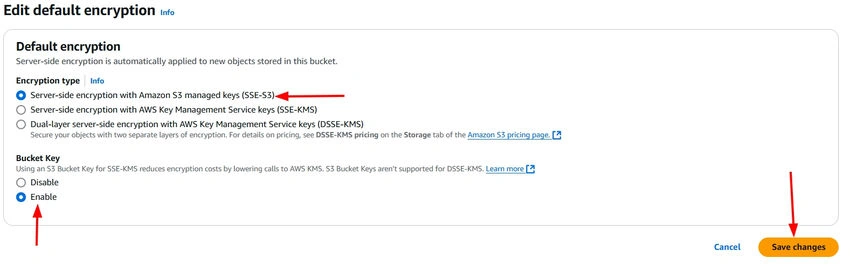
Now, any new files uploaded to this bucket will automatically be encrypted using SSE-S3.
Step 3. Upload Files to the S3 Bucket.
Now that your bucket is set up for encryption, you can upload files, and they will automatically be encrypted using SSE-S3. To upload files.
- In your S3 bucket, click on Upload.
- Drag and drop files or click Add files to select files from your computer.
- Click Upload to start the upload process.
Step 4. Verify Encryption for Uploaded Files.
Once your files are uploaded, you can verify that they are encrypted.
- Click on the file you uploaded.
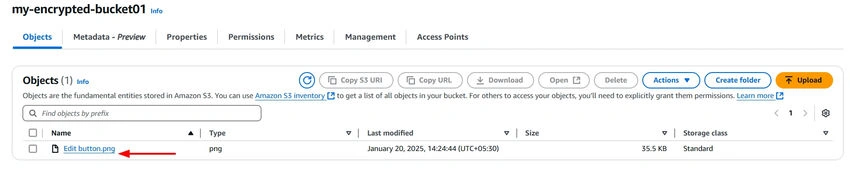
- In the Properties section, check the Encryption setting.
- You should see SSE-S3 under the encryption section, confirming that your file is encrypted.

Conclusion
Enabling Server-Side Encryption (SSE) in your Amazon S3 bucket is a simple and effective way to secure your data. By setting up SSE-S3, all new files uploaded to your bucket are automatically encrypted, ensuring enhanced protection. This easy step helps safeguard sensitive information and maintain compliance with security best practices.
Join the conversation! Your thoughts help the community grow.