

Introduction
When you have to run your Angular project or any ng command, you may see that the system shows the below error:
ng: File C:\Users\admin\AppData\Roaming\npm\ng.ps1 cannot be loaded because running scripts is disabled on this system. For more information, see about_Execution_Policies at https:/go.microsoft.com/fwlink/?LinkID=135170.
At line:1 char:1
+ ng --v
+ ~~
+ CategoryInfo : SecurityError: (:) [], PSSecurityException
+ FullyQualifiedErrorId : unauthorized access
Solution
This error occurs when your system has disabled the running script and your system is can’t accept the ng commands. This error occurs due to security reasons and won't let the script be executed on your system without your approval. Then you have to open the PowerShell with administrative rights.
To solve this problem, you need to follow a few steps:
Step 1
First, you have to need to open the command prompt and run this command.
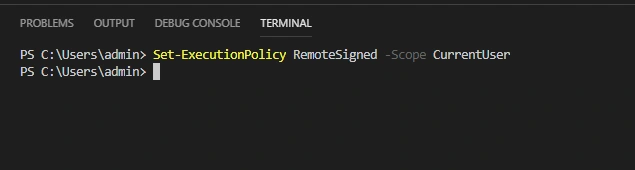
set-ExecutionPolicy RemoteSigned -Scope CurrentUser
When you run this command, you can see that your system has set all policies for the current user as remotely. It will take few seconds to complete this process.
The image will be shown like below.
Now you have to go to the next step.
Step 2
Now you have to run the second command on your system. This command is:
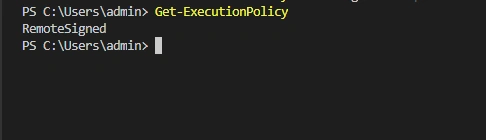
Get-ExecutionPolicy
When you have run this command your system has a show "RemoteSigned". If you have received this message, then your problem will be solved. Now you have to go to the next step to view the list of policy which policy has been updated by the last commands.
The image will be shown as below:
Step 3
To view their policy, you need to run this command in your command prompt:
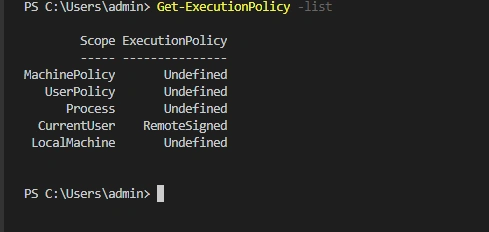
Get-ExecutionPolicy -list
When you run this command, a few policies are shown on your monitor screen. These policies are:
Scope ExecutionPolicy
----- ---------------
MachinePolicy Undefined
UserPolicy Undefined
Process Undefined
CurrentUser RemoteSigned
LocalMachine Undefined
CurrentUser RemoteSigned
LocalMachine Undefined
Now you can see your system execution policy list. You have successfully solved your problem. Now you need to go to the command prompt and check that your problem is solved.
Now I run an ng command in my command prompt. This command is "ng --version". To check my CLI version. When I run it, the ng command the output will be shown like this:
OUTPUT
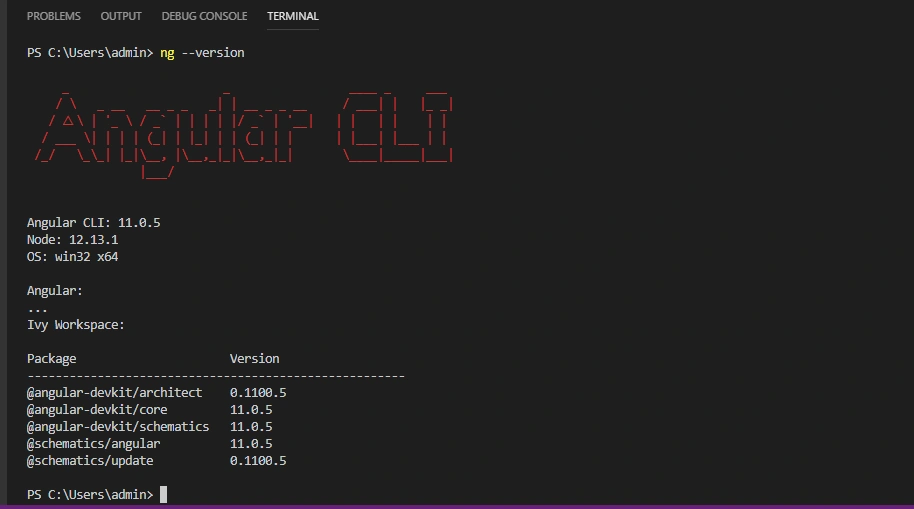
You can see that the ng command has been run successfully. Now my problem is solved.
I hope you enjoyed this article. To learn more about Angular, follow me, and to learn more technology, follow C# Corner.
KiwiFruitPosted Apr 25, 2024, 7:37 AM
Thanks, helps me save lots of time
Sujit PrabhakaranPosted Feb 17, 2024, 6:25 AM
Just I now I ran into this error and your article save my time. So thank you from the bottom of my heart!
JamaykaPosted Feb 28, 2023, 6:57 AM
Thank you so much... You saved my time..
Md. ShahriarPosted Jan 22, 2023, 4:02 AM
Very nice....Thanks a lot....!!!
Chaman GautamPosted Dec 1, 2022, 6:20 AM
Thanks dear
Sarathlal SaseendranPosted Dec 1, 2022, 3:09 AM
Superb article. Solved my big issue today
Anil GangwarPosted Aug 30, 2022, 1:15 PM
Thanks .. Great .....
Soumik MukhopadhyayPosted Jun 24, 2022, 3:30 PM
Thanks. Problem solved
Dharmendra Kumar PanditPosted Apr 15, 2022, 9:35 AM
Thank you working fine.... Great
Trek TreetechnoxPosted Mar 22, 2022, 10:22 AM
Great job, thank you
Noura ZakiPosted Feb 17, 2022, 7:25 PM
Thank you! it worked
Tien TranPosted Feb 15, 2022, 2:05 PM
Thank you!
Dhanush KPosted Feb 1, 2022, 9:06 AM
Thank you!!!
Alex Sylvain LuengaPosted Jan 31, 2022, 2:59 PM
Ng : The term 'ng' is not recognized as the name of a cmdlet, function, script file, or operable program. Check the spelling of the name, or if a path was included, verify that the path is correct and try again.
George JewellPosted Jan 27, 2022, 2:54 PM
Thank you sir! That fixed my problem.
Muhammad SalemPosted Dec 2, 2021, 2:33 PM
Thanks a lot it solved my problem
Đạtt TiếnPosted Nov 17, 2021, 9:58 AM
Thank you, i solved my problem
Carlos AdpPosted Nov 15, 2021, 1:38 PM
You are great my man, you are just great!!!!! ::)))))
Prasobh PrabhakaranPosted Oct 13, 2021, 5:39 PM
Thank you brother.
Syed ShahPosted Oct 8, 2021, 7:10 PM
Sir its not work for me because when i opened my project using cmd then ng works and when i type ng in visual studio code then its didn't works ? i don't Know Why?
Rajesh KumarPosted Oct 4, 2021, 6:30 AM
Thanks, this solved my problem
Như PhanPosted Sep 30, 2021, 9:15 AM
It's so helpful, thank you very much <3
Sanjeeta KumariPosted Sep 15, 2021, 7:49 AM
Thank you very much..... it worked for me .. saved my day
venkatesh mandaPosted Sep 9, 2021, 12:20 PM
Thank you very much..... it worked for me .. saved my day
Krzysztof WiewióraPosted Sep 8, 2021, 9:36 AM
Thank You for solution. It's work.
Matineh ShakibPosted Sep 6, 2021, 1:41 PM
Good luck, u help me a lot
OM mPATILPosted Aug 25, 2021, 12:03 PM
Thank you You really saved my life, I was on this of like 3 hours and was on the verge of formating my laptop
Rohi KakadPosted Aug 21, 2021, 3:27 PM
Does Administrator login mandatory in order to run this command ?
Jayanti RoyPosted Aug 19, 2021, 4:23 PM
Thanks a lot lot Chaman , U saved my Life of Angular :). I am new baby in angular , i was loosing hope, But your post helped me to get out of this problem. Waishe mujhe solution samaj nahi aaya ki kya kiya, but mera run ho gaya :)
Hemasandhya baskarPosted Aug 15, 2021, 3:56 PM
Thank u so much ..It really helped me a lot
Sarvani LoyaPosted Aug 5, 2021, 3:06 PM
Hey nice description but I m still facing issue in the step-1 itself . I am getting error like --> set-ExecutionPolicy RemoteSigned -Scope CurrentUser'set-ExecutionPolicy' is not recognized as an internal or external command,operable program or batch file.
Bhavin PandyaPosted Jul 1, 2021, 4:26 AM
Thanks Chaman for your extended help for this issue. Simple but still frustrating issue. Thanks a lot.
Priya TPosted Jun 29, 2021, 5:47 PM
Thanks alot . I tried to rectify these issues long hours but I couldn't .After following the simple steps here i solved it .Thanks for Sharing
super testPosted Apr 15, 2021, 9:59 PM
Your the master, perfect description, thank you very much :)
syuhadah rahimPosted Feb 7, 2021, 7:55 AM
Hi, I've succeed till step 3. but when I want to check my CLI version “ ng --version”, Got this message: ng : ng : The term 'ng' is not recognized as the name of a cmdlet, function, script file, or operable program. Check the spelling of the name, or if a path was included, verify that the path is correct and try again.At line:1 char:1+ ng --version + ~~ + CategoryInfo : ObjectNotFound: (ng:String) [], CommandNotFoundException + FullyQualifiedErrorId : CommandNotFoundException