

What is a barcode?
A barcode is a small image of lines (bars) and spaces that is affixed to retail store items, identification cards, and postal mail to identify a particular product number, person, or location. The code uses a sequence of vertical bars and spaces to represent numbers and other symbols. A bar code symbol typically consists of five parts: a quiet zone, a start character, and data character a stop character, and another quiet zone.
Now, we will see how to generate the barcode. Let us see step by step.
Step 1
First, we have to download the Free Barcode Font from this link or also this link
->After downloading the file, we extract the ZIP file.
-> Click and Execute INSTALL.exe file.
-> After installation is completed restart our machine.
Step 2
Open our Visual Studio and create a web application in MVC. After that, we add a controller and add an action to get action method.
- public ActionResult GenerateBarCode()
- {
- return View();
- }
Now, we need to add a View and design the our View page using HTML.
- @using (Html.BeginForm("GenerateBarCode", "BarCodeDemo", FormMethod.Post))
- {
- <div class="row">
- <div class="col-md-3"></div>
- <div class="col-md-6">
- <h2>Generate Bar Code</h2>
- <input type="text" name="barcode" Class="form-control col-4" ID="textCode" />
- <br /><br />
- <input type="submit" Class="btn btn-primary" ID="btnGenerate" value="Generate" />
- <hr />
- @if (ViewBag.BarcodeImage != null)
- {
- <img src="@ViewBag.BarcodeImage" alt="" />
- }
- </div>
- </div>
- }
After that we will create a post action method and write the below code.
- [HttpPost]
- public ActionResult GenerateBarCode(string barcode)
- {
- using (MemoryStream memoryStream = new MemoryStream())
- {
- using (Bitmap bitMap = new Bitmap(barcode.Length * 40, 80))
- {
- using (Graphics graphics = Graphics.FromImage(bitMap))
- {
- Font oFont = new Font("IDAutomationHC39M", 16);
- PointF point = new PointF(2f, 2f);
- SolidBrush whiteBrush = new SolidBrush(Color.White);
- graphics.FillRectangle(whiteBrush, 0, 0, bitMap.Width, bitMap.Height);
- SolidBrush blackBrush = new SolidBrush(Color.DarkBlue);
- graphics.DrawString("*" + barcode + "*", oFont, blackBrush, point);
- }
- bitMap.Save(memoryStream, ImageFormat.Jpeg);
- ViewBag.BarcodeImage = "data:image/png;base64," + Convert.ToBase64String(memoryStream.ToArray());
- }
- }
- return View();
- }
In the above code I used many classes and properties; let's see what the uses of given classes and properties are step by step
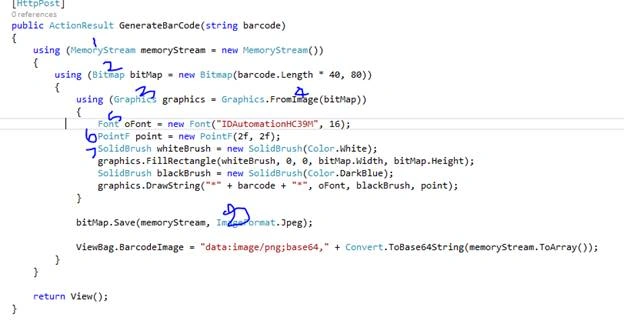
- MemoryStream
Creates a stream whose backing store is memory. - Bitmap
Encapsulates a GDI+ bitmap, which consists of the pixel data for a graphics image and its attributes. A System.Drawing.Bitmap is an object used to work with images defined by pixel data. - Graphics
Encapsulates a GDI+ drawing surface. - FromImage
Creates a new System.Drawing.Graphics from the specified System.Drawing.Image. System.Drawing.Image from which to create the new System.Drawing.Graphics. - Font
The installed Barcode font. - PointF
Represents an ordered pair of floating-point x- and y-coordinates that defines a point in a two-dimensional plane. - SolidBrush
Defines a brush of a single color. Brushes are used to fill graphics shapes, such as rectangles, ellipses, pies, polygons, and paths. This class cannot be inherited.
- ImageFormat
Specifies the file format of the image. And we can set multiple types of images and can choose any one.


Haziq AbbasiPosted Dec 30, 2022, 8:12 AM
Its Jst Create Image of which Number I add not Barcode, Whats the Problem? please tell me
Haziq AbbasiPosted Dec 8, 2022, 1:06 PM
How to create barcode for partial views for multiple rows. when data come from sql database
ankita srivastavaPosted Jan 14, 2021, 11:29 AM
Plz provide full information it creates more confusion.i request u
ankita srivastavaPosted Jan 14, 2021, 11:29 AM
What is barcodeDemo?
Muhammad IlyasPosted Dec 30, 2020, 11:10 AM
I need fixed size barcode
Rachmat PutraPosted Oct 8, 2020, 9:59 PM
Not working to read, i upload with png file and then get error index was outside the bounds of the array
sriPosted Aug 7, 2020, 7:49 AM
Barcode is not generating only the text typed in the textbox is displaying i installed font barcode also can u send me again pls
rabeea rehmanPosted Jun 29, 2020, 9:28 AM
Its perfectly working Thanks for great Help
krutarth bhavsarPosted Sep 8, 2019, 11:39 PM
Not WORKING Bro
Khushboo KumariPosted Jul 23, 2019, 6:59 AM
Nice it's working properly
Marfin sementaraPosted Jul 6, 2019, 6:05 AM
Thank you for your tutorial but barcodescanner does not exists. I hope in the next future you shall include the related code or libraries so the reader won't confused following your step sir.
amith sPosted May 25, 2019, 3:59 AM
Is there any method for scanning barcode via webcam
amith sPosted May 25, 2019, 3:58 AM
Barcode is not generating only the text typed in the textbox is displaying
Alice NguyenPosted Jan 28, 2019, 1:09 AM
Thank you, this tutorial is great, it was helpful a lot!
julio.valenciaPosted Jun 9, 2018, 4:50 AM
Nice article, can you share how can we read the Barcode directly in the app without the need to upload the image? I mean i have paper with the barcode and my application (MVC) running from a device with a camera reads the barcode directly from the camera or something similar?
Munish APosted May 29, 2018, 8:48 PM
Nice article keep sharing......