

In Power Pages, we often work with Dataverse tables that are related to each other using lookup columns. When building dynamic pages, we may need to retrieve data from these lookup columns using Web API and JavaScript.
This article explains how to access lookup column data using Web API with a simple and practical example. We will retrieve Dealer records from the Dealer table and related Machine records from the Dealer Machines table.
Tables used in Example
I have created the following two Dataverse tables:
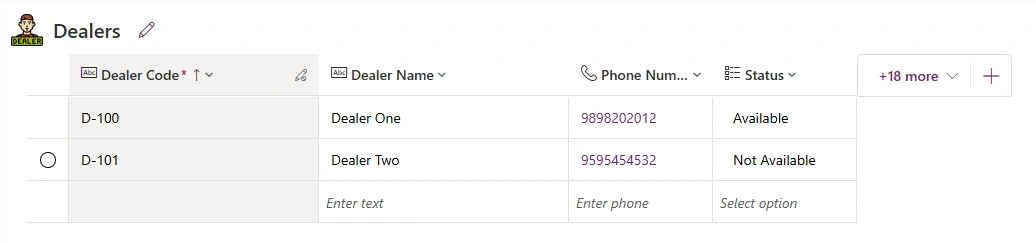
1 - Dealer Table
This table stores dealer information
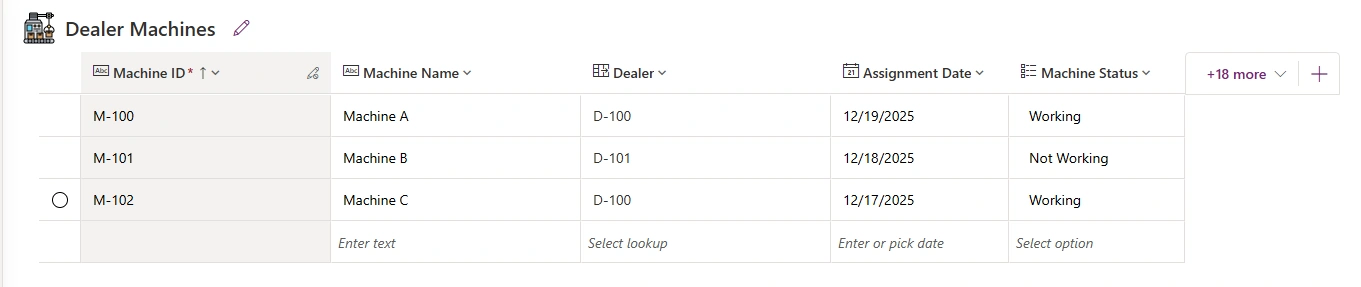
2 - Dealer Machine Table
This table stores machine details and contains a lookup column (Dealer) to the Dealer table.
Understanding Relationship between Tables
The Dealer column in the Dealer Machines table is a lookup column.
This lookup creates a many-to-one relationship
One Dealer can have multiple Machines
Javascript Code Example
Below is the wrapper code that will be used for all Web API calls in this article. (put it on top of Javascript file)
(function (webapi, $) {
    function safeAjax(ajaxOptions) {
        var deferredAjax = $.Deferred();
        shell.getTokenDeferred().done(function (token) {
            if (!ajaxOptions.headers) {
                $.extend(ajaxOptions, {
                    headers: {
                        "__RequestVerificationToken": token
                    }
                });
            } else {
                ajaxOptions.headers["__RequestVerificationToken"] = token;
            }
            $.ajax(ajaxOptions).done(function (data, textStatus, jqXHR) {
                validateLoginSession(data, textStatus, jqXHR, deferredAjax.resolve);
            }).fail(deferredAjax.reject);
        }).fail(function () {
            deferredAjax.rejectWith(this, arguments);
        });
        return deferredAjax.promise();
    }
    webapi.safeAjax = safeAjax;
})(window.webapi = window.webapi || {}, jQuery)
Web API Wrapper Function in Power Pages
In Power Pages, we cannot directly call the Dataverse Web API using a normal AJAX request. Every Web API call must include a request verification token to ensure the request is secure and comes from an authenticated user.
To make this easier, we use a wrapper function called safeAjax.
This wrapper automatically:
Gets the security token
Adds it to the request headers
Handles authentication validation
Executes the Web API call safely
Once this wrapper is defined, we can reuse webapi.safeAjax() for all Web API calls in Power Pages without repeating the token logic every time.
Get Lookup Column Data (Dealer Machines → Dealer)
function getRecord(){
    webapi.safeAjax({
        type: "GET",
        url: "/_api/cr399_dealermachines?$select=cr399_machinename,cr399_assignmentdate,cr399_machinestatus&$expand=cr399_Dealer($select=cr399_dealername,cr399_phonenumber)",
        contentType: "application/json",
        success: function(res){
            console.log(res)
        }, error: function(error){
            console.error(error);
        }
    })
}

getRecord()
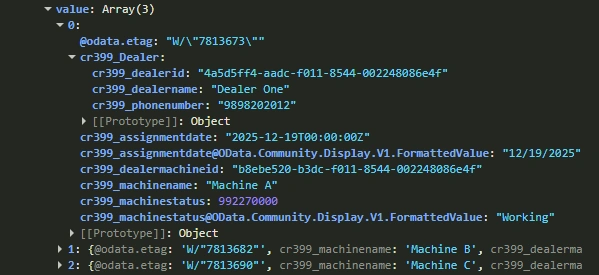
The above function is used to retrieve records from the Dealer Machines table along with related Dealer information using a lookup column.
Console Output
Understanding the Web API URL Structure
url: "/_api/cr399_dealermachines?$select=cr399_machinename,cr399_assignmentdate,cr399_machinestatus&$expand=cr399_Dealer($select=cr399_dealername,cr399_phonenumber)",Where
cr399_dealermachines is set name of Dealer Machine Table.
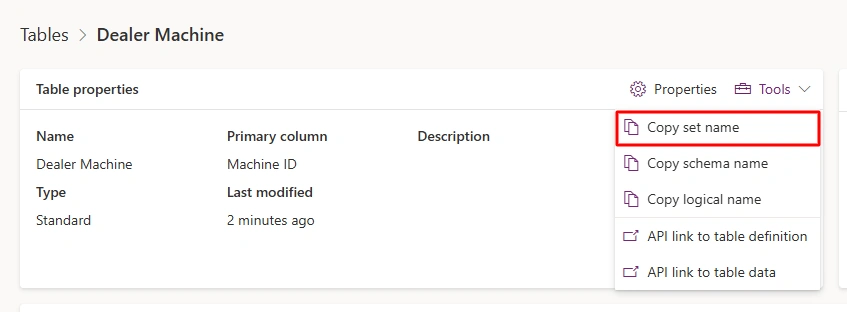
$select specifies which columns to get from Dealer Machine Table.
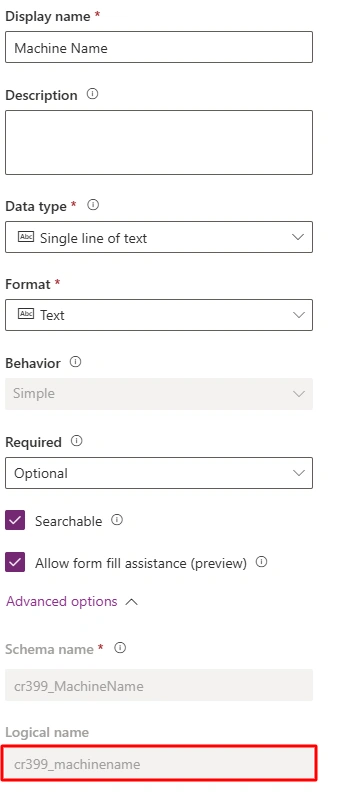
The columns which are assigned to $select are logical name of columns.
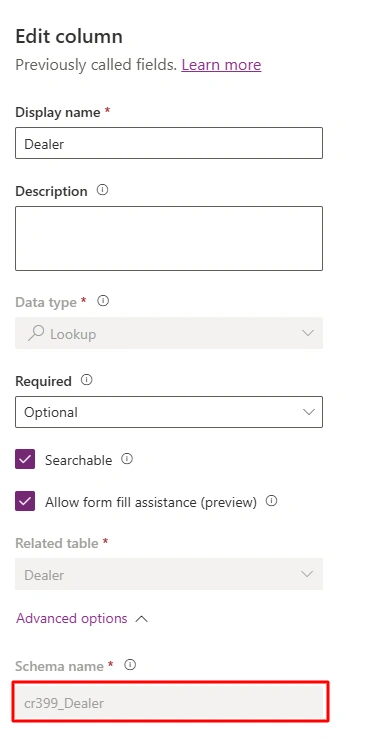
cr399_Dealer (Schema name) is a lookup column in the Dealer Machines table.
$expand=cr399_Dealer tells Dataverse to return Dealer details along with each machine record.
$expand is used to retrieve related records from another table using a lookup column.
$select inside $expand is used to retrieve only required columns from Dealer table.
Where to use which names?
In Power Pages Web API, different types of names are used in different parts of the query. Here’s a simple guide to understand where to use each
Table set name in URL → identify table
Logical name in $select → identify columns
Schema name in $expand → identify lookup relationship
Important Notes
Configure Web API in site settings.
Make sure you have configured site settings & table permissions for both tables.
Verify that the users accessing the page have appropriate Web Roles assigned for these tables.
Conclusion
We explored that with help of Web API in Power Pages, we can easily retrieve records from Dataverse tables, including related records through lookup columns. By understanding table set names in URLs, logical names in $select, and lookup schema names in $expand, you can fetch only the data you need and display it securely using webapi.safeAjax().
Join the conversation! Your thoughts help the community grow.