

Introduction and Background
This article is pretty much focused toward the beginners and newbies in programming field. If you are a beginner in computer programming, have been in this field and don’t have any idea of how to turn the odds in your own favor, this post has got you covered. In this post I will try to share my own experience with you, to teach you how to get started on the right path in programming. Programming and programmers are the friendly ones you may think of. We do create a very friendly product, but it doesn’t mean we are also friendly and that we like to be bugged often. We don’t, and that is just the Rule #1!
In this post, I will share how to get started, what to learn, how to learn and in case you get trouble, what to do.
Figure: Keep calm, it’s just the beginning!
How to get started?
Computer programming is a very interesting topic nowadays, many beginners just want to join computer programming for the sake of “show off”. It is not a bad thing to do, after all everyone wants to get some attention, some limelight and some fun to do. Computer programming is all of them! No one is left behind, no one is junior (unless they are hired) and everyone can share their knowledge with each other because the platform is very much concise and short.
Computer programming can be of many types, you may want to build software for native metal, you may want to build software for users, you may want to write a program that manages the networking and so on and so forth. The programming languages are also of many types, there are many paradigms involved and above all, there are many “confusing” concepts involved that may blow your mind off before you can even start. I am writing this article to categorize things a bit.
Firstly, just ask yourself a question, what do you want to do with computer programming? There are many answers and every reader that reads this would have a separate opinion to be used. I understand, everyone has a separate perspective from where they see computer. The start of computer programming is by learning computer architecture. Just like cricket, to start playing cricket, you first of all learn what “cricket” is. You learn that this is a game, where two players are standing on pitch, waiting for a baller to ball and the rest are standing at random locations in the ground and so on. Then you start playing cricket, in the beginning you get out, you cannot catch the ball and many other mistakes. Which demonstrate your lack of experience. As time passes, you are experienced and you are a good player. You may be recruited by a “league” to play for them and you become professional.
In a similar manner, to start programming, you start by learning what a computer is! You start by learning about different components of computer. No computer programmer would be found, who doesn’t know where a variable is stored, what processes the commands and so on. If you are unaware of these, please read more about computer architecture.
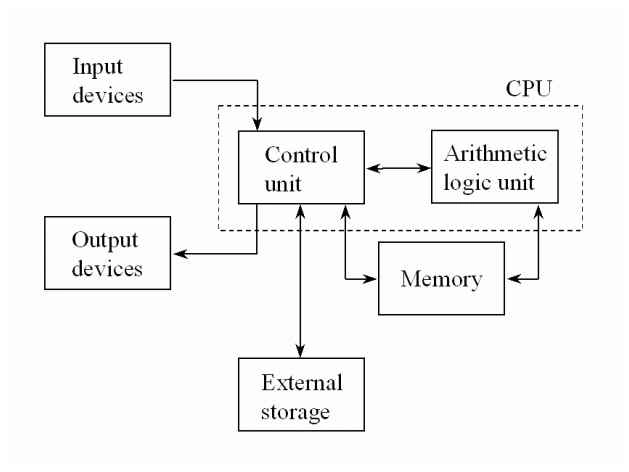
Figure: Computer architecture
Not always, but mostly a computer is a machine that comprises these components. That definition, “A computer is an electronic machine that processes your input data and provides you with an output” is a very old one. Let go of it for a while and learn more about what is computer made of.
I would like to recommend some books and resources, please read them and learn more about computer architecture before diving any further.
Recommended books for Computer Architecture
- Computer Organization and Architecture: Designing for Performance
- Computer System Architecture by M. Morris Mano
You may also want to read some more in-depths on Wikipedia.
What is difference between program and programming?
If you are aware of computer, you would also know that a computer itself is not capable of doing anything at all. Computer needs to be taught to do something. Those instructions are “programs”. They are written in a programming language, in a way that is understood by the computer. Actually what happens is something different and in the coming sections, I will cover that.
Programming language is the language in which a program is written in. The language depends on the nature of program. If you want to create a program that controls the hardware from a very low-level, then chances are that you are going to use a programming language that is very close to the machine, otherwise, if you just want to make-up a beautiful GUI program then you will be using a high-level language. Since you are beginner, you will find it interesting to know that there are multiple language for each purpose, already defined and being used.
After all, programming is just like solving the puzzle.

Low-level programming vs high-level programming
In programming, you may also want to choose your side. There are types of software programs, some run in the background, where as some run in the front-end to maintain everything that user interacts with. You can then of them as services and buttons. Each button can turn on one service, user is not able to see how a service is performed, but he can see either button is turned on or off and so on.
Below are the descriptions for both, low and high level programming concepts. You can read them and consider choosing one of them wisely.
Low-level programming
Low-level programming is mostly done by “expert” programmers, they have big beard, no hairs on their head, big belly and, they have no sense of dressing. *No offense*.
Low-level programming is done using a language that is very much closer to the metal itself. Machine language, Assembly language and C are a few examples of low-level programming languages. Most of the systems are written in Assembly language mixed with some of C programs. Kernel, file system managers, clock managers and similar stuff, they are all written in C.
C provides programmers with a very “solid” grasp over the hardware. You can write any program in C, that your machine is capable of executing. Most of the hardware devices, such as music players can be programmed in C itself. Linux kernel was written in C.
Characteristics of a low-level language:
- Smaller memory benchmark.
- Good performance.
- Easily understood by machine, thus executable.
- Smaller in size, not many libraries to work with.
- Has to be re-written for every platform.
High-level programming
Since low-level programming handles how computer actually processes, high-level programming focused on the make-over of these programs. High-level programming languages such as Java, C# or C++ focus more on how to create user-applications. Your web browsers, games, etc. are written in Java or C# language.
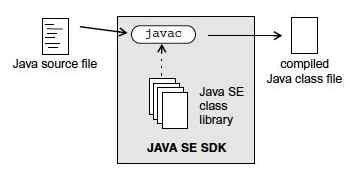
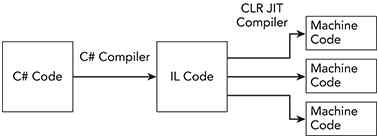
High-level languages are human-readable and very much easy to learn and use for building daily-use applications. Java and C# for example, are very short and concise application programming languages. Languages are very much smart, most of the job is done by language itself.
Microsoft, Oracle and individual programmers have built such languages. Bjarne Stroustrup is one of such individuals. The frameworks they have built is a cross-platform platform. Which means that the same code block can execute on multiple platforms, unlike the previous languages.
Characters of high-level language:
- Easier to understand and use.
- IDEs process and manage most of the project configuration.
- Require compilation, before it can be executed.
- Cross-platform support.
- Memory-management and resource check-up included.
Reference and recommendation for further read:
You may consider starting learning programming languages from the following links (or books)
- The Java™ Tutorials
- C# Programming Guide
- Programming — Principles and Practice Using C++ (Bjarne’s book)
You may also consider reading online resources, such as from C# Corner, CodeProject or you may also read my blogs and articles. I have written a number of articles for beginners.
Great, so how to start programming?
If you have read above content, and you are reading to start programming. Please consider selecting a language. A language is more like a tool, or weapon that you are going to use on a war. Choose one wisely, master it and then use it to “program“. Below I will share my experience with some programming languages that I would suggest you to use, you can also share your own experience if you think mine is lacking something.
C programming language:
One of my favorite programming languages, ever built! C is a very powerful programming language and includes everything that you need to in a low-level environment. That’s right, C is used in low-level environment.
Compilers for C language come for free, GNU C compiler (GCC compiler) is one of these compilers. C programming language is used to write operating system kernels, where performance is a “must-have“.
Praveen KumarPosted Jan 16, 2016, 6:22 AM
Good
Santhakumar MunuswamyPosted Dec 4, 2015, 7:32 AM
Good one