

Introduction
In this article, I will explain to you how to host your website to GoDaddy Server. I will also explain how you can create a database server on GoDaddy. But the process we would follow will not be only for GoDaddy, it can be followed for all other hosting services.
Note
To host your ASP.NET MVC website on GoDaddy, you must have Windows plan.
To host your ASP.NET MVC website on GoDaddy, you must have Windows plan.
Let's start step by step.
Step 1
Step 1
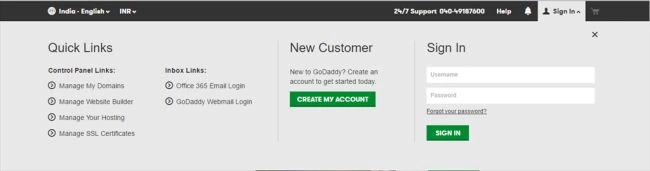
Step 2
Now, your Account page will open where you will get WEB HOSTING. Click on Manage button.
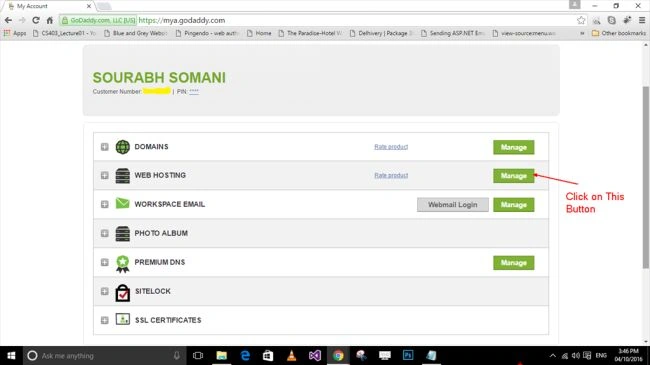
Step 3
After that, you will get your hosting server page. From there you can add new domain for a new website or you can also add new sub domain for a new website.
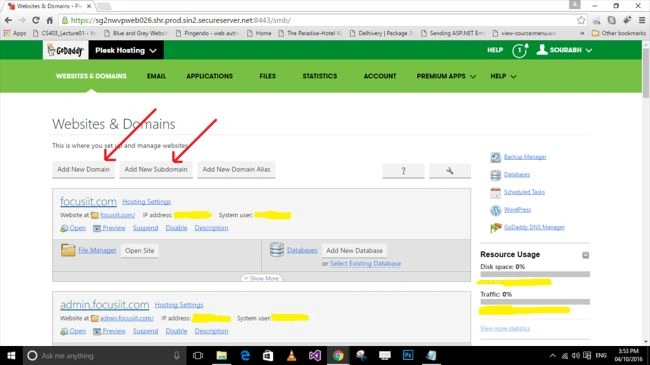
Step 4
After that, you will get your hosting server page. From there you can add new domain for a new website or you can also add new sub domain for a new website.
Step 4
Now either Add New Domain or Add Sub Domain. I am going to add new sub domain. When you will add new sub domain you will get the following page.
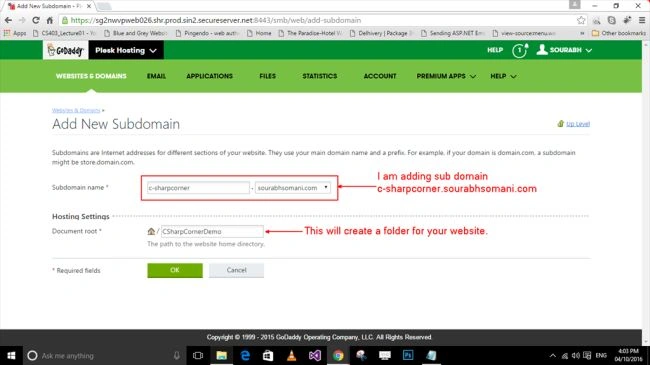
Step 5
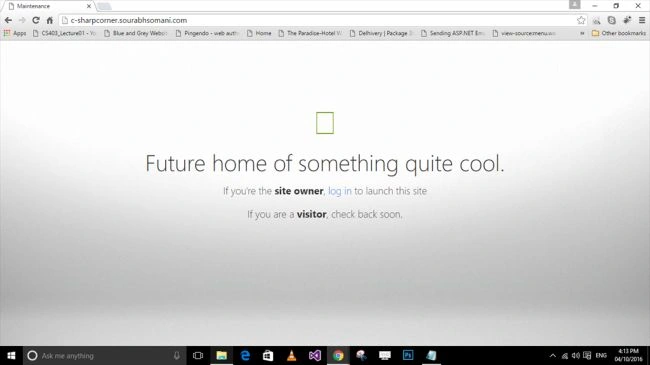
After adding sub domain, your website will be live and that will look like as follows,
Step 6
After giving the name of the website and folder name click on OK button. So it will create a folder for your website which is given in Document Root textbox. Your folder will be like as follows.
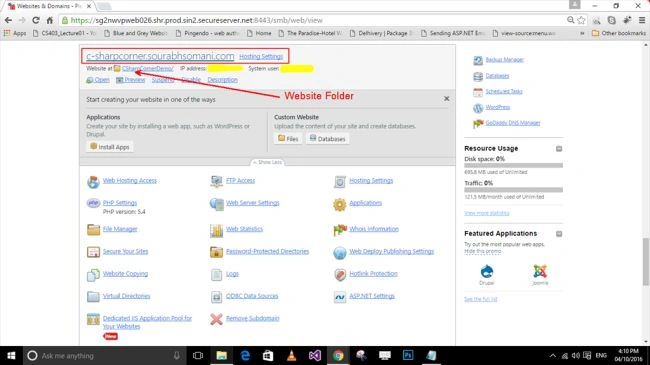
After giving the name of the website and folder name click on OK button. So it will create a folder for your website which is given in Document Root textbox. Your folder will be like as follows.
Step 7
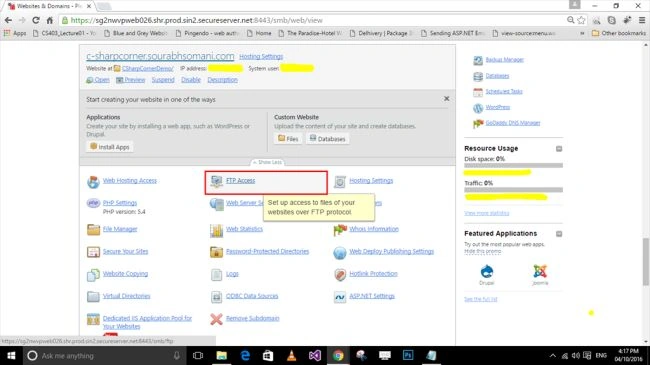
Now create an FTP user for your account by clicking on FTP Access.
Step 8
Now click on Add FTP Account.
Now create an FTP user for your account by clicking on FTP Access.
Step 8
Now click on Add FTP Account.

Step 9
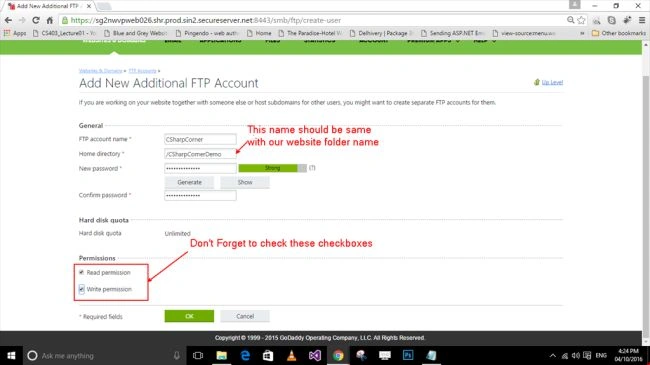
Now, fill the following form after clicking "Add New FTP Account" button.
Step 10
After completing this process, go back to your Server home page and create database on the server if you have in your project.
Now, fill the following form after clicking "Add New FTP Account" button.
Step 10
After completing this process, go back to your Server home page and create database on the server if you have in your project.
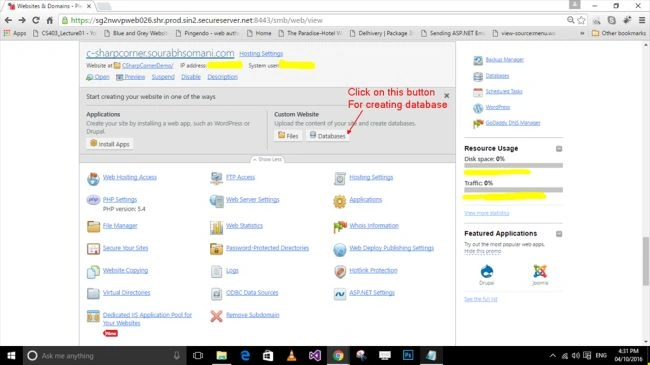
Step 11
Now, click on Add New Database Button.

Step 12
Fill the following form to create the database on the Server.
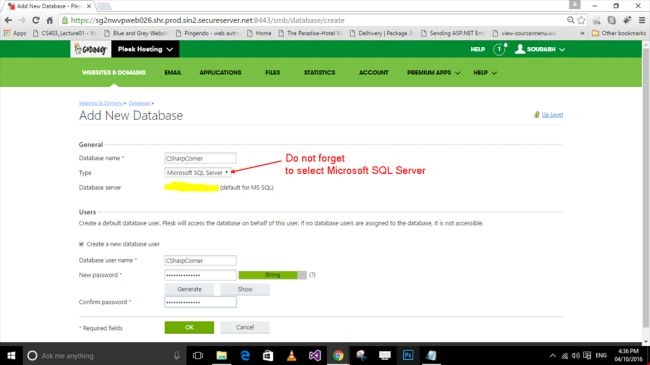
Fill the following form to create the database on the Server.

ParthaPosted Oct 8, 2021, 12:04 PM
How to publish using Web deploy option from Visual Studio?
sundari balajiPosted May 27, 2021, 3:05 PM
Hi, Thanks for your article. Will the same procedure applicable for Blazor Server Hosting Model App's too?
Furqan AzizPosted Feb 10, 2021, 8:46 PM
Hi, i have one issue, my website hosted on godaddy and its in MVC C# , it was working fine since 2017 but today its showing error . please guide. HTTP Error 403.14 - ForbiddenThe Web server is configured to not list the contents of this directory.
Soumik MahajanPosted Dec 30, 2020, 11:08 AM
Can not find database type , i want to import a microsoft sql server database but only MySql db available , any solutions?
Madan RoutPosted Aug 26, 2020, 11:41 AM
[email protected]
Madan RoutPosted Aug 26, 2020, 11:41 AM
Do anybody know how to publish asp.net web api into GoDaddy so I can acccess through mobile app or postman .please share the valuable thought.
Charan SinghPosted Jun 24, 2020, 5:16 AM
This configuration section cannot be used at this path. This happens when the site administrator has locked access to this section using <location allowOverride="false"> from an inherited configuration file. Getting this error when trying to host asp.net web api on plesk shared hosting by creating a virtual directory. Please help
Atta KumahPosted Jun 10, 2020, 6:38 AM
Thanks Very Much Boss. I really enjoy it.
Pankaj PawarPosted May 30, 2020, 2:26 PM
As we All Know Asp.net Core is Platform Independent and Open Source, Web Applications Built on Asp.net core run on any operating System, So Can We host Asp.net Core Web application on Linux Server (shared Hosting) Or (VPS) , BeCoz Linux Hosting Plans are Cheaper than Windows Hosting..
Dev SinharoyPosted May 17, 2020, 7:33 PM
Hi tried to follow and but I made it with an asp.net core and now when I run update-database I get this error CREATE DATABASE permission denied in database 'master'. I would appreciate it If you could make a tutorial doing the same thing in asp. net core and put the link in the reply You give me Thanks
toni mcneelyPosted May 8, 2020, 7:28 AM
Thank you for your reply. I have one other question, it seems that plesk on godaddy only looks for the web.config for the application configuration, but my application is using appsettings.json for my configuration variables. I believe this is why I am getting a 500 server error and the webpage is not coming up. Any thoughts on this topic? I really woud appreciate your input. thank you.
toni mcneelyPosted May 5, 2020, 6:43 AM
I am very new to this technology. I am working on hosting an asp.net core website to godaddy. I followed your instructions but ran into difficulty when dealing with the database connection strings. you briefly speak of server side connection string. can you further explain.
Dev SinharoyPosted May 4, 2020, 8:47 PM
Can u make a tutorial doing the same thing but asp.net core
Al MondalePosted Apr 20, 2020, 12:12 PM
I believe GD now will host ASP.net CORE apps. Is there any different process, compared with "basic" MVC precompiled app?
prince tomyPosted Jul 25, 2019, 3:36 AM
Thanks for the help.Nice explanation..Nice articles..you are a great...
Berend OttenPosted May 27, 2019, 3:52 AM
Please, can you tell what kind of Windows hosting you bought at Godaddy? Or did you use a virtual private server?
Reid CorcoranPosted Mar 21, 2019, 10:24 PM
Hi, I deployed to GoDaddy hosting but didn't use VS publish. I just chose files and folders and transferred using FileZilla. I may be missing some functionality. My issue is that I did a minor edit to one of my MVC controllers (specifically, added "[Authorize]" to a few of my views) but now several hours later, the change I made is not implemented. I am a relative novice, so if I need to deploy MVC another way like in your step-by-step, I can do that but would like to know what if anything I left out. Or, do I need the GoDaddy server to recompile/rebuild the website? Can their server do that? Thanks.
Deep ApsingekarPosted Mar 7, 2019, 11:23 AM
Hi, I have a question, so if your site has both MVC and Web API (Web services). Do you have to host both of them separately. Or Can I use the same hosting to host both of them
Surya NPosted Oct 28, 2018, 10:31 PM
Error: PM> update-database Introducing FOREIGN KEY constraint 'FK_dbo.Questions_dbo.Users_UserID' on table 'Questions' may cause cycles or multiple cascade paths. Specify ON DELETE NO ACTION or ON UPDATE NO ACTION, or modify other FOREIGN KEY constraints.Could not create constraint or index. See previous errors.
Muhammad Ashikuzzaman AshikPosted Sep 7, 2018, 9:55 PM
Thanks. It helped me.
Jason StathamPosted Jul 31, 2018, 11:19 AM
Is it possible to work with entity framework [ connection string ] especially the data first approch..!
Azhar KalamPosted Jun 3, 2018, 3:07 PM
I cant see ASP.NET settings under Godaddy server page?
amigo wispPosted Apr 13, 2018, 2:58 PM
Parser Error Message: It is an error to use a section registered as allowDefinition='MachineToApplication' beyond application level. This error can be caused by a virtual directory not being configured as an application in IIS.
amigo wispPosted Apr 13, 2018, 2:57 PM
Is an error to use a section registered as allowDefinition='MachineToApplication' beyond application level. This error can be caused by a virtual directory not being configured as an application in IIS.
Tridip BhattacharjeePosted Mar 9, 2018, 3:26 AM
Is there any hosting provider where i can create my account freely and upload my asp.net mvc4/ and 5 web application freely with sql server database support. share some site names if you aware of. thanks
Tridip BhattacharjeePosted Mar 9, 2018, 3:24 AM
Why you add sub-domain instead of domain? what is the difference between domain and sub-domain. if possible please discuss it in details here. thanks
bolo boloPosted Jan 22, 2018, 4:03 AM
Nice Article Explained Thoroughly and step by step but images are not clear
ankit agrawalPosted Nov 12, 2017, 1:23 PM
Hey..did you create table in the godaddy database again?? I mean how actually your data from local database is getting into hosted website. Please explain
Kashyap KakiPosted Oct 23, 2017, 5:37 AM
Thanks for your article. Its really helpful. Keep posting!
JMPosted Oct 17, 2017, 4:45 PM
Can i have another question, i have carefully followed your instructions here, when i run my site with www.domain.com i still get the Error in '/' message BUT when i put www.domain.com/default.aspx it works fine. I'm not sure where the error is coming from tho i already set the document root to httpdocs and the default.aspx page is inside it.
JMPosted Oct 17, 2017, 6:43 AM
How do you update individual files? do you re-publish the whole project again?
Stephanie HallbergPosted Oct 12, 2017, 4:45 PM
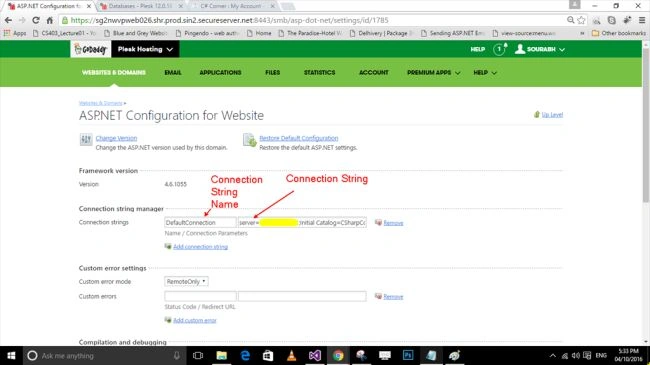
Where can we find the Connection String mentioned in step 19 and 20.. "Write Connection String for your server side database. ?"
Ahmed AbdiPosted Aug 24, 2017, 5:24 AM
Awesome article thanks for share
dotnet guyPosted Aug 3, 2017, 10:18 AM
Hi there, The above steps can be used for ASP.NET WebApI too? for some reason i am getting 404 error after hosting my website to SHARED hosting server i.e; brinkster.com. Not sure if we need something else for deploying web api.
Navneet Singh RajputPosted Jun 28, 2017, 12:46 PM
I faced some issue. please help me out.. Code generated using the T4 templates for Database First and Model First development may not work correctly if used in Code First mode. To continue using Database First or Model First ensure that the Entity Framework connection string is specified in the config file of executing application. To use these classes, that were generated from Database First or Model First, with Code First add any additional configuration using attributes or the DbModelBuilder API and then remove the code that throws this exception.
Devendra kumarPosted Jun 8, 2017, 5:29 AM
My domain name is http://moviecollection.in/
Devendra kumarPosted Jun 8, 2017, 5:28 AM
Could not load file or assembly 'WebGrease, Version=1.5.1.25624, Culture=neutral, PublicKeyToken=31bf3856ad364e35' or one of its dependencies. The located assembly's manifest definition does not match the assembly reference. (Exception from HRESULT: 0x80131040)
Armaan LabibPosted Jun 1, 2017, 12:42 PM
I am having problem with connection string. Its saying parameter is missing.
Mohamed ElqassasPosted May 25, 2017, 1:21 PM
Great, Thanks for sharing!
Former memberPosted May 25, 2017, 4:37 AM
Go daddy is not good choice because they some time charge money with wrong info to customer. has no good reputation. better approach ORCSWEB. it has solid reputation but could be costly compared with go daddy.
Muhammad Aqib ShehzadPosted May 25, 2017, 1:39 AM
Very nice share and nicely elaborated
Satyaprakash SamantarayPosted May 25, 2017, 12:26 AM
Nice ...................................
ryan pascalPosted May 24, 2017, 8:33 PM
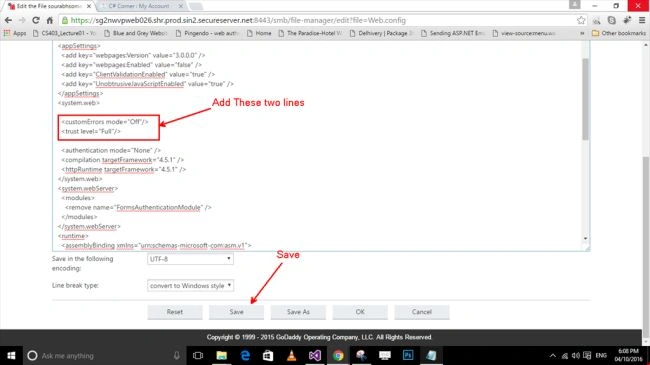
Hello, I am receiving this error: Configuration ErrorDescription: An error occurred during the processing of a configuration file required to service this request. Please review the specific error details below and modify your configuration file appropriately. Parser Error Message: This configuration section cannot be used at this path. This happens when the site administrator has locked access to this section using <location allowOverride="false"> from an inherited configuration file. Source Error: An application error occurred on the server. The current custom error settings for this application prevent the details of the application error from being viewed remotely (for security reasons). It could, however, be viewed by browsers running on the local server machine. The error is on this line of the web config <trust level="Full"/>
Muhammad AhmedPosted May 23, 2017, 9:41 AM
Thanks for your clear explanation. I followed your steps and uploaded successfully!.
Bellezze AppsPosted Apr 3, 2017, 2:32 PM
I am getting the "path too long" error, which is preventing me from uploading altogether. Any ideas as to how to fix this?
Nilesh SawardekarPosted Mar 5, 2017, 11:58 PM
Getting error,Secure Connection Failed
Nilesh SawardekarPosted Mar 5, 2017, 11:34 PM
Very helpful..In vs2015, your step of creating new profile is not there.. there is option 'Custom' for that.
satish kumar donthuPosted Dec 20, 2016, 8:10 AM
Hi how to restore our database backup file after creating a database...can you please replay
siddu patilPosted Nov 25, 2016, 2:04 AM
Hi Sourabh what is cost to buy domain...??????
KamPosted Nov 14, 2016, 2:29 AM
Hi Sourabh, can you show us what to do if you include obfuscation of controller and model code when deploying? Thanks.
Muhammad shahidPosted Oct 24, 2016, 7:21 AM
Solved
Muhammad shahidPosted Oct 19, 2016, 6:09 AM
Server Error in '/' Application. Security Exception Description: The application attempted to perform an operation not allowed by the security policy. To grant this application the required permission please contact your system administrator or change the application's trust level in the configuration file. Exception Details: System.Security.SecurityException: Request failed.
Muhammad shahidPosted Oct 19, 2016, 6:09 AM
Also this 1.
Muhammad shahidPosted Oct 19, 2016, 6:05 AM
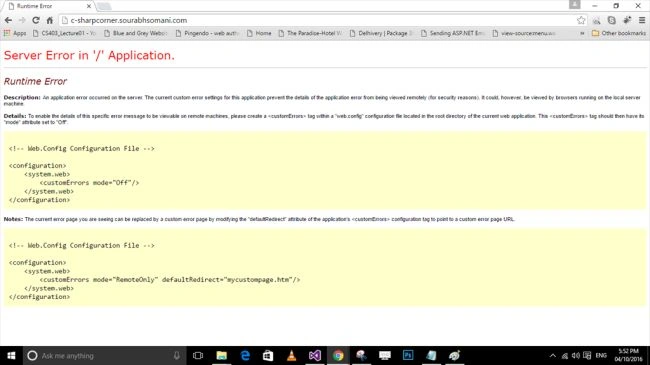
The same error as show in Step-21.
Muhammad shahidPosted Oct 17, 2016, 6:39 AM
I follow all steps but its still the same error as i before.Server Error in '/' Application.
Ritesh SinghPosted Aug 3, 2016, 10:03 AM
Very nice explanations
Ajeet MishraPosted Apr 28, 2016, 9:15 AM
Nice
Khawar IslamPosted Apr 12, 2016, 1:32 PM
Wow
Sam HobbsPosted Apr 12, 2016, 12:25 PM
Does it matter whether it is a Visual Studio Web Project or a Visual Studio Web Site?
Shaili DashoraPosted Apr 12, 2016, 10:43 AM
Nice Article,good job Sourabh Somani..
Mohammed IbrahimPosted Apr 11, 2016, 1:48 PM
nice
Kuppurasu NagarajPosted Apr 11, 2016, 1:18 PM
Nice Sharing
NitinPosted Apr 11, 2016, 11:25 AM
Good one. Thanks for sharing.
Debasis SahaPosted Apr 11, 2016, 10:35 AM
Nice One...
Amit KumarPosted Apr 11, 2016, 7:36 AM
when we update site its chargeable or not?
Amit KumarPosted Apr 11, 2016, 7:35 AM
how to update and edit in my site?
Vignesh ManiPosted Apr 11, 2016, 6:54 AM
Nice
Humayun Kabir MamunPosted Apr 11, 2016, 4:00 AM
Nice...
Anupam SinghPosted Apr 11, 2016, 3:29 AM
Good share Sourabh Somani , very helpful steps to host a website/web applciation.
Jaipal ReddyPosted Apr 11, 2016, 3:20 AM
Nice. .
Manish Kumar ChoudharyPosted Apr 11, 2016, 1:43 AM
Nice one.
Sthitaprajnya Debasis NayakPosted Apr 11, 2016, 1:23 AM
Thanks...
Manoj KulkarniPosted Apr 11, 2016, 1:21 AM
Nice article. Thank you for sharing
MannanPosted Apr 11, 2016, 1:13 AM
Nice..
Rahul Kumar SaxenaPosted Apr 11, 2016, 12:57 AM
Good Hosting Show :)
Ravi PatelPosted Apr 11, 2016, 12:49 AM
nice share