

Introduction
Chakra UI, a popular React component library, offers a convenient way to implement checkboxes. In this article, we will learn how to implement checkboxes using Chakra UI.
Prerequisites
- Node.js
- Next.js
- Chakra UI
Implement Chakra UI Checkbox in Next.js
Step 1. Create the Next Js Project using the following command.
npx create-next-app my-test-app
Step 2. Install Chakra UI and its dependencies using the following command.
npm install @chakra-ui/react @emotion/react @emotion/styled framer-motion
Step 3. Install Chakra UI Icons for adding icons to your checkbox
npm install @chakra-ui/icons
Step 4. Now, let's create a Chakra UI Checkbox component in a Next.js application.
Create a Chakra UI component.
import React, { useState } from 'react';
import { Checkbox, CheckboxGroup, Stack } from '@chakra-ui/react';
import { CheckIcon } from '@chakra-ui/icons';

const MyCheckbox = () => {
  const [checkedItems, setCheckedItems] = useState([false, false]);

  const allChecked = checkedItems.every(Boolean);
  const isIndeterminate = checkedItems.some(Boolean) && !allChecked;

  return (
    <>
      <Container maxW="xl">
        <Checkbox defaultChecked>Checkbox</Checkbox>

        <span>Disabled Checkbox</span>
        <Stack spacing={5} direction='row'>
          <Checkbox isDisabled>Checkbox</Checkbox>
          <Checkbox isDisabled defaultChecked>
            Checkbox
          </Checkbox>
        </Stack>

        <span>Checkbox with custom color</span>
        <Stack spacing={5} direction='row'>
          <Checkbox colorScheme='red' defaultChecked>
            Checkbox
          </Checkbox>
          <Checkbox colorScheme='green' defaultChecked>
            Checkbox
          </Checkbox>
        </Stack>

        <span>Checkbox sizes</span>
        <Stack spacing={[1, 5]} direction={['column', 'row']}>
          <Checkbox size='sm' colorScheme='red'>
            Checkbox
          </Checkbox>
          <Checkbox size='md' colorScheme='green' defaultChecked>
            Checkbox
          </Checkbox>
          <Checkbox size='lg' colorScheme='orange' defaultChecked>
            Checkbox
          </Checkbox>
        </Stack>

        <span>Indeterminate</span>
        <Checkbox
          isChecked={allChecked}
          isIndeterminate={isIndeterminate}
          onChange={(e) => setCheckedItems([e.target.checked, e.target.checked])}
        >
          Parent Checkbox
        </Checkbox>
        <Stack pl={6} mt={1} spacing={1}>
          <Checkbox
            isChecked={checkedItems[0]}
            onChange={(e) => setCheckedItems([e.target.checked, checkedItems[1]])}
          >
            Child Checkbox 1
          </Checkbox>
          <Checkbox
            isChecked={checkedItems[1]}
            onChange={(e) => setCheckedItems([checkedItems[0], e.target.checked])}
          >
            Child Checkbox 2
          </Checkbox>
        </Stack>
      </Container>
    </>
  );
}

export default MyCheckbox;
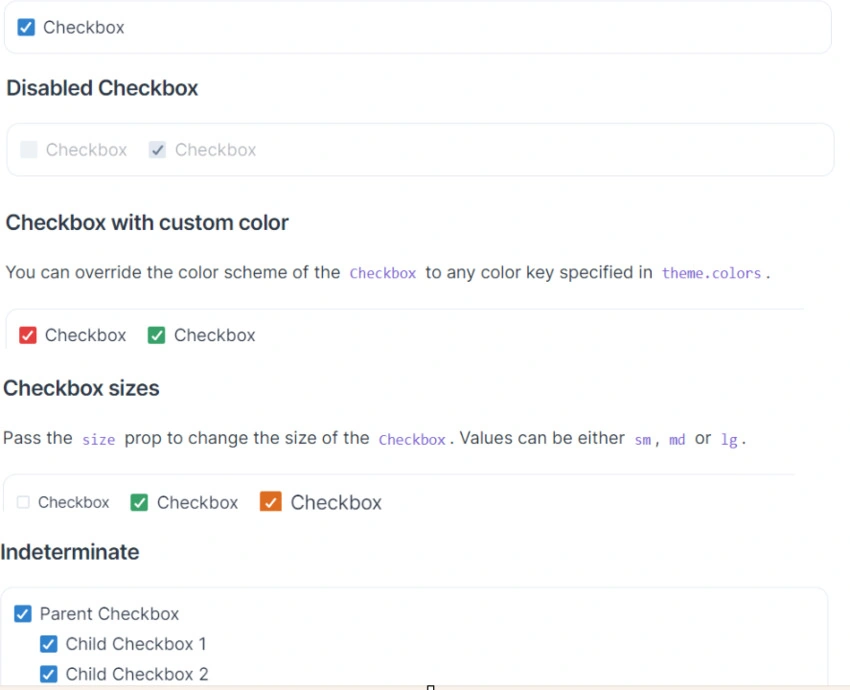
Step 5. Run the application using the following command.
npm start
Summary
In this article, we learned about how the Chakra UI Checkbox can be implemented in Next Js.
Join the conversation! Your thoughts help the community grow.