

Introduction

Problem Statement
Let’s begin...
Step 1
- create table Qualf(
- Cand_id int primary key identity(1,1),
- Qulfns varchar(50)
- );
Step 2

Now right click on the project name and select “Add New Item.” From item templates select “Web Form” template and rename it or keep “Default.aspx” as it is. I am keeping it as it is. The following image shows the process,

Step 3

To design the “Default.aspx” page, write/copy and paste the below code,
Default.aspx
- <%@ Page Language="C#" AutoEventWireup="true" CodeFile="Default.aspx.cs" Inherits="_Default" EnableEventValidation="false" %>
- <!DOCTYPE html PUBLIC "-//W3C//DTD XHTML 1.0 Transitional//EN" "http://www.w3.org/TR/xhtml1/DTD/xhtml1-transitional.dtd">
- <html xmlns="http://www.w3.org/1999/xhtml">
- <head runat="server">
- <title></title>
- </head>
- <body>
- <form id="form1" runat="server">
- <div style="width: 860px">
- Qualification</br>
- <asp:CheckBoxList ID="CheckBoxList1" runat="server" RepeatColumns="2" RepeatDirection="Horizontal">
- <asp:ListItem>SSC</asp:ListItem>
- <asp:ListItem>HSC</asp:ListItem>
- <asp:ListItem>Diploma</asp:ListItem>
- <asp:ListItem>BSC</asp:ListItem>
- <asp:ListItem>BE</asp:ListItem>
- <asp:ListItem>MSC</asp:ListItem>
- </asp:CheckBoxList>
- <br />
- <asp:Button ID="Button1" runat="server" Text="Submit" OnClick="Button1_Click" />
- <br />
- <br />
- <asp:Label ID="Label2" runat="server" Text="Label" Font-Bold="True"></asp:Label>
- <asp:Label ID="Label1" runat="server" Text="qual" Font-Bold="True"></asp:Label>
- <br />
- <br />
- <asp:GridView ID="GridView1" runat="server" AutoGenerateSelectButton="true" OnSelectedIndexChanged="GridView1_SelectedIndexChanged"
- AutoGenerateColumns="false" OnRowDataBound="GridView1_RowDataBound">
- <Columns>
- <asp:BoundField DataField="Cand_id" HeaderText="Candidade ID" />
- <asp:BoundField DataField="Qulfns" HeaderText="Qualfications" />
- </Columns>
- <SelectedRowStyle BackColor="#009999" ForeColor="#CCFF99" Font-Bold="true" />
- </asp:GridView>
- </div>
- </form>
- </body>
- </html>
Step 4
- using System.Data;
- using System.Data.SqlClient;
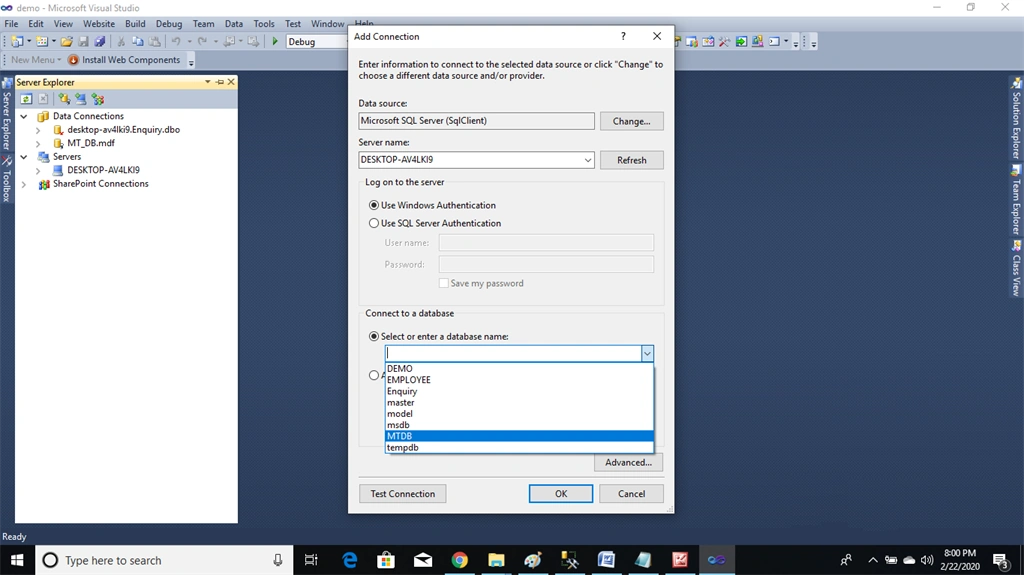
Now right-click on the newly created connection which is shown in the Server Explorer window and check the connection properties. From properties, copy the connection string and paste it into “Default.aspx.cs” code file while creating the connection object.
Step 5
Write or copy-paste the below code into the “Default.aspx.cs” code file:
Default.aspx.cs
- using System;
- using System.Collections.Generic;
- using System.Linq;
- using System.Web;
- using System.Web.UI;
- using System.Web.UI.WebControls;
- using System.Data;
- using System.Data.SqlClient;
- public partial class _Default : System.Web.UI.Page
- {
- SqlConnection cn = new SqlConnection("Data Source=.\\SQLEXPRESS;AttachDbFilename=E:\\ASP_BASIC\\0GLOBAL_MT_DB\\MT_DB.MDF;Integrated Security=True;Connect Timeout=30;User Instance=True");
- protected void Page_Load(object sender, EventArgs e)
- {
- DisplayData();
- Label1.Visible = false;
- Label2.Visible = false;
- }
- // To insert data into Qualf table
- public void INSERDATA()
- {
- String str = "";
- for (int i = 0; i <= CheckBoxList1.Items.Count - 1; i++)
- {
- if (CheckBoxList1.Items[i].Selected)
- {
- if (str == "")
- {
- str = CheckBoxList1.Items[i].Text;
- }
- else
- {
- str += "," + CheckBoxList1.Items[i].Text;
- }
- }
- }
- SqlCommand cmd = new SqlCommand("Insert into Qualf(Qulfns) values('" + str + "')", cn);
- cmd.ExecuteNonQuery();
- }
- // To display data from Qualf table
- public DataTable DisplayData()
- {
- SqlDataAdapter adpt = new SqlDataAdapter("select * from Qualf ", cn);
- DataTable dt = new DataTable();
- adpt.Fill(dt);
- GridView1.DataSource = dt;
- GridView1.DataBind();
- return dt;
- }
- // To retrives the values when user select the row from GridView
- protected void GridView1_SelectedIndexChanged(object sender, EventArgs e)
- {
- if (IsPostBack)
- {
- CheckBoxList1.ClearSelection();
- }
- GridViewRow row = GridView1.SelectedRow;
- Label1.Text = row.Cells[2].Text;
- Label1.Visible = true;
- string str_split = Label1.Text;
- string[] qual = str_split.Split(',');
- foreach (string sub_str in qual)
- {
- for (int i = 0; i <= CheckBoxList1.Items.Count - 1; i++)
- {
- if (sub_str == CheckBoxList1.Items[i].Text)
- {
- CheckBoxList1.Items[i].Selected = true;
- }
- }
- }
- Label2.Text = "Your Qualification is:";
- Label2.Visible = true;
- }
- protected void GridView1_RowDataBound(object sender, GridViewRowEventArgs e)
- {
- if (e.Row.RowType == DataControlRowType.Header)
- {
- e.Row.Cells[0].Style.Add(HtmlTextWriterStyle.Display, "none");
- }
- if (e.Row.RowType == DataControlRowType.DataRow)
- {
- e.Row.Cells[0].Style.Add(HtmlTextWriterStyle.Display, "none");
- e.Row.Attributes["onclick"] = ClientScript.GetPostBackClientHyperlink(this.GridView1, "select$" + e.Row.RowIndex);
- }
- }
- //Calling the INSERDATA() function and after inserting data clear the CheckBoxList selected values and closing the connection
- protected void Button1_Click(object sender, EventArgs e)
- {
- cn.Open();
- INSERDATA();
- CheckBoxList1.ClearSelection();
- DisplayData();
- cn.Close();
- }
- }
Join the conversation! Your thoughts help the community grow.