

In this article, we will use the Nutrient Web SDK, an external JavaScript PDF library, to preview PDF files in Power Pages.
Goal
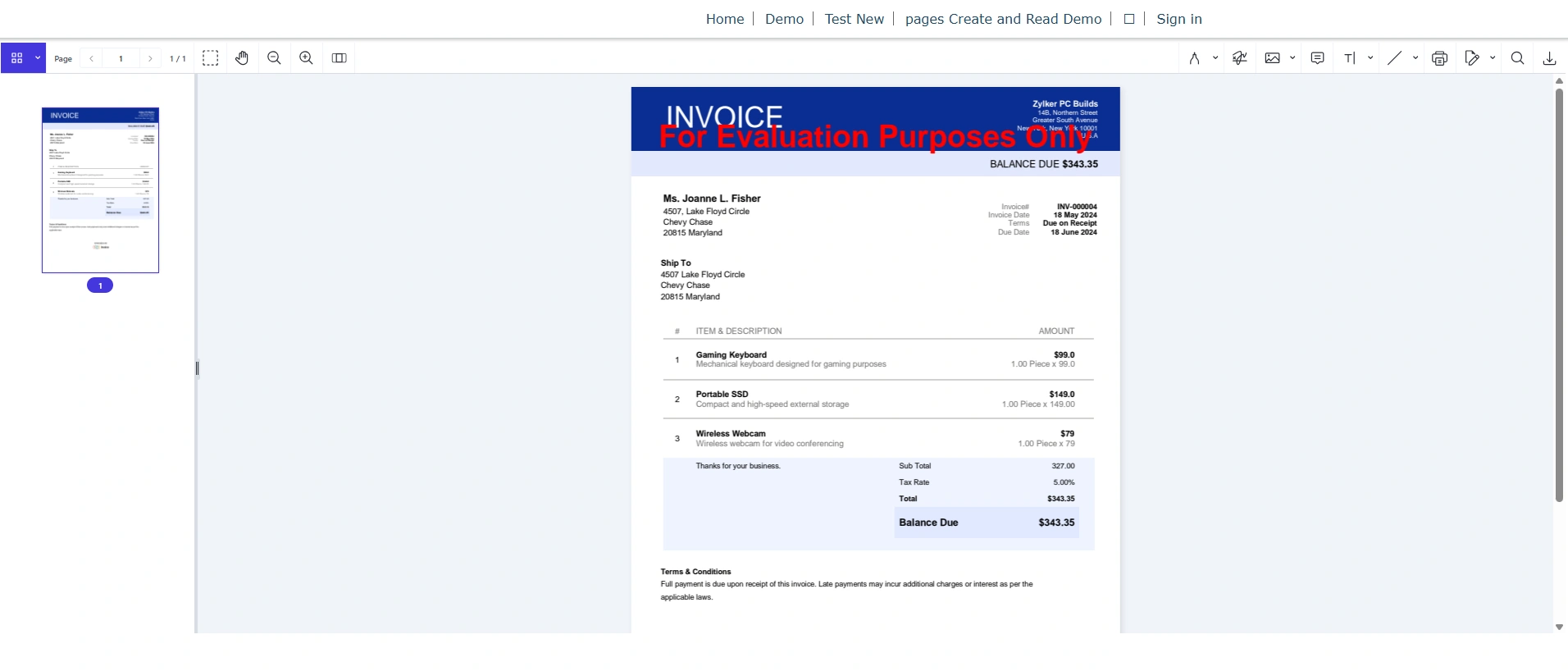
Stepwise Implementation
1 - Create Custom Table
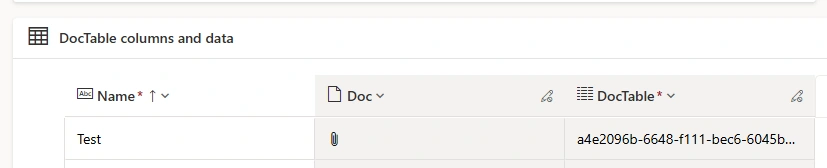
I have created custom table named "DocTable" and created a File data type column in it.
Upload pdf file from Form.
2 - Enable Web API Access to Table
Enable Web API access for the table so that the file content can be retrieved using JavaScript.
Go to Site Settings from Power Pages Advanced Configuration
Add or update settings to allow Web API access for your table
Ensure the required columns (including the file column) are exposed.
3 - Assign Permissions and Web Roles to Table
You can set this from Table Permissions from Power Pages Advanced Configurations.
You can assign web roles from Power Pages Studio.
4 - Integrate Nutrient Web SDK (via CDN)
Add script reference in HTML file
<script src="https://cdn.cloud.pspdfkit.com/[email protected]/nutrient-viewer.js"></script>Code Section
1 - HTML
<script src="https://cdn.cloud.pspdfkit.com/[email protected]/nutrient-viewer.js"></script>

<div class="row sectionBlockLayout text-start" style="min-height: auto; padding: 8px;">
  <div style="width:100%; height:900px; overflow:hidden;">
    <div id="pspdfkit" style="width:100%; height:100%;"></div>
  </div>
</div>
2 - JS
(function (webapi, $) {
    function safeAjax(ajaxOptions) {
        var deferredAjax = $.Deferred();
        shell
            .getTokenDeferred()
            .done(function (token) {
                if (!ajaxOptions.headers) {
                    $.extend(ajaxOptions, {
                        headers: {
                            __RequestVerificationToken: token,
                        },
                    });
                } else {
                    ajaxOptions.headers["__RequestVerificationToken"] = token;
                }
                $.ajax(ajaxOptions)
                    .done(function (data, textStatus, jqXHR) {
                        validateLoginSession(data, textStatus, jqXHR, deferredAjax.resolve);
                    })
                    .fail(deferredAjax.reject);
            })
            .fail(function () {
                deferredAjax.rejectWith(this, arguments);
            });
        return deferredAjax.promise();
    }
    webapi.safeAjax = safeAjax;
})((window.webapi = window.webapi || {}), jQuery);
The above code is helper function to safely call the Power Pages Web API using AJAX. It handles authentication (token) automatically so you don’t have to repeat that logic every time.
const id = "a4e2096b-6648-f111-bec6-6045bd09615c"
const containerId = "#pspdfkit";

document.addEventListener("DOMContentLoaded", () => {
    PreviewFile(id)
})
Where id is of record with file uploaded. (take from Dataverse table)
Where containerId is for giving reference of element where pdf will be loaded.
PreviewFile function will run, once is page is ready.
function PreviewFile(docId) {
    webapi.safeAjax({
        url: `/_api/cr399_doctables(${docId})/cr399_doc/$value`,
        type: "GET",
        xhrFields: {
            responseType: "blob"
        },
        success: function (blob) {
            if (blob) {
                loadNutrientPdfViewer(blob);
                console.log(blob)
            } else {
                console.log("Not loaded");
            }
        },
        error: function (err) {
            console.error(err);
        }
    });
}
This function fetches a PDF file from a Dataverse file column using the Power Pages Web API and displays it in the PDF viewer.
url: `/_api/cr399_doctables(${docId})/cr399_doc/$value`,Where docId is guid of record.
cr399_doctables is set name of table.
cr399_doc is logical name of File data type column.
$value is used for getting file content.
let nutrientInstance = null;

function loadNutrientPdfViewer(blob) {
    const objectUrl = URL.createObjectURL(blob);

    window.NutrientViewer.unload("#pspdfkit");
    window.NutrientViewer.load({
        container: "#pspdfkit",
        document: objectUrl,
        initialViewState: new NutrientViewer.ViewState({
            sidebarMode: NutrientViewer.SidebarMode.THUMBNAILS
        })
    }).then((instance) => {
        nutrientInstance = instance;
        $(".loader").hide();
        URL.revokeObjectURL(objectUrl);
    }).catch(error => {
        console.error("Failed to load document:", error);
        URL.revokeObjectURL(objectUrl);
    });
}
This is the part where your PDF actually gets rendered in the viewer. The function takes the file (as a blob) and loads it into the Nutrient Web SDK viewer.
Explantation
A variable is created to store the viewer instance so it can be reused later for actions like zooming or interacting with the PDF.
The function receives a file in binary format (blob), which represents the PDF retrieved from Dataverse.
The blob is converted into a temporary URL so that the PDF viewer can load it, since the viewer requires a URL instead of raw binary data.
Before loading a new document, any existing PDF viewer instance is unloaded from the container to avoid duplication or rendering issues.
The Nutrient viewer is then initialized and instructed to load the PDF into a specific container on the page.
The temporary URL is passed as the document source so the viewer can display the PDF.
An initial view configuration is applied, which opens the viewer with a thumbnail sidebar to help users navigate pages easily.
Once the PDF is successfully loaded, the viewer instance is stored in the variable for future use.
A loading indicator (if present on the page) is hidden to indicate that the document is ready.
The temporary URL is released from memory to improve performance and prevent memory leaks.
If any error occurs while loading the document, it is logged in the console for debugging purposes.
Even in case of an error, the temporary URL is still released to make sure proper memory cleanup.
Conclusion
We explored how an external JavaScript PDF library can be integrated with Power Pages to manage and preview documents efficiently.
Join the conversation! Your thoughts help the community grow.