

C# List<T> class provides methods and properties to create a list of objects (classes). You can add items to a list during the initialization or using List.Add() and List.AddRange() methods.
List is a generic class. You must import the following namespace before using the List<T> class.
using System.Collections.Generic;
The Reverse method of List<T> reverses the order all items in in the List.
The following code example reverses a List.
- // List of string
- List<string> authors = new List<string>(5);
- authors.Add("Mahesh Chand");
- authors.Add("Chris Love");
- authors.Add("Allen O'neill");
- authors.Add("Naveen Sharma");
- authors.Add("Mahesh Chand");
- authors.Add("Monica Rathbun");
- authors.Add("David McCarter");
- Console.WriteLine("Original List items");
- Console.WriteLine("===============");
- // Print original order
- foreach (string a in authors)
- Console.WriteLine(a);
- // Reverse list items
- authors.Reverse();
- Console.WriteLine();
- Console.WriteLine("Sorted List items");
- Console.WriteLine("===============");
- // Print reversed items
- foreach (string a in authors)
- Console.WriteLine(a);
Listing 1.
The output of Listing 8 looks like Figure 1.
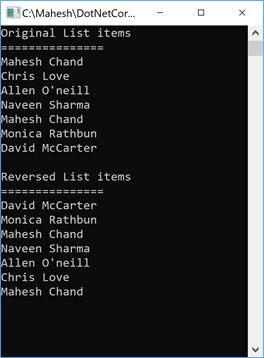
Figure 1.
Next > C# List Tutorial
Sudarshan BhatPosted Oct 22, 2021, 3:25 PM
Nice Information Sir. But, I want to know is it possible to reverse the same according to alphabetical order?
Hardik DeshaniPosted Oct 9, 2018, 7:43 AM
Nice one sir