

Upload and display an image in the ASP.NET MVC application.
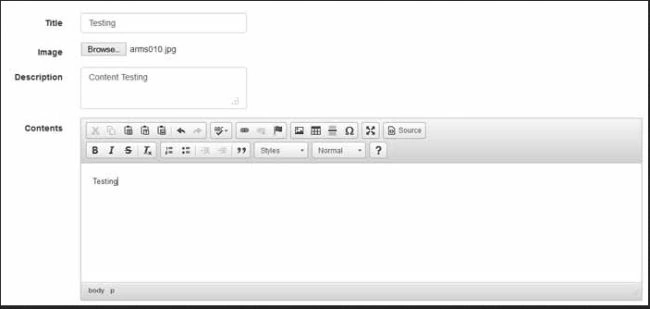
Here are the steps needed to store an image in a database from an MVC application.
Step 1. First, we create a class in the model folder.
    public class ContentViewModel
    {
        public int ID { get; set; }
        public string Title { get; set; }
        public string Description { get; set; }
        [AllowHtml]
        public string Contents { get; set; }
        public byte[] Image { get; set; }
    }
Step 2. Create an Action Method in the Controller class.
    public ActionResult Create()
    {
         return View();
    }
Step 3. Create a View.
    @using (Html.BeginForm("Create","Content", FormMethod.Post, new { enctype ="multipart/form-data" }))
    {
       <input type="file" name="ImageData" id="ImageData" onchange="fileCheck(this);" />
    }
Step 4. Submit the form.
    [Route("Create")]
    [HttpPost]
    public ActionResult Create(ContentViewModel model)
    {
        HttpPostedFileBase file = Request.Files["ImageData"];
        ContentRepository service = new ContentRepository();
        int i = service.UploadImageInDataBase(file, model);
        if (i == 1)
        {
             return RedirectToAction("Index");
        }
        return View(model);
    }
Step 5. Convert Image and Upload code.
    private readonly DBContext db = new DBContext();
    public int UploadImageInDataBase(HttpPostedFileBase file, ContentViewModel contentViewModel)
    {
        contentViewModel.Image = ConvertToBytes(file);
        var Content = new Content
        {
           Title = contentViewModel.Title,
           Description = contentViewModel.Description,
           Contents = contentViewModel.Contents,
           Image = contentViewModel.Image
        };
        db.Contents.Add(Content);
        int i = db.SaveChanges();
        if (i == 1)
        {
            return 1;
        }
        else
        {
            return 0;
        }
    }
    public byte[] ConvertToBytes(HttpPostedFileBase image)
    {
         byte[] imageBytes = null;
         BinaryReader reader = new BinaryReader(image.InputStream);
         imageBytes = reader.ReadBytes((int)image.ContentLength);
         return imageBytes;
    }
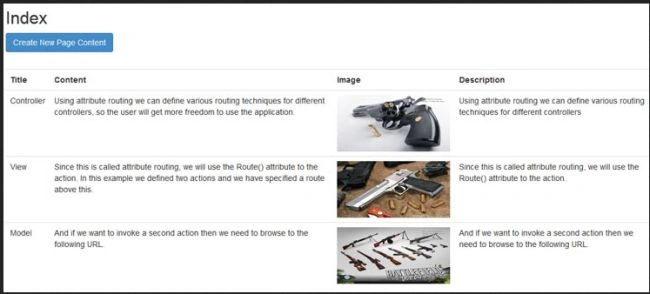
Step 6. Display an image from the database on view. Here we display the content and image from the database.
    public ActionResult Index()
    {
        var content = db.Contents.Select(s => new
        {
            s.ID,
            s.Title,
            s.Image,
            s.Contents,
            s.Description
          });
          List<ContentViewModel> contentModel = content.Select(item => new ContentViewModel()
          {
                ID = item.ID,
                Title = item.Title,
                Image = item.Image,
                Description = item.Description,
                Contents = item.Contents
            }).ToList();
           return View(contentModel);
    }
Step 7. Set the Retrieve Image action with the ID.
    <td>
         <img src="/Content/RetrieveImage/@item.ID" alt="" height=100 width=200 />
    </td>
    public ActionResult RetrieveImage(int id)
    {
        byte[] cover = GetImageFromDataBase(id);
        if (cover != null)
        {
            return File(cover, "image/jpg");
        }
        else
        {
            return null;
        }
    }
    public byte[] GetImageFromDataBase(int Id)
    {
        var q = from temp in db.Contents where temp.ID == Id select temp.Image;
        byte[] cover = q.First();
        return cover;
    }
How to use CKEditor in MVC
If you want to use CKEditor in ASP.NET MVC, then check the official CKEditor.NET Control. Download it from CKEditor and unzip this folder. After you download the installation package, copy the ckeditor folder and paste it into our solution.
Step 1. Set a reference for ckeditor.js and jquery.js in the view.
    <script src="~/ckeditor/ckeditor.js"></script>
    <script src="~/ckeditor/adapters/jquery.js"></script>
Step 2. Add this code.
@Html.TextAreaFor(model => model.Contents, new { @class = "ckeditor", placeholder = "Content" })
Step 3. Allow an HTML attribute in your model like this.
    [AllowHtml]
    [Required]
    public string Contents { get; set; }
Suppose you are not AllowHtml attribute run time exception. A potentially dangerous Request.Form value was detected from the client (Contents="<p>Content Here</p>").
Summary
This code demonstrated how to upload an image to a database in an ASP.NET MVC app.
App DevPosted Aug 31, 2023, 7:17 PM
How can you post something that does not work. You failed to mention how to make the database you failed to tell the reader how we should have built the database. Very bad example. Thank you all the same. But it does not work at all
Dũng HàPosted Jun 10, 2022, 2:53 PM
Hi Vikas Kumar Saini, I have issued the Request. Files["ImageData"] return is null when submitting in modal, please help me to give advice!
Alexis GuayPosted Jul 9, 2018, 10:44 AM
Would any of this work with .NetCore 2.0?
Siyabonga HlotywaPosted Jan 31, 2018, 8:46 AM
I give up I just can't get it right.
Siyabonga HlotywaPosted Jan 31, 2018, 8:45 AM
Public int UploadImageInDataBase(HttpPostedFileBase file, Template template) { template.ImageByte = ConvertToBytes(file); template.DateChanged = DateTime.Now.ToString("dd-MM-yyyy"); var Template = new Template { Title = template.Title, Address = template.Address, ImagePath = template.ImagePath, SubTitle = template.SubTitle, TermsConditions = template.TermsConditions, QuoteID = template.QuoteID, QuoteTypeID = template.QuoteTypeID }; db.Templates.Add(Template); int i = db.SaveChanges(); if (i == 1) { return 1; } else { return 0; } }public byte[] ConvertToBytes(HttpPostedFileBase image) { byte[] imageBytes = null; BinaryReader reader = new BinaryReader(image.InputStream); imageBytes = reader.ReadBytes((int)image.ContentLength); return imageBytes; }
Siyabonga HlotywaPosted Jan 31, 2018, 8:25 AM
I can't really format this error to be clear, but that's the error I'm getting.
Siyabonga HlotywaPosted Jan 31, 2018, 8:22 AM
Object reference not set to an instance of an object.Description: An unhandled exception occurred during the execution of the current web request. Please review the stack trace for more information about the error and where it originated in the code. Exception Details: System.NullReferenceException: Object reference not set to an instance of an object. Source Error: Line 111: { Line 112: byte[] imageBytes = null; Line 113: BinaryReader reader = new BinaryReader(image.InputStream); Line 114: imageBytes = reader.ReadBytes((int)image.ContentLength); Line 115: return imageBytes;
Joslin JoPosted Nov 15, 2017, 11:45 PM
Here for single image how to modify for multiple images
Vikas Kumar SainiPosted Oct 27, 2017, 2:31 AM
Sorry guys, I did not participate this conversation due to some reason.
Mohammad MansoorPosted Oct 4, 2017, 5:15 PM
It helped me to worked in my codefirst project. It looks like Database first version. But i changed according to it. Thanks for sharing.
Lu SanchezPosted Aug 31, 2017, 11:34 PM
Just what i need to learn, thank you.
KUNAl VermaPosted Aug 24, 2017, 4:14 AM
Why so .........................................
KUNAl VermaPosted Aug 24, 2017, 4:13 AM
<img src="/Content/RetrieveImage/@item.ID" alt="" height=100 width=200 /> is not working for me..
Mazedur RahamanPosted Jul 19, 2017, 9:53 AM
Please include some feature edit and delete operation in this project. It's very effective for learning people...
Manav PandyaPosted Apr 14, 2017, 12:44 AM
Thanks for sharing
amrita kalalPosted Mar 24, 2017, 8:08 AM
Sir image is not getting dispayed
Minh NguyenPosted Mar 17, 2017, 9:02 AM
I can't call HttpPostedFileBase in UploadImageInDataBase . I've been create "public HttpPostedFileBase File { get; set; }" in Model.
Sammy CaPosted Jan 12, 2017, 5:50 AM
Nice article Vikas, the only one that made sense and actually works from what I've seen tonight. Would be great if you could show us one that works with Mongo or DocumentDB. Keep up the good work
Ajay KulkarniPosted Jan 3, 2017, 10:00 AM
What is ContentRepository ???
Amit KumarPosted Dec 29, 2016, 1:47 AM
Thanks for the nice post........its helpful for me...
s sPosted Nov 12, 2016, 12:01 PM
Will wait for edit / delete feature in this example also. Its one of best example i have search in last 2 week .
karthick KumarPosted Nov 11, 2016, 10:02 PM
Hi..Thanks for ur examples. i have one small problem..File doesn't get from View..only get null value in Controller..am i use any scripts?and what is fileCheck(this)?where get that function?
Bou Rif AbdouPosted Oct 11, 2016, 9:21 PM
The project not working
Vikas Kumar SainiPosted Sep 27, 2016, 3:50 AM
Hi.. Amjad Aslam ContentRepository this is only Service layer just like interface and their implementation.....
Amjad AslamPosted Sep 4, 2016, 9:52 PM
Please tell me ....... what is ContentRepository???
Tim RehbergPosted Aug 17, 2016, 1:21 PM
If i select just Id == 3 it gives me all the images information but just the one picture but i need just the one picture and the one desc and etc
Tim RehbergPosted Aug 17, 2016, 1:09 PM
Hello i was just wondering if i just want to select images with a certain Id how can i just show that one
Mohamed AlaaPosted May 8, 2016, 10:33 PM
I have problem can't add to database :\
Sisovin CHIENGPosted Apr 1, 2016, 7:11 AM
How to converttobytes in Mvc 6?
Sisovin CHIENGPosted Apr 1, 2016, 7:10 AM
This is very good examples, but for Mvc 6, it have problem at public byte[] ConvertToBytes(HttpPostedFileBase image) { byte[] imageBytes = null; BinaryReader reader = new BinaryReader(image.InputStream); imageBytes = reader.ReadBytes((int)image.ContentLength); return imageBytes; }
Falgun MistryPosted Feb 1, 2016, 10:59 PM
Hello! Thanks for nice lesson. What if i need to add event Edit functionality for allowing user to make changes to text in CKeditor and change uploaded image or delete uploaded image.. Can you please guide me on that too? I think i'll have to create action method for edit part too and i'll have to create view for it but a little confused this is my first time experience to upload images in MVC. Thank You for support in advance.
Firas MaswadayPosted Jan 25, 2016, 9:52 AM
Hello , and thanks for this lesson , can you please update it with also edit page for the same content , because i did all your steps and works well , but i added an edit page for the post , when i try to edit the post image , it's not saving it . so please if you can help me with that , just how to make edit page for the same thing . and thanks
Vikas Kumar SainiPosted Jan 9, 2016, 11:49 AM
evanth jain ... no hitting twice action method on my machine...
evanth jainPosted Jan 9, 2016, 8:25 AM
@Vikas Kumar Saini , i tried your solution while retrieving the Image you have given the Controller and Action Method with Id for retrieve image .I have a doubt why it is hitting the Action method Twice ?? please keep the Break point and Check
Garivi NareshreddyPosted Dec 30, 2015, 4:04 AM
Thanks for the clear info.
yagnik patelPosted Nov 7, 2015, 6:46 AM
http://dotnet-way.blogspot.in/2015/09/how-to-upload-image-to-database-and.html
Tanuj NayanamPosted Mar 17, 2015, 7:58 AM
i am getting this error : 'System.Data.Entity.Core.ProviderIncompatibleException' occurred in EntityFramework.dll but was not handled in user code
Sandeep NegiPosted Mar 10, 2015, 7:07 AM
Vikas not running project on my site.
Ravi PatelPosted Feb 27, 2015, 6:12 AM
thanks for sharing this articles
Arpan khandelwalPosted Feb 24, 2015, 2:45 PM
Thanks for providing full application.
Vikas Kumar SainiPosted Feb 10, 2015, 12:11 PM
welcome rahul
Rahul SharmaPosted Feb 6, 2015, 5:33 AM
Thank You so much..
Rahul SharmaPosted Feb 6, 2015, 5:32 AM
Such a good work....It's working fine.
vishal patilPosted Feb 1, 2015, 5:48 AM
Please solve this Object reference not set to an instance of an object. Description: An unhandled exception occurred during the execution of the current web request. Please review the stack trace for more information about the error and where it originated in the code. Exception Details: System.NullReferenceException: Object reference not set to an instance of an object. Source Error: Line 36: { Line 37: byte[] imageBytes = null; Line 38: BinaryReader reader = new BinaryReader(image.InputStream); Line 39: imageBytes = reader.ReadBytes((int)image.ContentLength); Line 40: return imageBytes;
Vikas Kumar SainiPosted Jan 22, 2015, 11:28 AM
Bahadir Hatunoglu........ yeah sure please look these link ......... http://stackoverflow.com/questions/14423056/why-do-we-use-viewmodels http://www.dotnet-tricks.com/Tutorial/mvc/QHQT270712-Understanding-ViewModel-in-ASP.NET-MVC.html
Bahadir HatunogluPosted Jan 20, 2015, 3:08 AM
Hi, Can you tell me how you binded the view and the viewmodel? And viewmodel is really necessary? Thanks
Ramsès Zogning IIPosted Dec 8, 2014, 11:48 AM
thk u, i'm going to look it
Vikas Kumar SainiPosted Dec 8, 2014, 11:11 AM
Hello Ramses please see these links http://www.codeproject.com/Articles/774807/Attribute-Routing-in-ASP-NET-MVC-WebAPI http://www.codeproject.com/Tips/573454/Routing-in-MVC
Ramsès Zogning IIPosted Dec 6, 2014, 11:21 AM
How can i change the link ok my project from http://localhost/Home/Index to http://localhost/Home/Index?UserId=2 (just an example of link). I know that it's in global.asax file, but what it's the complete configuration please ??
shreya kumrawatPosted Dec 5, 2014, 9:56 PM
thanx its lot helpfull for me
Ramsès Zogning IIPosted Nov 27, 2014, 7:03 PM
Thk Sir, i actually solved my problem!
Vikas Kumar SainiPosted Nov 26, 2014, 11:00 AM
If you want to complete Sample please click this link........ https://onedrive.live.com/redir?resid=1F9E67EA808B03D8%21281
Vikas Kumar SainiPosted Nov 26, 2014, 10:57 AM
Rams?s Zogning please explain which type of problem you are facing....
Vikas Kumar SainiPosted Nov 26, 2014, 10:55 AM
dear Ajay Shedge please see in Repositories folder......
Ramsès Zogning IIPosted Nov 25, 2014, 8:16 PM
It's work perfectly, but i have some Problems when i try to join the table of picture (ID, Title, ...) to one other table :/
Ajay ShedgePosted Nov 22, 2014, 6:13 AM
hello sir please tell me where is ContentRepository define
vijay NelsonPosted Oct 30, 2014, 1:26 AM
Good one
??? ???Posted Aug 20, 2014, 4:03 PM
Nice!
eric newbiePosted Aug 10, 2014, 7:26 PM
Good article