* Style Rules….*</style>
Now let’s do an example.
You can have multiple occurrences of the style element within the head of the document, and you can even import some styles with these elements.
The following is the output for the code above:
While this technique is a common practice and used for script masking as well, there are some subtle issues, particularly when including non-comment-friendly content like multiple dashes or trying to address XML strictness. (McGraw-Hill CSS)
3. Inline Styles
Instead of using a Style Sheet for an entire page, you can add style information directly within a single element. Suppose you want to set one specific <h1> tag to render in extra-large, green, Arial font. You could quickly apply the style to only the tag in question using its style attribute, which is a core attribute common to nearly any HTML element.
As an example, the following markup shows an inline style applied to a heading:
<h1 style="font-size: xx-large; font-family: Arial; color: green;">
This sort of style information doesn’t need to be hidden from a browser that isn’t Style Sheet-aware because browsers ignore any attributes that they don’t understand.
Although using inline styles seems to be an easy route to using CSS, it does have a number of drawbacks. The largest problem is that inline rules are bound very closely to a tag. If you want to affect more than one <h1> tag then you need to copy and paste the style attribute into every other heading of interest. The separation of markup from CSS presentation is not optimal with an inline style. However, for quick and dirty application of CSS rules, this might be appropriate, particularly for testing things out.
The second and lesser-known concern with inline CSS rules is that you simply cannot perform every task with them. For example, if you want to change the look of various link states, this is easily accomplished in a document-wide or linked Style Sheet with pseudo-class rules like:
- a:link {color: blue; text-decoration: none;}
- a:visited {color: red; text-decoration: none;}
- a:hover {color: red; text-decoration: underline;}
- a:active {color: red; text-decoration: none;}
However, if you attempt to put such rules in a <a> tag, how are other states indicated? The simple example here would appear to set the color to blue for any state:
<a href="http://www.w3.org" style="color: blue;">Inline Link Styles?</a>
Similarly, in order to change the first letter of a paragraph to large, red text, you might use a pseudo-element rule like:
p:first-letter {color: red; font-size: xx-large;}
However, when you attempt to do this inline, you are forced to introduce an element to hold the first letter as in the following:
<p><span style="color: red; font-size: xx-large;">T</span>his is a test.</p>
While these examples indicate why these selectors were given the names pseudo-class and pseudo-element, they don’t really show us how to use such inline styles.
- <a href="http://www.w3.org/" style="{text-decoration: none; }: link {color: blue;
- }: visited {color: red; }: hover {color: red; text-decoration: underline; }:
- active {color: red;
- }">Inline Link Styles?</a>
To set the first letter on paragraphs, we would use:
- <p style="{text-indent: 1em; text-align: justify; line-height: 150%; }: first
- letter {color: red;
- font-size: xx-large; }">
- </h2>
- <p>
This is the set of <p></p>.
The emerging specification even suggested the importation of Style Sheets directly inline:
<div id="navbar" style="@import url(navigationstyles.css);">just an example</div>
While all these ideas are quite interesting, more than seven years after the working draft was authored, not a single browser supports this syntax at the time this edition is being completed. So, besides being too closely bound to tags, understand that unless this situation has changed by the time you read this edition, only using inline styles is going to limit your application of some of the more useful CSS selectors. (Reference McGill CSS)
These were some methods for using CSS, there are many other methods for using CSS but includes the preceding three-parent methods. So for more stay tuned for the next articles while continuing your coding work with various examples.
Do more exercise and pingback your problems.


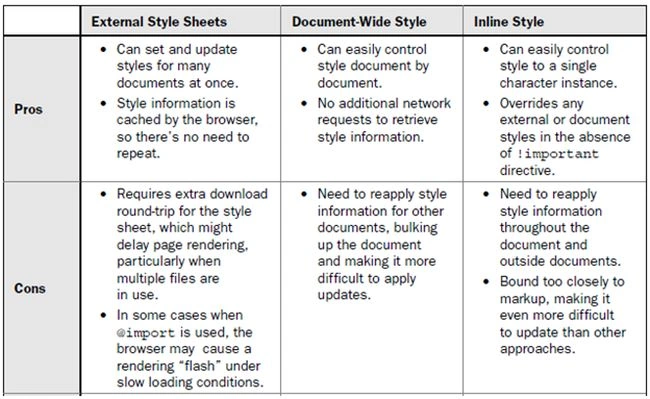 Now let’s do some work using all three methods.
An external Style Sheet is simply a plain text file containing CSS style rules. The common file extension .css indicates that the document provides Style Sheet information. As an example, the following CSS rules can be found in a file called sitestyle.css, that defines a Style Sheet used site-wide:
Now let’s do some work using all three methods.
An external Style Sheet is simply a plain text file containing CSS style rules. The common file extension .css indicates that the document provides Style Sheet information. As an example, the following CSS rules can be found in a file called sitestyle.css, that defines a Style Sheet used site-wide:
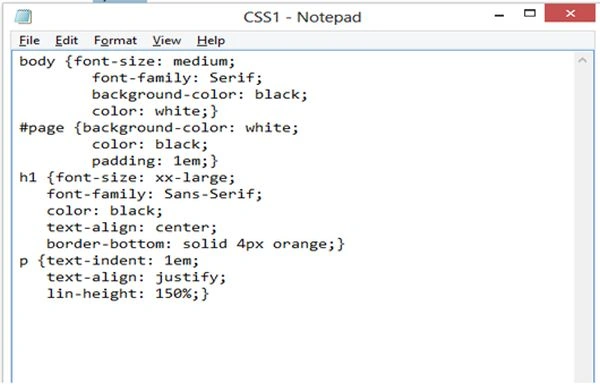 After above sheet, we will work with HTML doc
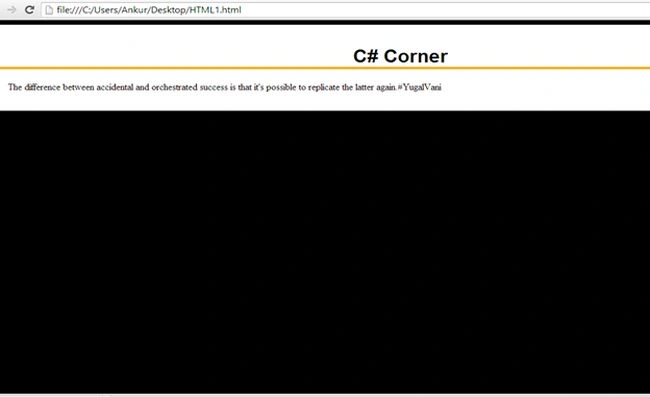
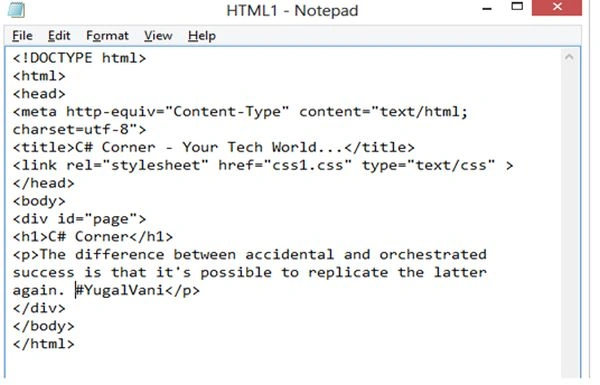 So now we are done with both files Let’s see the output:
 CSS is, at least theoretically, not the only style technology we could use, though as it stands, by default, most browsers assume that CSS is being used. We set the type to be specific but that may get a bit redundant. The HTML specification suggests you can set a default Style Sheet language in the head element of the document by using the <meta> tag, as shown here:
<meta http-equiv="Content-Style-Type" content="text/css">
By using this value in the HTTP headers delivered to a site. Interestingly, many sites set the <meta> tag and use the type attribute, that is particularly appropriate as of this edition’s publication as the specification dictates that the type attribute must be set and thus the W3C validator will complain if the attribute is not set regardless of the appearance of the <meta> tag.
The second way to include a Style Sheet is to embed it. When you embed a Style Sheet, you generally write the style rules directly within the document with a <style> tag found within the <head> </head> of the document.
The basic syntax of the <style> tag is as follows:
<style type="text/css" media="all | print | screen">
CSS is, at least theoretically, not the only style technology we could use, though as it stands, by default, most browsers assume that CSS is being used. We set the type to be specific but that may get a bit redundant. The HTML specification suggests you can set a default Style Sheet language in the head element of the document by using the <meta> tag, as shown here:
<meta http-equiv="Content-Style-Type" content="text/css">
By using this value in the HTTP headers delivered to a site. Interestingly, many sites set the <meta> tag and use the type attribute, that is particularly appropriate as of this edition’s publication as the specification dictates that the type attribute must be set and thus the W3C validator will complain if the attribute is not set regardless of the appearance of the <meta> tag.
The second way to include a Style Sheet is to embed it. When you embed a Style Sheet, you generally write the style rules directly within the document with a <style> tag found within the <head> </head> of the document.
The basic syntax of the <style> tag is as follows:
<style type="text/css" media="all | print | screen">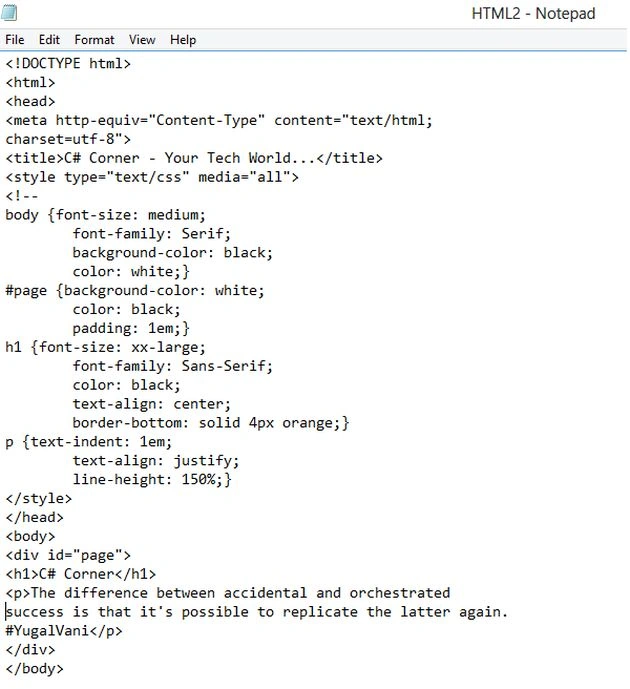

Join the conversation! Your thoughts help the community grow.