Bluetooth
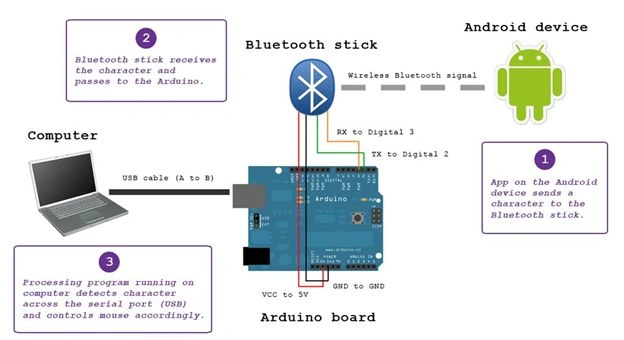
Bluetooth is a technology for wireless communication. It is designed to replace cable connections. Usually, it connects small devices like mobile phones, PDAs and TVs using a short-range wireless connection. And it uses the 2.45Ghz frequency band. The connection can be point-to-point or multipoint where the maximum range is 10 meters. The transfer rate of the data is 1Mbps (or a maximum of 2Mbps).
Figure 1: Bluetooth
What we will do
We will create an Arduino-model where we turn on a LED light using Bluetooth commands. And we will that instruction using our Android Phone. In short, we will control our LED using a phone.
And via Bluetooth, we will the ON/OFF instruction.
Figure 2: Bluetooth stick ( Pic Courtesy: instructable.com)
So, what we need:
- Arduino Uno Board
- Bluetooth Module (HC-05)
- 1x 3.5mm LED
- 1k Ohm Resistor
- Jumper Wires
Most of the pre-requisites we have used already in my past articles, except for the Bluetooth Module HC-05.
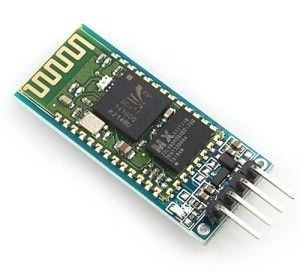
Figure 3: Bluetooth Module
It is a class-2 Bluetooth module with Serial Profile that can be used as a Master or Slave. In Arduino, we will use Serial Communication for various purposes. Since it also supports Serial Communication and you can treat it as a replacement.
HC-05 Specifications
- 2.45Ghz Frequency
- Asynchronous Speed 2.1Mbps (max) .160Kbps
- Security: Authentication
- Profile: Bluetooth Serial Port
- Power Supply: +3.3 VDC
- Working Temperature: >20C
- Cost : Around INR 300
HC-05 Description
So, we have six (or four) leads in this module. But we will genuinely care about only four of them. Where the two are for Vcc and GND.
Vcc= Power Supply (in other words 5V or 3.3V)
GND= Ground (in other words 0 volts)
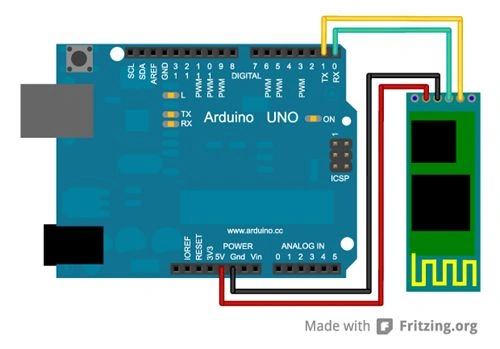
And the next two leads are for RX (Receiving End) and TX (Transmitting End). From the basic idea, we can say the RX of the module will go to the TX of the Arduino UNO. In the same way, we connect the TX of the module with the RX of the Arduino UNO.
Figure 4: Arduino UNO
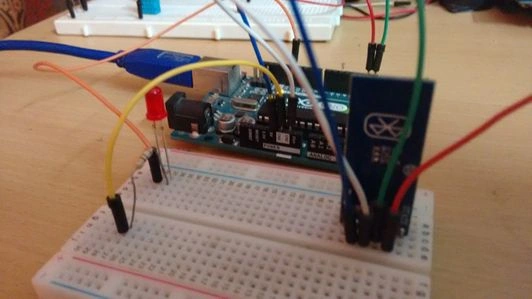
In addition, you can add a LED to determine the instruction more correctly. So, add a LED to digital PIN 12.
Sketch
In this sketch, we will write the basic code where we are accepting 0 or 1 (in other words true or false) from the serial port and process accordingly.
- int LED= 12;
- char input;
-
- void setup()
- {
- Serial.begin(9600);
- pinMode(LED, OUTPUT);
- Serial.println(">> START<<");
- }
-
- void loop()
- {
- if(Serial.available()>0)
- {
- input= Serial.read();
- if(input=='1')
- {
- Serial.println("ON");
- digitalWrite(LED, HIGH);
- delay(2000);
- }
- else if(input=='0')
- {
- Serial.println("OFF");
- digitalWrite(LED, LOW);
- delay(2000);
- }
- else
- {
- Serial.println("NO INPUT");
- Serial.println(input);
- }
- }
-
- }
Illustration
In the Definition part, we declare the LED variable that accepts 12 (in other words the Digital PIN). And the char input that we will further use for accepting the user's instructions.
Until now, we have just declared two variables.
Next we have a setup() block where we will initialize a LED and serial communication. So, we have pinMode() and Serial.begin().
In the next loop() block we do all the actual coding.
First, we decide whether or not the serial port is available. If yes, then we will do the communication. For that, we have a Serial Method available().
On yes, we proceed and ask for the user's input via the serial port. And, the read() method is there that accepts input from the serial port.
Whatever value we get from the serial port we store in the input variable that we defined earlier.
And, on the input, it will decide to turn it on or not.
See, we haven't written any code for Bluetooth communication. So, that's because Bluetooth communication is implicitly Serial Communication. And in Arduino, what you can do with the Serial Monitor in Arduino is that you can also implement Bluetooth Serial Communication.
Before we connect to the Android Phone, install an app that will do the rest of the job.
ArdruDroid
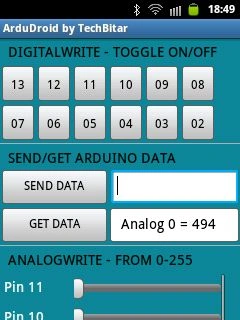
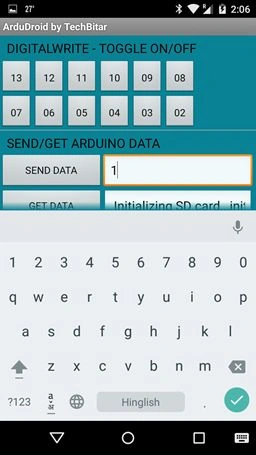
Figure 5: ArdruDroid by TechBitar
Note: Play
Store link.
This App is designed for Arduino Bluetooth Communication. With That SEND button, we can send instructions to the HC-05 module. Whereas, the GET button is used to see what HC-05 is returning as the return value.
Since here we have two instructions, 1 (true) to turn on the LED and the other is 0 (false) to turn off the LED.
Output
Use the following procedure.
- Upload the code to the Arduino UNO where we have successfully attached the Bluetooth HC-05 module.
Note: When uploading the sketch please remove the RX and TX wires from the Arduino UNO. I don't even know why they don't work when they are attached. After successfully uploading, attach RX and TX to the board.
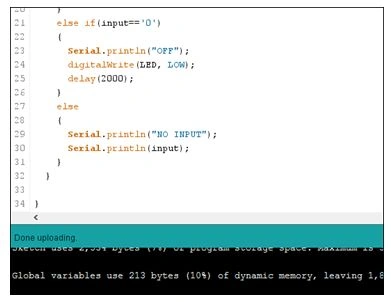
Figure 6: Program
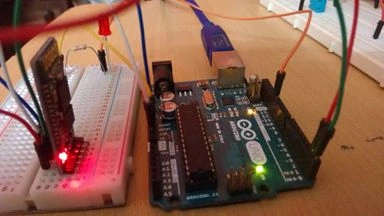
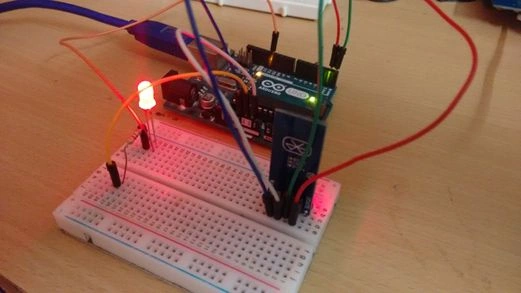
- After successfully Uploading check whether the Bluetooth module is working or not. (The easiest way is to see if the RED indicator is blinking).
Figure 7: Blinking RED indicator
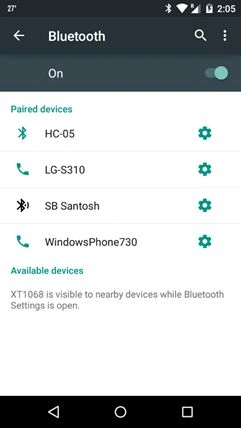
- Now, go to the Bluetooth Settings on your phone and pair your phone with the HC-05 Device. The key is 1234.
Figure 8: Bluetooth on
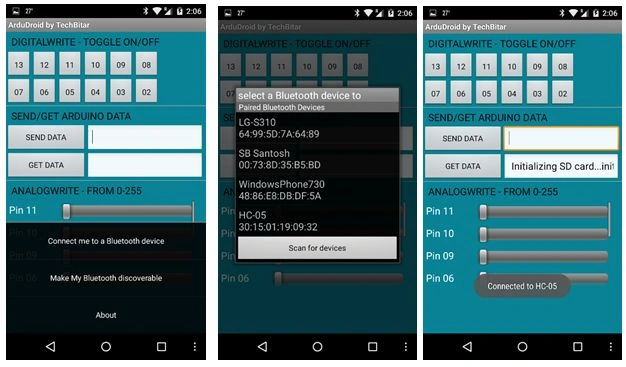
- After successfully pairing, open the ArduDroid App and connect with the HC-05 module.
Figure 9: ArduDroid App
- After doing this, now you can send instructions to the HC-05 with your app. So, we are sending 1 as input.
Figure 10: Send instruction to HC-05
After sending, you see something like this.
Figure 11: After sending
- And 0 to turn off the LED.

Figure 12: 0 to turn off the LED
And then:
Figure 13: Turn off the LED
Conclusion
Using the HC-05 Module, I showed you how to implement it with a LED without using any external library. Next, we try to explore something more with this module using analog inputs. Until then enjoy coding.



 It is a class-2 Bluetooth module with Serial Profile that can be used as a Master or Slave. In Arduino, we will use Serial Communication for various purposes. Since it also supports Serial Communication and you can treat it as a replacement.
HC-05 Specifications
It is a class-2 Bluetooth module with Serial Profile that can be used as a Master or Slave. In Arduino, we will use Serial Communication for various purposes. Since it also supports Serial Communication and you can treat it as a replacement.
HC-05 Specifications
 In addition, you can add a LED to determine the instruction more correctly. So, add a LED to digital PIN 12.
Sketch
In this sketch, we will write the basic code where we are accepting 0 or 1 (in other words true or false) from the serial port and process accordingly.
In addition, you can add a LED to determine the instruction more correctly. So, add a LED to digital PIN 12.
Sketch
In this sketch, we will write the basic code where we are accepting 0 or 1 (in other words true or false) from the serial port and process accordingly.
Munish APosted Oct 17, 2017, 1:40 AM
Nice one really intresting...
Reinis JerķisPosted Aug 20, 2017, 3:18 PM
Hey, can you please help me. I wanna code an arduino for Ios app and the app only allows to send commands digitally from 1-9, for example 0 turn an led on and 1 to turn it off. But i need to control a lot of led's and it doesns't read past 9, When i press command 11 it receivs it as 1. I know its in the code. but im a bad coder. Can you please help me?
ajesh singhviPosted May 12, 2017, 4:48 AM
Still not working.....my Bluetooth module red led blinks when connected but using app nothing happens
Rushank ShahPosted Mar 7, 2017, 1:20 AM
How can i get current status of led when bluetooth connection established ?
SubashPosted Jul 20, 2016, 8:46 AM
Nice
Anne CoudyzerPosted Nov 24, 2015, 11:06 AM
the VCC of the HC-05 is 5V but the input on the RX port is only 3.3V !? So you have to put a voltage divider on the TX of arduino to go to the RX of the HC-05 module , is that correct ?
Anne CoudyzerPosted Nov 24, 2015, 11:03 AM
test
Vaikesh K PPosted Nov 11, 2015, 7:06 AM
Nice One
Pankaj Kumar ChoudharyPosted Jun 15, 2015, 10:24 PM
Nice Article Sir..........
NitinPosted Jun 15, 2015, 9:24 AM
good one
Manoj KulkarniPosted Jun 15, 2015, 12:25 AM
Nice article. Thank you for sharing
Carmelo La MonicaPosted Jun 14, 2015, 2:52 PM
Good article, thanks for sharing :)
Santhakumar MunuswamyPosted Jun 14, 2015, 2:25 PM
Thanks for good work. :)