

This article demonstrates how to use a RDLC local report to get various downloadable file formats of reports, such as a Word or Excel document or a PDF.
Prerequisites: VS2010, SQL Server 2005/08
Step 1: Test Data
The following is my test data and also Stored Procedure to fetch the data for the report.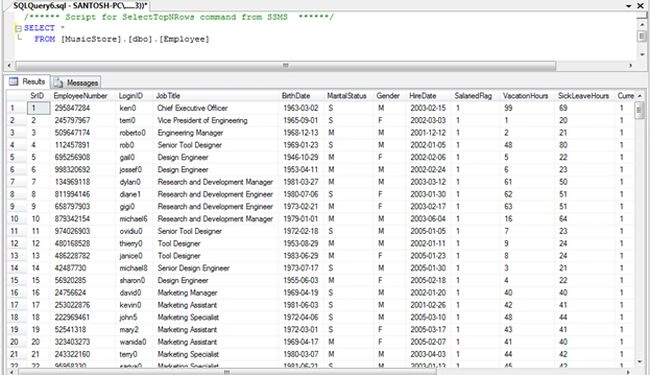
- -- =============================================
- -- EXEC USP_GETEmployeeDetails
- -- =============================================
- ALTER PROCEDURE [dbo].[USP_GETEmployeeDetails]
- AS
- BEGIN
- SELECT SrID
- , EmployeeNumber
- , LoginID
- , JobTitle
- , BirthDate
- , MaritalStatus
- , Gender
- , HireDate
- , SalariedFlag
- , VacationHours
- , SickLeaveHours
- FROM Employee
- END
Step 2
Create a new ASP.NET Empty Web Application.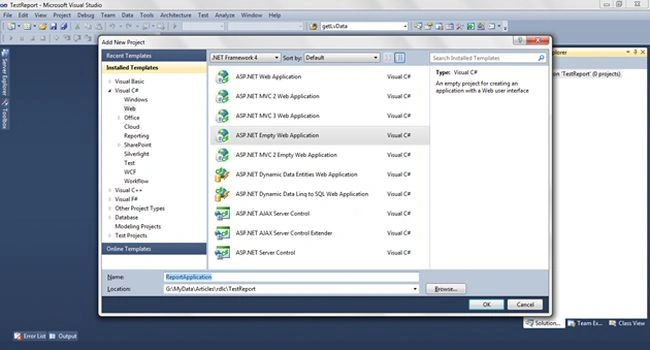
Step 3
Add a new DataSet from the Data templates.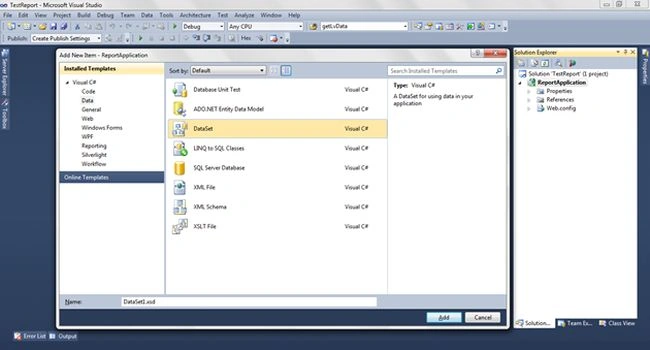
Step 4
Here add a new DataTable into a Dataset as shown below.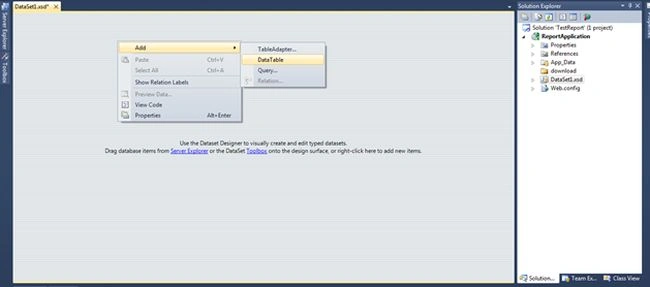
Step 5
Add columns to the DataTable and name each column the same as used for the Stored Procedure.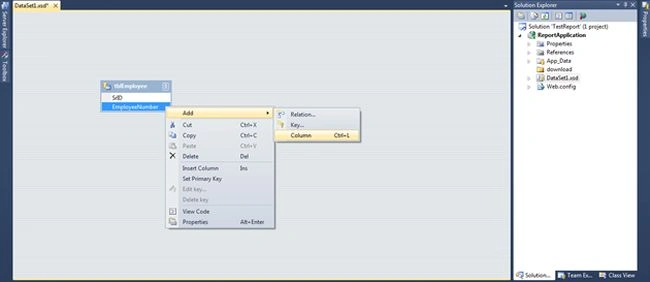
Finally the Data Table is ready, having the required columns in it.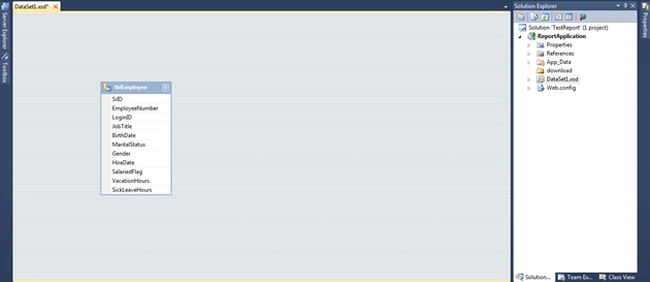
Step 6
Add a new Report file (.rdlc) from the Reports templates.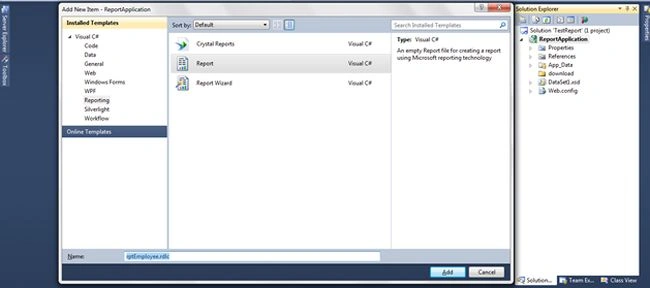
The RDLC report has the default view as below: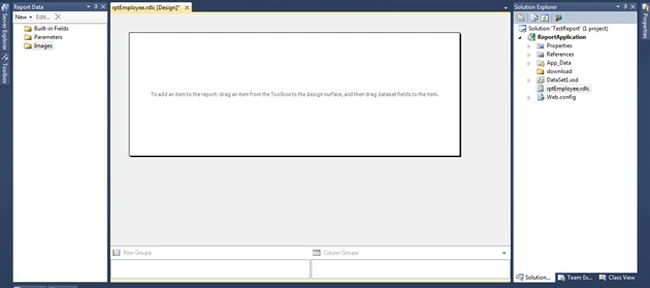
Step 7
In the Report Data click and new button and select DataSet. And then select the appropriate DataSet. After selecting the DataSet, the columns appear in the right tab.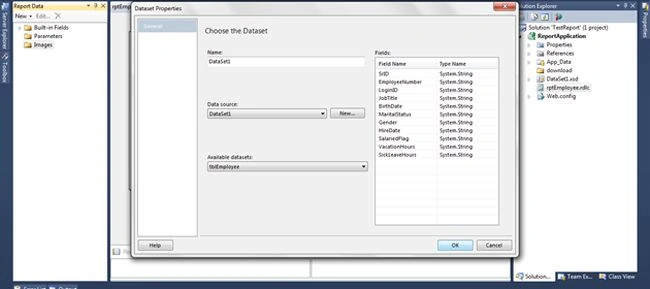
After adding the DataSet, the report data is as below: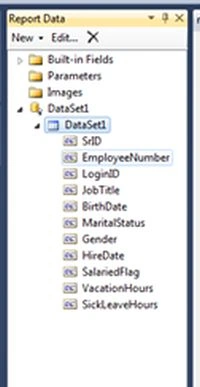
Step 8
Right-click on Report Page and select the Insert command. Select Table from the available tools.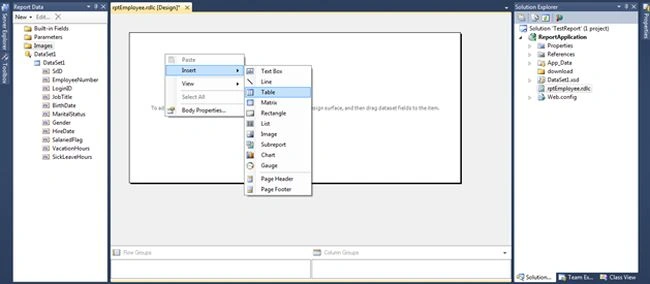
Step 9
Binding DataColumns from the DataSet in the Table Control. Right-click on the dynamic row and select the appropriate column from DataColumns as shown below.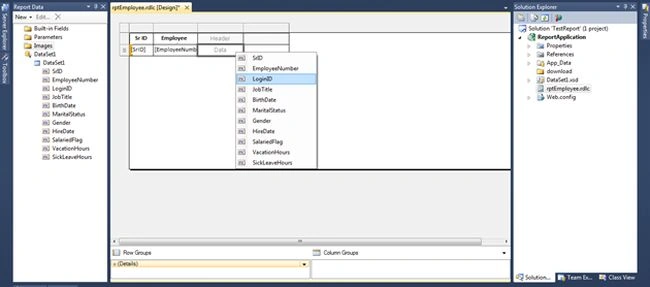
After adding DataColumns the Report Page is as in the following: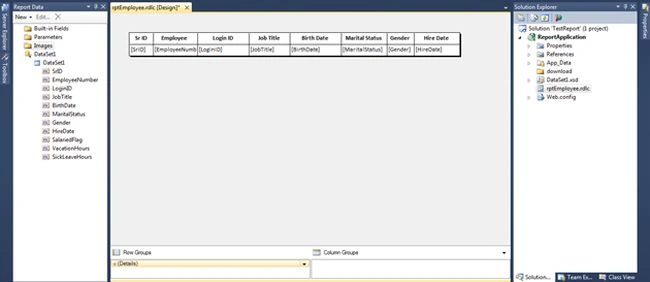
Step 10
Up to this step we have completed the report design.
Add new WebPage 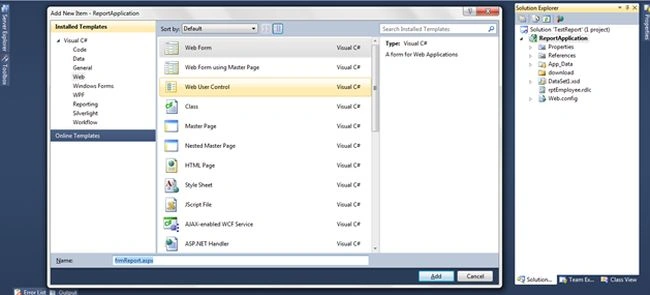
Step 11
The WebPage has the following script and it will look as in the following image:
- <%@ Page Language="C#" AutoEventWireup="true" CodeBehind="frmReport.aspx.cs" Inherits="ReportApplication.frmReport" %>
- <html xmlns="http://www.w3.org/1999/xhtml">
- <head runat="server">
- <title></title>
- </head>
- <body>
- <form id="form1" runat="server">
- <center>
- <h2>
- Employee Report</h2>
- <table width="60%" border="1">
- <tr>
- <td>
- <asp:DropDownList ID="ddlFileFormat" runat="server">
- <asp:ListItem Text="PDF" Value=".pdf"></asp:ListItem>
- <asp:ListItem Text="WORD" Value=".doc"></asp:ListItem>
- <asp:ListItem Text="EXCEL" Value=".xls"></asp:ListItem>
- </asp:DropDownList>
- </td>
- <td>
- <asp:Button ID="btnDownload" runat="server" Text="Download" OnClick="btnDownload_Click" />
- </td>
- </tr>
- </table>
- </center>
- </form>
- </body>
- </html>

The WebPage has the following C# code:
- namespace ReportApplication
- {
- public partial class frmReport : System.Web.UI.Page
- {
- protected void Page_Load(object sender, EventArgs e)
- {
- }
- #region " [ Button Event ] "
- protected void btnDownload_Click(object sender, EventArgs e)
- {
- // select appropriate contenttype, while binary transfer it identifies filetype
- string contentType = string.Empty;
- if (ddlFileFormat.SelectedValue.Equals(".pdf"))
- contentType = "application/pdf";
- if (ddlFileFormat.SelectedValue.Equals(".doc"))
- contentType = "application/ms-word";
- if (ddlFileFormat.SelectedValue.Equals(".xls"))
- contentType = "application/xls";
- DataTable dsData = new DataTable();
- dsData = getReportData();
- string FileName = "File_" + DateTime.Now.ToString("ddMMyyyyhhmmss") + ddlFileFormat.SelectedValue;
- string extension;
- string encoding;
- string mimeType;
- string[] streams;
- Warning[] warnings;
- LocalReport report = new LocalReport();
- report.ReportPath = Server.MapPath("~/rptEmployee.rdlc");
- ReportDataSource rds = new ReportDataSource();
- rds.Name = "DataSet1";//This refers to the dataset name in the RDLC file
- rds.Value = dsData;
- report.DataSources.Add(rds);
- Byte[] mybytes = report.Render(ddlFileFormat.SelectedItem.Text, null,
- out extension, out encoding,
- out mimeType, out streams, out warnings); //for exporting to PDF
- using (FileStream fs = File.Create(Server.MapPath("~/download/") + FileName))
- {
- fs.Write(mybytes, 0, mybytes.Length);
- }
- Response.ClearHeaders();
- Response.ClearContent();
- Response.Buffer = true;
- Response.Clear();
- Response.ContentType = contentType;
- Response.AddHeader("Content-Disposition", "attachment; filename=" + FileName);
- Response.WriteFile(Server.MapPath("~/download/" + FileName));
- Response.Flush();
- Response.Close();
- Response.End();
- }
- #endregion
- #region " [ Get report Data ] "
- private DataTable getReportData()
- {
- DataSet dsData = new DataSet();
- SqlConnection sqlCon = null;
- SqlDataAdapter sqlCmd = null;
- try
- {
- using (sqlCon = new SqlConnection(ConfigurationManager.ConnectionStrings["connectionString"].ConnectionString))
- {
- sqlCmd = new SqlDataAdapter("USP_GETEmployeeDetails", sqlCon);
- sqlCmd.SelectCommand.CommandType = CommandType.StoredProcedure;
- sqlCon.Open();
- sqlCmd.Fill(dsData);
- sqlCon.Close();
- }
- }
- catch
- {
- throw;
- }
- return dsData.Tables[0];
- }
- #endregion
- }
- }
Step 12
When using a RDLC Local report, it is necessary to add the following assemblies.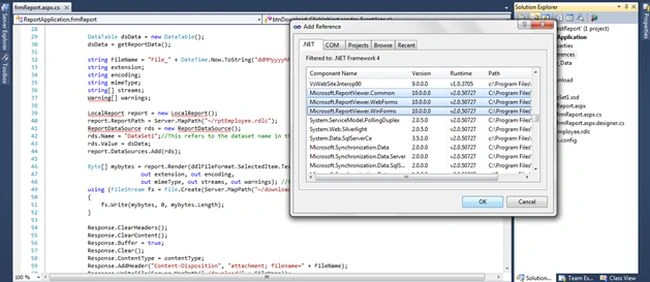
Step 13
Finally build and run the project.
The results are as below.
1. PDF downloadable report file 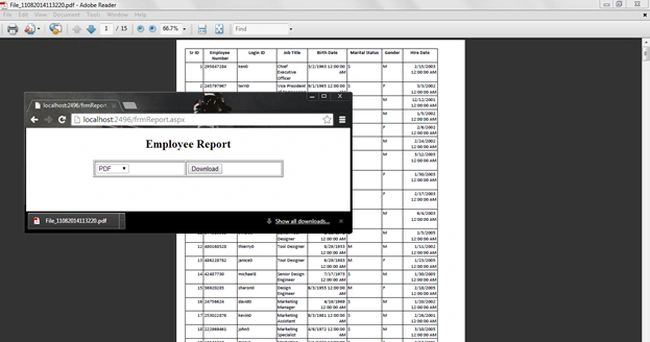
2. DOC downloadable report file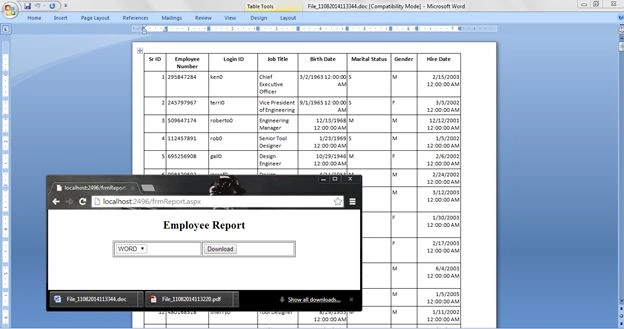
3. Excel downloadable report file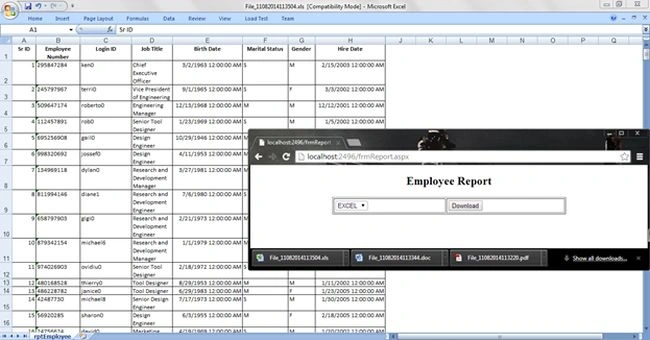
The following are the files stored in the download folder: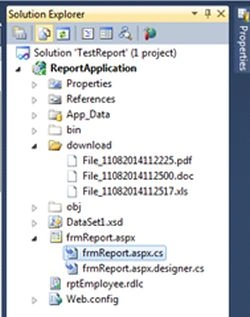
Step 14: Deployment of RDLC report on IIS
Most of the time the hosting server is not updated with the Microsoft Reporting Package and then we receive the following error after deployment.
Could not load file or assembly 'Microsoft.ReportViewer.Common, Version=11.0.0.0
This error occurs since required assemblies are not present in the GAC's assembly folder.
Remedy: When deploying the project add the following assemblies to the bin folder:
- Microsoft.ReportViewer.Common.dll
- Microsoft.ReportViewer.ProcessingObjectModel.dll
- Microsoft.ReportViewer.WebForms.dll
- Microsoft.ReportViewer.WinForms.dll (not required for web application)
For more detailed code and database script information download the source code attached.
SURESHKUMAR VIJAYAKUMARPosted Jul 29, 2020, 11:47 PM
Hi . I am getting report time out error when the data is more. Have tried increasing the timeout value in config file. But the same error.
Kent VickeryPosted Mar 10, 2019, 11:15 PM
Never mind. I just realized I had placed my asp:Button inside of an asp:UpdatePanel. Works fine now that I moved the button outside of that panel.
Kent VickeryPosted Mar 10, 2019, 11:00 PM
Hi Santosh. I realize this is an old article and you probably don't respond to comments on it anymore, but I'll try anyway. I have a asp.vb application that looks almost exactly like your example, but when I click on the button the browser never ask me if I want to save or open the PDF. I can see the PDF is generated and can save the report data to a PDF file to verify. Any thoughts as to why things are not working form me?
aravind sasiPosted Nov 15, 2016, 8:45 AM
Hi Santosh, I follow your code and I can download PDF/EXCEL in my local server. For IIS hosting (web application), i put 3 dlls(that you mentioned above) in bin folder and run, excel/pdf files are not downloading. Is anything to add in web config ?. Is I want install ReportVIewer.msi on the host server ?.
Sushil JadhavPosted Mar 27, 2015, 9:44 AM
I think Error occurs at below line 3 . ReportParameter[] parms = new ReportParameter[1]; parms[0] = new ReportParameter("rptParamCompany", "ABC"); report.SetParameters(parms); report.Refresh();
Sushil JadhavPosted Mar 27, 2015, 9:42 AM
Hi Santosh, Your application work well with my local VS2010. but when deployed on server & tried to run I am getting below error message (An error occurred during local report processing). Please suggest where I am missing. I searched lot on internet. Operation : EnsureExecutionSessionStackTrace : at Microsoft.Reporting.WebForms.LocalReport.EnsureExecutionSession() at Microsoft.Reporting.WebForms.LocalReport.SetParameters(IEnumerable`1 parameters) at PMS.Master.GeneralSearch.ExportReport(ExportType exportType) at PMS.Master.GeneralSearch.lnkExcel_Click(Object sender, EventArgs e) Exception : Microsoft.Reporting.WebForms.LocalProcessingException: An error occurred during local report processing. ---> Microsoft.Reporting.DefinitionInvalidException: The definition of the report 'D:\sushil\TMS\PMS\Report\rpt_viewdata.rdlc' is invalid. ---> Microsoft.ReportingServices.ReportProcessing.ReportProcessingException: An unexpected error occurred while compiling expressions. Native compiler return value: ‘[BC2001] file 'C:\Windows\TEMP\ne1aa11m.0.vb' could not be found’. at Microsoft.ReportingServices.RdlExpressions.ExprHostCompiler.ParseErrors(CompilerResults results, List`1 codeClassInstDecls) at Microsoft.ReportingServices.RdlExpressions.ExprHostCompiler.InternalCompile(Report report, AppDomain compilationTempAppDomain, Boolean refusePermissions) at Microsoft.ReportingServices.RdlExpressions.ExprHostCompiler.<>c__DisplayClass1.<Compile>b__0() at Microsoft.ReportingServices.Diagnostics.RevertImpersonationContext.<>c__DisplayClass1.<Run>b__0(Object state) at System.Security.SecurityContext.Run(SecurityContext securityContext, ContextCallback callback, Object state) at Microsoft.ReportingServices.Diagnostics.RevertImpersonationContext.Run(ContextBody callback) at Microsoft.ReportingServices.RdlExpressions.ExprHostCompiler.Compile(Report report, AppDomain compilationTempAppDomain, Boolean refusePermissions) at Microsoft.ReportingServices.ReportPublishing.ReportPublishing.Phase3(ICatalogItemContext reportContext, ParameterInfoCollection& parameters, AppDomain compilationTempAppDomain, Boolean generateExpressionHostWithRefusedPermissions, Dictionary`2& groupingExprCountAtScope) at Microsoft.ReportingServices.ReportPublishing.ReportPublishing.CreateIntermediateFormat(ICatalogItemContext reportContext, Byte[] definition, IChunkFactory createChunkCallback, CheckSharedDataSource checkDataSourceCallback, ResolveTemporaryDataSource resolveTemporaryDataSourceCallback, DataSourceInfoCollection originalDataSources, PublishingErrorContext errorContext, AppDomain compilationTempAppDomain, Boolean generateExpressionHostWithRefusedPermissions, IDataProtection dataProtection, String& description, String& language, ParameterInfoCollection& parameters, DataSourceInfoCollection& dataSources, UserLocationFlags& userReferenceLocation, ArrayList& dataSetsName, Boolean& hasExternalImages, Boolean& hasHyperlinks) at Microsoft.ReportingServices.ReportProcessing.ReportProcessing.CompileOdpReport(ICatalogItemContext reportContext, Byte[] reportDefinition, IChunkFactory createChunkCallback, CheckSharedDataSource checkDataSourceCallback, ResolveTemporaryDataSource resolveTemporaryDataSourceCallback, DataSourceInfoCollection originalDataSources, PublishingErrorContext errorContext, AppDomain compilationTempAppDomain, Boolean generateExpressionHostWithRefusedPermissions, IDataProtection dataProtection, String& reportDescription, String& reportLanguage, ParameterInfoCollection& parameters, DataSourceInfoCollection& dataSources, UserLocationFlags& userReferenceLocation, ArrayList& dataSetsName, Boolean& hasExternalImages, Boolean& hasHyperlinks) at Microsoft.ReportingServices.ReportProcessing.ReportProcessing.CreateIntermediateFormat(ICatalogItemContext reportContext, Byte[] reportDefinition, IChunkFactory createChunkFactory, CheckSharedDataSource checkDataSourceCallback, ResolveTemporaryDataSource resolveTemporaryDataSourceCallback, DataSourceInfoCollection originalDataSources, AppDomain compilationTempAppDomain, Boolean generateExpressionHostWithRefusedPermissions, ReportProcessingFlags processingFlags, IDataProtection dataProtection) at Microsoft.Reporting.ReportCompiler.CompileReport(ICatalogItemContext context, Byte[] reportDefinition, Boolean generateExpressionHostWithRefusedPermissions, ControlSnapshot& snapshot) --- End of inner exception stack trace --- at Microsoft.Reporting.ReportCompiler.CompileReport(ICatalogItemContext context, Byte[] reportDefinition, Boolean generateExpressionHostWithRefusedPermissions, ControlSnapshot& snapshot) at Microsoft.Reporting.PreviewStore.StoredReport.EnsureCompiled(CatalogItemContextBase itemContext) at Microsoft.Reporting.PreviewStore.GetCompiledReport(CatalogItemContextBase context, Boolean rebuild, Byte[]& reportDefinition, ControlSnapshot& snapshot) at Microsoft.Reporting.LocalService.GetCompiledReport(CatalogItemContextBase itemContext, Boolean rebuild, ControlSnapshot& snapshot) at Microsoft.Reporting.WebForms.LocalReport.EnsureExecutionSession() --- End of inner exception stack trace --- at Microsoft.Reporting.WebForms.LocalReport.EnsureExecutionSession() at Microsoft.Reporting.WebForms.LocalReport.SetParameters(IEnumerable`1 parameters)
Manish Kumar ChoudharyPosted Dec 12, 2014, 12:14 AM
Nice explanation Santosh Gadge sir..
Jaipal ReddyPosted Dec 11, 2014, 7:51 AM
how to implement if SP expects a parameter
prince kothariPosted Dec 4, 2014, 12:24 PM
I got an error "An error occurred during local report processing.". on "Byte[] mybytes = report.Render(ddlFileFormat.SelectedItem.Text, null, out extension, out encoding, out mimeType, out streams, out warnings);"
prince kothariPosted Dec 4, 2014, 12:22 PM
Hi,
M SKPosted Aug 29, 2014, 12:12 AM
Good Article...
Guest UserPosted Aug 14, 2014, 8:21 PM
very well defined!