

How to use StyleSheet?
- Style sheets describe how documents are presented on screens, in print, or perhaps how they are pronounced.
- Cascading Style Sheets, or CSS, is the recommended way to control the presentation layer in a web document. The main advantage of CSS over presentational HTML markup is that the styling can be kept entirely separate from the content. For example, it's possible to store all the presentational styles for a 10,000-page website in a single CSS file. CSS also provides far better control over presentation than do presentational element types in HTML.
Step 1. Right-click on Solution Explorer - Add New Item - Add StyleSheet.css.
Step 2. In the body class of StyleSheet.css just give the property which has to be set for any page in the project.
Source code: StyleSheet.css
body {
    background-color: Silver;
}
Step 3. Drag and drop StyleSheet.css from Solution Explorer.

Step 4. Write the classes defining the style that has to be applied.
Example. textbox background color has to be the same in all the pages so we define a class .txtbox with the background color.
Source code: StyleSheet.css
body {
    background-color: Silver;
}

.txtbox {
    width: 20;
    height: 10;
    background-color: Aqua;
}

.Dropdownlist {
    width: auto;
    background-color: Lime;
}
Step 5. Drag a textbox and give a textbox class as a CSS class in the property.
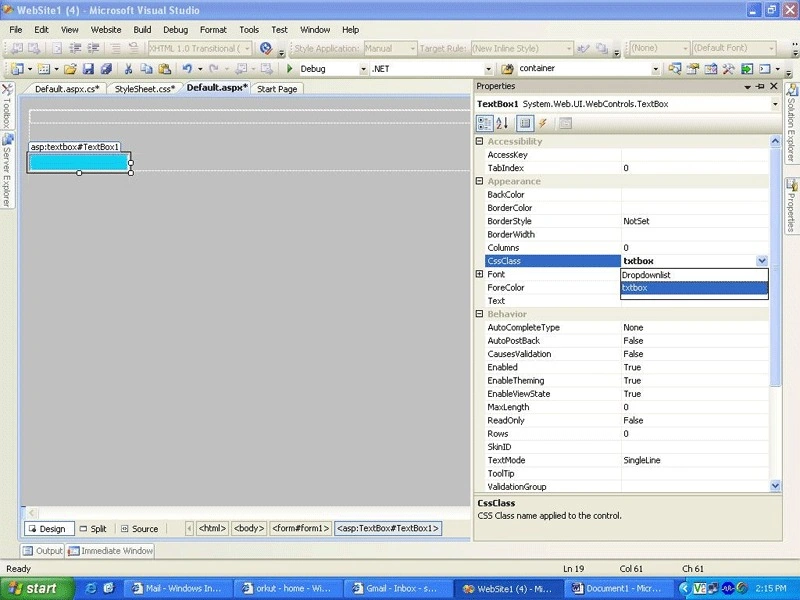
Source code: Default.aspx
<%@ Page Language="C#" AutoEventWireup="true" CodeFile="Default.aspx.cs" Inherits="_Default" %>
<!DOCTYPE html PUBLIC "-//W3C//DTD XHTML 1.0 Transitional//EN" "http://www.w3.org/TR/xhtml1/DTD/xhtml1-transitional.dtd">
<html xmlns="http://www.w3.org/1999/xhtml">
<head runat="server">
    <title>Untitled Page</title>
    <link href="StyleSheet.css" rel="stylesheet" type="text/css" />
</head>
<body>
    <form id="form1" runat="server">
        <div>
            <!-- Content can be added here -->
        </div>
        <br />
        <br />
        <asp:TextBox ID="TextBox1" runat="server" CssClass="txtbox"></asp:TextBox>
    </form>
</body>
</html>
Step 6. Add a new form and the same StyleSheet.css can be used for any textbox placed in the project.
rajeev pandeyPosted Mar 25, 2012, 2:29 AM
good job
Divya SPosted Nov 11, 2010, 5:30 AM
thanks it was useful
sabeesh kuttyPosted Sep 9, 2010, 4:28 AM
hi mam u done it well.......thank you...
Arnel RustemovicPosted Aug 28, 2010, 7:59 AM
How to add background image to this ?
mahesh kannanPosted Apr 10, 2010, 5:36 AM
thank u very match author
Raj KumarPosted Dec 30, 2009, 12:50 AM
Welcome back...long time no articles???
hiren visavadiyaPosted Dec 29, 2009, 1:15 PM
Thats a great article, Keep it up.