In this article I will explain how to upload an image into a database and how to see the uploaded image in in the front end. To do this first we create a database and table.
Create Database
<?php
$con=mysql_connect ("localhost","root","");
if(!$con)
{
die('Could not connect'.mysql_error());
}
if(mysql_query ("create database ABC",$con))
{
echo "Your Database Created";
}
else
{
echo "Error".mysql_error();
}
mysql_close($con);
?>
Create Table
<?php
$con = mysql_connect ("localhost","root","");
if (!$con)
{
die ('Could not connect: ' . mysql_error());
}
mysql_select_db ("ABC", $con);
$sql = "CREATE TABLE tbl_image
(
`id` INT( 50 ) NOT NULL AUTO_INCREMENT ,
`photo` VARCHAR( 50 ) NOT NULL ,
`status` INT( 50 ) NOT NULL ,
PRIMARY KEY ( `id` )
)";
mysql_query($sql,$con);
mysql_close($con);
?>
When you create a database and table using MySql you will write the code for uploading an image. The code for uploading an image is as follows:
Upload an Image
<?php
$con=mysql_connect( "localhost","root","");
mysql_select_db ("ABC",$con);
if(@$_POST ['submit'])
{
$file = $_FILES ['file'];
$name1 = $file ['name'];
$type = $file ['type'];
$size = $file ['size'];
$tmppath = $file ['tmp_name'];
if($name1!="")
{
if(move_uploaded_file ($tmppath, 'image/'.$name1))//image is a folder in which you will save image
{
$query="insert into tbl_image set photo='$name1'";
mysql_query ($query) or die ('could not updated:'.mysql_error());
echo "Your image upload successfully !!";
}
}
}
?>
<html >
<head>
<title>Image Upload</title>
</head>
<body bgcolor="pink">
<form name="form" action="" method="post" enctype="multipart/form-data">
Photo <input type="file" name="file" />
<input type="submit" name="submit" value="submit" />
</form>
</body>
</html>
Output
When you browse the above code then you will get the following output:

Now you will click on the Browse button for selecting an image.
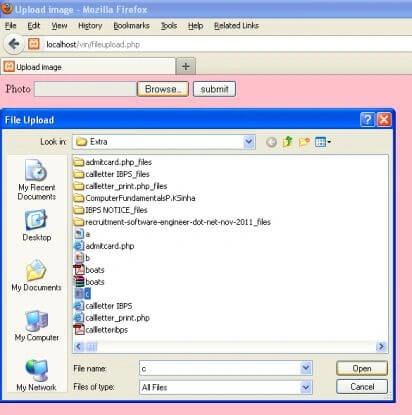
After selecting an image you will click on the submit button. Then you will get a message i.e. "Your image upload successfully".

If you want to see the uploaded an image in the front end then you will write the following code:
Show an Image
<?php
$con=mysql_connect ("localhost","root","");
mysql_select_db("abc",$con);
@$sql="select * from tbl_image where id='1' and status='0'";
@$query=mysql_query($sql);
while(@$row=mysql_fetch_array($query))
{
@$image=$row ['photo'];
?>
<img src="image/<?php echo $image; ?>" width="360" height="150">
<?php
}
?>
Output
When you browse your code you will get the following output:

Conclusion
So in this article you saw how to upload an image and how to see the uploaded image in the front end. Using this article one can easily understand the concept of image uploading using PHP.
Some Useful Resources


Shashank JamalpurPosted Aug 12, 2014, 10:37 AM
thanks for the article it has helped me alot.....
Sanjay SinghPosted Jul 19, 2014, 10:43 AM
very nice article ... well and easily explained
Domingo vargasPosted Feb 12, 2013, 5:02 AM
how to view [ IMAGE, ITEM NO# DESCRIPTION, QUANTITY, PRICE] in another page and save it into database.
OdyeditedPosted Nov 15, 2012, 4:03 PMEdited Nov 16, 2012, 3:40 PM
Hello, I want to let you know that I am glad to find your tutorial and I also want to let know that it worked very well. However, I wonders if I could get help on how to make it possible to stop the uploading of any thing that doesn’t have image extension as .jpg, .jpeg, .png, and .gif for example. Thanks, Ody.
Richard MerrenPosted Oct 18, 2012, 6:32 PM
Ok so I tried to do it how you posted it and got nothing, it skipped all the code inside the if(@$_POST['submit']. Any ideas on why this happened??
pearlyn reyesPosted Aug 26, 2012, 8:27 AM
hey gourav jain, have u created the folder named image on your root directory? ive tried the code and it worked for me..
gourav jainPosted Aug 24, 2012, 3:05 PM
HI I HAVE TIRED THE CODE AS YOU HAVE WRITTEN..BUT IM GETTING SOME ERROR: Warning: move_uploaded_file(image/20313_0002_1_lg.jpg) [function.move-uploaded-file]: failed to open stream: No such file or directory in C:\wamp\www\New Folder\petal\move_upload_file.php on line 13 WHAT THIS MEAN PLZ HELP ME..... THANKYOU
pearlyn reyesPosted Aug 7, 2012, 9:02 AM
oh tnx, but i already fixed that, but i have another question,. when im uploading an image with a file extension .JPG which is capitalized, it doesnt work,. how can i fixed that? THANK YOU!!
pearlyn reyesPosted Aug 7, 2012, 9:02 AM
oh tnx, but i already fixed that, but i have another question,. when im uploading an image with a file extension .JPG which is capitalized, it doesnt work,. how can i fixed that? THANK YOU!!
pearlyn reyesPosted Aug 7, 2012, 9:02 AM
oh tnx, but i already fixed that, but i have another question,. when im uploading an image with a file extension .JPG which is capitalized, it doesnt work,. how can i fixed that? THANK YOU!!
Vineet Kumar SainiPosted Aug 7, 2012, 8:41 AM
Hi Cathy !! In which type you edit upload file ? You can rename uploaded file.
pearlyn reyesPosted Aug 5, 2012, 8:28 AM
hey, can i ask,. how can i edit the uploaded file?,. does it possible? thankyou!